Rates, costs and targets
Set hourly rates, staff cost rates, fixed costs and utilisation targets so profitability and utilisation are right.
Profitability, margin and utilisation are only as good as the rates behind them. These live in Settings > Reports, on the Rates and targets and Cost rates tabs. Administrators and people who manage Finance can change them; Finance managers see only these money tabs.
Hourly rate without a contract
Go to Settings > Reports > Rates and targets.
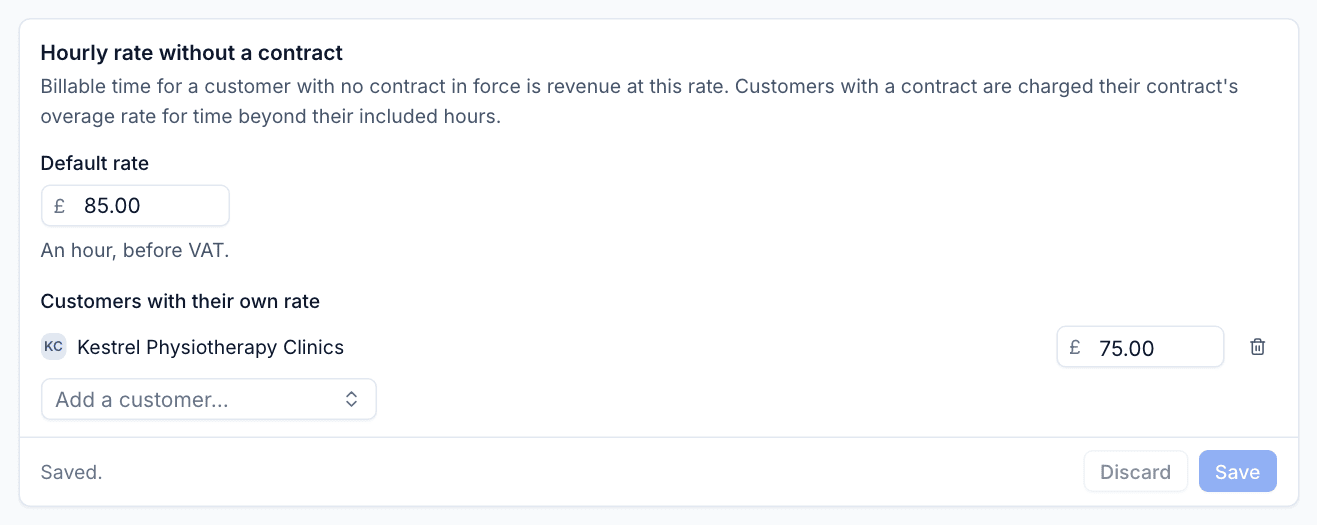
- Default rate: what billable time is worth, before VAT, for a customer with no contract in force (£85 by default).
- Customers with their own rate: use Add a customer... to give a customer a different rate.
Customers with a contract are not charged this: their time beyond the contract's included hours counts at the contract's overage rate.
Targets and how revenue is counted
On the same tab:
- Utilisation target: logged time as a share of expected hours (75% by default). It is the dashed line on the overview.
- Billable target: billable time as a share of expected hours (60% by default).
- One-off work counts as revenue: When accepted (the month the customer accepts the quote) or When invoiced (the month its draft invoice is first exported to Xero).
- Contract fees are called: the service name for contract fees when recurring revenue is split by service ("Support contracts" by default).
Click Save under each card.
Fixed costs
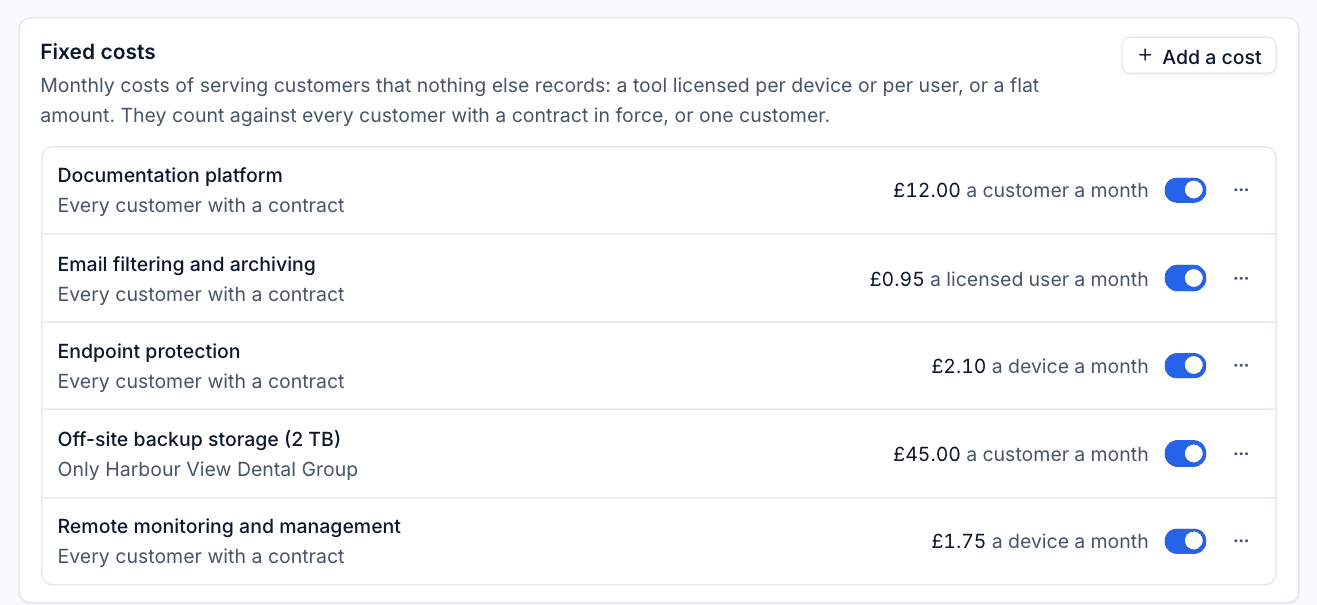
Some costs of serving customers are not recorded anywhere else, such as a tool you license per device. Add them under Fixed costs.
- Click Add a cost.
- Give it a name.
- Choose how it is charged: per device, per Microsoft 365 licensed user, or per customer, and the monthly amount.
- Choose who it applies to: every customer with a contract in force, or one customer.
- Save it.
Use the switch on each cost to pause it, and the ... menu to change or remove it.
Cost rates
Go to Settings > Reports > Cost rates. A cost rate is what an hour of someone's time costs you: salary, employer costs and overheads, however you work it out.
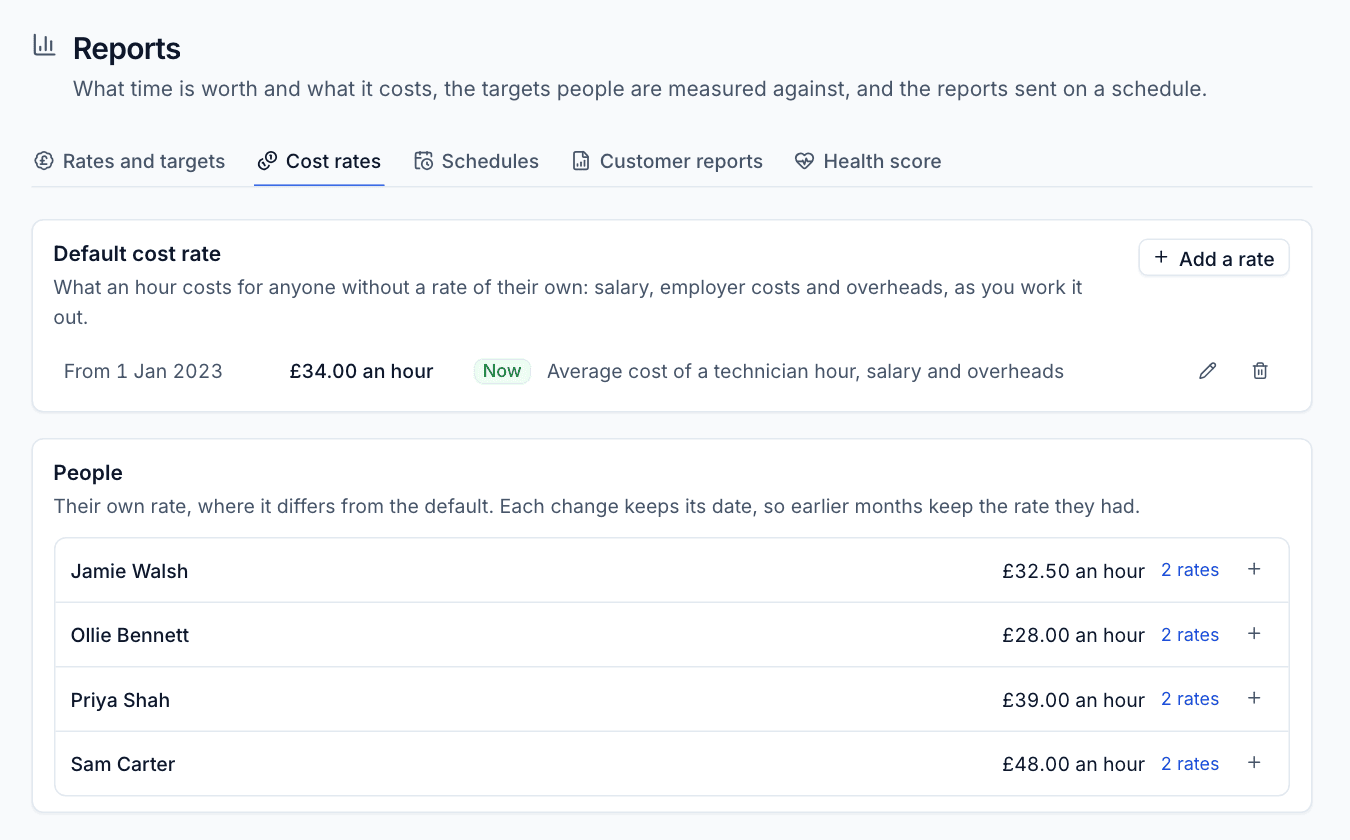
- Under Default cost rate, click Add a rate, enter the hourly cost and the date it applies from, and an optional note.
- Under People, click + beside anyone whose cost differs from the default and add their rate and date.
Each change keeps its date, so earlier months keep the rate they had. A rate applies from its date until the next one; time logged before someone's first rate uses that first rate, because most MSPs set rates after the fact. Click 2 rates (or similar) to see a person's history.
Warning: Time logged by someone with no rate at all costs nothing, which makes margins look better than they are. The Reports overview lists anyone missing a rate.
How the figures are worked out
Revenue
Revenue follows your invoices, so it agrees with the Xero export:
- Contracts: each month's fee (part months pro rata by days) and the contract's recurring lines. Quarterly and annual lines count in the month they are charged.
- Licences billed: contract lines that bill licence subscriptions.
- Time billed: overage beyond included hours at the overage rate, and billable time for customers with no contract at their own or the default rate.
- Expenses rebilled: approved expenses and mileage marked to rebill.
- One-off work: accepted quotes' one-off items after discount, before VAT.
Cost
- Licences: each licence subscription's monthly cost at the time, from the licence change log.
- Staff: every minute logged against the customer at the person's cost rate on the day.
- Expenses: approved expenses and mileage, less VAT reclaimed.
- One-off: the accepted quote's one-off cost.
- Fixed: your fixed costs above.
Margin is revenue less cost, and margin % is margin over revenue.
Utilisation
Expected hours come from each person's working pattern (Settings > Scheduling, else your working hours), less bank holidays, office closures and approved leave. Utilisation is logged time over expected; billable % is billable time over expected. People counted are everyone on the scheduling roster plus anyone who logged time in the period.
Recurring revenue
MRR on a day is every contract in force that day at its full monthly fee, plus its recurring lines at their monthly equivalent (a quarterly line a third, an annual line a twelfth). ARR is MRR x 12. Each closed month's MRR is stored, so editing an old contract later does not rewrite history.
Was this page helpful?
Thanks for the feedback.