Reconciling against Microsoft 365
Compare the seats you buy with what each customer's tenant has bought and assigned, find unused, orphaned and over-assigned licences, and reclaim seats from inactive users.
Reconcile answers one question: are you paying for licences nobody uses? It compares the seats supplied by your licence sources with the licences bought and assigned in each customer's Microsoft 365 tenant, and puts a monthly cost on the difference.
It needs two things in place:
- The customer's tenant connected in the Microsoft 365 area and read at least once. See Microsoft 365.
- The distributor company mapped to the customer. See Mapping companies and products.
Subscriptions are matched to the tenant by their Microsoft part number (for example SPB for Microsoft 365 Business Premium). Products with no part number, such as a backup or email security product, are not reconciled.
The Reconcile page
Go to Sales, then Reconcile under Licences. The line under the title gives the monthly cost of seats nobody uses and the counts behind it, for example "£114.80 a month on seats nobody uses: 8 unused, 5 orphaned, 2 over-assigned, 4 reclaimable."
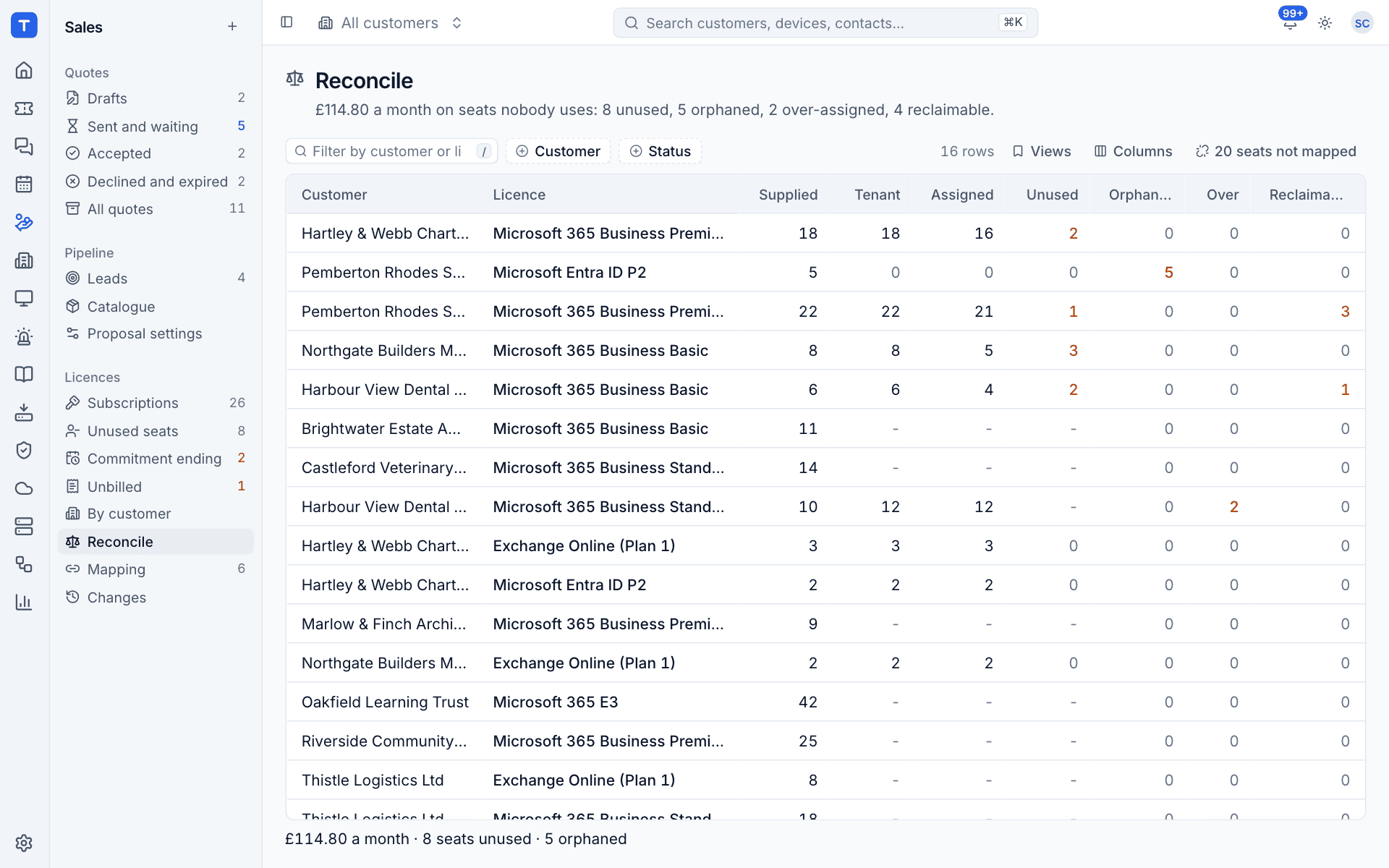
There is one row for each customer and licence:
| Column | Meaning |
|---|---|
| Supplied | Seats across all your licence sources for that customer and part number |
| Tenant | Licences bought in the customer's tenant (from any supplier) |
| Assigned | Licences assigned to users in the tenant |
| Unused | Supplied seats nobody is assigned |
| Orphaned | Seats you supply that are not in the tenant at all |
| Over | Assigned beyond what you supply (over-assigned) |
| Reclaimable | Licences held by users who are disabled or inactive |
| Waste | What the unused and orphaned seats cost you a month |
A dash means the figure is not known, usually because no tenant has been read for that customer.
Status
Each row has a status you can filter on with Status:
| Status | Meaning |
|---|---|
| In step | Supplied, bought and assigned agree |
| Unused seats | Some supplied seats are not assigned |
| Orphaned | You supply seats the tenant does not have, for example after a customer moved the licence elsewhere or the subscription was placed on the wrong tenant |
| Over-assigned | The tenant assigns more than you supply. The extra seats are bought elsewhere (direct from Microsoft, a trial, another distributor) |
| No tenant | The customer has no Microsoft 365 tenant that has been read |
Views has Unused seats, Orphaned, Over-assigned, Reclaimable users and No tenant connected, plus Save as new view... for your own. Filter by Customer too.
The N seats not mapped button at the top right counts seats of distributor companies that are not mapped to a customer yet. Select it to go to Mapping.
How the figures are worked out
- Tenant and Assigned come from the tenant's own licence counts, taken from tenants whose directory sync has succeeded, fully or in part.
- Bought elsewhere is what the tenant has bought beyond what you supply.
- Unused is only counted when the tenant has nothing bought elsewhere for that part number. When some seats come from someone else, nobody can tell whose seats are the spare ones, so the row says so rather than guess.
- Orphaned is supplied minus bought in the tenant, when that is above zero.
- Waste is unused plus orphaned seats, times your monthly cost for one seat.
Note: With the Microsoft 365 module switched off, nothing is compared and every row shows as No tenant.
The reconcile panel
Click a row to open its panel.
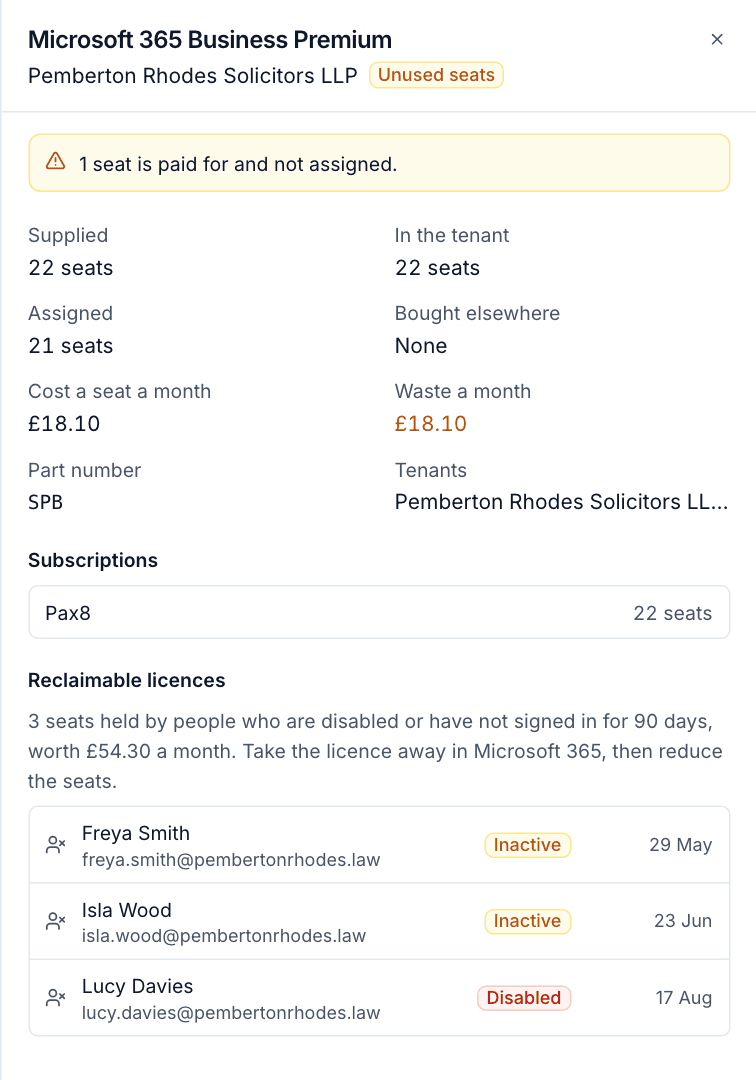
It shows:
- a banner saying what is wrong, for example "1 seat is paid for and not assigned.";
- Supplied, In the tenant, Assigned, Bought elsewhere, Cost a seat a month, Waste a month, Part number and Tenants;
- Subscriptions: each source supplying the seats, and how many;
- Reclaimable licences: the users holding this licence who could give it up.
Reclaimable licences
A licence is reclaimable when the user holding it:
- is disabled (Disabled),
- has not signed in for 90 days (Inactive), or
- has never signed in and was created more than 90 days ago (Never signed in).
Sign-in dates come from Microsoft Entra ID, which only records them for tenants with Entra ID P1 or better. Users whose sign-in dates are not known are never counted as reclaimable.
To reclaim seats:
- Open the row and read the list under Reclaimable licences.
- Check with the customer that the users no longer need the licence.
- Take the licence away from those users in Microsoft 365.
- Once the tenant has synced again, the seats show as Unused. Open the subscription on the Subscriptions list and use Change seats to reduce them. See Subscriptions and seat changes.
Warning: On annual commitments Microsoft only lets you reduce seats in the first seven days or at renewal. Use the Commitment ending view to plan reductions for the renewal date.
Reconciliation on the customer
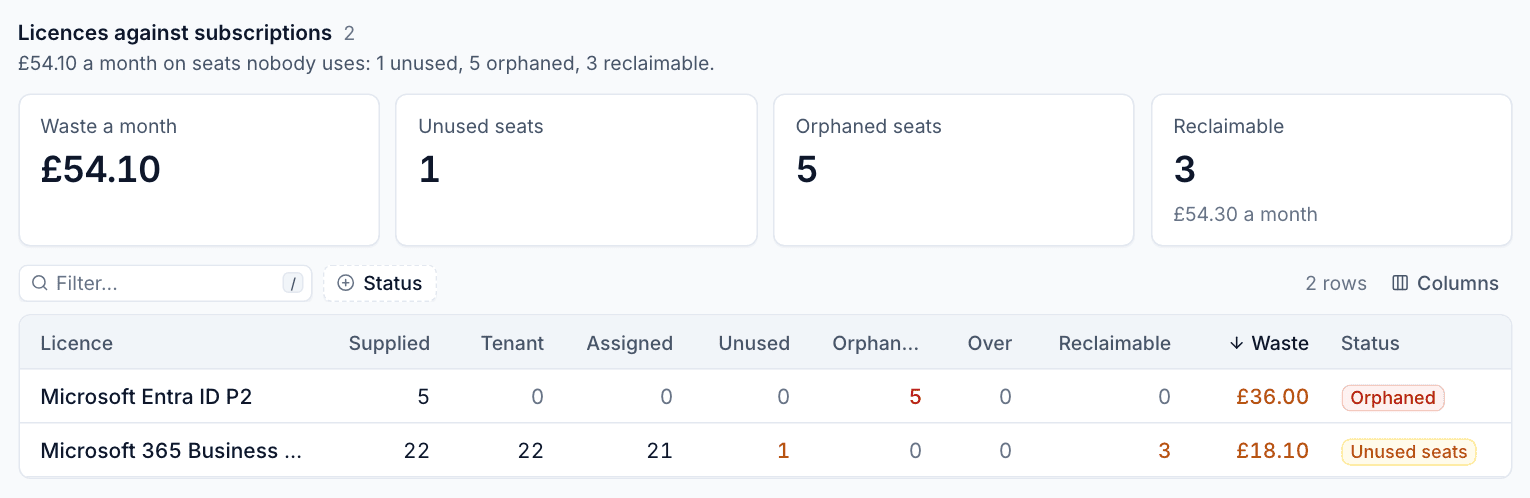
The same comparison for one customer appears on the customer's Microsoft 365 tab, and on each tenant's licences tab, as Licences against subscriptions. It shows Waste a month, Unused seats, Orphaned seats and Reclaimable with what they cost, above the customer's rows.
Over-assignment also raises an alert, so it does not wait for someone to open this page. See Unbilled seats and licence alerts.
Was this page helpful?
Thanks for the feedback.