Licences and billing overview
What the licences area does, where to find it, and how sources, mapping, reconciliation and billing fit together.
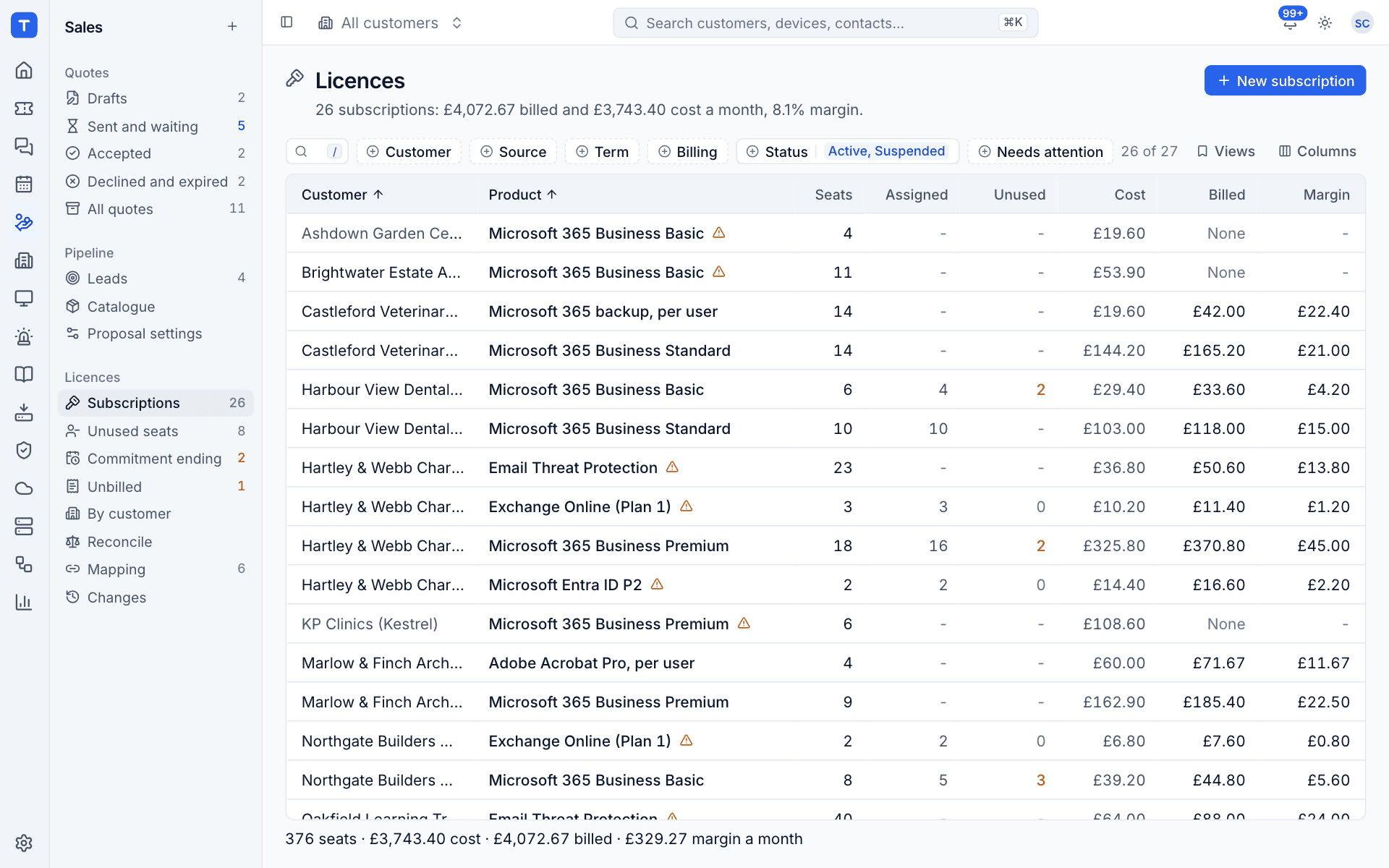
Licences and billing keeps three things in step: what you buy from your distributors, what your customers actually use in Microsoft 365, and what you charge them on their contracts. Tenvara reads every subscription from your licence sources each night, logs every change, compares the seats against each customer's tenant and keeps the matching recurring lines on the customer's contract up to date.
Where to find it
Licences live in the Sales area, below the catalogue. The sidebar group Licences has these entries:
| Entry | What it shows |
|---|---|
| Subscriptions | Every subscription across all customers, with seats, cost, billed amount and margin |
| Unused seats | Subscriptions where seats are paid for but not assigned in Microsoft 365 |
| Commitment ending | Subscriptions whose commitment term ends soon |
| Unbilled | Subscriptions whose billing needs attention |
| By customer | Billed, cost and margin totals customer by customer |
| Reconcile | Seats supplied against seats bought and assigned in each tenant |
| Mapping | Distributor companies and products still to be matched |
| Changes | The change log: every seat, price, cost and term change |
The numbers beside the entries tell you how many items need a look, for example how many subscriptions have unused seats or how many companies are still to map. The list itself, its views and changing seats are covered in Subscriptions and seat changes.
Each customer's own licences, with billed, cost and margin, are on the Contracts and time tab of the customer page, and the Microsoft 365 tab shows how their licences reconcile against the tenant. Home shows a Licences line whenever something needs someone.
You can also reach every licence screen from the command palette: press Cmd+K (or Ctrl+K) and type "licen" to jump to a view, open Licence sources in settings or start a New licence subscription.
How it fits together
- Connect a source. An administrator adds Pax8 or Microsoft Partner Center in Settings > Integrations > Licence sources, or records licences by hand with Manual entry. See Connecting licence sources.
- Map companies and products. Each company at the distributor is matched to one of your customers, and each product to a catalogue item. Tenvara suggests matches; nothing is billed until a person confirms them once. See Mapping companies and products.
- Sync. Every source syncs each night at 02:15 and whenever you press Sync now. New subscriptions, seat changes, price changes and cancellations land in the change log. See Sync and the change log.
- Reconcile. Supplied seats are compared with the seats bought and assigned in the customer's Microsoft 365 tenant, so you can see unused, orphaned and over-assigned licences and what they cost you. See Reconciling against Microsoft 365.
- Bill. Each mapped subscription is kept as a recurring line on the customer's contract, which then flows into the Xero export. See Billing licences into contracts.
- Act on alerts. Failed syncs, commitments about to end, unbilled seats and over-assignment raise alerts that your alert rules can turn into tickets. See Unbilled seats and licence alerts.
Key terms
| Term | Meaning |
|---|---|
| Source | A distributor account Tenvara reads from (Pax8, Microsoft Partner Center) or Manual entry |
| Subscription | A number of seats of one product for one company at a source |
| Seats | How many licences you buy on the subscription |
| Assigned | How many of those licences are given to users in the customer's Microsoft 365 tenant |
| Unused | Seats paid for and not assigned to anyone |
| Cost | What you pay the distributor, shown per month |
| Billed | What the customer's contract charges, shown per month |
| Margin | Billed minus cost, in pounds and as a percentage |
| Commitment | The term you are locked into with the distributor (monthly, annual or three years) |
| Part number | The Microsoft SKU part number (for example SPB for Microsoft 365 Business Premium) that links a subscription to the tenant's licences |
Every money figure in the licence screens is a monthly figure, even for annual subscriptions, so you can compare them side by side. The footer of each list adds up the rows you are looking at.
Who can do what
Licences and billing has its own permission area in Settings > Roles and permissions. By default administrators can manage it, technicians can view it, and read only users cannot see it at all, so you can keep costs and margins away from people who do not need them. Adding, editing, testing and deleting licence sources always needs an administrator.
Licences bill through contracts, so the area is only available when the ticketing and contracts module is switched on.
Was this page helpful?
Thanks for the feedback.