Subscriptions and seat changes
Use the Licences list and its views, read a subscription's side panel, change seats at the distributor and record licences by hand.
The Subscriptions list is the home of the licences area. It shows every subscription from every source across all your customers, with what it costs you, what the customer is billed and the margin in between.
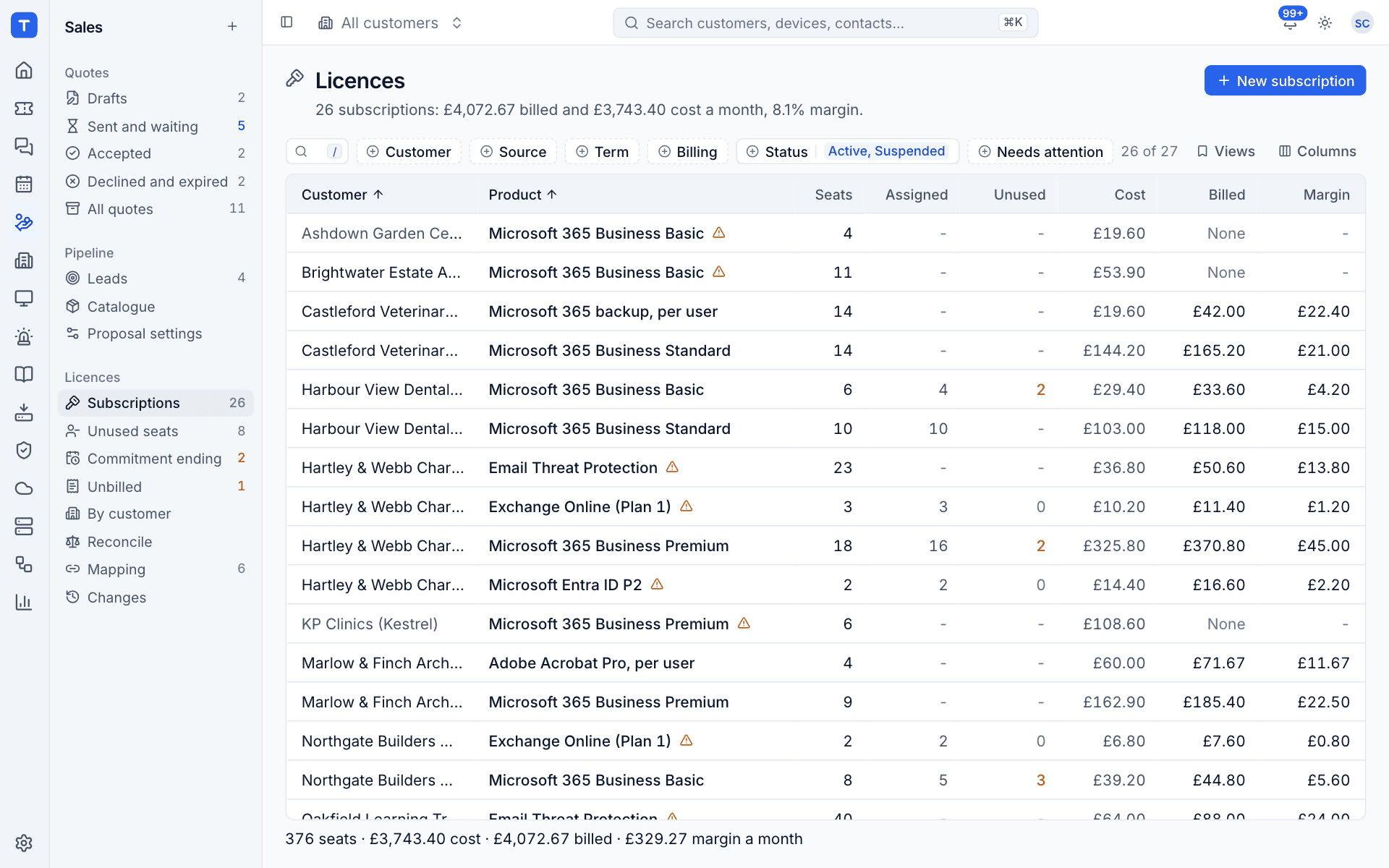
The list
Go to Sales, then Subscriptions under Licences. The line under the title sums up what you are looking at, for example "26 subscriptions: £4,072.67 billed and £3,743.40 cost a month, 8.1% margin". The footer adds up the seats, cost, billed amount and margin of the rows currently shown.
| Column | Meaning |
|---|---|
| Customer | The customer the subscription belongs to. Greyed out when the company is not mapped yet |
| Product | The catalogue item name, or the distributor's product name when it is not mapped. A warning icon means something needs a look |
| Seats | Seats bought at the distributor |
| Assigned | Seats given to users in the customer's Microsoft 365 tenant, when a tenant has been read |
| Unused | Seats paid for and not assigned, highlighted when above zero |
| Cost | What you pay a month |
| Billed | What the contract charges a month, or None |
| Margin | Billed minus cost a month |
Open Columns to add Commitment, Billing, Source, Part number, Term and Status.
Filters and views
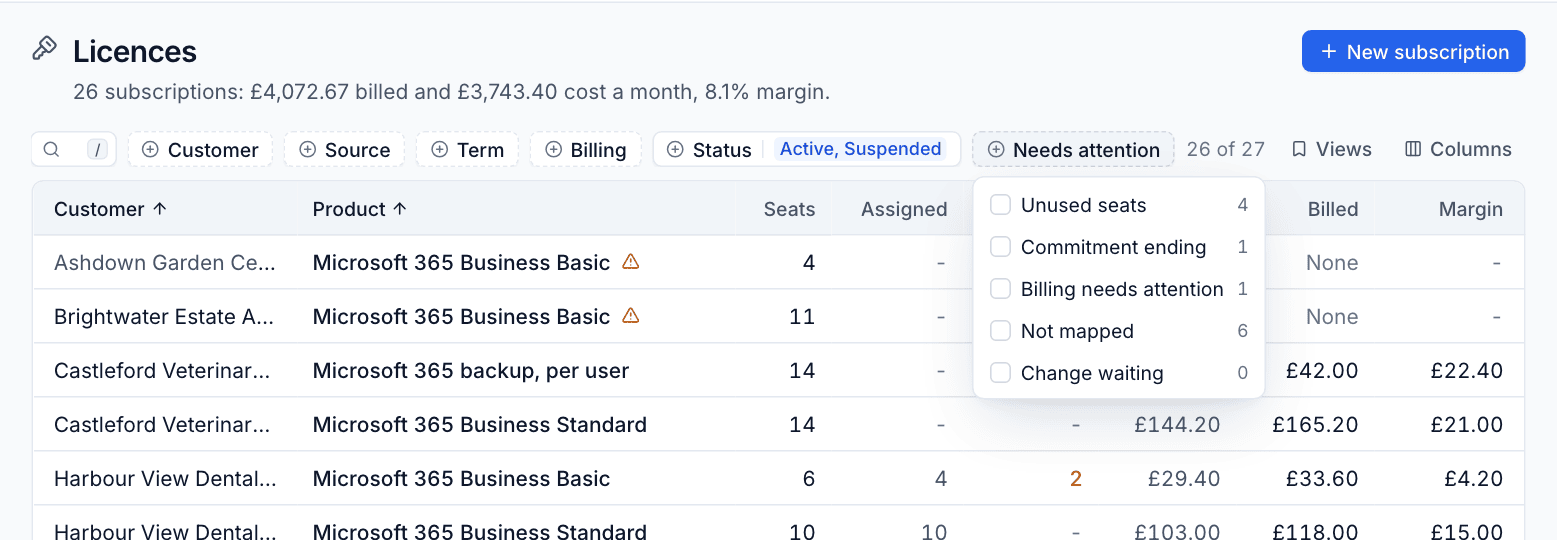
The filter bar has Customer, Source, Term, Billing and Status (by default Active and Suspended, the subscriptions in force). Needs attention narrows the list to subscriptions with Unused seats, a Commitment ending, Billing needs attention, Not mapped or a Change waiting, each with a count.
Views has ready made views: Unused seats, Commitment ending, Unbilled, Unmapped, Lowest margin and All subscriptions. Set up your own filters and choose Save as new view... to keep them. The sidebar entries Unused seats, Commitment ending and Unbilled open the matching views directly.
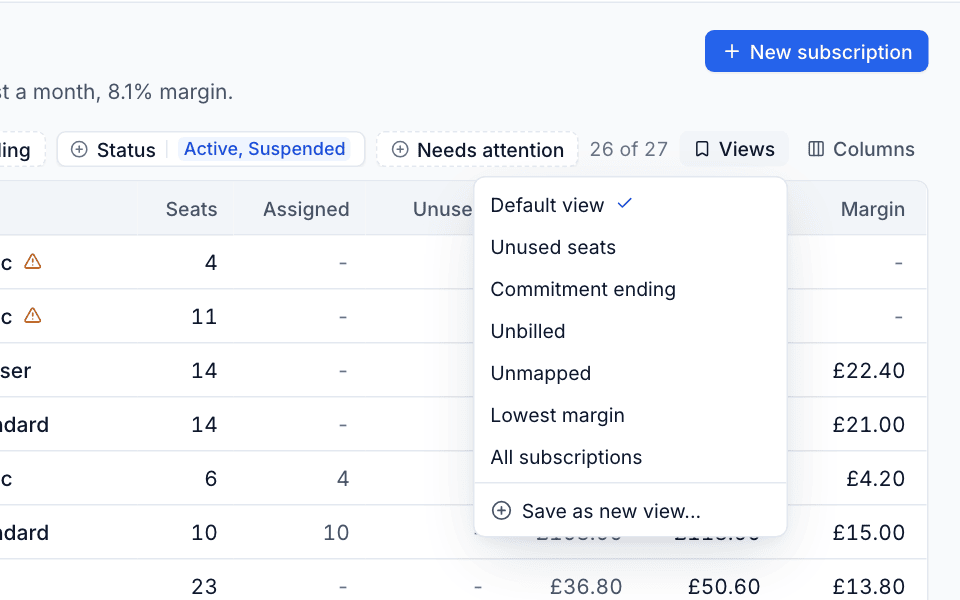
Tip: Lowest margin sorts by margin, lowest first. It is the quickest way to find a product sold at or below cost.
The subscription panel
Click a row to open its side panel. The header shows the product, the customer, the source and the status (Active, Pending, Suspended, Cancelled or Trial).
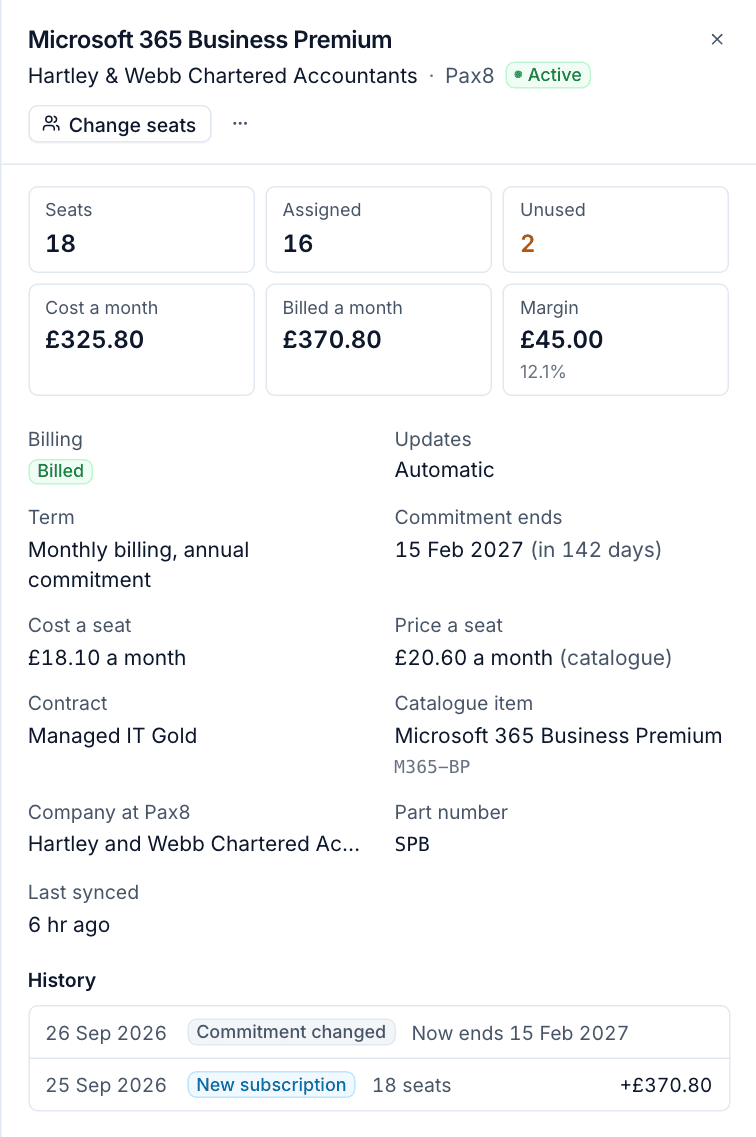
The panel shows:
- Seats, Assigned and Unused. When the contract bills a different number of seats, Seats says how many are billed underneath.
- Cost a month, Billed a month and Margin with its percentage.
- Billing: Billed, Differs, Not billed yet, Cannot bill or Not billed. See Billing licences into contracts.
- Updates: Automatic or By approval, from the customer's billing setting.
- Term, for example "Monthly billing, annual commitment", and Commitment ends with the days left (or "Rolls monthly").
- Cost a seat and Price a seat, with where the price comes from: (catalogue) or the source name.
- Contract, Catalogue item (or "Not mapped: map the product"), Company at the source, Part number and Last synced.
- History: every change log entry for the subscription with the monthly difference. Entries still waiting for billing are marked Waiting.
When something is wrong, a banner at the top says so, for example "The customer has no contract to bill it on." or "The contract bills 40 seats (the subscription has 42)."
Change seats
You can add or remove seats from Tenvara. The change is sent to the distributor first, so Pax8 or Partner Center is updated at the same time. It needs the manage permission for licences.
- Open the subscription's panel and select Change seats, or select the row in the list and press
q. - Enter the new number in Seats. Underneath you see the current seats and how many are assigned in Microsoft 365.
- Check the table: it shows Our cost and Customer is charged a month, now, after and the difference.
- Read the note under the table. It tells you how the contract will follow: from today pro rata for a monthly line, from the next billing period for an annual line, or not at all until someone applies it when the customer approves licence changes.
- Select Change to N seats, or press Cmd+Enter.
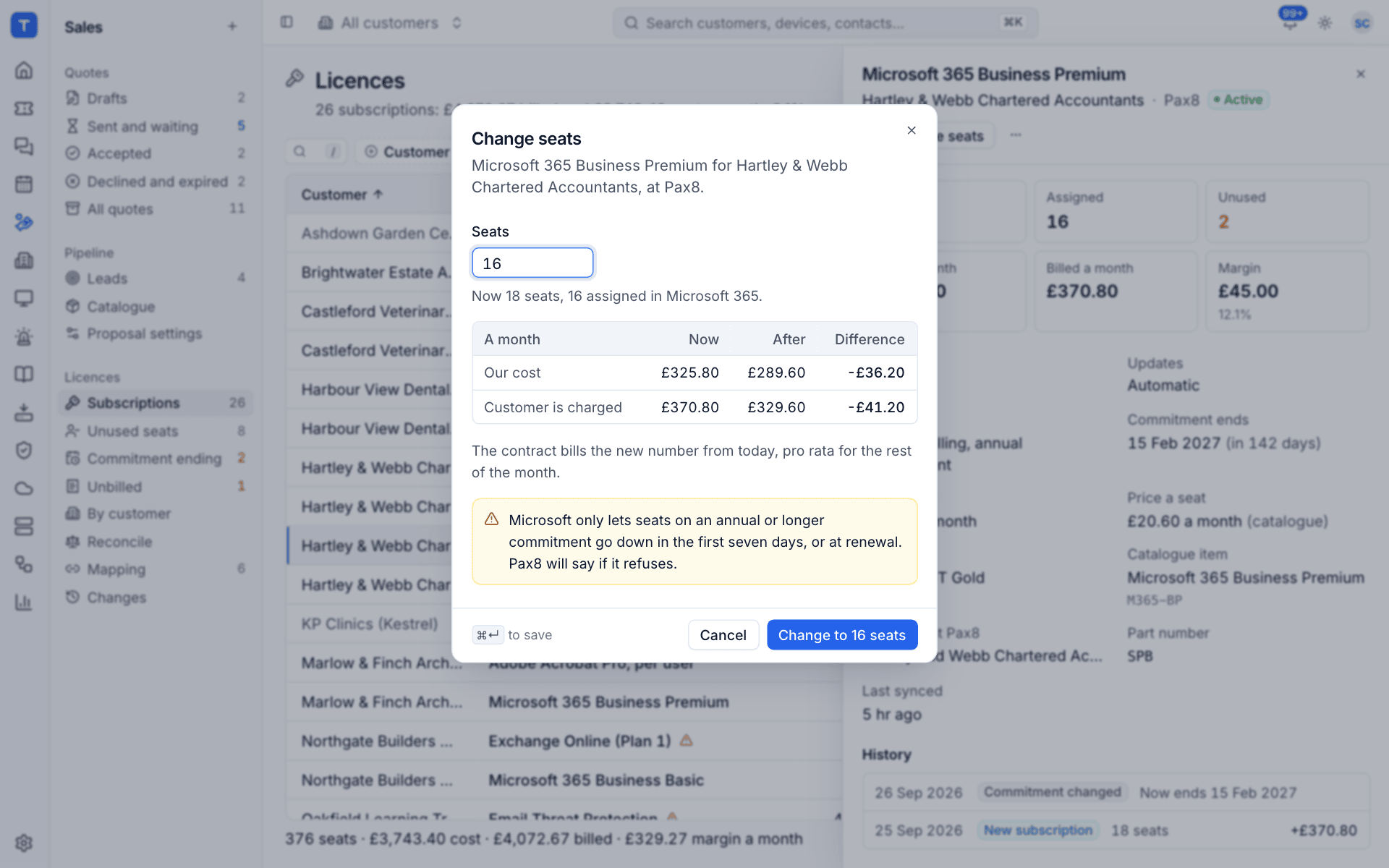
If the distributor refuses the change, Tenvara shows its reason and nothing changes.
Warning: Microsoft only lets seats on an annual or longer commitment go down in the first seven days, or at renewal. The dialog warns you, and the distributor refuses the change if you are outside that window.
Add a subscription by hand
For licences bought somewhere Tenvara cannot read (another distributor, a vendor portal, a card payment), add them by hand. They are billed, reconciled and alerted on like any other.
- Select New subscription on the Licences list, or Add by hand on the customer's Contracts and time tab.
- Choose the Customer.
- Choose a Catalogue item, or leave it as Not in the catalogue. The item's price bills the subscription, and its name is used when you leave Name empty.
- Enter the Seats and, for Microsoft licences, the Microsoft part number (for example
SPB) so it reconciles against the tenant. - Choose the Billing: Monthly, Annual or Three years.
- Enter the Cost a seat (what you pay each billing period) and, when there is no catalogue item, the Price a seat.
- Choose the Commitment and add Notes if you like.
- Select Add subscription.
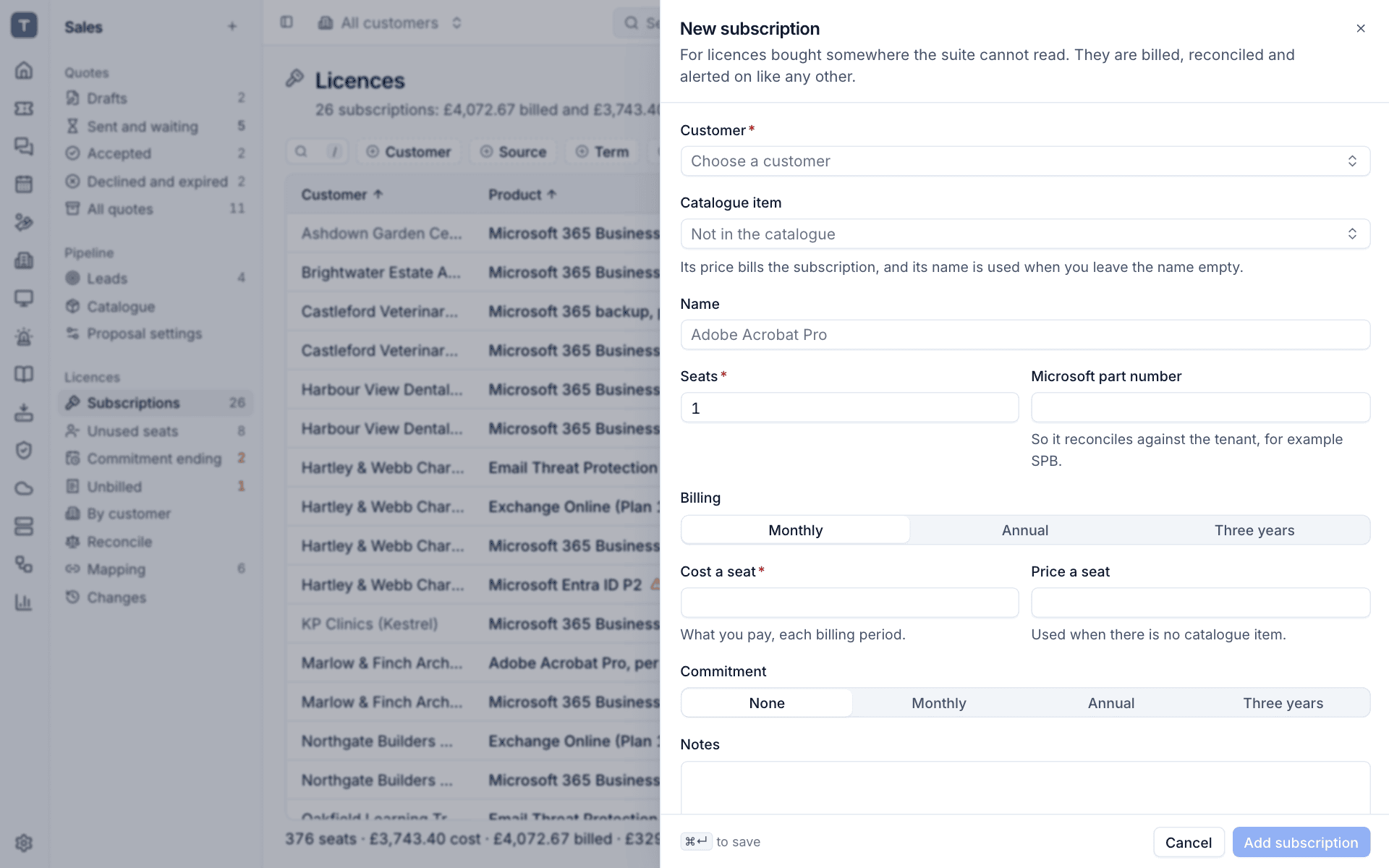
Manual subscriptions appear with Manual entry as their source. Seat changes on them are recorded straight away, since there is no distributor to tell.
More actions
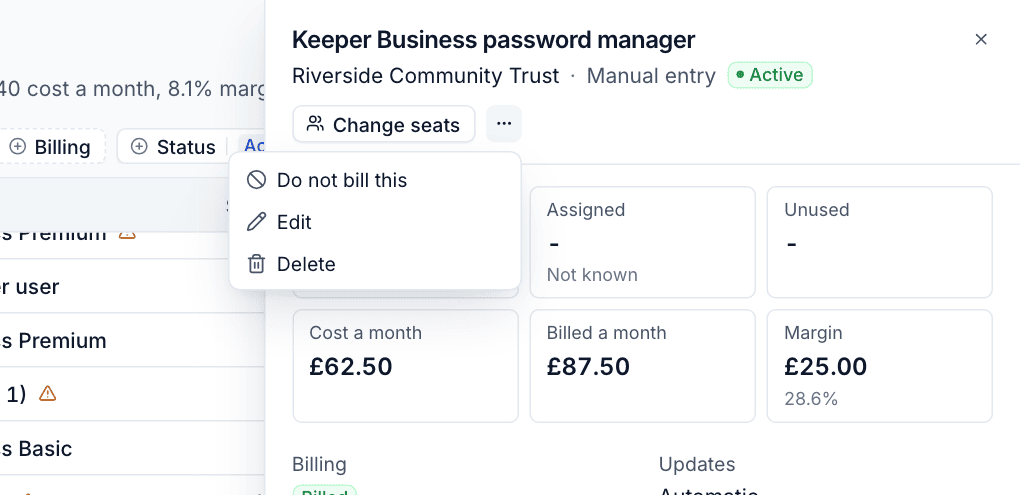
The ... menu in the panel has:
- Do not bill this: takes the subscription off billing and ends its contract line the day before. Use it for licences included in a bundle price or given away. Bill this again reverses it.
- Edit and Delete, for manual subscriptions only. Deleting ends its contract line today and removes its seats from reconciliation; the change log keeps its history.
Was this page helpful?
Thanks for the feedback.