Billing licences into contracts
How mapped subscriptions become recurring lines on customer contracts, how seat changes are charged, approving changes before they bill, and seeing billed, cost and margin by customer.
Tenvara keeps a recurring line on the customer's contract for each mapped subscription, and changes it when the subscription changes. Because the contract is what the Xero export reads, licence changes reach your invoices without anyone retyping them.
What gets billed
A subscription is billed when it is:
- mapped to a customer,
- not marked Do not bill this,
- in force (Active or Suspended), and
- recurring.
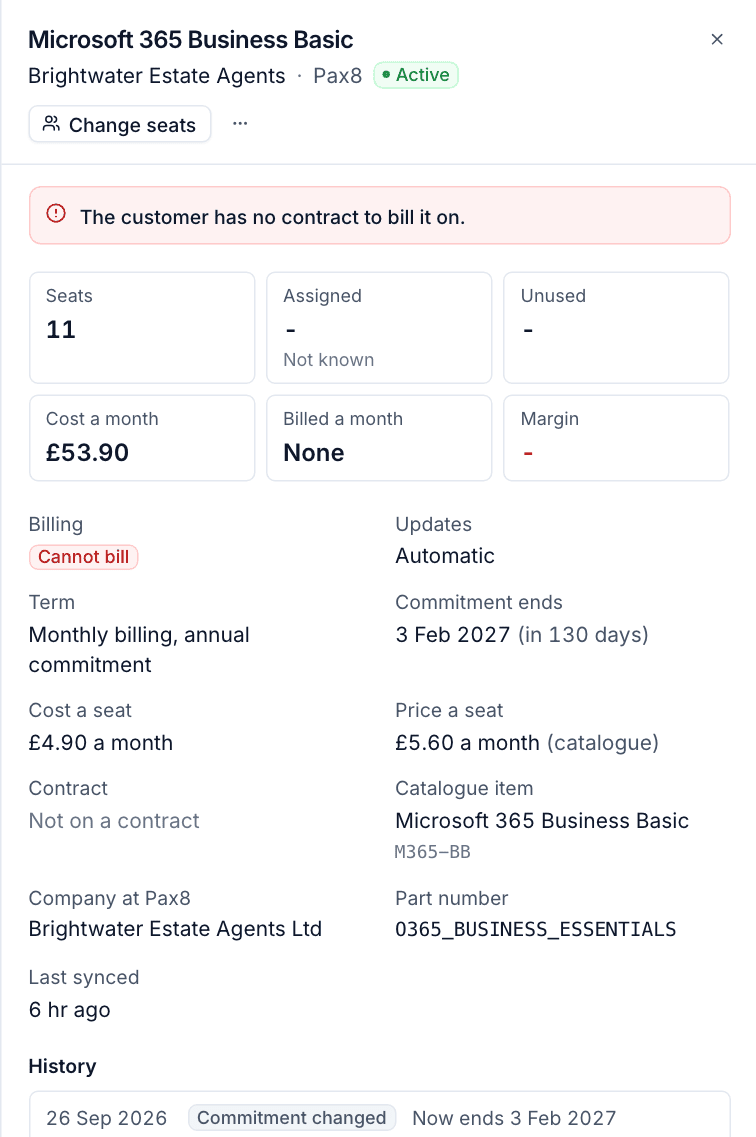
It goes on the customer's contract in force today. If there is none, it goes on a contract starting later, and failing that on a draft contract. Tenvara never creates a contract by itself: a customer with no contract at all shows as Cannot bill and raises an alert.
The line bills seats x price:
- Price is the mapped catalogue item's price (converted when the item bills at another frequency), or the source's price when the product is not mapped to an item.
- Frequency follows the billing term: monthly terms bill monthly, and annual, two year and three year terms bill annually.
- The VAT rate, item code and account code come from the catalogue item.
Cost comes from the source, else the catalogue item. When neither gives one, the cost is shown as not known, never as free, and totals leave it out and say how many they skipped. When the catalogue cost differs from what the source charges, the subscription says so.
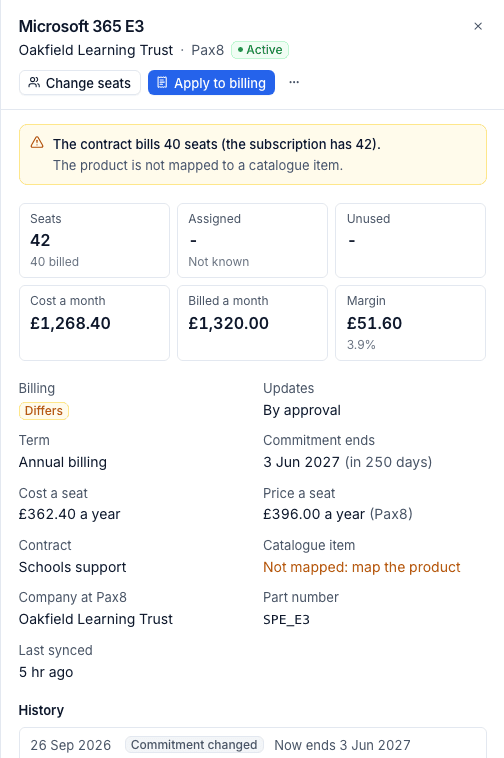
Billing states
Each subscription shows its billing state in the list's Billing column and in its panel:
| State | Meaning |
|---|---|
| Billed | The contract bills exactly what the subscription says |
| Differs | A line bills another quantity, price or frequency, or has ended |
| Not billed yet | It should be billed and has no line yet |
| Cannot bill | It cannot go on a contract: the customer has no contract, or there is no price |
| Not billed | It is not meant to be billed: not mapped, marked not billed, not in force or not recurring |
How changes are charged
Changes are billed from the day they happened, not the day someone noticed:
- Monthly lines: the old line ends the day before the change and a new line starts that day. The part month is charged pro rata on each, and the Xero export shows both.
- Quarterly and annual lines: these are charged in full at the start of each period, so the change starts at the next period. The old line ends the day before.
- Cancellations end the line after the day of cancellation.
- Do not bill this ends the line the day before.
- A line that has not started yet is updated in place, or removed.
Only one line per subscription is kept in step at a time. The lines it replaced keep their dates as billing history. If the contract already has a matching line (for example from an accepted quote, for the same catalogue item or with the same description), Tenvara takes it over rather than billing the seats twice.
Note: Distributors often charge their own pro rata amount for seats added part way through an annual term. Tenvara leaves that to the person billing; the change log shows the date and seats so you can add a one-off charge.
Automatic or by approval
Each customer has an Update billing automatically switch, on by default.
- On (Automatic): changes go on the contract by themselves, as soon as a sync or seat change records them.
- Off (By approval): changes wait. They are logged as Waiting, the subscription shows Differs, the unbilled alert is raised, and the contract is not touched until someone applies the change.
Use approval for customers who sign off licence changes, or where you want to check each change before it reaches an invoice.
Apply waiting changes
For one subscription:
- Open it on the Subscriptions list (the Unbilled view lists every one that needs it).
- Select Apply to billing in the panel.
For every waiting subscription of a customer:
- Open the customer and go to Contracts and time.
- In the Licences section, the banner says how many subscriptions are not billed as the distributor says, and why.
- Select Apply to billing in the banner.
Applying replays the waiting changes in the order they happened, each from its own day with the seats it left. For example, going from 10 seats to 5 on the 5th and back to 10 on the 20th bills 5 seats in between.
Turning Update billing automatically back on applies everything waiting.
Licences on the customer
The customer's Contracts and time tab has a Licences section: "Subscriptions from your distributors, and how they reach this customer's contract."
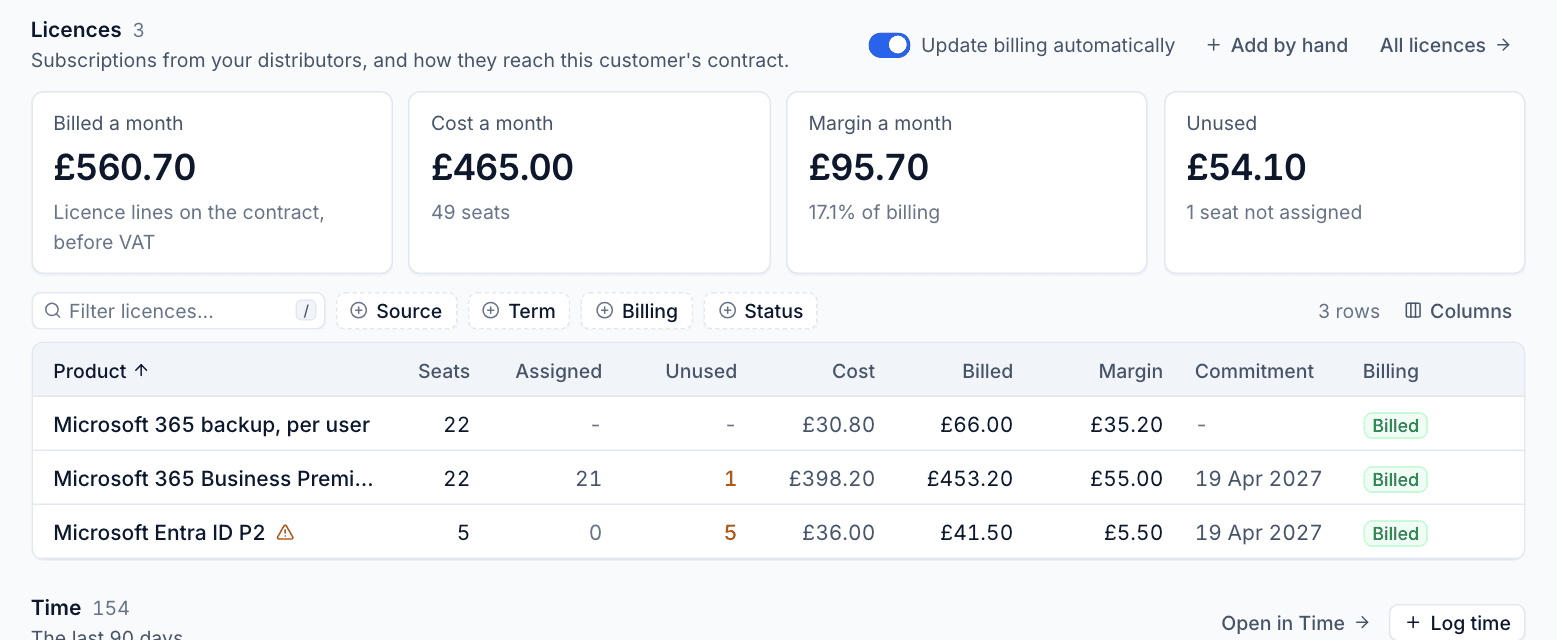
It shows:
- Billed a month (licence lines on the contract, before VAT), Cost a month, Margin a month and Unused (the monthly cost of seats not assigned in Microsoft 365);
- the Update billing automatically switch, Add by hand for a manual subscription, and All licences;
- banners for subscriptions waiting or unable to bill;
- every subscription, with Seats, Assigned, Unused, Cost, Billed, Margin, Commitment and Billing. Click one to open its panel.
Licences by customer
By customer under Licences puts every customer side by side: "£4,072.67 billed, £3,566.20 cost and £506.47 margin a month (12.4%) across 10 customers."
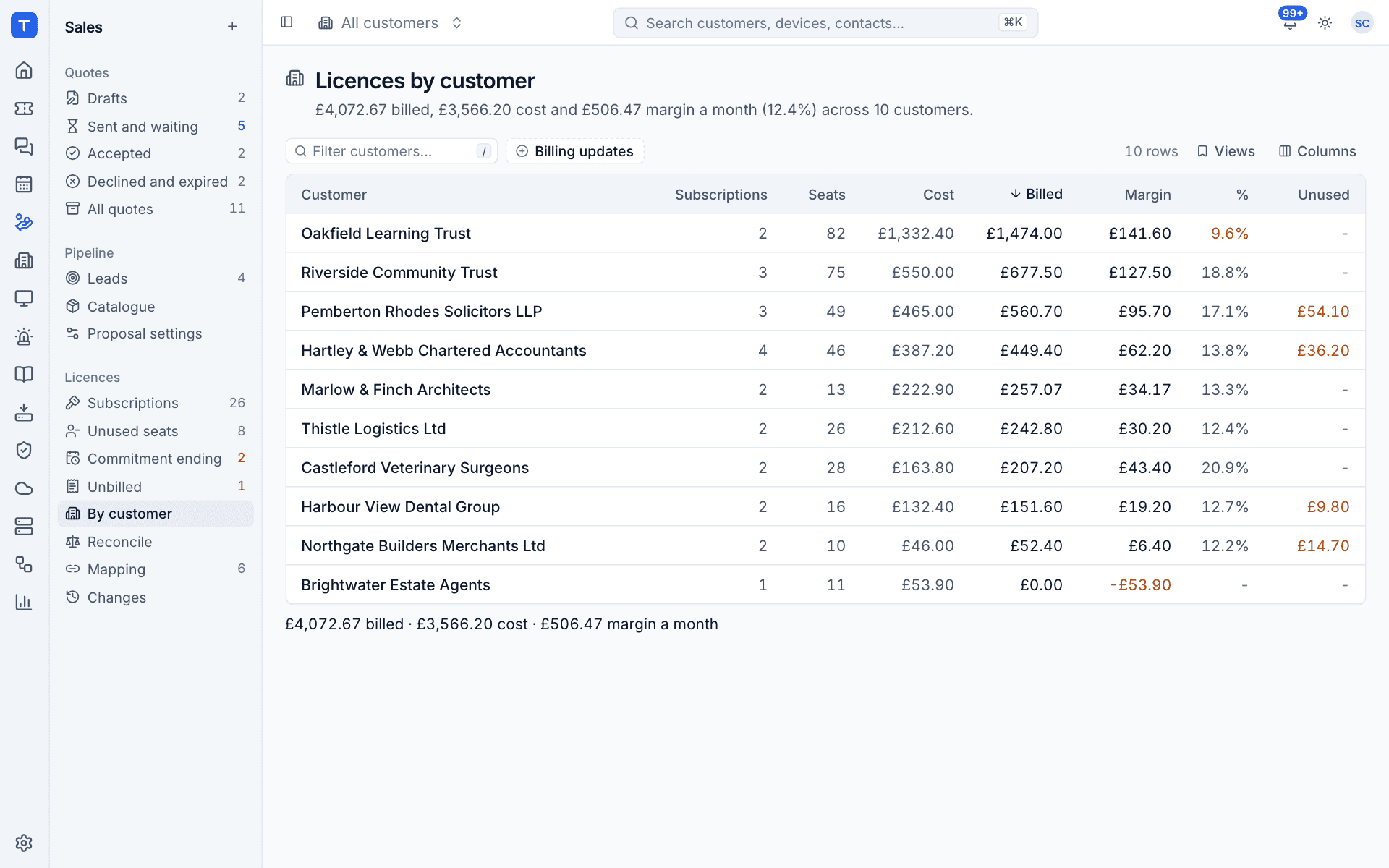
| Column | Meaning |
|---|---|
| Subscriptions and Seats | How much each customer has |
| Cost, Billed and Margin | A month |
| % | Margin as a share of billing, highlighted under 10% |
| Unused | The monthly cost of unused licences |
| Billing | In step, or how many changes are waiting or subscriptions need a check |
| Updates | Automatic or By approval |
If Billing or Updates is not shown, add it from Columns. Filter by Billing updates to list the customers who approve changes.
A negative margin usually means a customer with no contract or no price, such as a subscription showing Cannot bill.
Was this page helpful?
Thanks for the feedback.