Sync and the change log
What happens when a licence source syncs, how changes are dated, and how to read and filter the Licence changes log.
Every licence source is read each night, and whenever someone presses Sync now. Each sync compares what the distributor says now with what Tenvara saw last time, and writes every difference to the change log. The change log is the record you check when a customer asks why their bill went up, or when you want to see which seat changes have reached billing.
What a sync does
- Reads the source. Companies, subscriptions and the products those subscriptions name. If the read fails, the sync stops and changes nothing; the error is kept on the sync and an alert is raised.
- Updates companies and products. New ones are added, and Tenvara suggests a customer or catalogue item for anything not yet mapped. See Mapping companies and products.
- Updates subscriptions and logs what changed. Each difference becomes a change log entry.
- Keeps billing in step for every subscription of the source, then refreshes the licence alerts.
The nightly sync runs at 02:15. A separate daily check at 06:30 compares subscriptions against the latest Microsoft 365 data and raises commitment, unbilled and over-assignment alerts. See Unbilled seats and licence alerts.
To sync one source straight away, go to Settings > Integrations, open the Licence sources tab and select Sync now on its row. The Recent syncs table there shows each run's result. See Connecting licence sources.
Safety checks
- A failed read is never treated as an empty list, so a distributor outage cannot cancel your subscriptions.
- If a source suddenly returns no companies or no subscriptions where it had some before, Tenvara does not believe it. Nothing is marked as gone and the sync is recorded as partial with a warning.
- When a distributor cannot read one company's subscriptions, that company's subscriptions are left as they were; the rest sync as normal.
- A subscription the source stops listing is treated as cancelled from that day.
- A subscription that shows as pending at the distributor while it is already being paid for (for example a change Pax8 is still processing) stays in force until the change completes.
What gets logged
| Change | When it is logged |
|---|---|
| New subscription | A subscription appears for the first time |
| Cancelled | The source cancels it, or stops listing it |
| Reactivated | A cancelled subscription is active again |
| Seats added / Seats removed | The quantity changed |
| Price changed | The price the source charges your customer changed |
| Cost changed | What you pay the distributor changed |
| Term changed | The billing term changed, for example monthly to annual |
| Commitment changed | The commitment term or end date changed, for example after a renewal |
Every entry keeps the before and after, the change in seats, and the monthly difference in what the customer is charged and what it costs you.
How changes are dated
- A seat change is dated the day the source says it happened, and never earlier than the last sync that saw the old number.
- A cancellation is dated its cancellation day.
- Everything else (price, cost, term, commitment, reactivation) is dated the day the sync saw it.
The date matters because billing follows it: a monthly contract line changes from that day, pro rata. See Billing licences into contracts.
Seat changes you make in Tenvara with Change seats go through the same log, marked as made by you. Every change also appears on the customer's activity timeline.
The Licence changes page
Go to Sales, then Changes under Licences.
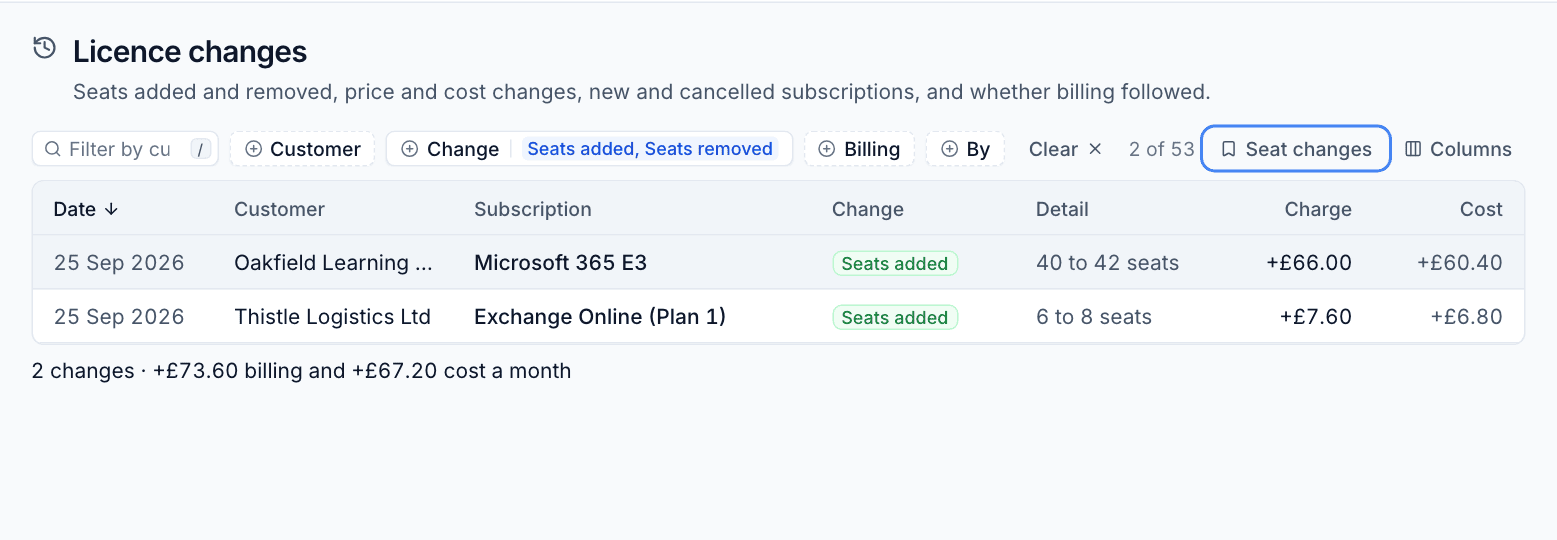
| Column | Meaning |
|---|---|
| Date | The day the change happened |
| Customer | The customer, or Not mapped when the company is not mapped yet |
| Subscription | The product |
| Change | The kind of change |
| Detail | What changed, for example "40 to 42 seats" or "Now ends 3 Jun 2027" |
| Charge | The monthly difference in what the customer is charged |
| Cost | The monthly difference in what it costs you |
| Billing | What happened to billing (see below) |
The footer totals the monthly difference in billing and cost for the rows shown.
The Billing column
| Value | Meaning |
|---|---|
| Applied | The contract has been updated for this change |
| Waiting | The customer approves licence changes, and nobody has applied this one yet |
| Not billed | The subscription is not billed, for example because the company is not mapped |
| No effect | The change does not affect billing, such as a new commitment end date |
Filters and views
Filter by Customer, Change, Billing and By (the source for changes a sync found, or the person who made the change). Views has:
- Waiting for billing: changes still to be applied to a contract.
- Seat changes: seats added and removed.
- New and cancelled: subscriptions that started or ended.
- Price and cost changes: anything that moved your margin.
Tip: At month end, open Waiting for billing before you run the Xero export. Anything listed there has not reached the contract yet.
Each subscription's side panel shows the same history for that subscription alone, under History.
Was this page helpful?
Thanks for the feedback.