Documentation overview
What the Docs area holds, how it is organised, and where documentation shows up across Tenvara.
The Docs area is where your team keeps what it knows. It holds three kinds of thing:
- Articles: rich-text pages. Your own how-tos and processes live in the knowledge base; notes about one customer live with that customer.
- Records: structured facts about a customer, filled in from a template: their network, Wi-Fi, Microsoft 365 tenant, line-of-business applications, suppliers, backup plan and site access.
- Credentials: usernames, passwords, two-factor secrets and licence keys, encrypted in the vault. Every reveal and copy is logged.
Everything links to the real customers, sites, contacts, devices and tickets in Tenvara, so the right documentation appears where the work is happening rather than in a separate tool.
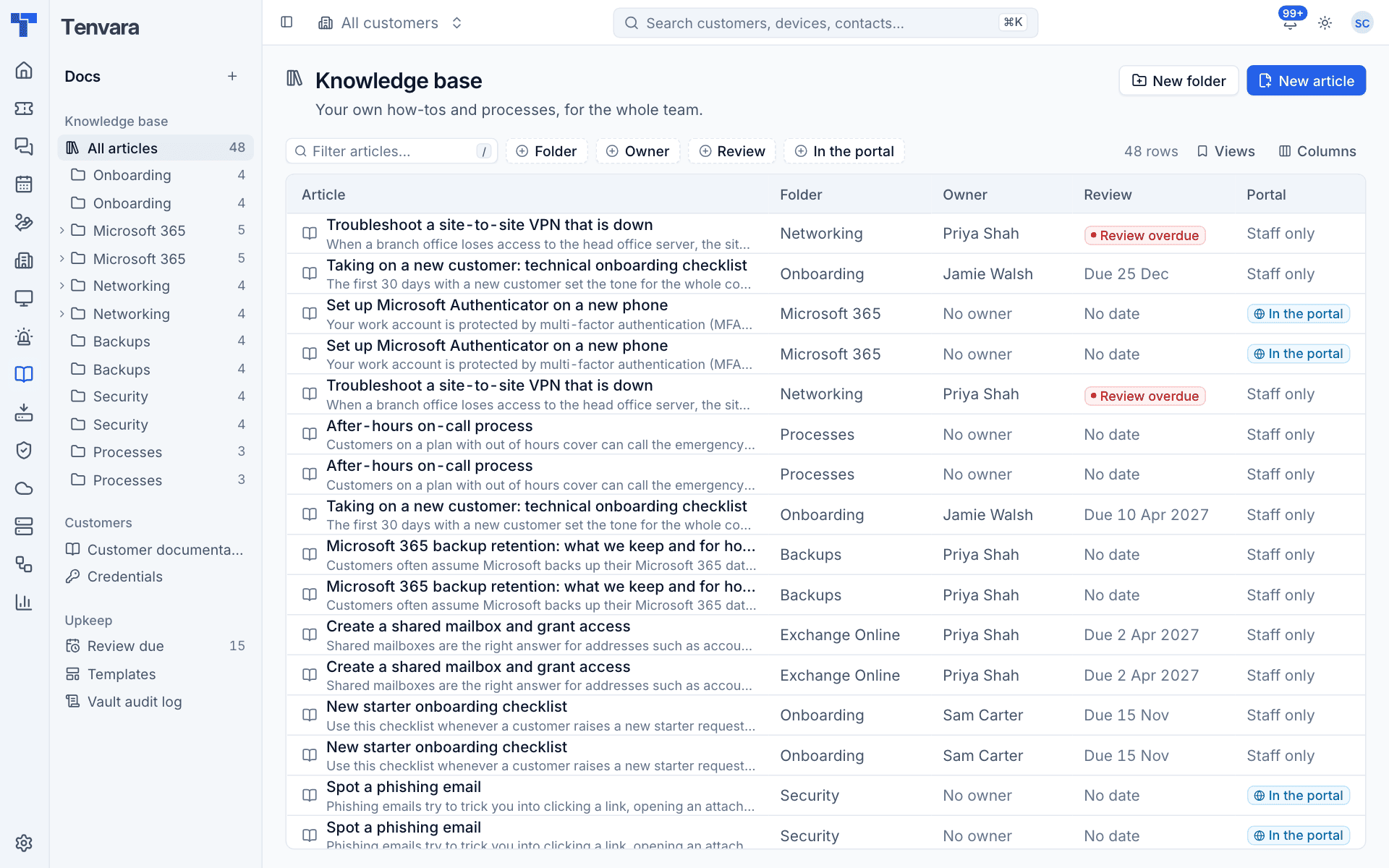
The Docs sidebar
Open Docs from the rail. The sidebar has three groups:
| Group | Item | What it shows |
|---|---|---|
| Knowledge base | All articles and each folder | Your internal articles, with the number in each folder. Folders can be nested; a small arrow opens the ones inside |
| Customers | Customer documentation | Every customer's articles and records in one list |
| Credentials | Every credential in the vault | |
| Upkeep | Review due | Articles due for review in the next two weeks, overdue, or expiring |
| Templates | The templates records are made from | |
| Vault audit log | Who revealed, copied or changed which secret |
Recently viewed at the bottom lists the articles, records and credentials you opened last, so you can get back to them in one click. The + next to the Docs heading creates something new.
The lists
The knowledge base, customer documentation, credentials, review and audit pages all use the same table. You can:
- Type in the filter box (press
/to jump to it) to search. - Add filters with the buttons beside it, for example Folder, Owner, Review and In the portal on the knowledge base, or Type and Customer on customer documentation.
- Save a combination of filters as a view with Views, and choose what to show with Columns.
- Click any row to open it.
Where documentation shows up
You rarely need to go to Docs to find something. Documentation also appears:
- On the customer: a Documentation tab lists that customer's records, articles and credentials. See Customer documentation and records.
- On devices, sites and contacts: a Documentation section lists the articles, records and credentials linked to them. Credentials show inline with reveal and copy buttons.
- On tickets: the details panel suggests articles for the ticket and lets you insert one into your reply. See Documentation on tickets and in the portal.
- In search: Cmd+K finds articles by their full text, records by name, and credentials by name, username and address. Secrets are never searchable.
- In the customer portal: articles you publish appear to customers under Help articles.
- In activity: creating, changing, reviewing and deleting documentation appears on the customer's timeline and in the activity log. Reveals and copies of secrets go to the vault audit log only.
Switching Docs on and off
Documentation is a module. In Modules you can switch Documentation off, which hides Docs everywhere for everyone, including the credentials vault.
Permissions
Documentation has its own area in Roles and permissions, and Credentials is a separate area under it so you can let people read articles without seeing passwords:
| Area | View | Manage |
|---|---|---|
| Documentation | Read articles and records | Add, change and delete articles, records and folders |
| Credentials | See credentials and reveal or copy their secrets | Add, change and delete credentials, and see the vault audit log |
Read-only users get no access to credentials by default. People without the credentials permission do not see credential links anywhere, including in records.
Templates are changed by administrators.
In this section
- Knowledge base articles: folders, writing articles, versions and reviews.
- Customer documentation and records: per-customer articles and structured records.
- Templates: what each kind of record holds, and adding your own.
- The credentials vault: storing, revealing and copying secrets.
- Reviews and the vault audit log: keeping articles current and seeing who looked at what.
- Documentation on tickets and in the portal: suggestions, inserting articles and Help articles.
Was this page helpful?
Thanks for the feedback.