Domain and SSL monitoring
Watch every customer domain's registration, expiry, name servers and mail servers, and check the certificates on their websites, webmail, gateways and VPN portals.
A domain that lapses or a certificate that expires takes a customer's email or website down just as surely as a dead server. Tenvara keeps one list of every customer domain, looks up its registration, watches its name servers and mail servers for changes, and checks the certificates on the hosts that matter. Problems raise alerts well before they become outages.
The domain list
Go to Domains in the main navigation.
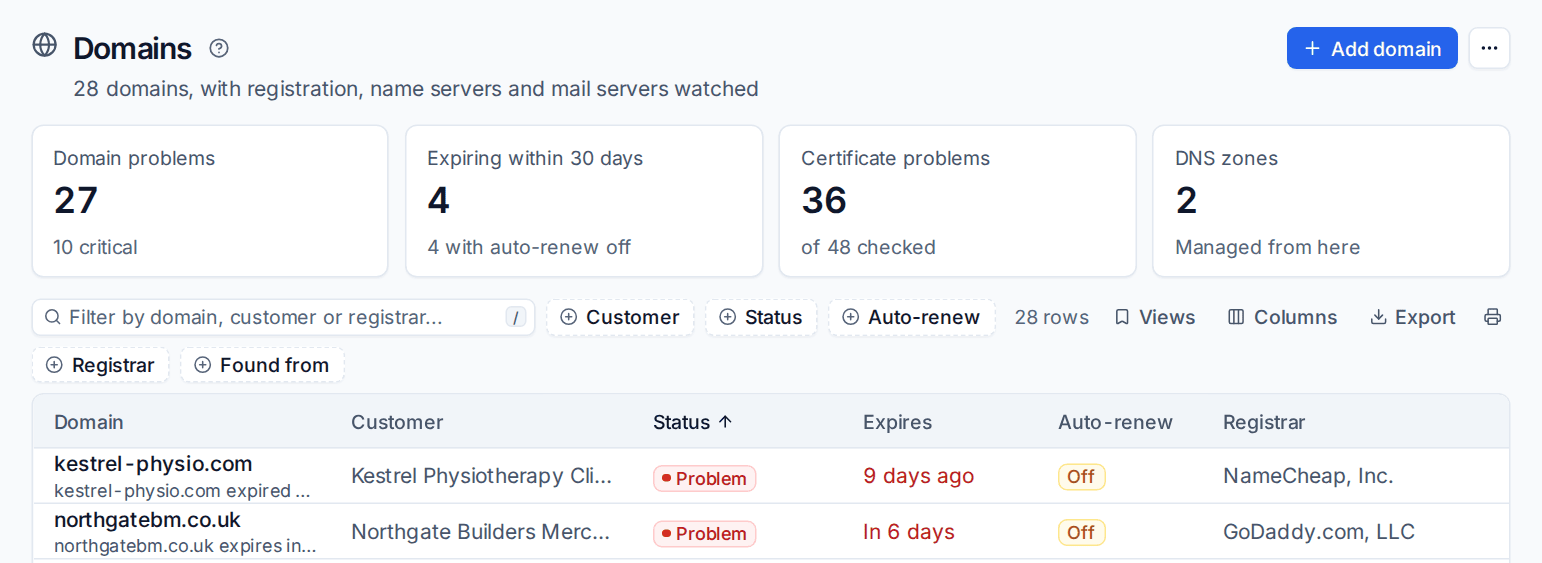
The tiles show domain problems (and how many are critical), domains expiring within the warning window (and how many have auto-renew off), certificate problems and DNS zones. The list shows each domain's customer, status, expiry, auto-renew and registrar. Filter by Customer, Status, Auto-renew, Registrar or Found from, or use the saved views for problems, the soonest to expire and domains with auto-renew off.
Where domains come from
Each domain has one record, whoever found it. Discovery runs each morning and adds domains from the sources switched on under Settings > Domains and DNS > General > Discovery:
- Customers' email domains and websites, from each customer's record.
- Microsoft 365 tenants' verified domains, for customers with a connected tenant.
- Sites on your web servers.
- Zones in DNS accounts you have connected (see DNS management).
Run it now from the ... menu with Find domains and certificates now.
Adding a domain by hand
- Click Add domain.
- Enter the Domain (a pasted web address works too) and choose the Customer.
- Leave Monitor this domain on. Turn it off to keep a domain on record without checking it.
- Optionally set Warn before expiry and Critical before expiry for this domain alone, and add Notes, such as who renews it.
- Save.
A domain's page
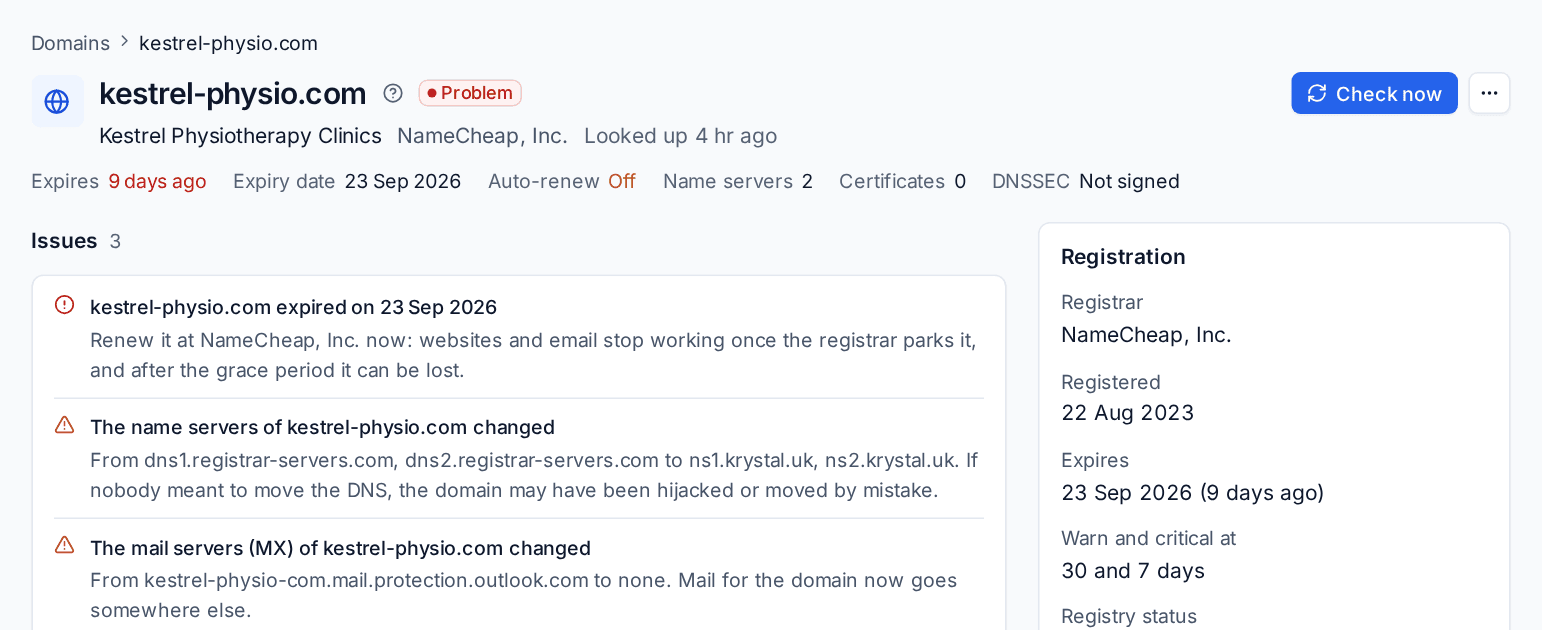
Click a domain to open it:
- Issues: what is wrong and what to do about it, for example Renew it at the registrar now: websites and email stop working once the registrar parks it.
- Name servers and mail: the current name servers and MX hosts.
- Certificates: the certificate checks under this domain, with Check a certificate.
- History: changes seen at the registry and in DNS, with before and after.
- Registration: registrar, registration and expiry dates, the warning thresholds, the registry status, where the facts came from and where the domain was found.
- DNS: its zone, if Tenvara manages it, or Add a zone. And a link to its Email security page for SPF, DKIM and DMARC.
Check now looks everything up again straight away.
What is checked
| Check | What raises an issue |
|---|---|
| Registration | Expired, expiring within the warning or critical window, in redemption or pending delete, or not registered at all (anyone could register it). |
| Name servers | The name servers changed. |
| Mail servers | The MX hosts changed. |
| Registrar | The domain moved to another registrar. |
Registration comes from RDAP, the registries' own lookup service, with WHOIS for domains whose registry has no RDAP. Changes stay amber on the domain for a week by default, so you have time to confirm they were expected.
Auto-renew and registrar accounts
RDAP and WHOIS cannot say whether a domain renews automatically, so Auto-renew shows Unknown unless the registrar says. Connect the registrar to get it: Cloudflare Registrar, GoDaddy, Namecheap, Amazon Route 53 Domains, Gandi and OVHcloud report expiry and auto-renew for the domains in your account. These are supported integrations you connect with your own registrar account and API key, under Settings > Domains and DNS > DNS providers. With auto-renew on, only the critical window raises an alert.
Certificates
Go to Domains > Certificates.
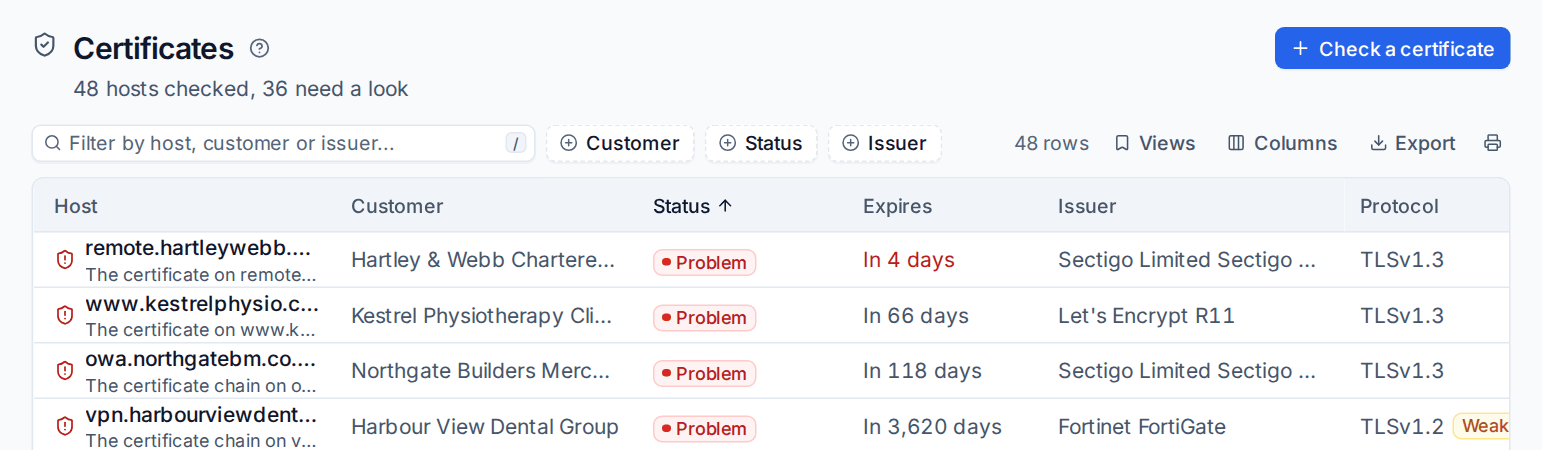
Every certificate check shows its host, customer, status, expiry, issuer and the TLS protocol it negotiated, flagged Weak when the host still accepts old protocols. Click one for what the host presented: the names on the certificate, the chain, the key, the protocol and its fingerprint.
Adding a check
- Click Check a certificate.
- Choose the Customer, then the Host (a pasted web address works) and Port.
- Under Connect with, choose TLS or STARTTLS (for mail servers).
- Fill in Name to ask for only when the certificate should be for a different name than the host.
- Link it to the customer's Domain, give it a Label such as RD gateway, and save.
Discovery also adds checks by itself for the usual hosts under each monitored domain (the domain itself, www, mail, webmail, remote, rdweb, vpn, sslvpn, portal and owa) when they answer TLS, skipping hosts that point at someone else's service such as Microsoft 365.
What a certificate check finds
Expired or expiring certificates, certificates not valid yet, chains that are not trusted (self-signed, a missing intermediate, an unknown root), a name that does not match the host, weak protocols accepted (TLS 1.0 and 1.1 by default), keys smaller than 2048 bits, SHA-1 signatures, and hosts that cannot be reached for three checks in a row. A replaced certificate is noted too.
Settings and alerts
Settings > Domains and DNS > General sets:
| Group | Settings |
|---|---|
| Expiry and strength | When domains (30 and 7 days) and certificates (21 and 7 days) turn amber and red, the weak protocols and the smallest RSA key. |
| How often | Registrations every 24 hours, name servers and mail servers every 60 minutes, certificates every 6 hours, how many failures make a host unreachable, how long a change stays on a domain. |
| Alerts | Which problems and changes raise alerts. They still show on the domain when off. |
| Discovery | The sources above, the hosts tried and the services to skip. |
Customers can have their own expiry thresholds, and so can a single domain or certificate check. Expiry and certificate alerts clear themselves when the problem goes; changes stay open until someone resolves them. All of them go through the alert desk, so your alert rules can make tickets of them.
The customer page has a Domains block with the customer's domains, their expiry and auto-renew, and their certificates.
Related
Was this page helpful?
Thanks for the feedback.