Customer offboarding
Take a leaving customer through one guided checklist: export their data, hand over or delete backups, remove agents, revoke Microsoft 365 access, stop billing, close the portal, archive them, and finish with a completion certificate.
When a customer leaves, there is a lot to remember and most of it matters: giving them their data, dealing with their backups, getting your agents off their machines, removing your access to their Microsoft 365, ending contracts on the right date and closing their portal. Tenvara turns that into one checklist on the customer, and ends with a completion certificate that records what was done, by whom and when.
Offboarding is for administrators only, because it ends contracts, removes agents and hands out a customer's data.
Start an offboarding
- Open the customer.
- In the actions menu (...), choose Offboard customer.
- Enter the Leaving on date (the day their service ends; contracts can end on it) and a Reason for your records and the certificate.
- Press Start offboarding.
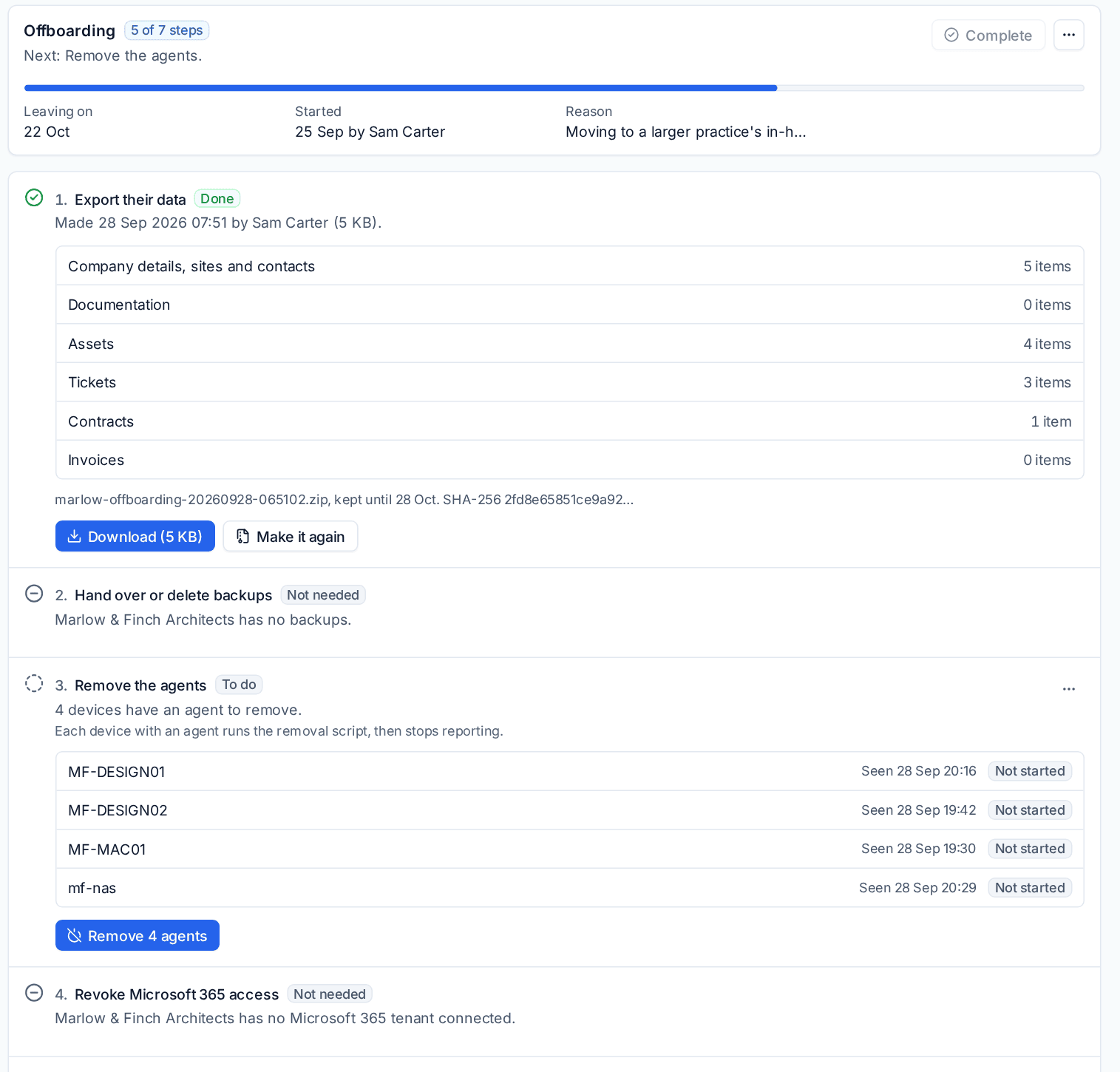
Nothing happens to the customer yet: each step only runs when you run it. The customer page now has an Offboarding tab with the checklist, a progress bar and the next step to do.
The steps
Each step shows its state: To do, Under way, Needs you, Done, Skipped or Not needed (for example when the customer has no backups). States are worked out from the real data every time you look, so work done elsewhere in Tenvara counts, such as a contract you ended from its own page.
1. Export their data
Make the export builds one ZIP in the background, with a page to read first. Choose what goes in:
- Company details, sites and contacts, as CSV and JSON;
- Documentation: articles as web pages, records and their files;
- Assets: devices and the hardware you supplied;
- Tickets, with the conversation and files (internal notes only if Settings says so, see below);
- Contracts, with their lines;
- Invoices, each as a PDF with a CSV list;
- Credentials (encrypted), sealed under a passphrase you type, with an offline viewer. Passwords never appear in the clear anywhere in the ZIP.
Warning: Give the customer the passphrase separately from the file, by phone or in person. Nobody can open the credentials without it, you included.
The ZIP is kept on the server for the number of days set in Settings > Offboarding and then deleted; its SHA-256 fingerprint stays on the record and the certificate. Making and downloading it are recorded in the audit log, and each credential's own log says it was exported.
2. Hand over or delete backups
The customer's backup repositories are listed. Hand over records how they got them (for example "copied to their NAS, passphrase given by phone"). Delete goes through Backup's own delete, so the recovery window and second-administrator approval still apply. See Restoring.
3. Remove the agents
The Remove button (for example Remove 4 agents) runs the removal script on every device with an agent. The agent unregisters, deletes its keys and uninstalls itself, and the step shows progress per device. Offline devices run it when they next come online, and failures can be tried again.
4. Revoke Microsoft 365 access
For each connected tenant, Tenvara ends your delegated admin (GDAP) relationships with your partner sign-in, removes its app from their tenant and disconnects the tenant. Where something cannot be ended from Tenvara, the step says exactly what to do in Partner Center or Entra, and waits for you to mark it done.
5. Stop billing
Gives notice on each running contract by its own terms (notice period and minimum term), or ends it on the leaving date or a day you choose. Subscriptions you entered by hand are cancelled; for subscriptions from a distributor, cancel them with the distributor and mark the step done. Unpaid invoices are shown so nothing is forgotten.
6. Turn off portal access
Every contact's portal access is turned off and their portal sessions are signed out.
7. Archive the customer
Marks the customer inactive: they leave lists, pickers and your licence count, and everything they hold is kept. Open tickets are pointed out first.
Steps done outside Tenvara
For work you did elsewhere, use Mark as done in the step's menu and say What was done, for example "GDAP relationship terminated in Partner Center". Your name and the time go on the certificate. Skip records a step as skipped with your reason.
Complete and the certificate
When every step is done, skipped or not needed, press Complete. The checklist is fixed as it is and the completion certificate PDF is made: numbered, in the customer's brand and language, opening with your certificate statement, then each step with its outcome, who did it and when, the export's contents and fingerprint, the Microsoft 365 outcome and the agents removed. Download it from the Certificate button and send it to the customer.
Stop offboarding in the menu closes the checklist and deletes the export file. Steps already done stay done.
Settings > Offboarding
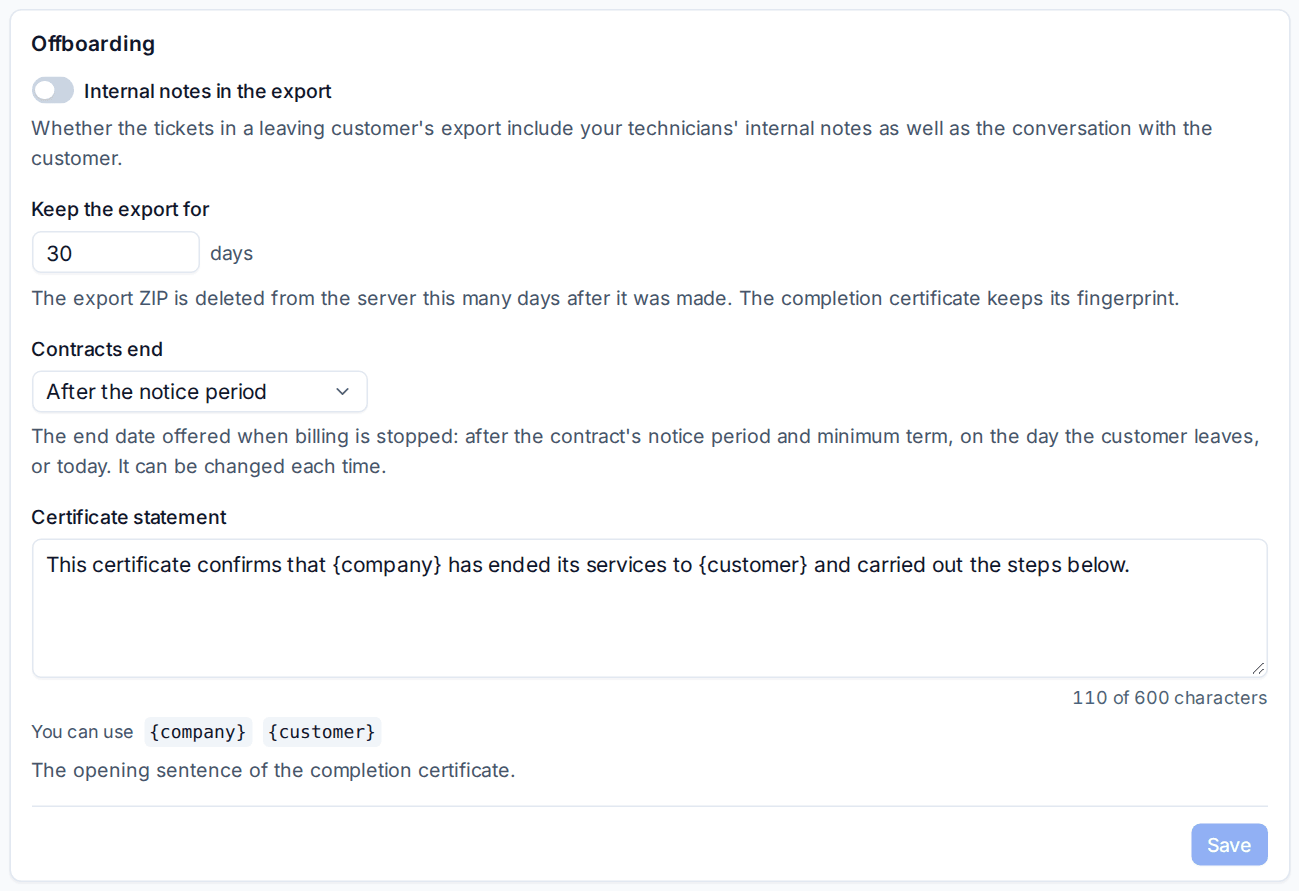
- Internal notes in the export: whether exported tickets include your technicians' internal notes as well as the conversation. Off by default.
- Keep the export for: days before the ZIP is deleted from the server (30 by default).
- Contracts end: the end date offered when billing is stopped: After the notice period, on the day the customer leaves, or today. It can be changed each time.
- Certificate statement: the opening sentence of the certificate, with
{company}and{customer}.
Related
Was this page helpful?
Thanks for the feedback.