Business reviews
Run quarterly business reviews with a recommendations register, a technology roadmap and budget, standards alignment, a booked meeting and a branded pack shared in the customer portal.
A business review (QBR) is the regular meeting where you step back with a customer: how things have gone, where they stand against your standards, and what you recommend they do next and when. Tenvara keeps everything for it on the customer's Reviews tab and turns it into a branded PDF pack you can share in the portal.
Business reviews come with the Reports module. Reading them needs the reports view permission, changing them reports manage, and the standards checklist is for administrators.
The customer's Reviews tab
Open a customer and choose Reviews. The figures at the top show the Next review, the share of Standards met, the Open recommendations and the Budget, next 4 quarters. Below are five views: Recommendations, Roadmap, Budget, Standards and Reviews.
Recommendations
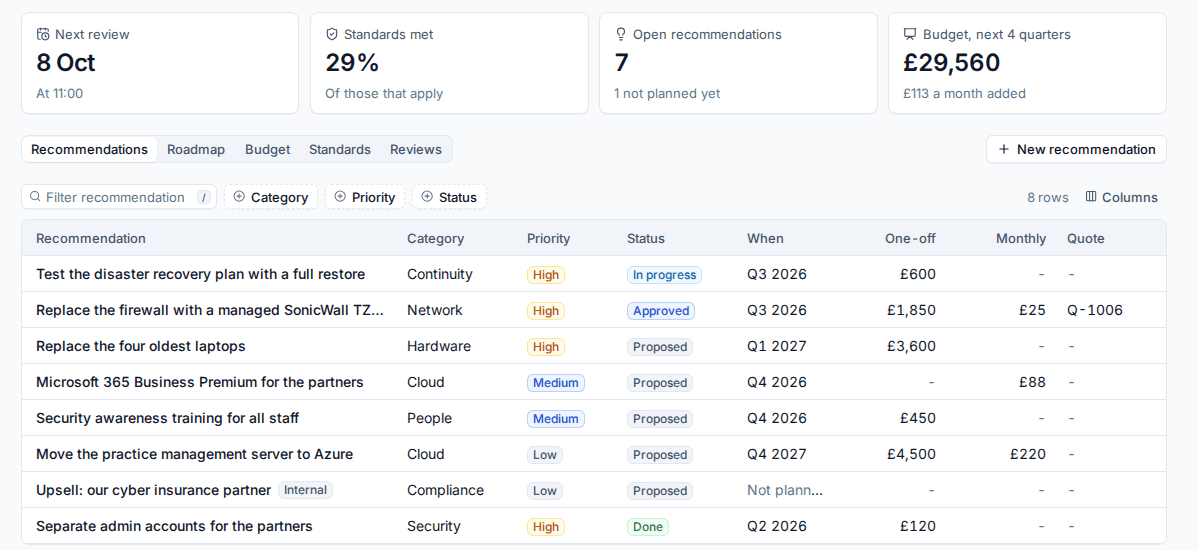
The recommendations register is what you advise the customer to do.
- Press New recommendation.
- Give it a title and say why (this is printed for the customer).
- Choose the category (Security, Hardware, Software, Cloud, Continuity, Network, People or Compliance, or your own) and the priority (Low, Medium, High or Critical).
- Enter a one-off and a monthly estimate before tax, and the quarter you are aiming for.
- Optionally link the quote that sells it, the standard it fixes, and an owner.
- Decide whether the customer sees it. Internal recommendations never reach the portal or the pack.
The status runs from Proposed through Approved, In progress and Done, or Deferred and Declined. Linking a quote with no estimate takes the quote's figures, and when the customer accepts that quote a proposed recommendation becomes approved.
Roadmap and budget
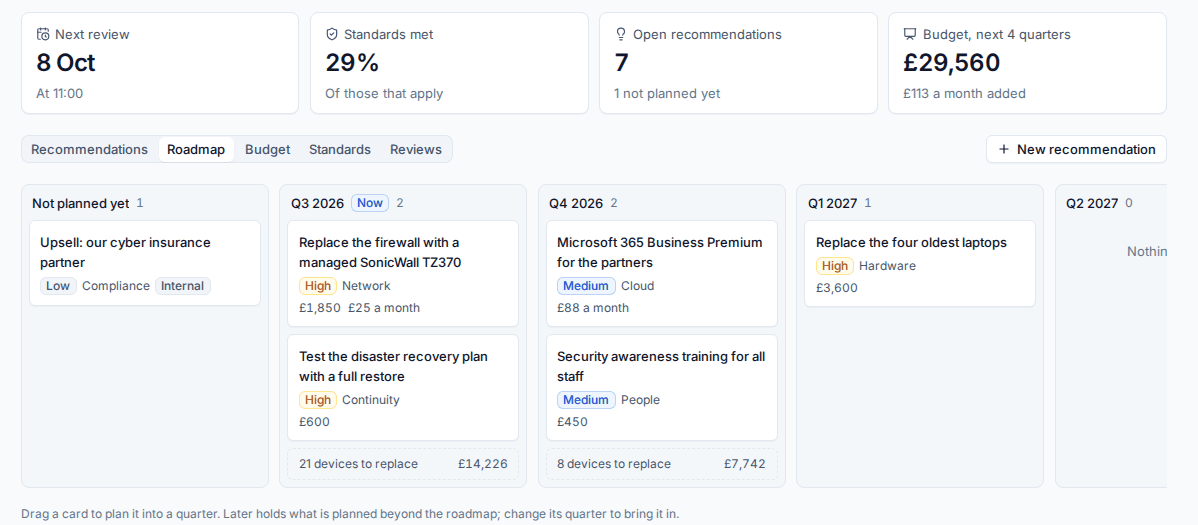
The Roadmap lays the recommendations out by quarter, from this quarter onwards (four by default). Drag a card into a quarter to plan it. Under each quarter you also see the devices due for replacement from the hardware refresh forecast, priced from your catalogue.
The Budget adds it up per quarter: one-off spend, hardware, new monthly costs and the monthly run rate, as a chart and a table in the customer's currency.
Standards
Standards shows how the customer measures up against your checklist, grouped by category, with the share met.
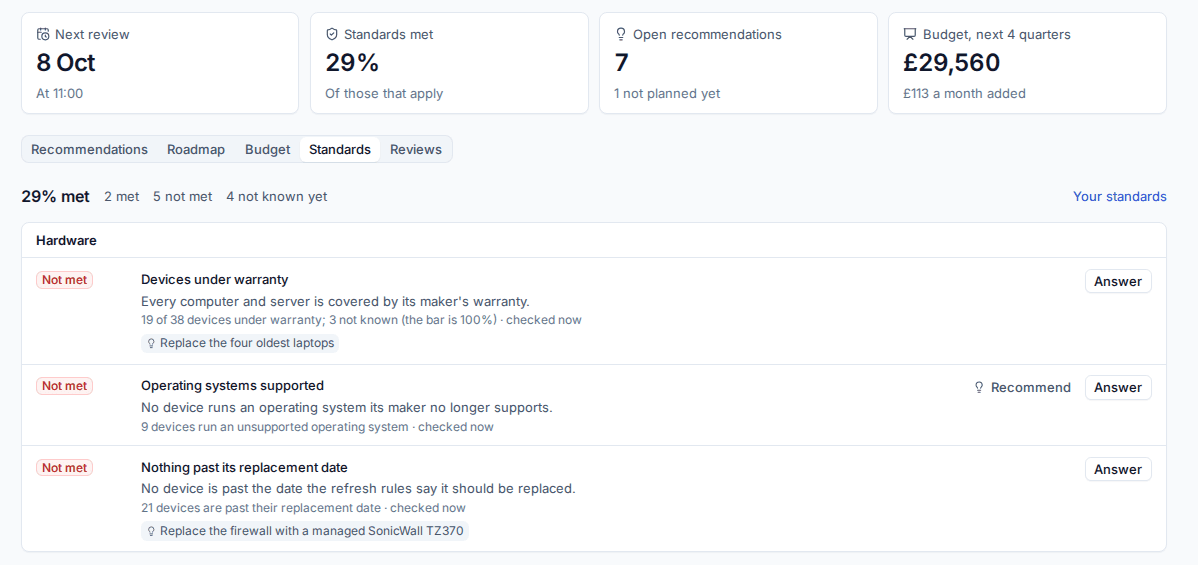
Some standards are measured from what Tenvara already knows: devices under warranty, supported operating systems, nothing past its replacement date, MFA for everyone, Microsoft Secure Score, updates installed, no open serious security detections and backups succeeding. Others are answered by hand, such as a tested disaster recovery plan or security awareness training.
- Answer (or Change answer) records Met, Not met or Does not apply, with a note. An answer always wins over the measurement.
- Recommend on a standard that is not met creates a recommendation linked to it.
- Standards with nothing to measure and no answer show Not known yet.
Change the checklist (names, what each means, how it is checked, the bar, its weight and order) in Settings > Business reviews.
Plan and hold a review
On the Reviews view, press Plan a review. Each review is for one quarter and is owned by the customer's account manager (or whoever planned it).
- Book the meeting: choose when, how long, who attends from the customer and from your team, and where. With Scheduling on, it goes on your staff's calendars as a booking, and the first customer contact gets the invitation if your Scheduling confirmations cover it.
- Write the Summary: your words for the customer, first in the pack.
- Keep Meeting notes: what was agreed. These are internal and never in the pack or the portal.
- Under In the pack, choose the parts: Summary, Health score, Standards alignment, Recommendations, Technology roadmap, Budget and Hardware refresh forecast.
- Make the pack. It is a snapshot, so what the customer downloads never changes underneath them. Make pack again after you update the register.
- Share puts the pack in the customer portal; Stop sharing takes it out.
- Mark the review held, with your notes.
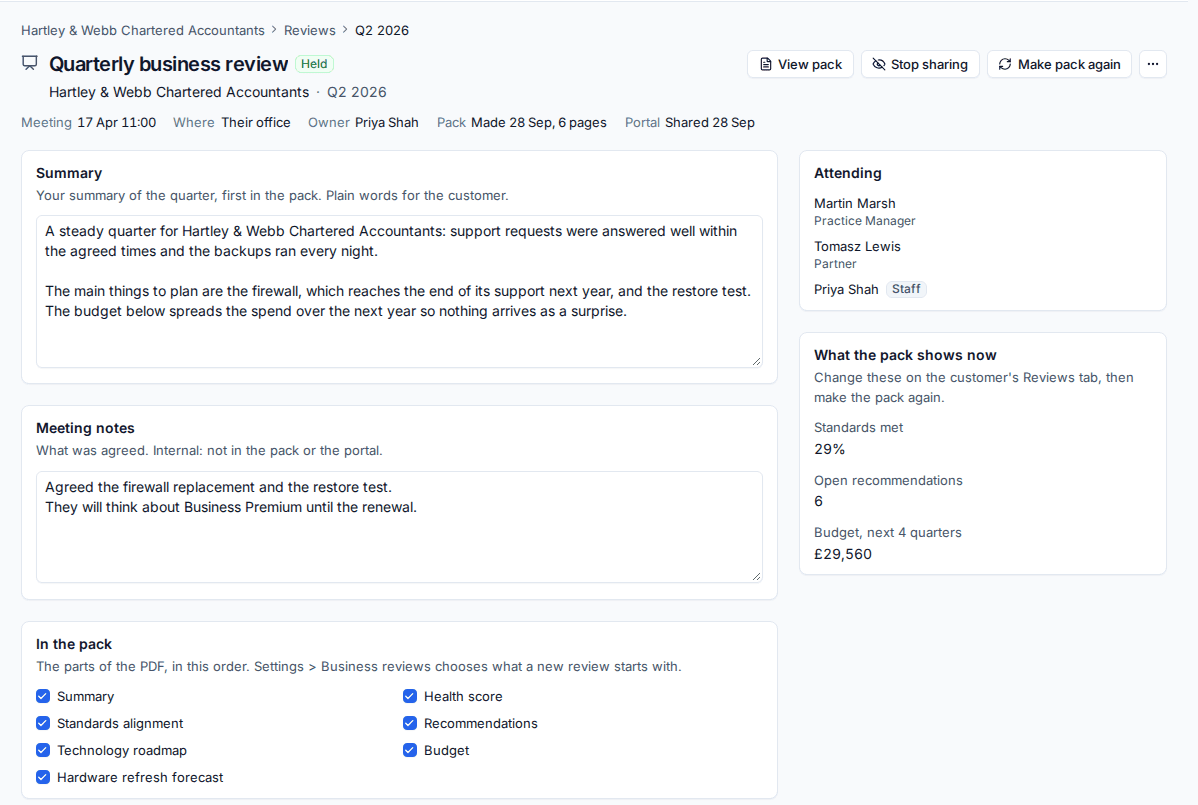
The pack is an A4 PDF in your branding: the cover facts, headline figures, your summary, the health score with its reasons and trend, standards alignment, recommendations (and those done since the last review), the roadmap, the budget and the hardware due for replacement.
Once a review is held, the next one is due three months later (you can change this per customer).
Keep on top of reviews
Reports > Business reviews lists every active customer by when their review is due: overdue (past due with no meeting booked), due soon and booked, with their open recommendations and health score, and Plan one to start the next.
In the customer portal
The portal's Reviews page appears once a customer has a pack, a plan or a meeting. It shows the next meeting, the packs you have shared, the roadmap and budget (without internal recommendations) and how they meet your standards. Who sees it follows your portal audience for monthly reports, and Settings > Business reviews can hide the plan per customer.
Settings > Business reviews
Set how often reviews come round, how long the meeting is, the review's title ("Quarterly business review"), how many quarters the roadmap shows, whether hardware refresh appears in the plan, the categories, which parts a new pack includes, and whether the plan shows in the portal. Then the standards checklist.
Related: Customer health score, Opportunities and pipelines.
Was this page helpful?
Thanks for the feedback.