Vulnerability management
Known vulnerabilities in the software and operating systems on every device, with severity, whether attackers use them, a deadline and the fix Tenvara can apply through patching or software deployment.
Security > Vulnerabilities matches the software and operating systems the agent reports on every device against the public vulnerability feeds. Each match is a finding with its severity, whether it is known to be exploited, how likely it is to be exploited, a deadline, and the fix. Most fixes are one click, through patching or software deployment.
Nothing needs installing: the agent already sends its software and operating system inventory.
Where the data comes from
The feeds are free and public, and are read once a day (after 03:00 by default):
| Feed | What it gives |
|---|---|
| NVD (the US National Vulnerability Database) | Affected versions of applications, CVSS scores and descriptions |
| CISA KEV | Vulnerabilities known to be exploited, with CISA's required action and whether ransomware uses them |
| EPSS | The probability of exploitation in the next 30 days |
| Microsoft security updates | The Windows builds each vulnerability affects and the KB that fixes it |
| OSV | Fixed package versions for Ubuntu, Debian, AlmaLinux and Rocky Linux |
| Apple security releases | The macOS and Safari release that fixes each vulnerability |
A feed that fails keeps what it had and says why on the overview and in Settings. Press Refresh feeds to read them now. Adding a free NVD API key in Settings > Vulnerabilities makes the NVD feed faster.
Installed applications are matched to NVD products by a built-in list of common applications, by mappings you make, and by suggestions from the NVD dictionary that you confirm on the Software tab. Windows is matched by build, macOS by version, and Linux packages by distribution.
The overview
The overview counts open findings that are Critical and High (with medium and low), Known exploited, Past their deadline, Fixable now and Resolved in the last 30 days. Each figure opens the findings list filtered to it.
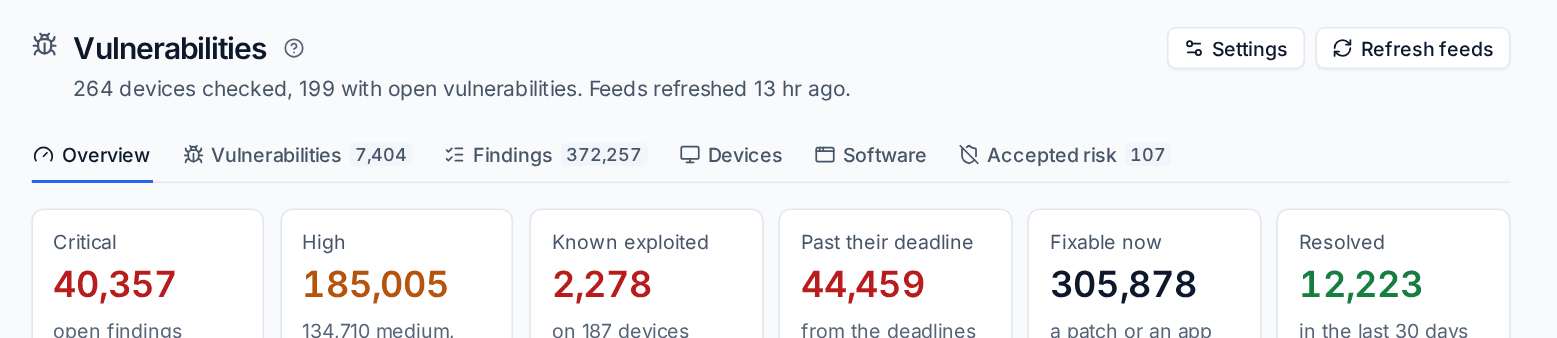
Below are open findings over 90 days by severity, the most vulnerable software, the top vulnerabilities (known exploited first), the riskiest devices and customers. The page follows the customer switcher.
Tabs
- Vulnerabilities: each CVE once, known exploited and highest scored first.
- Findings: each vulnerability on each device, with views for critical, known exploited, past deadline and fixable. Switch between Open, Accepted, Resolved and All.
- Devices: each device with its counts and risk.
- Software: installed names, how many devices have them, what they map to, and suggestions to confirm, map by hand or ignore.
- Accepted risk: active and ended risk acceptances.
A vulnerability's page
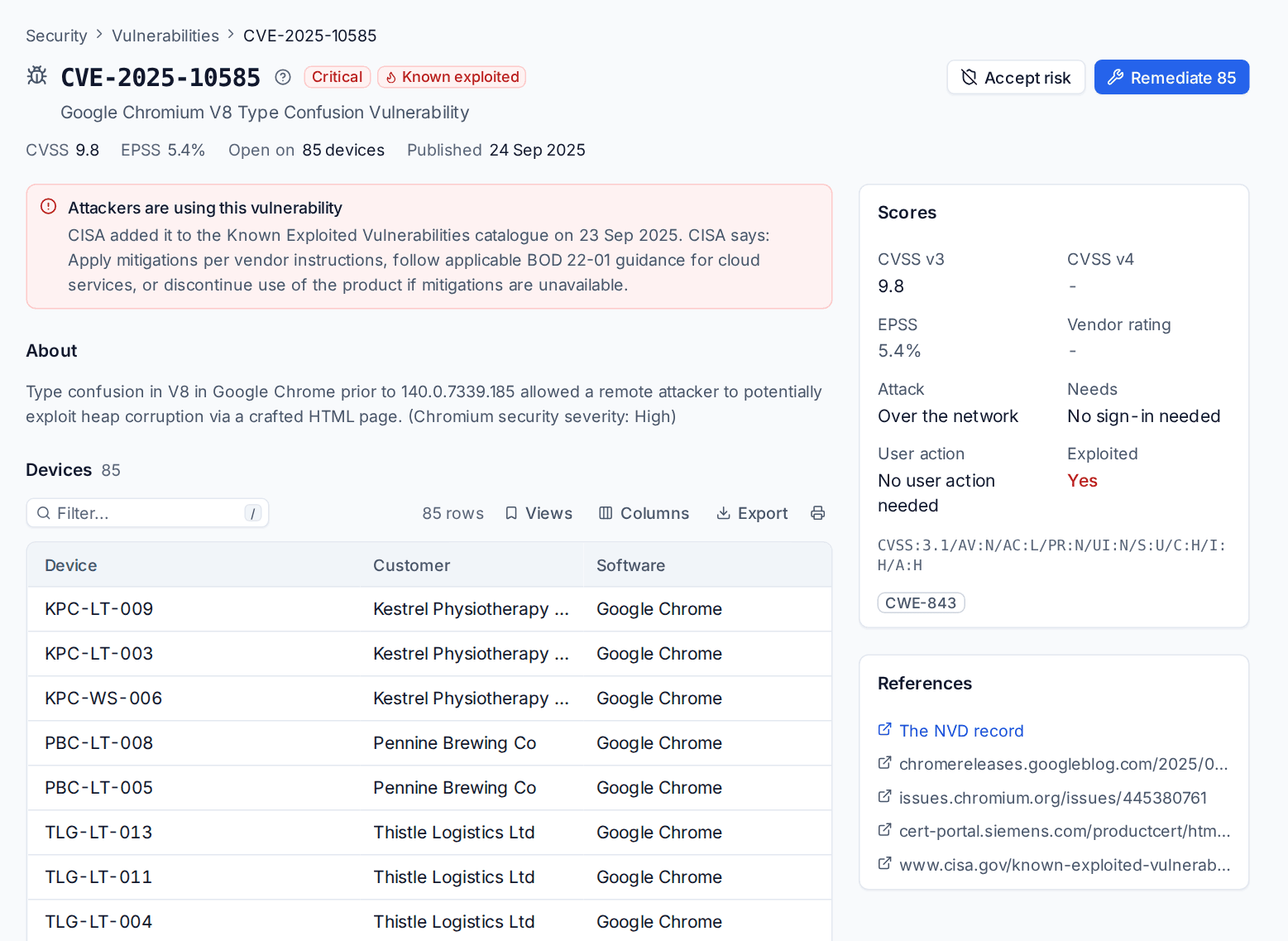
Click a CVE to open it: the CVSS score and its vector in words (attack over the network or not, sign-in needed, user action needed), EPSS, whether it is known exploited with CISA's required action and due date, the description, every device that has it, the fix for each product and links to the references.
A finding
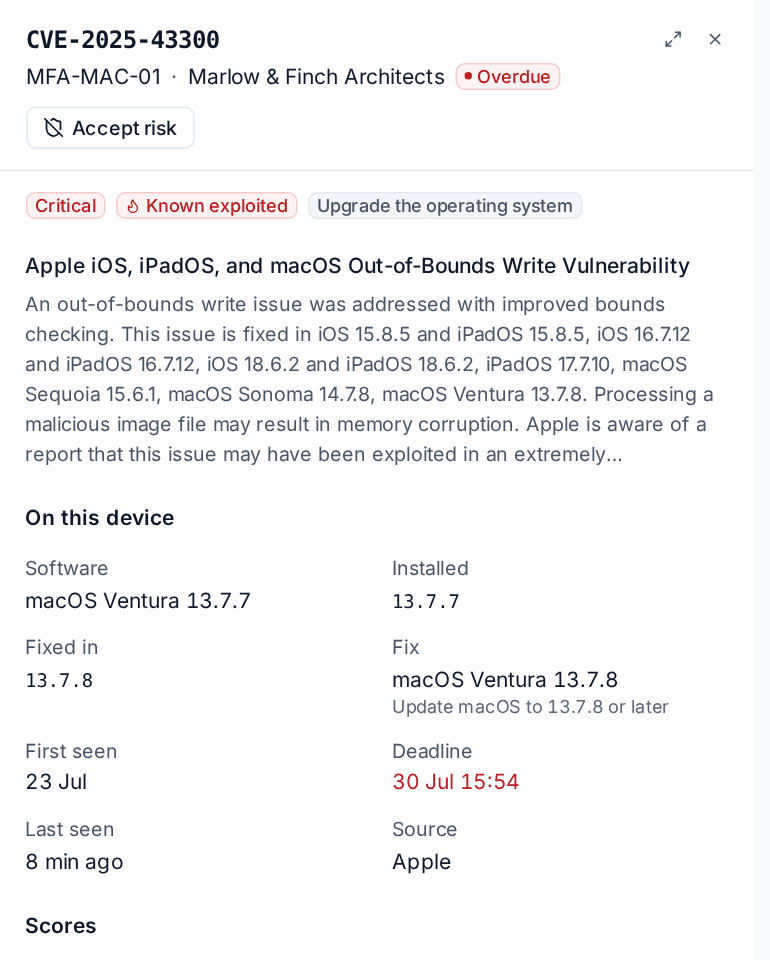
Click a finding for the software and version installed on that device, the version that fixes it, First seen, the Deadline, Last seen and the feed it came from.
Severity, deadlines and risk
- Severity comes from CVSS v4 where NVD has it, then CVSS v3.1, then the vendor's rating.
- Deadline is first seen plus the days for its severity: 14 days for critical and high (as Cyber Essentials asks), 60 for medium and 120 for low, and 7 days for anything known to be exploited.
- A device's risk (0 to 100) is its worst open finding, weighting the CVSS score, known exploitation and EPSS.
A finding closes by itself when the device next reports a version that is not affected. If the old version comes back, it opens again with a new deadline.
Fixing vulnerabilities
Press Remediate on a finding, a selection of findings, a CVE, a device or a customer. Tenvara asks for the fix through the right route:
- Windows: the missing update that fixes it, through patch management (Microsoft's KB, or the latest cumulative update, which carries every earlier fix).
- macOS: the macOS update patch management lists for the device.
- Linux: the device's pending package updates for the affected packages.
- Applications: the software catalogue's package is updated through software deployment.
What cannot be done automatically says what to do by hand, for example "Update Zoom Workplace to 6.5.0 or later".
Tip: In the findings list,
ffixes the active row. On a device, Cmd+K offers "Remediate n vulnerabilities on ..." and "Check ... for vulnerabilities again".
Accepting a risk
Sometimes a vulnerability is safe to leave for now: a compensating control, no exposure, or the vendor has no fix yet.
- Press Accept risk on a CVE or a finding.
- Choose Where: every device and every customer, one customer or one device.
- Give the Reason and when it Ends on (90 days by default, 365 at most).
- Press Accept risk.
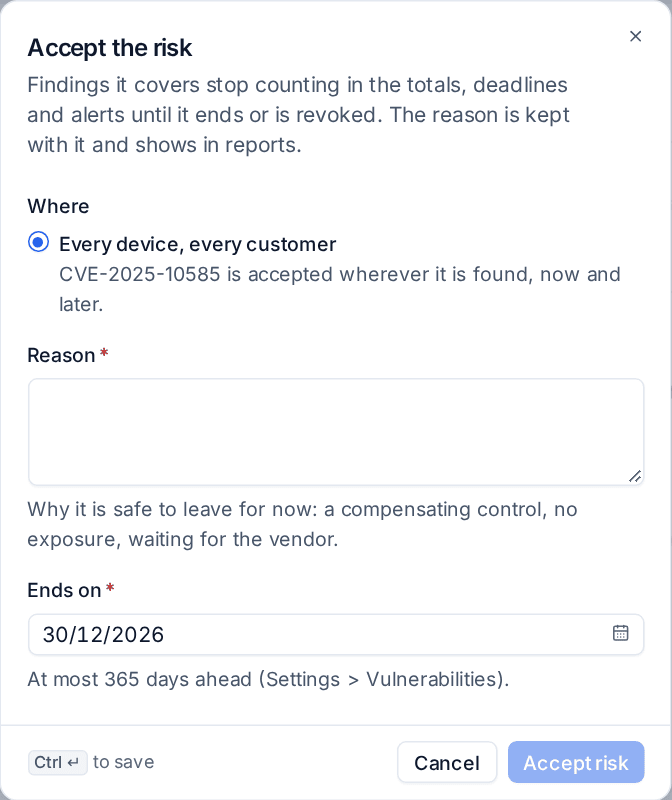
Accepted findings stop counting in the totals, deadlines, alerts and reports until the acceptance ends or is revoked. The Accepted risk tab keeps ended ones with who revoked them.
Alerts
Each device raises at most one alert of each kind, cleared when nothing on the device meets it any more:
- Known exploited (on, critical).
- High score: at or above a CVSS score (on, 9.0).
- Likely exploitation: at or above an EPSS probability (off, 50%).
- Past deadline (off).
Your alert rules can turn them into tickets.
Where else it shows
- Device page: a Vulnerabilities block with open findings worst first, their fixes, remediate everything fixable and check again.
- Customer page: a Vulnerabilities tab for the customer's devices, with their own deadlines.
- Customer report: a Vulnerabilities section with open high and critical, known exploited, fixed during the month and within the deadline, and the most serious to fix.
- Cyber Essentials and compliance frameworks: the check Known vulnerabilities fixed in time fails when a vulnerability scored 7 or more, or known to be exploited, is open on a device for longer than 14 days. See Cyber Essentials readiness and Compliance frameworks.
Settings
Settings > Vulnerabilities shows each feed's state with Refresh now and the NVD API key, then the feeds, deadlines, what counts (the lowest severity recorded), alerts and accepted risk limits. Deadlines, what counts and alerts can be set per customer on the customer's Settings tab.
Vulnerabilities follow the Security module and have their own permission area in Roles and permissions: view to look, manage to remediate, accept risk, map software and change settings.
Was this page helpful?
Thanks for the feedback.