Windows hosting: IIS, SQL Server and MySQL
Host static and .NET sites on Windows Server with IIS, with application pools, bindings, applications, rewrite rules, web.config, FTP, and SQL Server and MySQL databases side by side.
A Windows Server (2019 or later) running IIS is a web server in Tenvara like a Linux one: the agent's Web server role finds it, you adopt it, and then you create and run sites from Tenvara or let customers do it from the hosting panel. Windows sites are static or .NET (ASP.NET and ASP.NET Core). Databases are SQL Server Express and MySQL, side by side.
For finding and adopting servers, see Web servers. For creating a site, see Creating and managing sites.
How a Windows site is laid out
Each site gets:
- a folder
C:\Sites\<short name>with the current release, older releases, shared files, logs and a temporary folder; - its own local Windows account, so sites are kept apart: each can only read its own folder;
- its own IIS application pool and IIS site, with HTTPS bindings by host name (SNI) for its domains.
Certificates come from win-acme when it is installed on the server, or you upload your own.
The IIS tab
Open the site from Infrastructure > Sites and choose the IIS tab. It starts with the .NET and ASP.NET versions installed on the server.
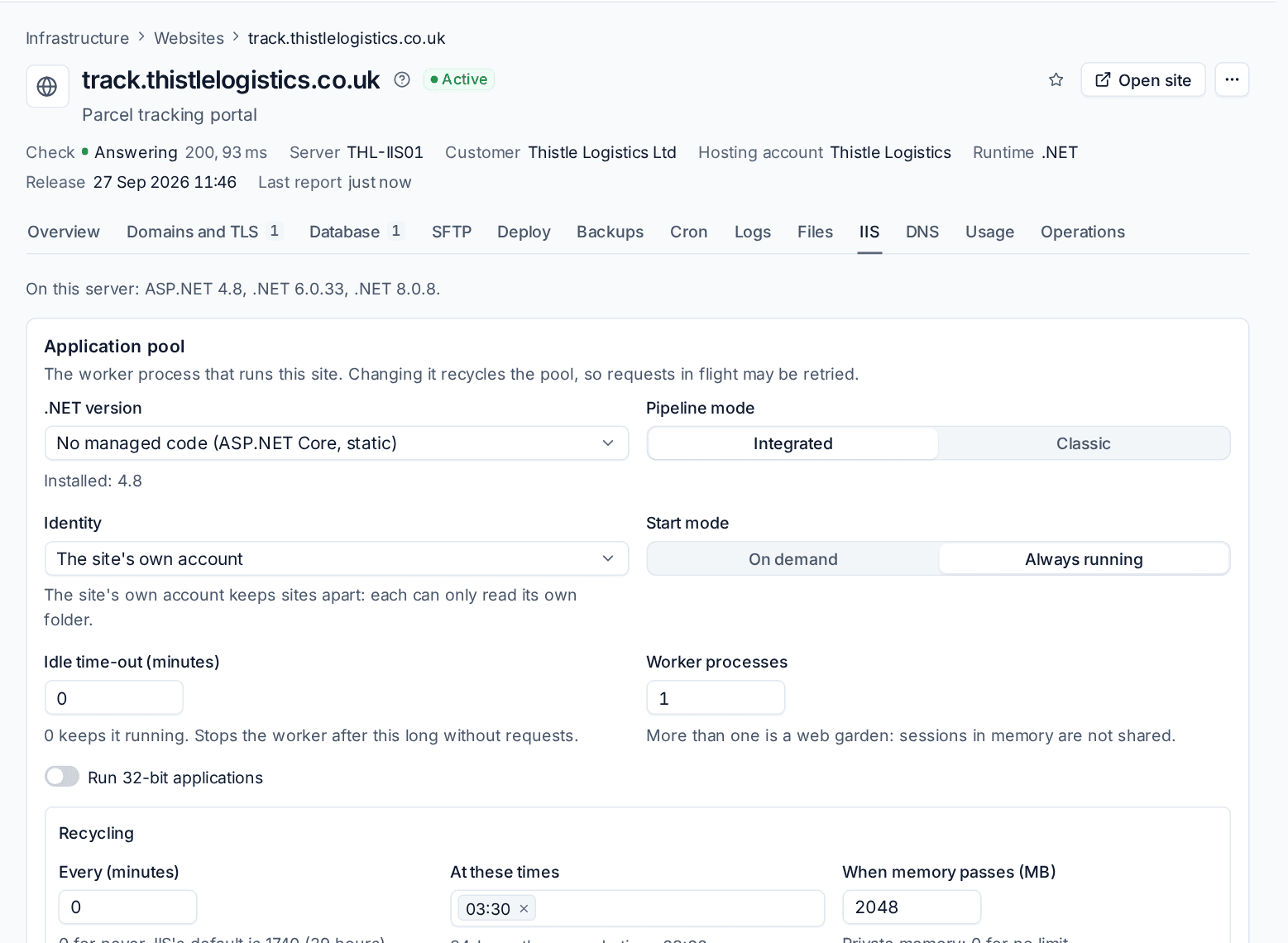
Application pool
The worker process that runs the site. Changing it recycles the pool, so requests in flight may be retried.
- .NET version: No managed code (ASP.NET Core, static), v4.0 or v2.0.
- Pipeline mode: Integrated or Classic.
- Identity: The site's own account (recommended: it keeps sites apart), ApplicationPoolIdentity, NetworkService or LocalService.
- Start mode: On demand or Always running.
- Idle time-out (minutes): 0 keeps it running.
- Worker processes: more than one is a web garden, where sessions in memory are not shared.
- Run 32-bit applications.
- Recycling: every so many minutes, At these times, and When memory passes (MB).
Bindings, applications and virtual directories
- Bindings beyond the site's own domains: http or https, IP address, port and host name. HTTPS bindings use the site's certificate.
- Applications under the site, each with its own application pool, for example an API at
/api. - Virtual directories that map a path to another folder.
URL Rewrite rules
With the IIS URL Rewrite module installed on the server, add rules that match a URL pattern with conditions (host, HTTPS, whether a file or folder exists, query string) and then redirect (301, 302, 303 or 307), rewrite, or abort the request. Your rules run before Tenvara's own maintenance rule.
web.config
Open the site's web.config, edit it and save. If IIS cannot read the new file (it answers with configuration error 500.19), Tenvara puts the previous one back automatically.
FTP
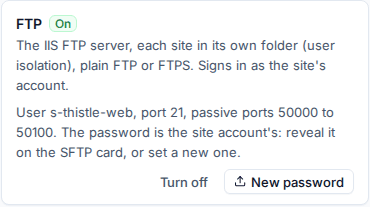
Windows sites offer FTP as well as SFTP. Tenvara runs one IIS FTP site on the server with user isolation, so each site's account sees only its own folder. Clients connect with plain FTP or FTPS, on port 21 with passive ports 50000 to 50100.
On the site's SFTP tab, the FTP card shows the user, port and passive ports. Turn off or turn on FTP for the site, and New password sets a new password for the site account.
Databases: SQL Server and MySQL
A Windows web server can run SQL Server Express and MySQL together. When both are on the server, the Create database dialog asks which Engine to use: SQL Server for .NET applications, MySQL for applications written for it.
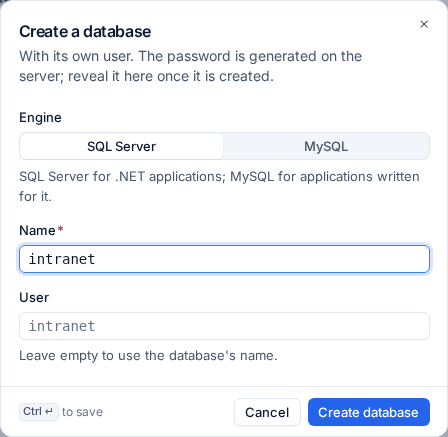
- Open the site's Database tab and press Create database.
- Choose the Engine if the server has both.
- Enter a Name and optionally a User (empty uses the database's name).
- Press Create database.
Each database gets its own login (SQL Server) or user (MySQL) with rights on that database only. The password is generated on the server; reveal it on the database's card once it is made. From the card you can also:
- Dump now: a
.bakfile for SQL Server, a.sqlfile for MySQL; - restore a dump;
- set a new password (the old one stops working);
- delete the database. Databases are also removed with their site.
Site backups include their databases, made with each engine's own tool, and restore them with the files.
Note: Tenvara manages MySQL on Windows once your server build has installed it and given the agent an administrator's option file, readable only by SYSTEM and Administrators. The agent never installs a database engine itself, and MySQL's administrator credentials never leave the server.
Logs and traffic
The Logs tab shows the IIS access log (W3C) and error log. Usage shows daily traffic and requests from the W3C logs, and disk and database size over time.
PHP, WordPress and Node.js sites
PHP, Laravel, WordPress and Node.js sites, and the WordPress tools, run on Linux web servers with nginx. Put those sites there, and use Windows servers for static and .NET sites.
Related
Was this page helpful?
Thanks for the feedback.