Invoicing and payments overview
How Tenvara turns contracts, licences, time, expenses, projects and quotes into invoices, and where payments, accounting and credit control fit in.
Tenvara makes your invoices itself. Everything you bill a customer for, from the monthly contract fee to a box of cables ordered for a ticket, ends up on a native invoice with gap-free numbering, the right tax for the customer's country and a PDF. You review a month's invoices together in an invoice run, issue them, email them, and take payment by bank transfer, card or Direct Debit. If you use Xero or QuickBooks Online, issued invoices and the payments against them stay in step with your ledger.
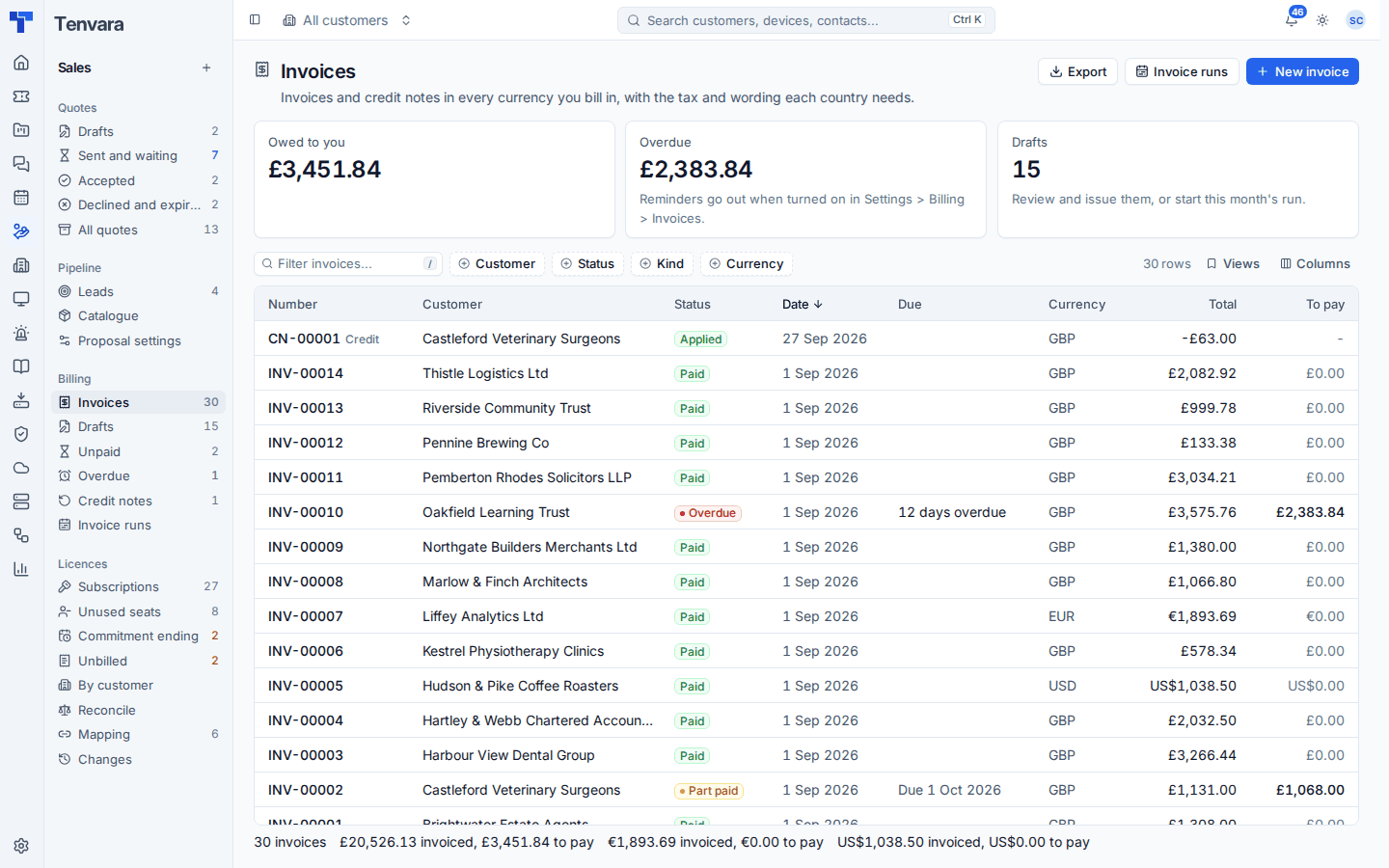
Where to find it
Invoicing lives in the Sales area, in the Billing group of the sidebar:
| Entry | What it shows |
|---|---|
| Invoices | Every invoice and credit note, with filters for Customer, Status, Kind and Currency |
| Drafts, Unpaid, Overdue, Credit notes | Ready-made views of the same list |
| Invoice runs | Each month's run: the drafts it built, its warnings and how far it has got |
| Prepaid hours | Blocks of hours customers have bought ahead, and what is left |
| Billable units | What each contract bills against what Tenvara counts every day |
| Renewals | Contracts whose term ends soon |
| Price uplifts | Annual price rises, their notice letters and the date they apply |
| On stop | Customers on a credit hold |
The top of the invoice list shows Owed to you, Overdue and Drafts, and the footer totals what was invoiced and what is still to pay in each currency. Each customer's page also has an Invoices section on its Contracts and time tab, with what they owe, their drafts and their billing details.
What gets invoiced
An invoice run gathers everything billable in a month that is not on an invoice yet:
- Contracts: the fee, recurring lines (licences included), billable time beyond the included hours, counted units, prepaid hour blocks bought by hand, milestones on fixed price contracts and call-out charges for onsite visits. See Contracts and invoicing.
- Licences: subscriptions from your distributors, through the recurring lines they keep on each contract. See Billing licences into contracts.
- Expenses and mileage approved to rebill to the customer.
- Projects: time on time and materials projects, and milestones on fixed price ones.
- Accepted quotes: their one-off work, at the prices the customer accepted.
- Ticket time for customers with no contract in force, at your hourly rate.
- Parts ordered for a customer on a purchase order, once they arrive. See Purchase orders.
- Late payment fees, when you charge them.
Each piece of work is billed once. A line knows where it came from, so the same time entry or contract month can never appear on two live invoices. Deleting a draft or voiding an issued invoice frees its work to be billed again; a credit note does not.
Time logged after its month was invoiced is not lost: the next run picks it up as late time, and extra hours on a contract month that was already billed become an overage adjustment.
How an invoice moves
| Status | Meaning |
|---|---|
| Draft | Being prepared. Lines, dates, currency and notes can all change, and it has no number yet |
| Approved | Checked and ready to issue. It can still go back to draft |
| Issued | Numbered, with its wording, tax and totals fixed. From here it can only be credited or voided |
| Void | Cancelled with a reason. It stays on record and its number is never used again |
Once issued, an invoice also has a payment status: Unpaid, Part paid, Paid or Overdue, worked out from its payments, credits and due date and checked every morning.
Money, currency and tax
Every invoice has one currency, and a customer billed in two currencies gets one invoice for each. Tax comes from the tax engine for your country and the customer's: the right rates, the reverse charge note for a business abroad, "Tax invoice" where the law asks for it, and the tax numbers each country needs. See Tax and Currencies and exchange rates.
If you invoice as more than one company, each trading entity has its own details, numbering and ledger. See Invoice layouts and trading entities.
Getting paid
- Bank transfer: your bank details print on every invoice. Record payments by hand, or let your accounting package report them.
- Card: customers pay on a secure Stripe page in the invoice's currency, and can save a card so later invoices are charged on their due date.
- Direct Debit: customers set up a GoCardless mandate once and each invoice is collected in the mandate's scheme.
Card and Direct Debit use your own Stripe and GoCardless accounts. See Taking payments and autopay.
Who can do what
Invoices have their own Billing area in Settings > Roles and permissions. By default administrators manage billing and technicians do not see it, so prices and balances stay with the people who need them. Settings for numbering, accounting and payments need an administrator.
In this section
Was this page helpful?
Thanks for the feedback.