Languages and international overview
How Tenvara works in your country and your customers': languages, formats, time zones, currencies, tax and public holidays, and where each is set.
Tenvara works wherever you and your customers are. Nothing assumes one country: the language people read, how dates and numbers look, the time zone a clock runs in, the currency an invoice is in, the tax it charges and the holidays an SLA skips are all settings, with sensible defaults from your country.
Where it is set
| Setting | Where | Who it applies to |
|---|---|---|
| Your country, base currency, default language and formats, time zone, week start, clock, distances and public holidays | Settings > Regional > General | The whole install, as the default |
| Exchange rates | Settings > Regional > Exchange rates | Converting between currencies |
| Tax registrations, rates and number checks | Settings > Regional > Tax | Quotes, contracts and invoices |
| Public holidays by region | Settings > Regional > Holidays | SLAs, on-call, chat, scheduling |
| Business hours calendars | Settings > Ticket setup > Business hours | SLA clocks per customer or contract |
| A person's own language, formats, time zone, clock and week start | Settings > Profile | That person |
| A customer's country, currency, language, formats, time zone, holidays and tax details | The customer's Billing and region section | Their portal, emails, documents, SLA clock and tax |
| A site's country, time zone and holidays | The site form | Visits and maintenance windows at that site |
Start with your country
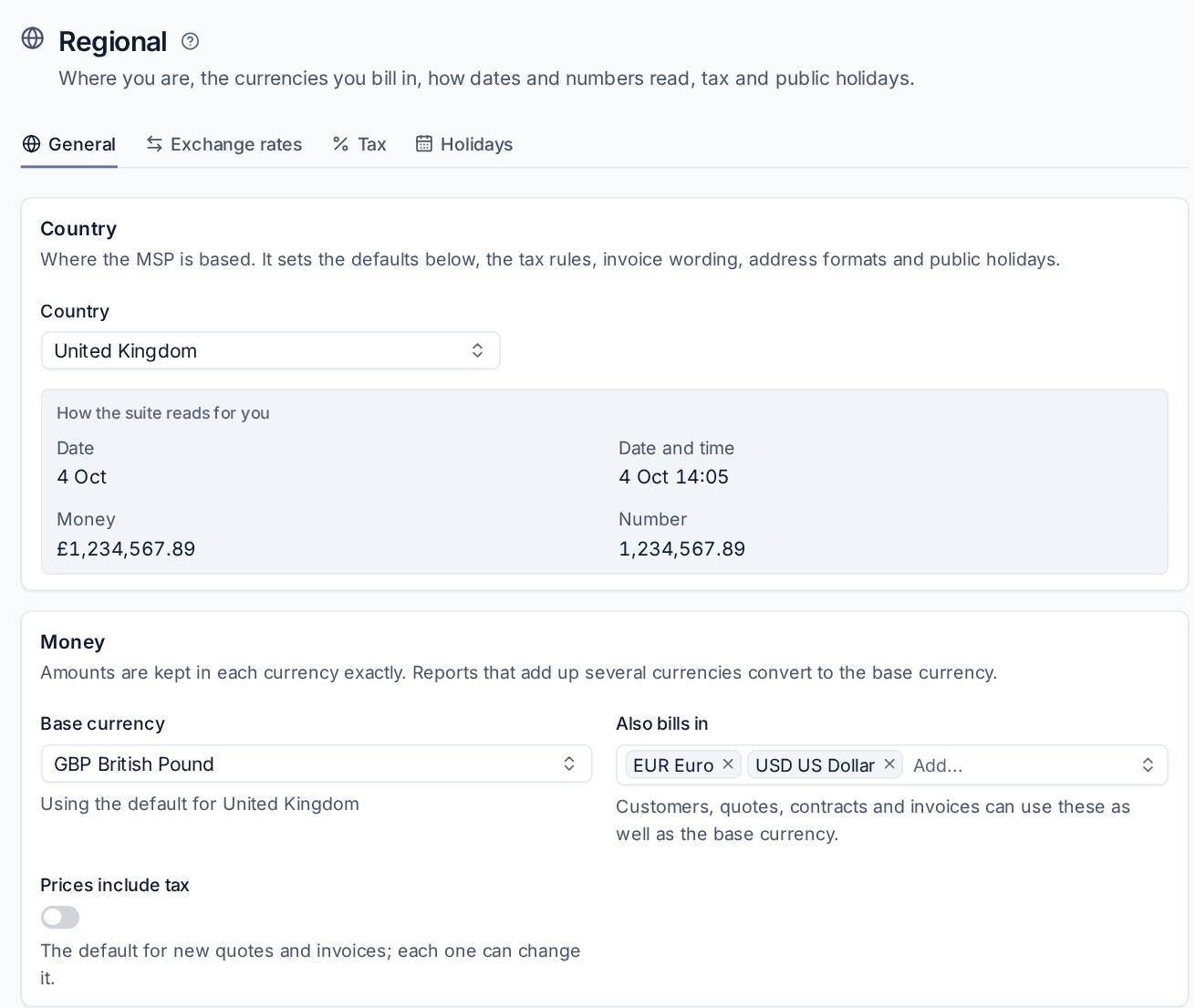
Country under Settings > Regional > General is where your business is based. It sets the defaults for everything else on the page, plus the tax rules, invoice wording, address formats and public holidays. Each default shows "Using the default for" your country underneath, so you can tell what you changed.
Changing the country resets everything you have not set by hand to the new country's defaults. Settings you chose yourself stay.
The How the suite reads for you box shows a date, a date and time, an amount of money and a number in the current settings, so you can see the effect before you save.
What is covered
- Languages: English (UK and US), French, German, Spanish and Dutch, for the install, each person and each customer.
- Regional formats and time zones: date and number formats, 12 or 24 hour clock, week start, distances, addresses, and which time zone applies where.
- Currencies and exchange rates: bill in any currency, with daily European Central Bank rates and your own.
- Tax: VAT, GST, sales tax and more, reverse charge, tax number checks and invoice wording by country.
- Public holidays and business calendars: holidays worldwide, your own days off, and the calendars SLA clocks run in.
Words and formats are separate
The language people read and the way dates and numbers are written are two settings. A German MSP can read English with German formats (27.09.2026, 1.234,56 €), and a customer can get German words with Swiss formats.
Data you type stays as typed
Tenvara translates its own screens, emails and documents. Text you or your customers write (ticket subjects, notes, names of your own records) stays in the language it was written in.
Related: Settings overview, Customers, sites and contacts.
Was this page helpful?
Thanks for the feedback.