Projects overview
What a project holds in Tenvara, how health is worked out, the Projects sidebar and list, and where projects show up across the rest of the app.
Projects are for one-off work that is bigger than a ticket: onboarding a new customer, a Microsoft 365 tenant migration, a server replacement, an office move, a new starter or a leaver. A project belongs to one customer and is laid out as phases, milestones and tasks, with time logged against a budget. It is built into the same service desk as your tickets, so time, tickets, quotes, the schedule, automation, the customer portal, invoicing and reports all know about it.
What a project holds
| Part | What it is |
|---|---|
| Project | Numbered from PRJ-1001 upwards. A customer, and optionally a site and the customer's contact for the project. An owner, a type, a status, start and target dates, how it is billed and a budget in hours and money |
| Phases | Ordered groups of tasks, such as Plan, Migrate and Tidy up |
| Milestones | Dates that matter, optionally signed off by the customer on the portal, and on fixed price work an amount billed once when reached |
| Tasks | Numbered within the project (PRJ-1003 #8). Assignees, status, priority, estimate, start and due dates, a checklist, files, comments with @mentions, links and dependencies |
| Team | The owner, everyone assigned a task, and anyone you add with a role and hours planned per week |
Project statuses are Planned, Active, On hold, Completed and Cancelled. Task statuses are To do, In progress, Waiting, Done and Cancelled. You can rename these and add your own in Settings > Projects, under Statuses and priorities; each of your own still counts as one of the built-in states, so health, the board, automation, the portal and reports keep working.
Health
Every open project is On track, At risk or Late. Tenvara works it out after every change and again each morning:
- Late when the project is past its target date, or a milestone is overdue.
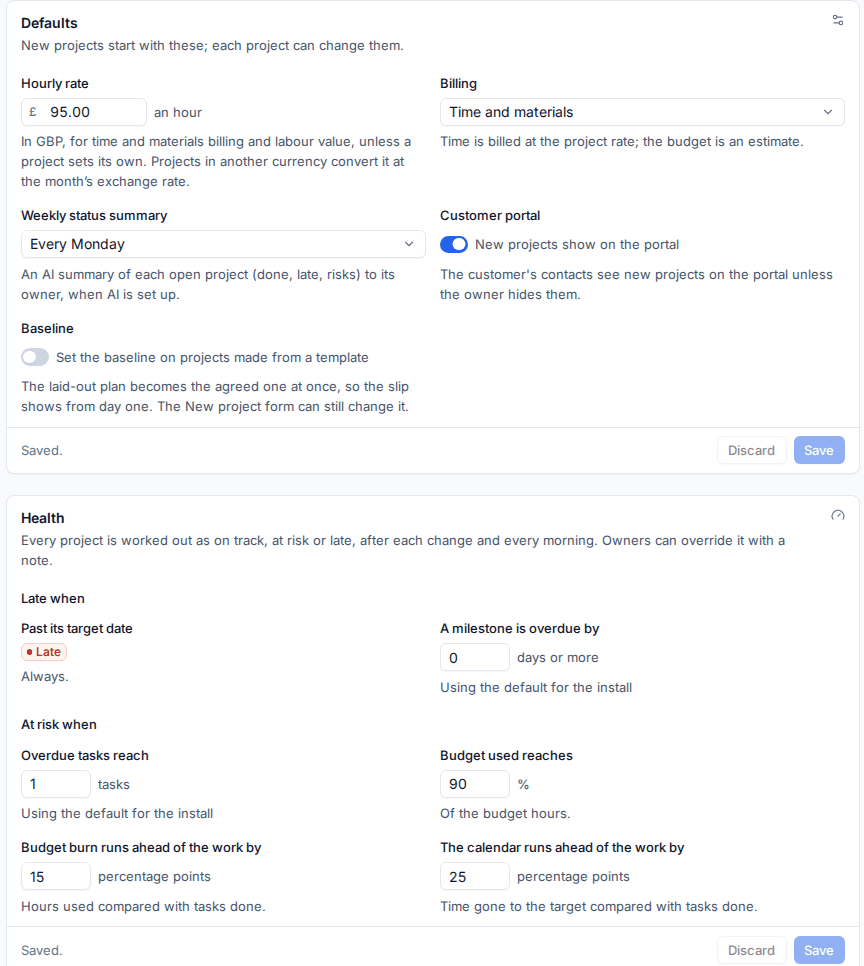
- At risk when tasks are overdue, most of the budget is used, the hours used run ahead of the work done, or the calendar runs ahead of the work.
Hover the health badge on a project to see the reasons, for example "80% of the budget used for 25% of the work".
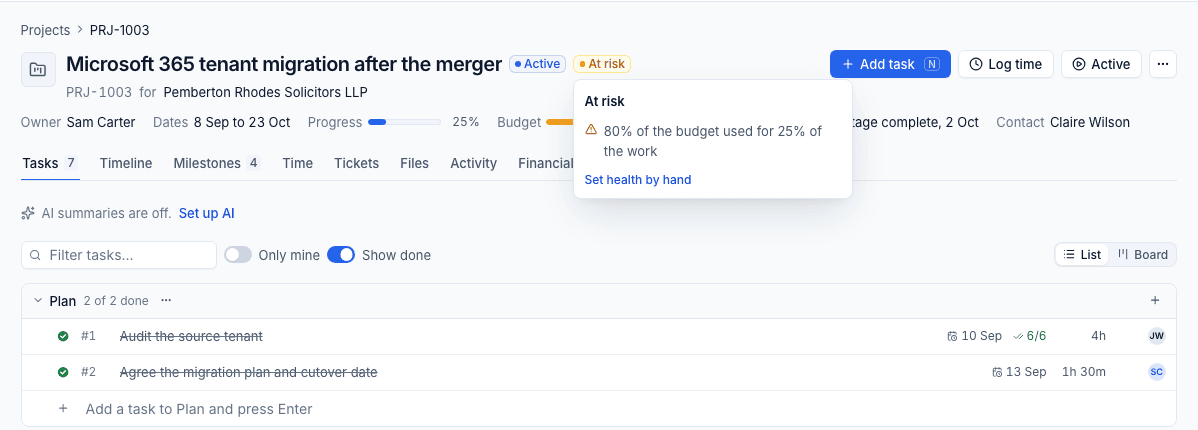
Progress is the tasks done, weighted by their estimates. The thresholds are in Settings > Projects under Health, beside the defaults new projects start with (hourly rate, billing, the weekly status summary, portal visibility and the baseline).
Setting health by hand
The owner, or anyone who manages projects, can override the health when they know better than the numbers. Hover the badge, choose Set health by hand, pick the health and write a note saying why. The override shows everywhere, with the worked-out value beside it, until you clear it.
The Projects sidebar
Open Projects from the rail (it sits after Tickets, or press g then p). The sidebar has:
- My work: your open project tasks and tickets together. See The board, the timeline and My work.
- Resource planning: hours planned on open projects against each person's working hours. See Project team and resource planning.
- All projects, Mine, At risk and late, Planned, Active, On hold and Completed, each with a count.
- Templates: the plans new projects are laid out from. See Project templates.
- Recently viewed projects.
The project list
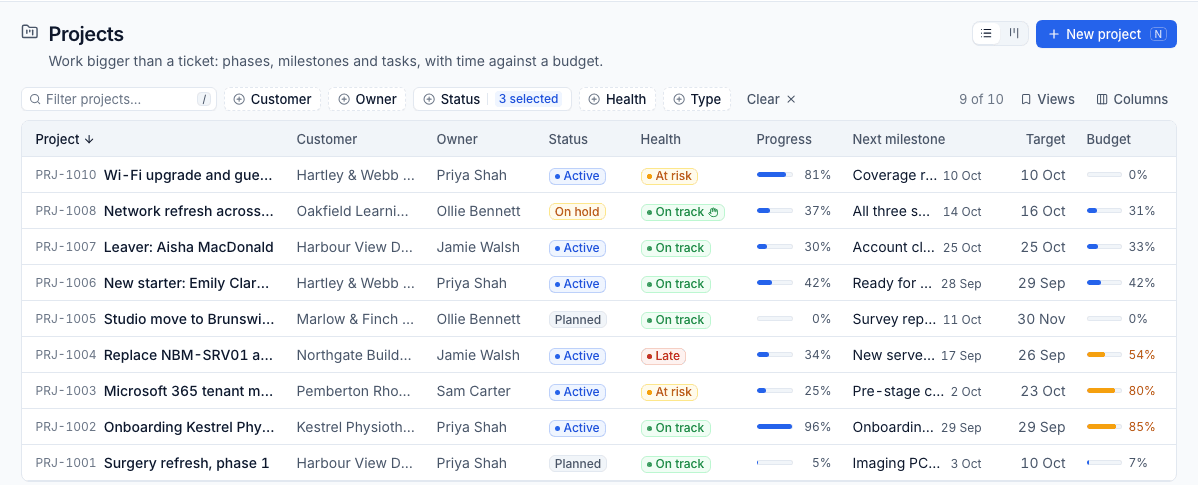
Each row shows the reference and name, the customer, the owner, the status, the health, progress, the next milestone with its date, the target date and the budget used. Late projects come first, then at risk, then on track. Filter by customer, owner, status, health and type, search, choose columns and save views. Press n for a new project.
The icons at the top right switch between the list and a board of projects by status, where dragging a card changes its status.
The project page
The header shows the status, the health, the customer and site, and the key facts: owner, dates, progress, budget used, the next milestone and the contact. Add task (n), Log time and the status button sit at the top right, with Edit (e), the health override, Save as a template, the baseline and the status report in the ... menu.
The tabs are Tasks, Timeline, Milestones, Team, Time, Tickets, Files, Activity and Financials (for people who can see finance).
Where projects show up
- Customers and sites: active projects with their health and next milestone, and the customer's Projects tab with their open tasks.
- Devices and contacts: open tasks linked to them.
- Tickets: the ticket's Project block, Attach to project and Convert to project task. See Phases, tasks and dependencies.
- Quotes: the project template chosen for when the quote is accepted, and the project it became.
- Home: your project tasks.
- Search (Cmd+K): projects and tasks by reference or name, New project, Go to My work and the saved views.
Permissions
Projects have their own area in Roles and permissions:
- View: see projects and tasks, comment, and on tasks assigned to you change the status, tick the checklist and log time.
- Manage: create and change projects, tasks, phases, milestones and templates.
Labour value, cost, margin and the Financials tab also need the finance permission. Settings > Projects is for administrators. Internal comments, tasks not shared with the customer, costs and rates never reach the customer portal.
Related: Creating a project, Time, budgets and billing.
Was this page helpful?
Thanks for the feedback.