Moving to Tenvara overview
What you can bring across from spreadsheets, IT Glue and Hudu, how sources, dry runs and imports work, and how records are matched.
Moving to a new platform is easier when you do not have to type everything in again. Settings > Migration brings your existing data into Tenvara from the places it lives today: spreadsheets, an IT Glue export and Hudu. Every import can be checked first with a dry run, repeated as often as you like while you still use the old tool, and undone if something is not right.
Migration is for administrators.
What you can bring across
| From | How | What comes across |
|---|---|---|
| CSV file | A spreadsheet saved as CSV, one kind of record per file, with a column mapper | Customers, sites, contacts, devices, assets (with purchase, warranty and cost) or credentials |
| IT Glue export | The export ZIP from IT Glue (Account > Export data) | Organisations, locations, contacts, configurations, passwords (with one-time password seeds) and documents |
| Hudu | Hudu's API, with your Hudu address and an API key | Companies, assets that are devices, passwords (with one-time password seeds) and articles |
Credentials are stored in the encrypted credentials vault, and documents and articles become Tenvara articles.
Tenvara only reads from your old tool. Nothing is ever written back to it.
How it works
- Add a source. A source is where the old data is: a CSV file, an IT Glue export or your Hudu account. Go to Settings > Migration and press Add source.
- Test it. Press Test on the source. Tenvara reads it and counts what it found of each kind. Runs start once a source can be read.
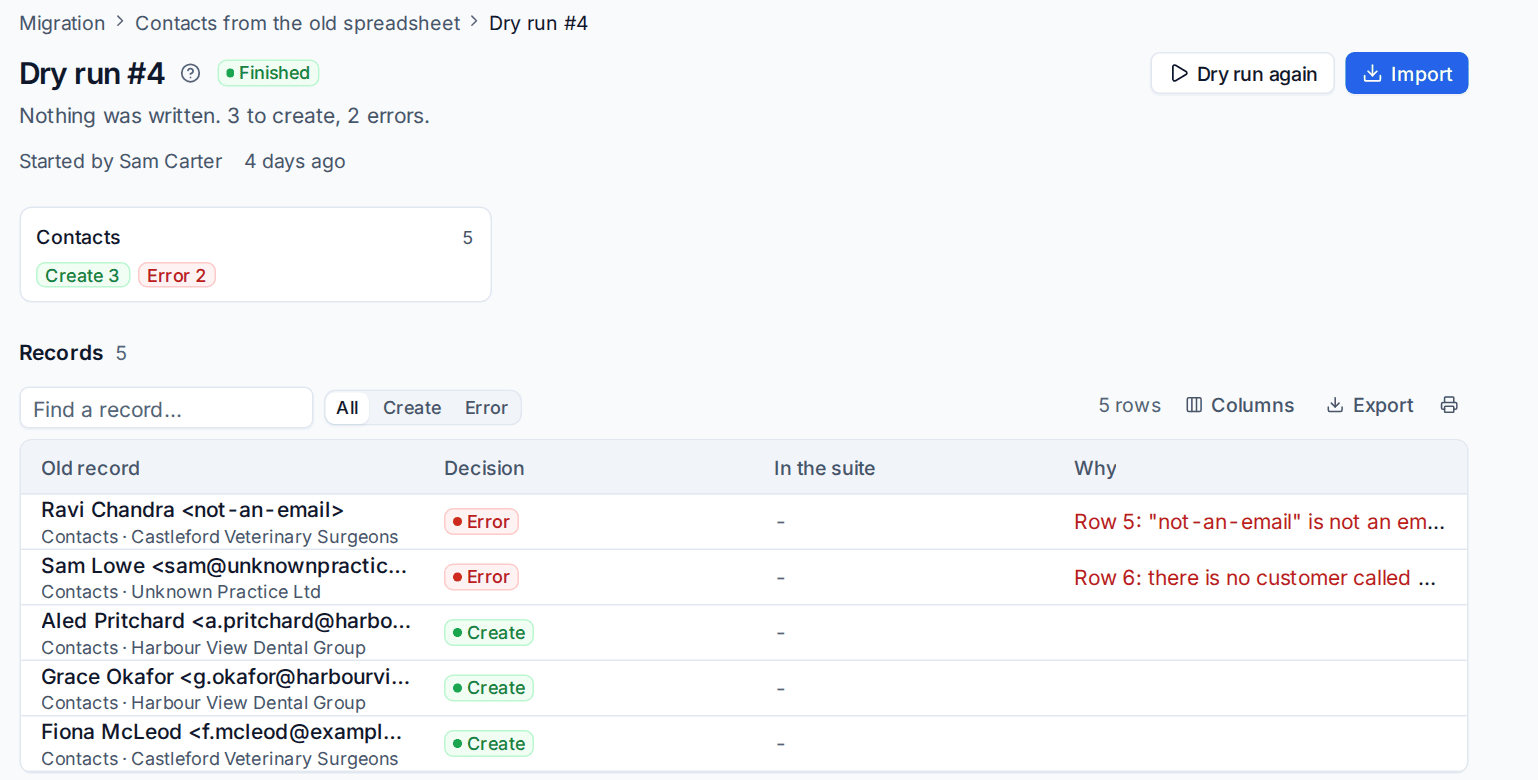
- Dry run. A dry run reads every record and shows what would happen to it, without writing anything.
- Fix and decide. Look through the result, fix problems in the source, and decide by hand anything Tenvara matched wrongly.
- Import. Import from the dry run once it looks right.
- Run it again later. Running the same source again picks up what changed since, without making duplicates.
- Undo if needed. An import can be undone, removing what it created.
Dry runs
A dry run reads everything and records a decision for every old record:
| Decision | Meaning |
|---|---|
| Create | Nothing in Tenvara matches, so a new record will be made |
| Match | It matches a record already in Tenvara, and says how (for example the same serial number) |
| Update | It was imported before and has changed, so the record will be brought up to date |
| Skip | It will be left out, with the reason |
| Error | Something is wrong with it, with the reason, for example an email address that is not valid |
Records a dry run would create are remembered, so their children (a new customer's sites and contacts) are previewed properly too. Passwords and other secrets are never shown in a run.
How records are matched
Tenvara matches old records to what is already there, so importing never duplicates a customer you added by hand.
| Record | Matched by, in order |
|---|---|
| Customer | Its external reference, then its name (ignoring case and "Ltd" or "Limited"), then an email domain |
| Site | Its name within the customer |
| Contact | Email address within the customer, then first and last name when the existing contact has no email |
| Device | Serial number within the customer, then host name |
| Credential | Name and username within the customer |
| Article | Title within the customer, or in the knowledge base |
You can overrule any decision by hand: match a record to one you choose, create it anyway, or skip it. Every later run follows your decision. See Running side by side and switching.
In this section
- Importing from CSV: spreadsheets of customers, sites, contacts, devices, assets and credentials.
- Importing from IT Glue and Hudu: documentation and passwords from your current documentation tool.
- Running side by side and switching: re-running imports, deciding by hand, undoing, and moving your customers over.
Was this page helpful?
Thanks for the feedback.