Opportunities and pipelines
Track deals from first conversation to won or lost on a pipeline board, log calls and follow-ups, quote from an opportunity, and read the forecast, win and loss report and sales targets.
An opportunity is a deal you are working on: who it is for, what it is worth, how likely it is to close and when. Opportunities sit between a lead (a company you are talking to) and a quote (a priced proposal), and move across your pipeline's stages until they are won or lost.
The pipeline board
Open Sales > Opportunities.
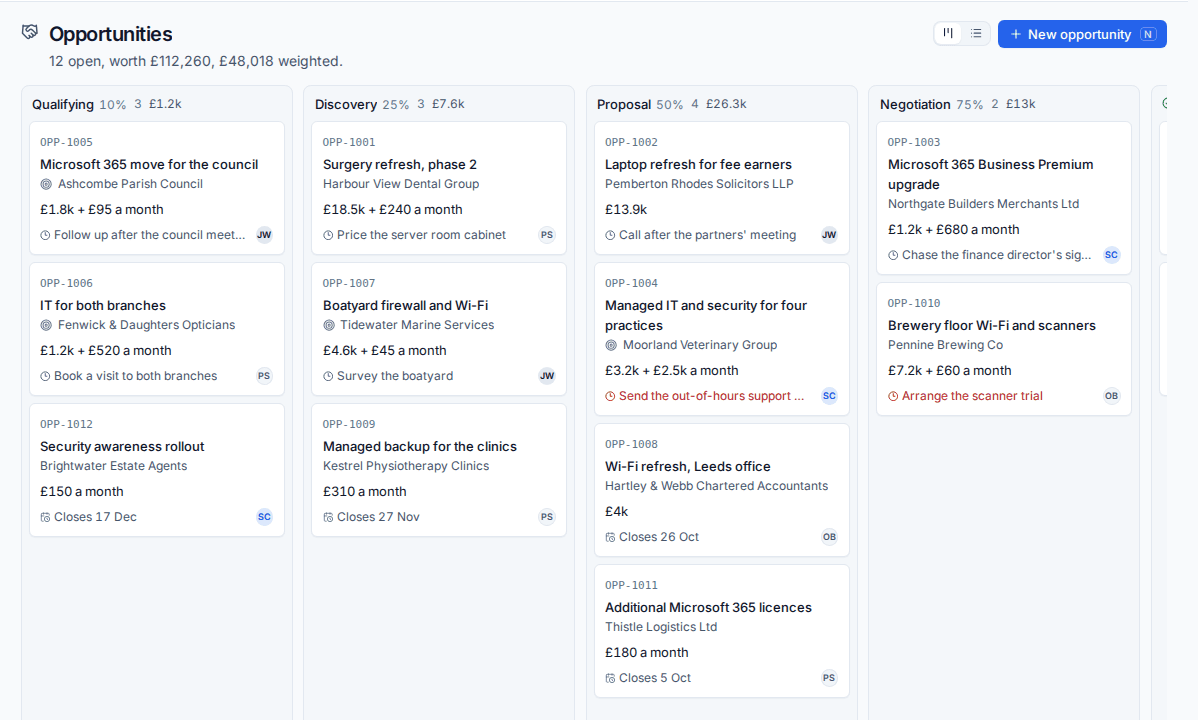
Each column is a stage with its chance of winning, how many opportunities are in it and their value. The line under the title gives the total open and weighted value. Each card shows the number (OPP-1004), title, customer or lead, the value one-off and monthly, the next follow-up (red when overdue) or the expected close date, and the owner.
- Drag a card to another column to move it to that stage.
- Drop it on Won or Lost and you are asked for the reason.
- The icons at the top right switch to a list with saved views.
The value of an opportunity is the one-off amount plus twelve months of the monthly amount, as leads and quotes count the first year. Weighted is the value times the chance of winning.
Add an opportunity
- Press New opportunity.
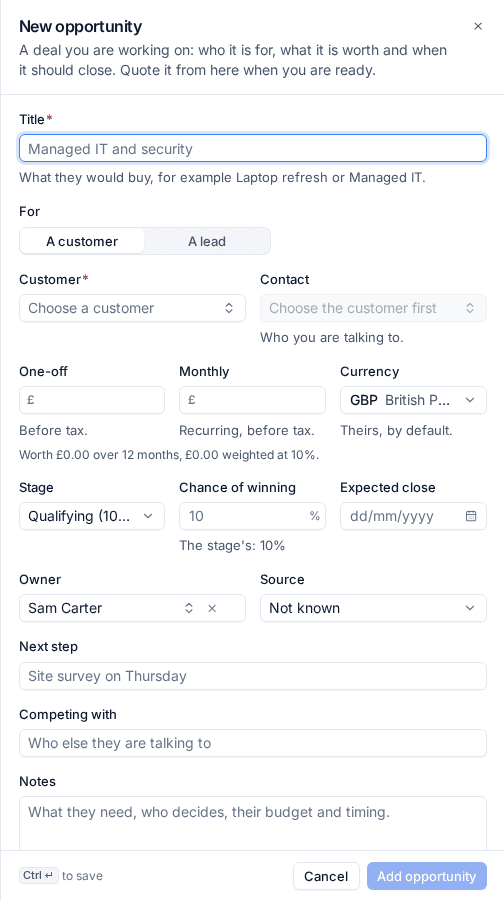
- Enter the Title: what they would buy, for example "Managed IT and security".
- Under For, choose A customer or A lead, then pick the customer (and Contact) or the lead.
- Enter the One-off and Monthly values before tax, and check the Currency (theirs by default).
- Choose the Stage. The Chance of winning follows the stage unless you give it your own.
- Set the Expected close date, the Owner and the Source.
- Add the Next step, who they are Competing with, and Notes.
- Press Add opportunity.
If you use opportunity types, choosing a Type fills in its pipeline, owner, chance and proposal template for you.
The opportunity page
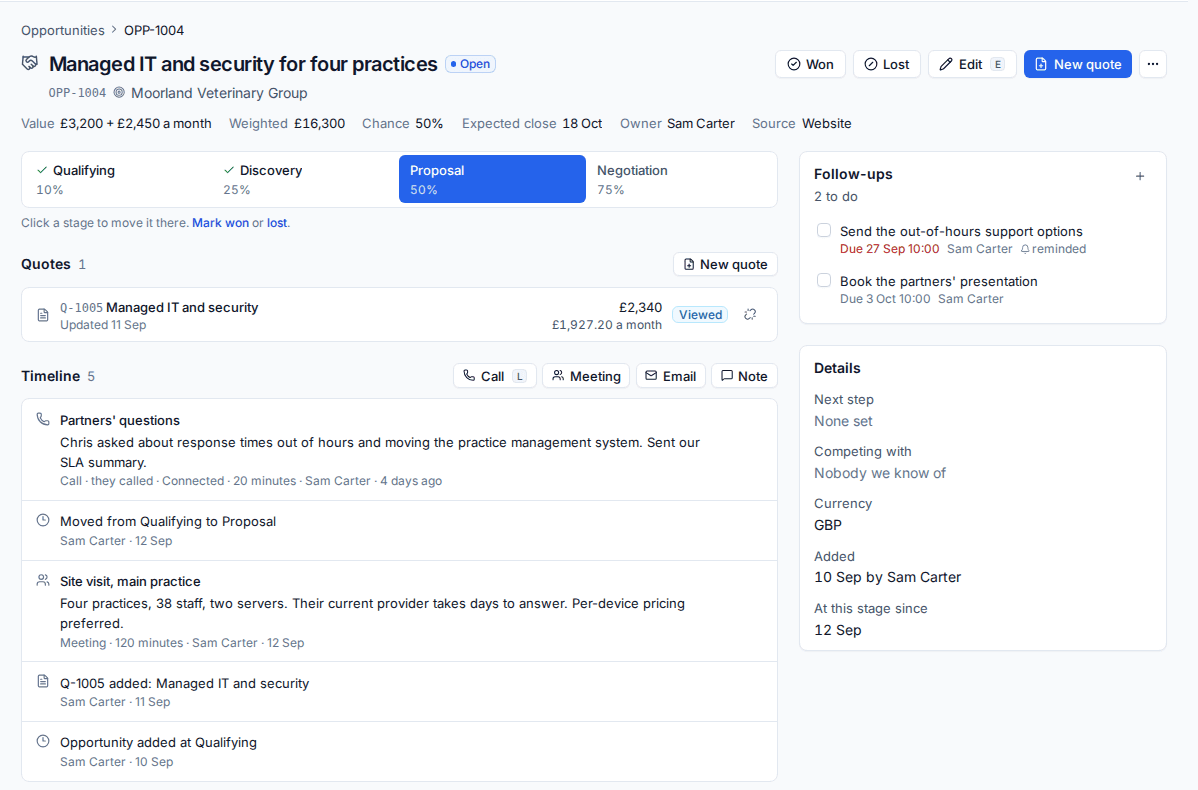
- The stages across the top: click one to move it there, or Mark won or lost.
- Won, Lost, Edit (
e) and New quote at the top right. - Quotes: New quote starts a quote filled in from the opportunity (with the type's template, if it has one). You can also link an existing quote or unlink one.
- Timeline: log a Call (
l), Meeting, Email or Note, with when it happened and how it went. Stage changes and quotes are added for you. An opportunity with nothing logged or done for 14 days is marked as going cold. - Follow-ups: tasks with a due date, time and assignee. You get a reminder in the bell when one comes due (and by email, if that is turned on in Settings > Sales). Sales > Follow-ups lists yours or everyone's, overdue first.
- Qualification: the answers to your qualification questions, if you have set any.
- Details: next step, competitors, currency, when it was added and how long it has been at this stage.
Won and lost
Mark an opportunity Won or Lost with a reason from your lists and a note. A reason is needed to lose; it is optional to win. Reopen puts it back on the board.
When the customer accepts one of the opportunity's quotes, the opportunity is won at the accepted value. When a lead becomes a customer, its opportunities move with it.
Opportunities also show on the customer, the lead and the quote, and in search (Cmd+K).
Pipelines, stages and reasons
Set these up in Settings > Sales (administrators).
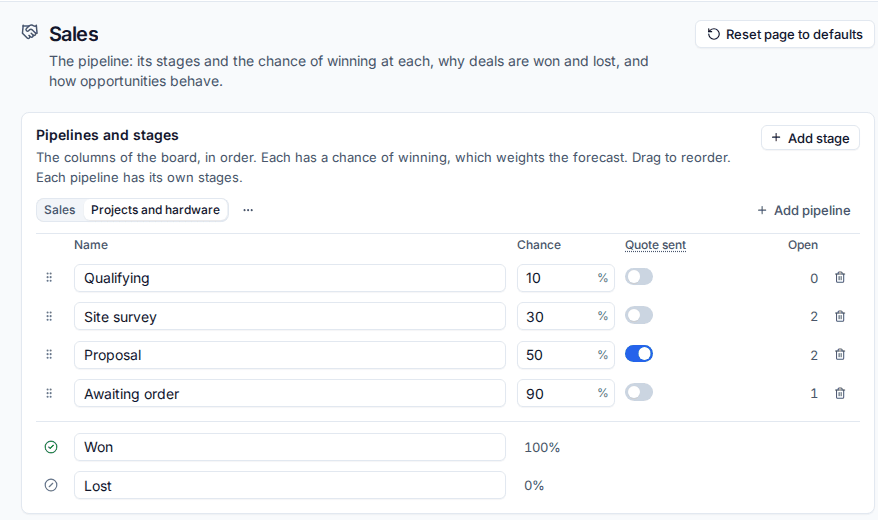
- Pipelines and stages: the columns of the board, in order, each with its chance of winning. Rename, re-weight, drag to reorder and remove stages with Add stage. Turn on Quote sent for the stage an opportunity moves to when one of its quotes is sent (Proposal, to begin with).
- Add pipeline creates another pipeline with its own stages and its own Won and Lost, for example "Projects and hardware" beside "Sales". A new pipeline can copy another's stages. One pipeline is the default for new opportunities.
- Why deals are won and Why deals are lost: the reasons offered when you close one.
- Sources: where opportunities come from.
- Opportunity types: kinds of deal (new managed services, a project, hardware), each with its own pipeline, owner, chance and proposal template.
- Qualification: questions asked of every opportunity (yes or no, a choice, a number or text). Each opportunity shows how many are answered.
With more than one pipeline, the board, the forecast and the win and loss report each let you choose the pipeline.
The forecast and targets
Sales > Forecast shows what the open pipeline should bring in.
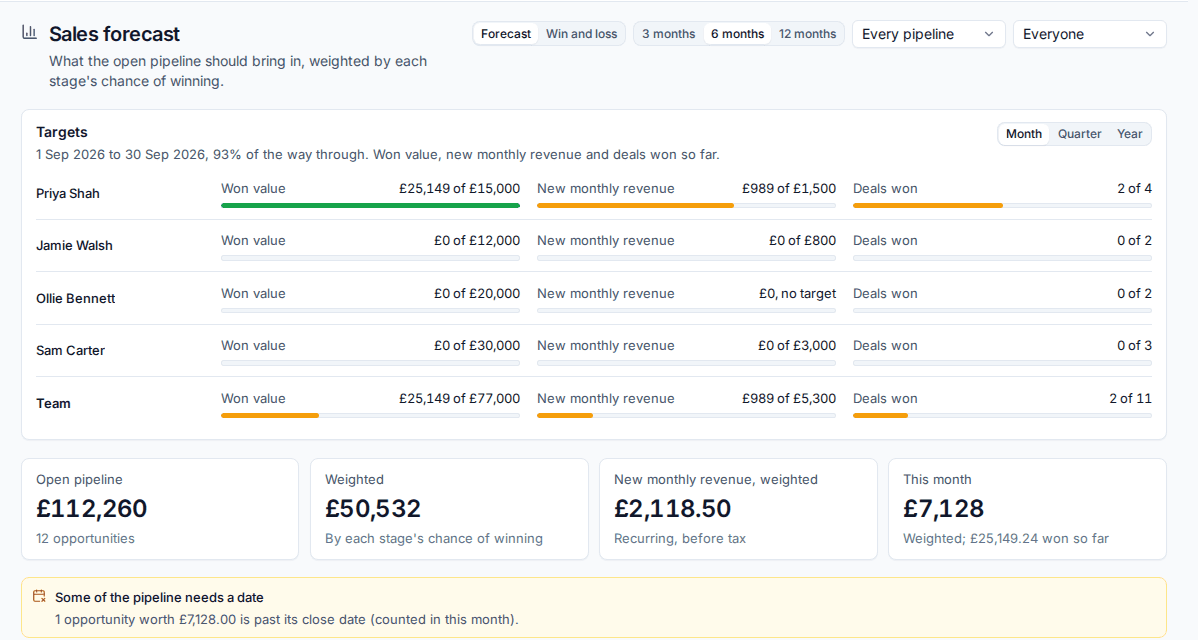
- Open pipeline, Weighted, New monthly revenue, weighted and This month.
- By month: weighted value expected to close each month, and what was won. Opportunities past their close date are counted in this month and called out.
- By owner and By stage.
- Choose 3 months, 6 months or 12 months, a pipeline and a person.
Targets show each salesperson's progress this Month, Quarter or Year against their targets for won value, new monthly revenue and deals won. An administrator sets them in Settings > Sales under Targets. Values are in your base currency; deals in other currencies are converted at today's rate.
Win and loss (beside Forecast) covers a period: opportunities created, won and lost, the win rate, the average won deal and days to close, by reason, source, owner and the competitors you lost to.
Related: Leads, Building a quote, Business reviews.
Was this page helpful?
Thanks for the feedback.