Log retention and archive
Keep security events searchable for up to ten years or without limit, archive older days to cheap storage as compressed files, and bring a range back for an investigation.
Security events are kept in two tiers. The event store holds what technicians search, rules read and reports use every day. The archive holds older days as compressed files on ordinary storage, for as long as you need, and any range can be brought back for an investigation and searched exactly like live events.
How long events stay searchable
Go to Settings > Security monitoring > General (administrators). Under How long events are kept:
- Events: how long security events stay in the event store, from 7 to 3,650 days, or 0 for no limit. Searches, detections and reports read these. The default is 90 days.
- Raw records: the original record behind each event (30 days by default). It is never kept longer than the events.
- Hourly counts: the volumes behind charts, sources and reports (400 days by default, 0 for no limit).
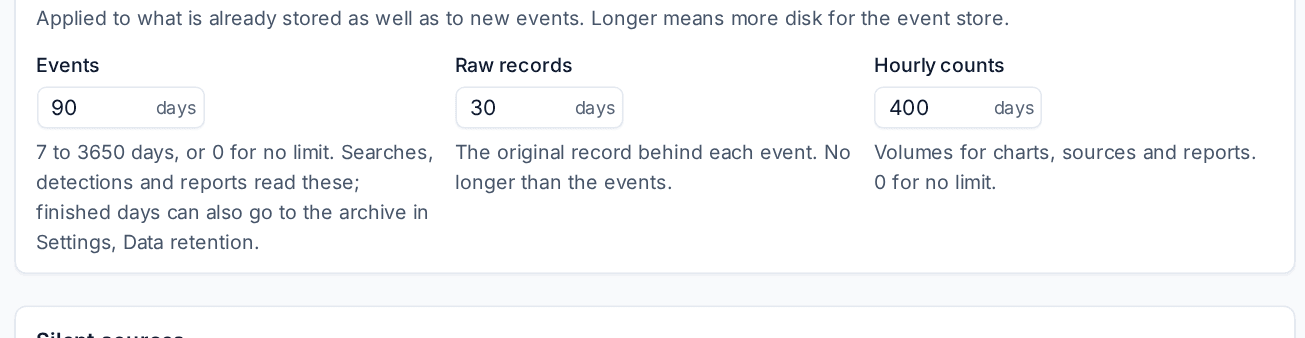
A change applies to what is already stored as well as to new events. Longer means more disk for the event store, so most MSPs keep a few months searchable and archive the rest.
Archiving older days
The archive is part of data retention, which sets how long each kind of data is kept and what happens at the end.
- Go to Settings > Data retention and open the Policies tab.
- Set Security events to Archive then delete.
- On the Archive tab, choose where archives go under Archive storage: S3-compatible storage (AWS S3, Backblaze B2, Wasabi, MinIO and others, with your own bucket and keys) or a Folder on the server. Press Test to write, read back and remove a small file.
Each night, every finished day of security events is written per customer as compressed JSON, with a manifest of checksums, so the files can be read without Tenvara. The nightly job compares what the event store holds with what the archive has, so late events, a missed night or a new legal hold are caught up.
The archive keeps the events after the event store lets them go, for as long as Keep archived data for says (for ever by default).
Tip: Use a bucket with versioning or Object Lock for archives that must not be changed. A year of a typical 50-endpoint customer's events is a few gigabytes in the archive, compressed about ten to one.
Legal holds
A customer on legal hold keeps everything. Their security events are always archived before they leave the event store, whatever the policy says, and archive clean-up never removes their files. Holds are placed in Settings > Data retention > Legal holds.
Restoring a range for an investigation
When an incident needs events older than the event store keeps:
- Go to Settings > Data retention > Archive. Security log archive shows how many days, events and how much space are archived, and from when to when.
- Press Restore a range.
- Give it a Name, for example an incident reference.
- Choose the days (up to 366), and the customers or leave it empty for Every customer.
- Choose Release after (7, 14, 30 or 90 days) and press Restore.
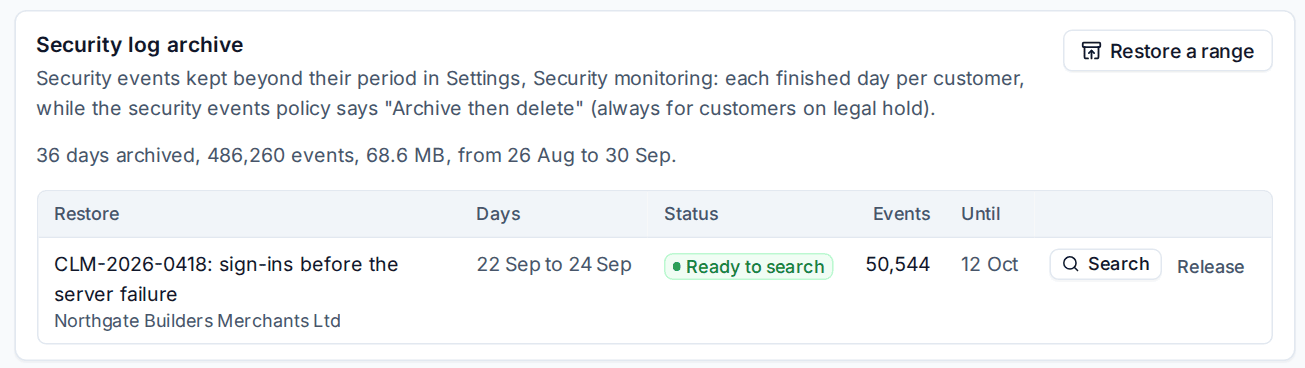
Tenvara checks every file's checksum and loads the days into the event store in their own place, apart from live events. When it shows Ready to search, press Search to open Security > Events on that restore: the same search language, histogram, facets, event panel and export, over the restored events only.
Press Release when you are done, or it is released automatically after its period. The archive keeps the events, so you can restore them again.
Who can do what
Retention and the archive are in Settings, so they are for administrators. Every change to a retention setting, and every retention run, is in the audit log.
Related: Searching security events, Event sources and collection.
Was this page helpful?
Thanks for the feedback.