Drift and reporting
Drift alerts that name who changed a setting, keep enforced to put it back, fights between tools, and hardening in the overview, Home, the monthly report and the customer portal.
Once a device meets its baseline, the job is keeping it there. Tenvara watches every audited setting and tells you when one moves.
What counts as drift
A setting that was compliant at the last audit and is not compliant now, while a baseline still reaches the device and no exception covers it, is drift. A setting that was never compliant is a compliance gap, shown on the compliance pages, not alerted.
Each drift records the device, the setting, the value before and after, where the value now comes from, when it changed and who changed it. On Windows the agent reads the event log for policy, account, audit, registry, Defender and firewall changes, so a drift reads like "PRS\jo, registry value changed (event 4657)". Where Windows does not log who made a change (for example a registry value without auditing switched on), it says it is not known.
Drift raises an alert (a warning by default) and shows on the customer's and device's Hardening tabs under Drift and fights. One drift that is still open is updated, never duplicated. When the setting is compliant again the drift closes and its alert clears.
Keep enforced
Switch on Keep enforced on an assignment, or set a setting's mode to keep enforced, and Tenvara puts local drift back by itself: it starts a small run for the device straight away and closes the drift as Put back once the next audit agrees. No alert is raised while it is being put back; you are alerted if the run fails, is rejected or is cancelled. BitLocker and local groups still wait for their approval.
A value that now comes from Group Policy, Intune or another MDM is never put back. The alert names the source instead: the agent never fights a management tool.
Fights
If the same setting on one device drifts three times in seven days, it is a fight: something keeps changing it back. Tenvara flags it with the likely source (the managing tool, else the account seen most often in the event log), raises a fight alert (critical by default) and stops keep enforced for that setting, so the two never take turns for ever. Deal with the source, then press Close fight.
To accept a drift that was agreed, use Accept with a note on the device's or customer's Drift and fights tab.
The counts, the alert severities, whether keep enforced stops in a fight and the portal page are in Settings > Endpoint > Device hardening, each per customer too.
The compliance overview
Security > Hardening brings every customer together: overall Compliance, Not compliant settings, Drift this week and Fights, then the fights with their likely source, compliance by customer (worst first, with each baseline), drift this week, the settings failing on the most devices and compliance by baseline. Press Work out again for fresh figures.
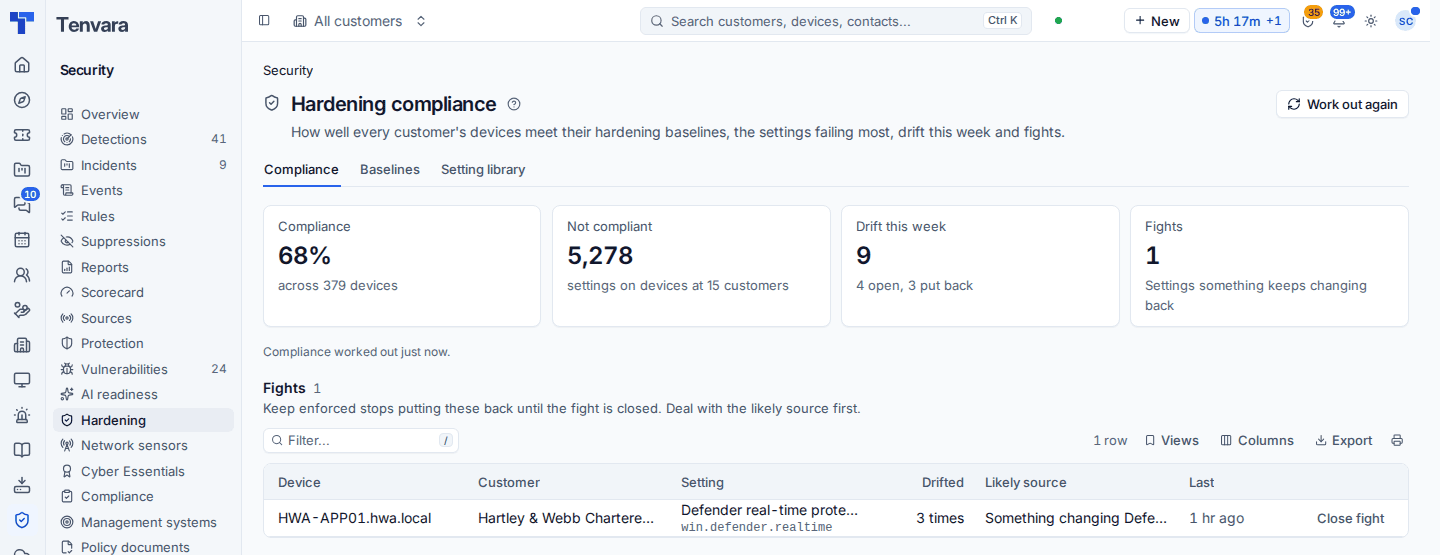
A Hardening block for Home and the TV dashboards shows the same headline figures and the customers furthest behind.
Reports and evidence
- Monthly customer report: a Device hardening section with compliance by baseline, drift in the month and how it ended, fights, the exceptions agreed and what to put right next. It uses counts and setting names only, never device names, and appears only for customers with a baseline on their devices.
- Cyber Essentials: the hardening settings mapped to Cyber Essentials requirements feed the readiness checks when a baseline covers them. See Cyber Essentials readiness.
- Management systems: hardening is evidence for ten common controls, so a customer's ISO 27001 or Cyber Essentials programme sees it automatically. See Evidence and compliance tasks.
Device security in the portal
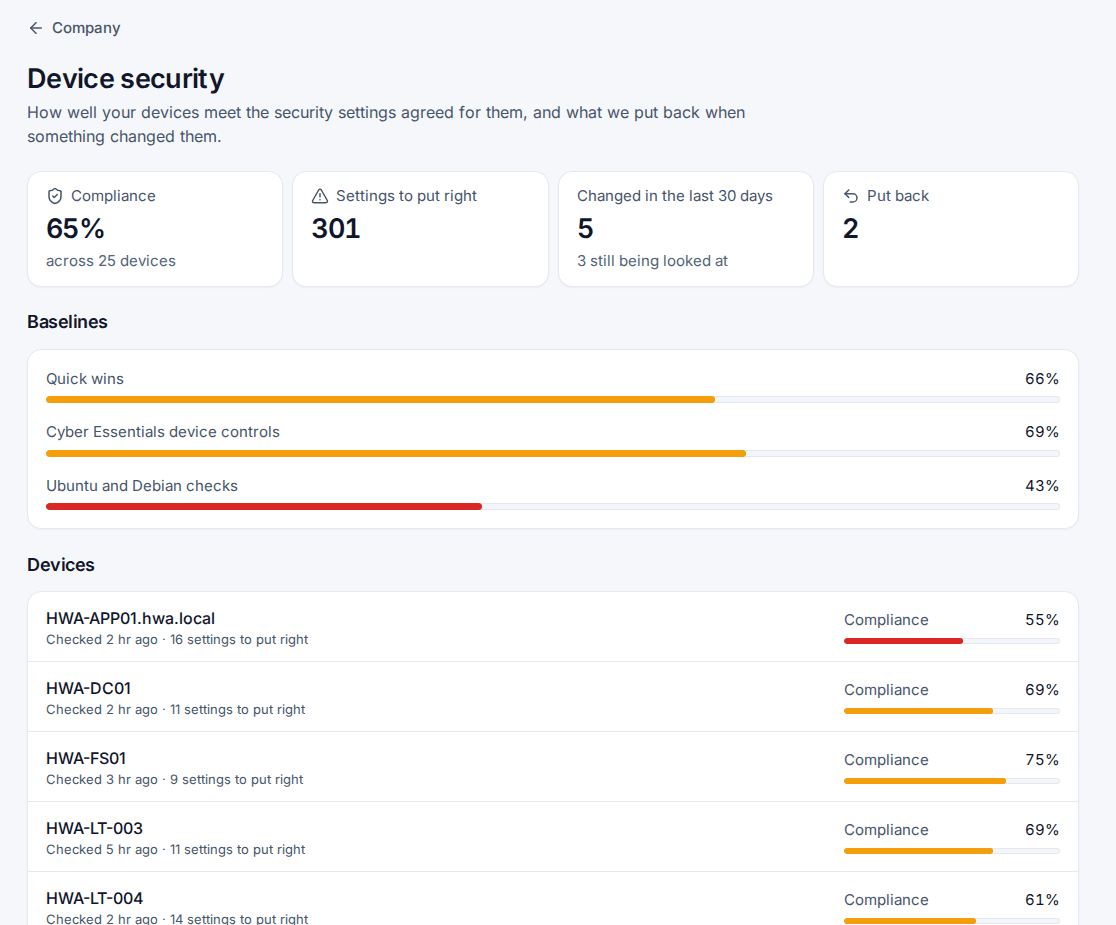
When it is switched on, the customer's managers (and contacts given Device security) see a read-only Device security page in the customer portal: compliance per baseline and per device, settings to put right, what changed in the last 30 days and what was put back, and the exceptions they approved, with who approved them and until when.
Asking the AI
The AI assistant and the MCP server can read hardening compliance and drift for the customers you may see ("which settings fail most at Pemberton Rhodes?"). Enforcing from them is a destructive action: it needs the destructive scope on an MCP token and goes through the same run and approvals as the device tab.
Was this page helpful?
Thanks for the feedback.