Commission
Set up commission plans for salespeople and account managers, let Tenvara work out each person's monthly statement from what they sold, approve statements through approvals and pay them with the payroll export.
If your salespeople and account managers earn commission, Tenvara works it out for you from the deals they win and the customers they look after. Each person gets a monthly statement, the owner approves it, and approved statements go out with the payroll.
How commission is earned
A plan can pay a share of four things:
| Part | What it pays on |
|---|---|
| New monthly revenue | The monthly value of the recurring lines on an accepted quote, before tax, for a number of months from the month it was accepted, while the deal's contract lines run |
| One-off margin | The margin on the one-off lines of an accepted quote, in the month it was accepted |
| Project margin | The margin on a project made from a quote, when the project is completed |
| Customers they manage | A share of what the customers they are account manager for are invoiced, less credit notes, before tax |
Whoever owns the quote sold it. A deal pays on the plan the person was on when it was accepted. Everything is in your base currency, converted at the rate on the day it was earned.
Clawback takes back new monthly revenue commission when the deal ends within a number of months, for example when a customer leaves in the first six months. Margin is never clawed back.
Set up plans
Open Sales > Commission and press Plans (you need the commission action in Roles and permissions).
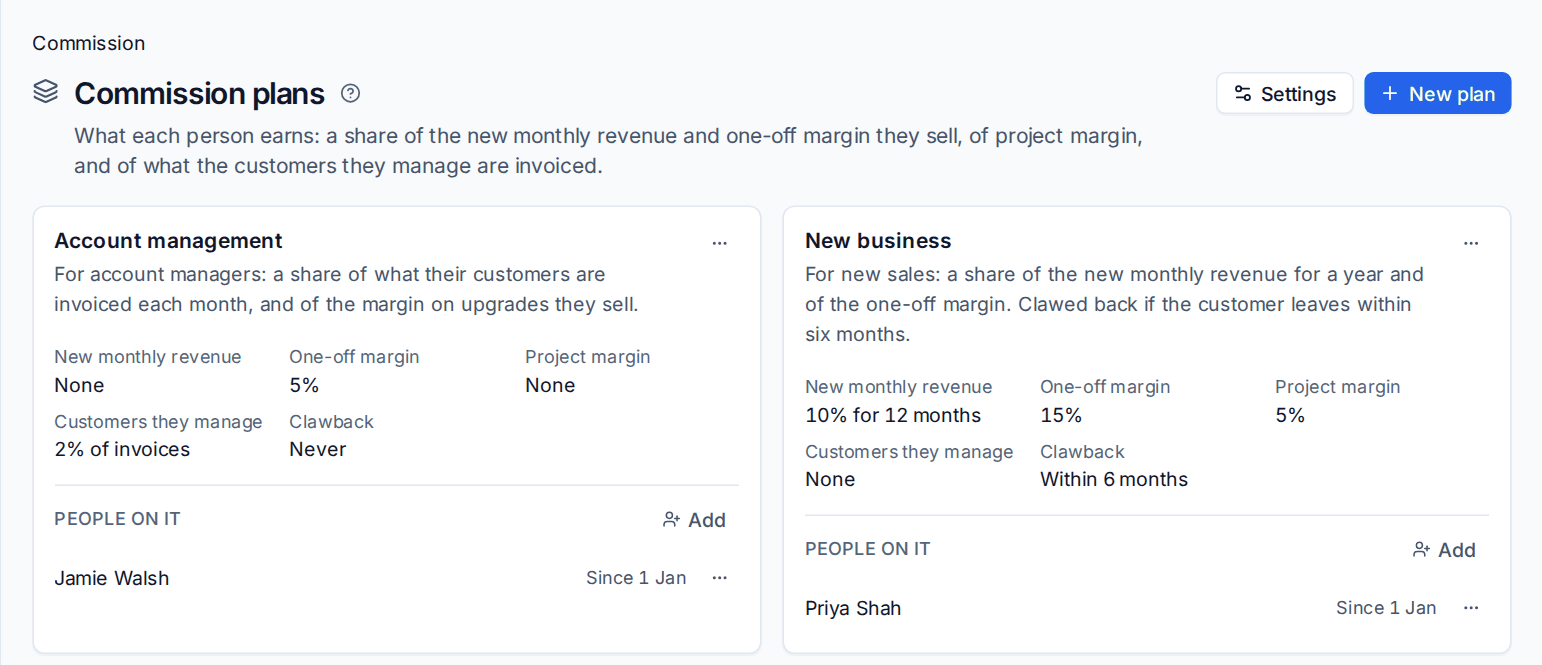
- Press New plan.
- Give it a Name and a Description, such as "New business: a share of the new monthly revenue for a year and of the one-off margin".
- Enter the percentages for each part. 0 turns a part off. For New monthly revenue, enter how many months it is paid for.
- Set Clawback: the number of months within which new monthly revenue commission comes back if the deal ends. 0 means never.
- Press Add the plan.
- Under People on it, press Add and choose the person and the date they start on it. The plan they were on before ends the day before.
Changes to a plan apply to statements worked out from then on. A plan nobody has been on can be deleted; otherwise Archive it, and its statements keep it.
Tip: A typical set-up is two plans: one for salespeople (for example 10% of new monthly revenue for 12 months and 15% of one-off margin, clawed back within 6 months) and one for account managers (2% of their customers' invoices and 5% of the margin on upgrades they sell).
Monthly statements
Each month Tenvara works out a statement for everyone on a plan, on the day set in Settings > Sales > Commission, and by default sends them for approval. You can also press Work out a month to do it by hand, or Work out again on a statement that has not been approved.
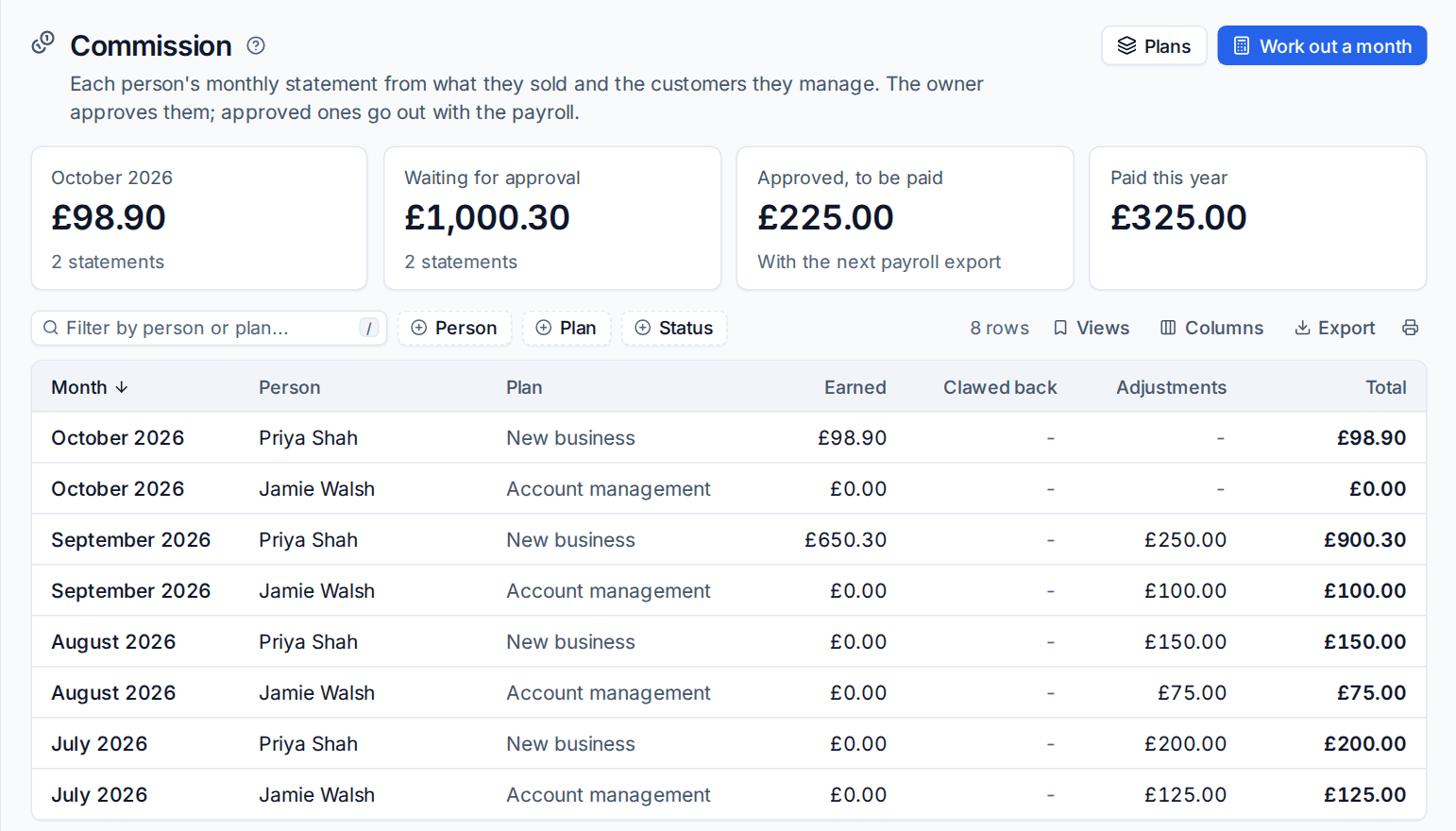
The figures at the top show this month so far, what is Waiting for approval, what is Approved, to be paid with the next payroll export, and what has been Paid this year. Each statement lists what it was Earned from, line by line (the quote, project or invoice), anything Clawed back, and Adjustments.
Adjustments
Press Add an adjustment on a statement for a bonus, or an amount taken off (type a minus), with a note saying what it is for, such as "bonus for the first managed services deal". Adjustments stay when the statement is worked out again.
Approval and payment
Statements are approved through Tenvara's approvals engine. By default the owner approves them, or the commission chain in Settings > Approvals if you set one up. Nobody approves their own statement. See Approvals.
- Send for approval sends a statement to the approver. While it waits it cannot change; Take back it to change it.
- The approver approves it, or sends it back with a note. Sent back, change it and send it again.
- Approved statements are paid in the next payroll export as a Commission pay item, in the payroll whose period starts after the statement's month. The statement then shows which payroll it went out in. See Payroll export and on-call pay.
Who sees what
Everyone on a plan sees their own statements under Sales > Commission. Seeing everyone's statements and managing plans needs the commission action. The statements read the quotes, projects and invoices behind them, so the figures always match what was sold and billed.
Related: Acceptance and what happens next, Opportunities and pipelines.
Was this page helpful?
Thanks for the feedback.