Threat intelligence and MITRE coverage
Known bad addresses from abuse.ch, Spamhaus and Emerging Threats on events and detections, country and network owner for every address, and the MITRE ATT&CK coverage of your rules.
Two things make an address in a log mean something: whether anyone knows it to be bad, and where it is. Tenvara adds both to every event, and shows which attack techniques your rules can actually see.
Known bad addresses
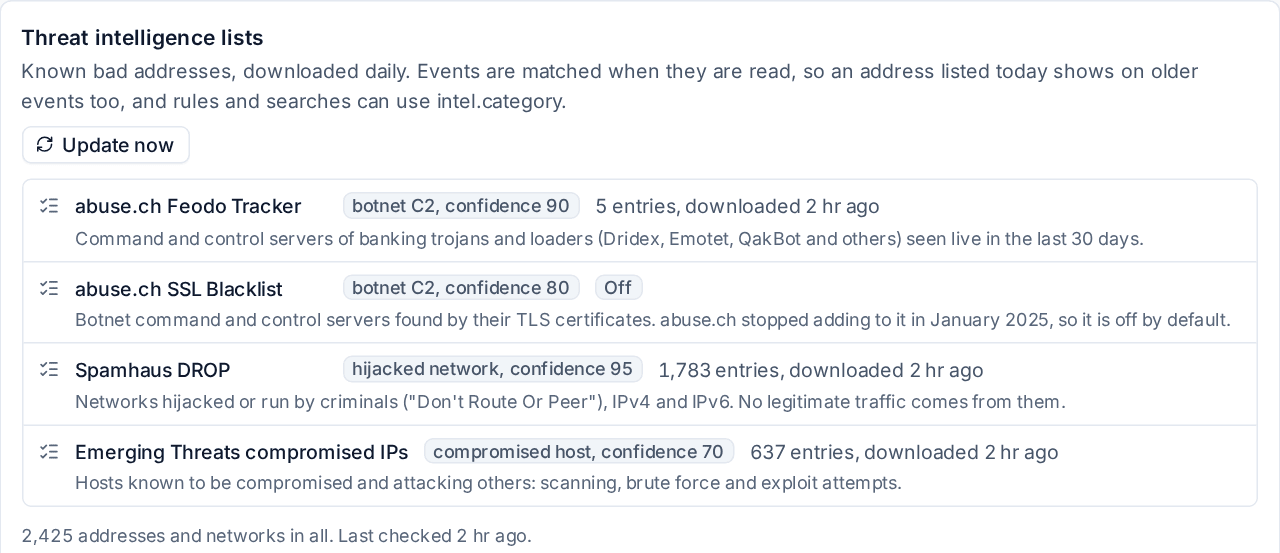
Tenvara downloads free threat intelligence lists every day and checks every event's addresses against them when you read the event:
| List | What is on it | Confidence |
|---|---|---|
| abuse.ch Feodo Tracker | Command and control servers of banking trojans and loaders seen live in the last 30 days | 90 |
| Spamhaus DROP | Networks hijacked or run by criminals, IPv4 and IPv6 | 95 |
| Emerging Threats compromised IPs | Hosts known to be compromised and attacking others | 70 |
| abuse.ch SSL Blacklist | Botnet servers found by their certificates. No longer updated, so off by default | 80 |
Because matching happens when events are read, an address listed today is flagged on last month's events too.
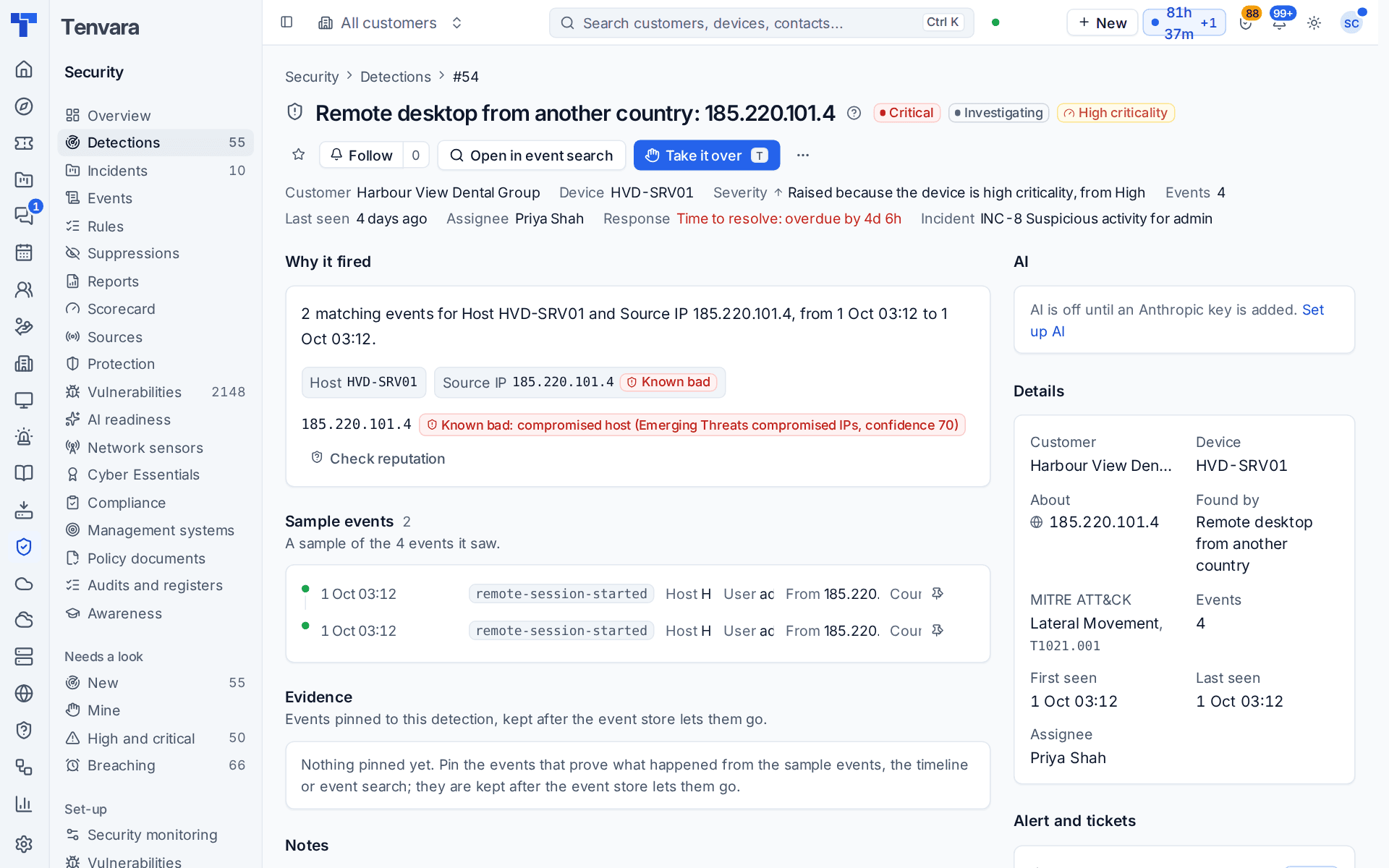
Where an address is listed you see a Known bad badge: beside the address in the events table, under From or To in an event's panel, and on a detection's page under Why it fired, with the list and its confidence, for example "Known bad: compromised host (Emerging Threats compromised IPs, confidence 70)".
Searching and rules
The lists are fields you can search and use in rules:
intel.category:*
intel.category:botnet-c2
intel.source:spamhaus_drop
The built-in rule Traffic to or logon from a known malicious address (high) fires when a successful sign-in or an allowed connection involves a listed address. Connections your firewall blocked do not fire it, so it stays quiet about the background noise and speaks up when something got through.
Managing the lists
Settings > Security monitoring > Enrichment shows each list with how many entries it holds and when it was last downloaded, with Update now. Switch each list on or off there. A list that fails to download keeps its last good entries and shows the reason.
Country and network owner
Every public address in an event gets its country and city and its network owner: the autonomous system number and who runs it, such as a broadband provider, a hosting company or a VPN service. Microsoft 365's own sign-in location is kept where it sends one. Private and internal addresses are never looked up, and addresses are never sent anywhere: the lookup uses databases kept on your Tenvara server.
The fields work in search, facets, saved searches and rules (short names country, asn, owner and network), and the events table, the event panel, sample events and the incident timeline show them. For example:
action:sign-in -country:GB owner:*hosting*
The built-in rule Remote desktop from another country fires on a remote desktop session from a public address outside your install's country (set in Settings > Regional).
The databases are DB-IP's free country and network owner databases, downloaded monthly; their state and Update now are on the same Enrichment page, where you can also switch lookups off or point at your own copy.
MITRE ATT&CK coverage
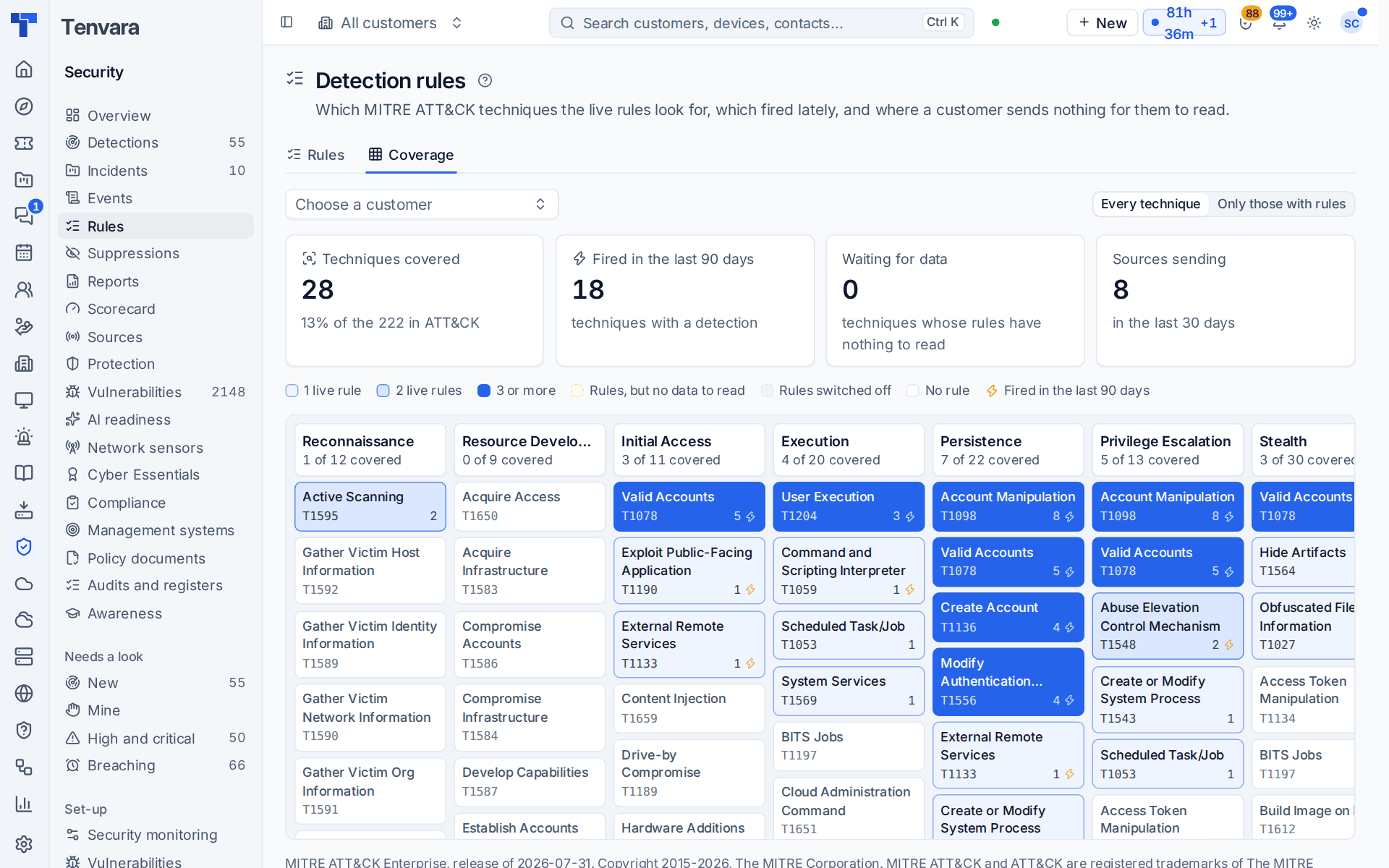
Every detection rule names the MITRE ATT&CK technique it looks for. Security > Rules > Coverage turns that into the ATT&CK matrix: tactics as columns, techniques as cells, coloured by how well your live rules cover each one.
| Cell | Means |
|---|---|
| Light to solid blue | One, two, or three or more live rules look for it |
| Lightning mark | A rule for it opened a detection in the last 90 days |
| Amber, dashed | Rules exist, but the customer sent none of the events they read in the last 30 days |
| Grey, dashed | Rules exist but are switched off, failing, or muted for the customer |
| Plain | No rule looks for it |
The tiles count Techniques covered (out of every technique in ATT&CK), Fired in the last 90 days, techniques Waiting for data and Sources sending. Choose a customer to see one customer's coverage: their muted rules count as off, and the page names every source they do not send (for example "no macOS logs"), which is often the quickest way to find a gap. Only those with rules hides the techniques nothing looks for.
Click a cell for its rules (with links), their severity and state, detections in 90 days and when one last fired, and the technique's page on attack.mitre.org.
Related: Detection rules and suppressions, Searching security events.
Was this page helpful?
Thanks for the feedback.