Copilot, people and policy
Check Copilot licence coverage, issue an AI acceptable use policy staff acknowledge, give the awareness lesson and keep the approved AI tools register.
Two sections of the AI readiness score are about the business rather than its files: whether the Copilot licences the customer pays for are given to the right people, and whether staff know the rules. This page covers the Copilot section's licence checks and the People and policy section.
Copilot licences
Tenvara reads Copilot licences from the tenant's licence sync, so the figures are always as fresh as the directory. Every Copilot SKU is recognised, including bundles and renamed SKUs, by the Copilot service plans they carry.
Open the customer, go to AI readiness and choose Copilot. The Copilot licences tile shows how many seats are given out of how many bought, and how many are not given to anyone.
The check Copilot licences are all in use warns when:
- seats are bought and not given to anyone, or
- a seat is held by an account that is switched off.
Each finding names the licence and how many seats it covers, so you can give the seat to someone or reduce the subscription. For the money side of licences across customers, see Licences and billing.
People and policy
Open AI readiness and choose People and policy.
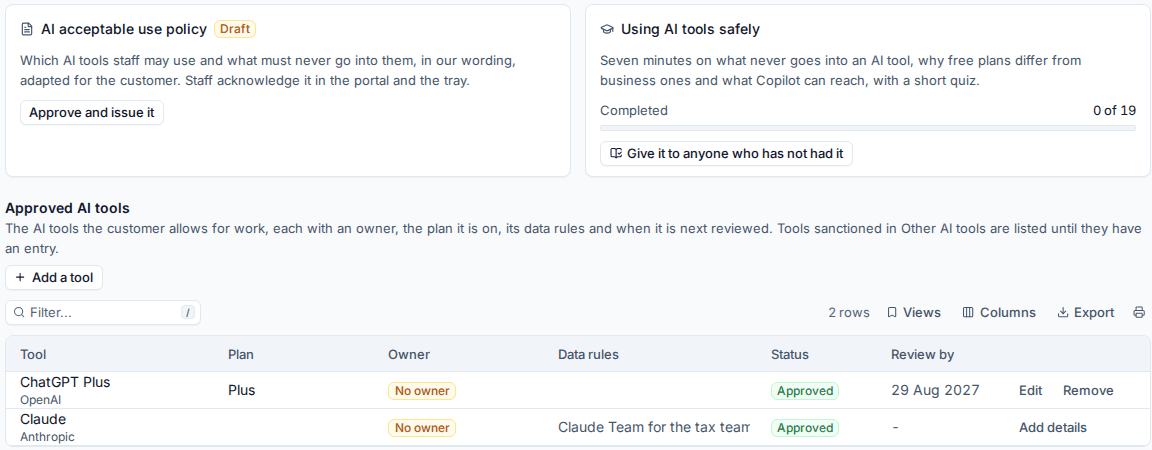
The AI acceptable use policy
The policy says which AI tools staff may use and what must never go into them, in your wording adapted for the customer. It is a controlled document, so it goes through the same review and issue as every other policy document. See Policy documents under control.
- On the AI acceptable use policy card, press Make the policy from our template. This makes your master copy in the master library.
- Review your master and issue it.
- Back on the customer's People and policy, press Adopt it for this customer. Tenvara makes the customer's copy with their details filled in, as a draft.
- Approve and issue the customer's copy (Approve and issue it).
Once it is issued, the customer's staff are asked to acknowledge it in the customer portal and in the tray app. The card shows how many have accepted it, for example "12 of 19".
The awareness lesson
Using AI tools safely is a seven-minute lesson with a short quiz: what never goes into an AI tool, why free plans differ from business ones and what Copilot can reach. It is part of the awareness training library.
- Give it to everyone assigns it to every contact with an email address.
- Give it to anyone who has not had it assigns it to the rest.
The card shows how many have completed it. See Security awareness training for how lessons are sent and tracked.
The approved AI tools register
The register lists the AI tools the customer allows for work, each with:
- the Tool (picked from the AI tool catalogue where it is there),
- the Plan they are on,
- the Owner, at the customer or at your company,
- Data rules, such as "Claude Team for the tax team, no client names",
- the Status, and
- the Review by date, a year ahead by default.
Press Add a tool to add one, or Edit and Remove on a row. Tools you sanction in Other AI tools are listed until they have an entry; Add details fills them in. Contacts with the AI readiness permission in the portal can see and keep the register too.
The checks
| Check | Severity |
|---|---|
| An AI acceptable use policy is issued | High |
| Staff have acknowledged the AI acceptable use policy | Medium |
| Staff have done the AI awareness lesson | Medium |
| Approved AI tools are listed with owners | Medium |
| Approved AI tools are reviewed on time | Low |
Tip: The policy, the lesson and the register are quick wins. A customer with nothing in place scores 0 in this section; issuing the policy and giving the lesson usually moves the overall score more than a week of sharing fixes.
The AI readiness checks also count as evidence in management systems, for example for acceptable use, unauthorised software, cloud services and data handling training. See Evidence and compliance tasks.
Was this page helpful?
Thanks for the feedback.