Group Policy and Intune
How hardening works beside Group Policy and Microsoft Intune, reads what they already set, never fights them, and pushes a baseline to Intune as a settings catalog policy.
Many customers already manage some settings with Group Policy or Microsoft Intune. Device hardening is built to sit beside them: it reads what they set, tells you when they disagree with the baseline, and never writes over them.
Group Policy
On Windows the agent works out where each setting's value comes from. Security settings (password and lockout policy, user rights, security options, advanced audit, services) carry the Group Policy object that won, and settings that come from administrative templates are matched to the Group Policy objects applied to the computer. A setting set by Group Policy shows on the device as Managed elsewhere, with Set by Group Policy: and the GPO's name in the Set by column.
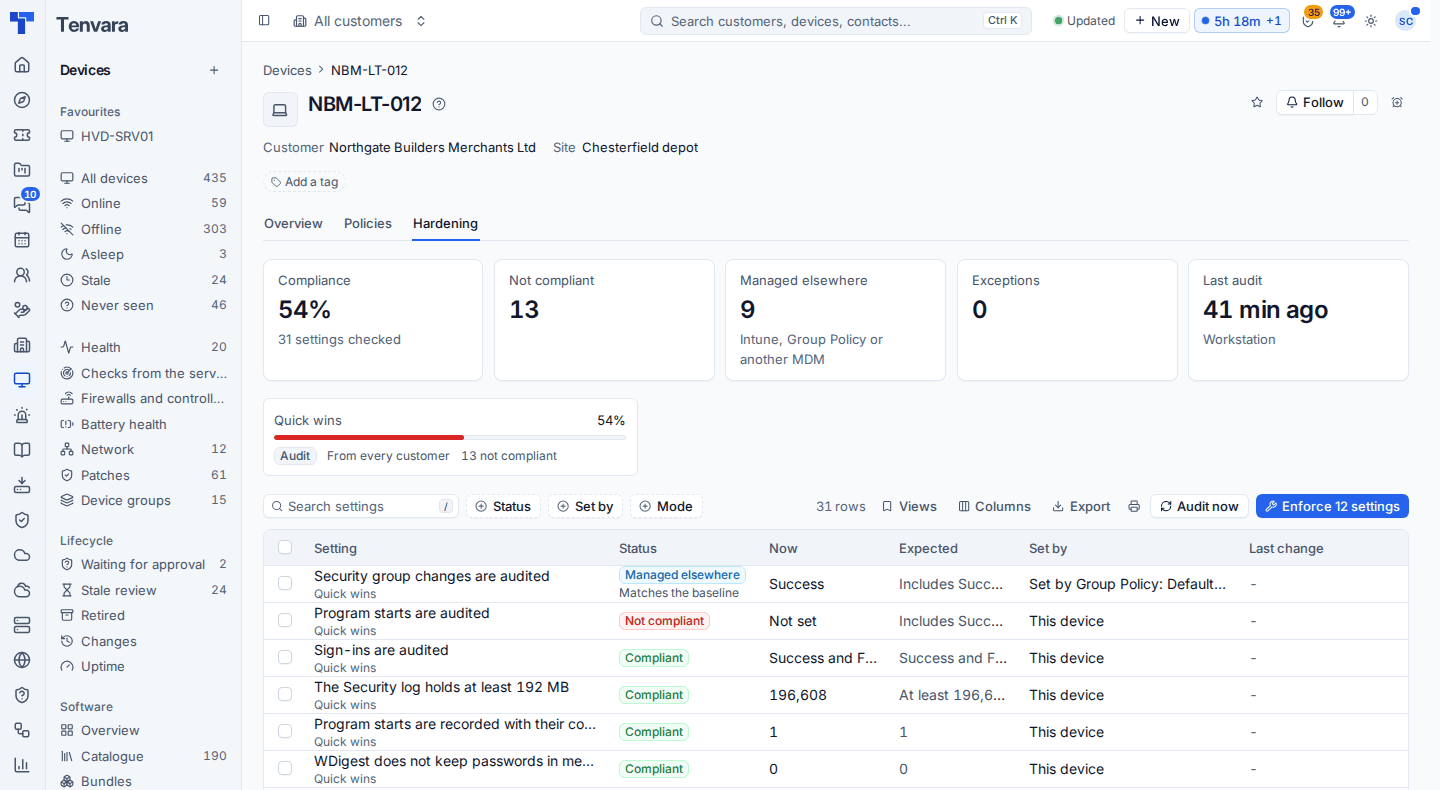
- The agent never writes it. An enforcement run skips it as managed elsewhere, and a run that finds it managed between planning and sending still leaves it alone.
- It still counts. If the GPO's value meets the baseline the setting is compliant; if not, it is not compliant, with a finding such as "Group Policy (Default Domain Policy) sets this to 1 and the baseline expects 0. Change the GPO, or except the setting here."
- Drift names it. If a value starts coming from a GPO, the drift alert says so and Tenvara does not put it back.
A customer's Hardening tab counts settings managed elsewhere by source, so you can see at a glance how much of a baseline Group Policy already covers.
Tip: Every setting in the library shows its Group Policy path with a copy button. When the fix belongs in a GPO, that is the quickest way to find the right policy.
What Intune sets
For customers with a connected Microsoft 365 tenant using Intune, Tenvara reads the tenant's Intune policies (settings catalog, endpoint security, configuration profiles and administrative templates) on each Intune sync and maps their settings to the hardening library. No extra permission is needed.
Open Customer > Hardening > Set by Intune to see each tenant, how many policies were read, which of them set library settings, and every setting with the policy that sets it, Intune's value and who the policy is assigned to. Use it to see where a baseline and the customer's Intune policies already agree, and where they differ.
Pushing a baseline to Intune
For devices you manage through Intune, you can turn a baseline into an Intune settings catalog policy instead of enforcing it through the agent:
- Open the baseline under Security > Hardening > Baselines and go to the Intune tab.
- Choose the customer's tenant and, optionally, a name for the policy.
- Review the preview. Each Windows setting that has an Intune equivalent goes in as a settings catalog setting, with the attack surface reduction rules as one group. Everything else is listed with why it was left out (no settings catalog equivalent, another platform, a value Intune cannot express, a check only setting).
- Choose the groups to assign it to and deploy it. Deploying uses the same Intune deployment as the rest of Tenvara, with its preview, approvals and undo: see Making changes safely.
After deployment, each Intune sync compares the tenant's policy with what was pushed and shows drift on the baseline's Intune tab. When the baseline gets a new version, the tab says the pushed policy is behind until you push it again.
Note: Connecting a tenant needs the customer's Microsoft 365 consent, and reading or deploying Intune policies needs the Intune feature switched on for that tenant. See Connecting a tenant.
Configuration profiles on Macs
On a Mac, a value set by a configuration profile or a managed preference is treated as managed elsewhere in the same way, and the agent never writes over it. See macOS and Linux.
Was this page helpful?
Thanks for the feedback.