Audits, reviews and registers
Plan internal audits over the cycle, raise and close nonconformities, hold management reviews with gathered inputs, track objectives, and keep the supplier, training, certificate and incident registers.
The "check and act" half of a management system lives under Security > Audits and registers. The tabs are Internal audits, Nonconformities, Management reviews, Objectives, Incidents, Suppliers, Training and Certificates, each listing every programme's entries with a filter.
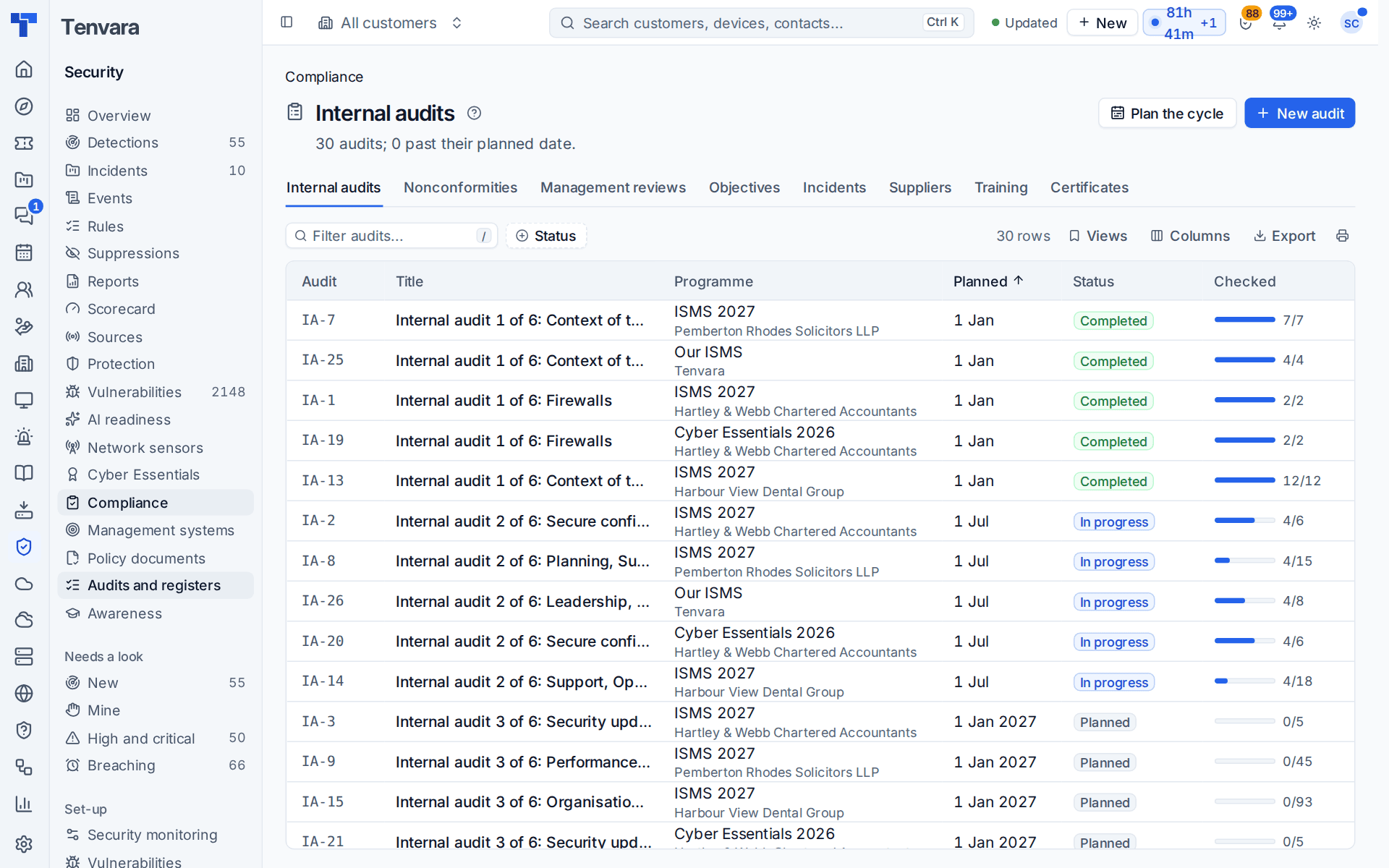
Internal audits
Press Plan the cycle on a programme to share its requirement groups (ISO clauses, Annex A themes, Cyber Essentials themes) over the audits of the cycle, so every area is audited at least once. The years in the cycle and audits a year are in Settings. Audits still planned are replaced when you plan again; started and finished ones stay.
Or press New audit for one of your own. An audit (numbered IA-1, IA-2 and so on) has a title, scope, the areas it covers, a planned date and a lead auditor. Its checklist is every requirement in those areas, copied as it reads that day, with the primary common control. Work through the checklist marking each item conforms, finding or not applicable, with notes and evidence. A finding is major, minor, an observation or an opportunity for improvement; the kinds you choose in Settings raise a nonconformity straight away. Complete the audit with a conclusion.
Nonconformities
A nonconformity (NC-1 and so on) comes from an audit finding, by hand with Raise nonconformity, from an incident's lessons, from the customer portal ("something not done as it should be") or from an external auditor. Each has a grade (major or minor, or an improvement), a source, an owner (here or at the customer) and a due date, and moves through:
- Open, then investigating: record the root cause.
- Action: the correction and the corrective action.
- Verifying: the effectiveness check falls due after a set number of days.
- Closed when it worked, or back to action when it did not.
Raise a problem and Raise a ticket hand the work to your service desk, linked both ways, and Settings can make a new nonconformity raise one by itself. Owners hear when one is overdue.
Management reviews
Press Plan a review, then Gather inputs to fill in everything ISO 27001 and ISO 9001 clause 9.3 ask for, from Tenvara, for the review's period: actions from earlier reviews, audit results, nonconformities raised, closed and overdue, objectives against target, framework scores, risk changes, security and major incidents, personal data breaches, supplier performance, and customer feedback (satisfaction ratings, complaints and portal reports). The inputs are kept as gathered, so the signed minutes keep the figures the meeting saw.
Record the attendees, minutes, decisions and actions with owners and due dates, then send it for sign-off through Approvals to the programme's owner, the customer's or both.
Objectives
An objective has a measure, a target, a baseline, an owner and a due date. The measure is entered by hand or read live every morning from Tenvara's own figures: patch compliance, Microsoft 365 MFA, Secure Score, SLA response and resolution met, satisfaction, backup success, awareness training completion, phishing clicks, policy acceptance and nonconformities closed on time. Past its due date an objective settles as achieved or missed.
Registers
- Incidents: the customer's security incidents and major incidents in the period, with what the programme recorded about them (lessons learned, and for a personal data breach when the regulator and the people affected were told). Raise a nonconformity carries the lessons into one. See Incidents and response.
- Suppliers: each supplier's services, criticality, the data they handle and where, contract and data processing agreement on file, review dates and the assurance they hold (ISO 27001, ISO 9001, Cyber Essentials and Plus, SOC 2, PCI DSS) with expiry dates.
- Training: each contact's qualifications, courses, certifications and inductions, with expiry and the certificate as a file. For your own company's programme the register holds your staff.
- Certificates: every certification (Cyber Essentials ones included) with scheme, body, number, scope, issue and expiry, and surveillance audit dates. Tenvara raises an alert before expiry and before each surveillance audit, cleared when it is renewed or done.
Supplier reviews, assurance and training that are about to expire tell their owner. The timings for all of this are in Settings > Security monitoring > Compliance, per customer too.
Was this page helpful?
Thanks for the feedback.