Records kept up to date and Active Directory snapshots
Let Tenvara fill Microsoft 365, backup, network, application and Active Directory records from what it already knows, get suggestions for applications to document, and compare a customer's Active Directory between any two days.
Documentation goes stale because nobody has time to retype what changed. For the built-in record templates, Tenvara can fill the record from its own data and keep it up to date, while the fields only a person knows stay theirs. For customers with Active Directory, it also takes a daily snapshot of the domain so you can see what changed and when.
Keeping a record up to date
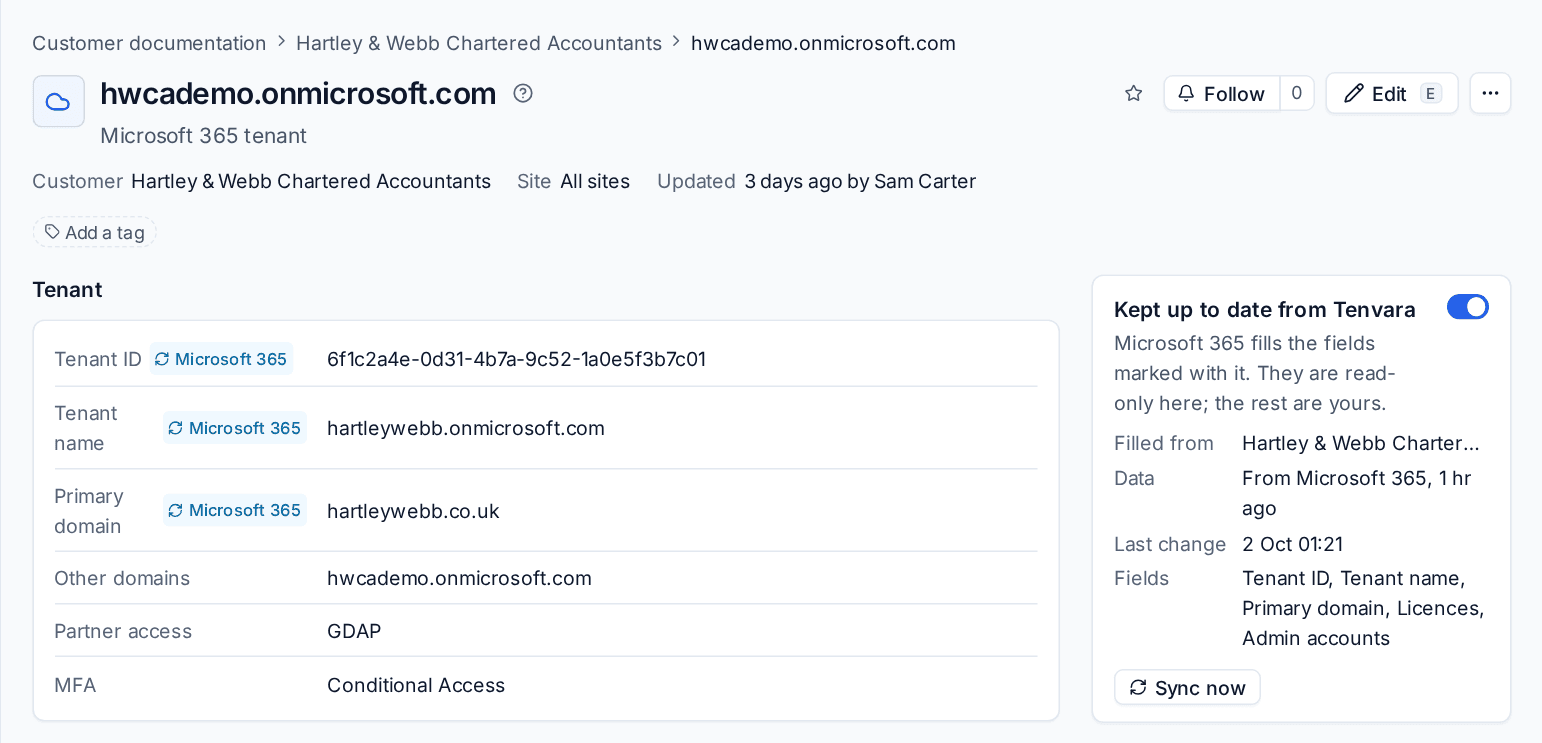
- Open a record made from one of the templates below.
- On the Kept up to date from Tenvara card, switch it on.
- If the customer has more than one of the source (two tenants, two domains), choose which one under Filled from.
The record is filled straight away and checked every hour after that. The card shows where the data came from and how fresh it is ("From Microsoft 365, 2 hours ago"), the last change, the fields it fills, Sync now, and the reason if the source could not be read.
How it treats your fields
- Fields that Tenvara fills are marked with their source and are read-only while it is on. Every other field stays yours.
- In a table (licences, admin accounts), the source's rows come and go with the source. Rows you add yourself stay yours, and your own columns on a synced row (a licence's renewal date, an admin account's credential) are kept.
- A sync only writes what changed. Each change is saved as a version by "Kept up to date from Tenvara" and noted on the record's timeline, so you can see what moved and when.
- If the source cannot be read (the module is off, the tenant was removed), the record keeps what it had. Switched off, every field is yours again and the values stay.
What each template is filled with
| Template | Filled from | What it fills |
|---|---|---|
| Microsoft 365 tenant | The customer's Microsoft 365 tenant | Tenant ID, tenant name, primary and other domains, paid licences (bought and assigned) and the Global Administrators |
| Backup and DR | The customer's backups | What is protected, where backups go, the schedule and retention, whether a copy is kept off site, the last good backup and the last passed test restore |
| Network | IP address management and the agents | Subnets with VLAN, gateway and DHCP range, the DNS servers in use, the gateways devices use, and the firewall where Tenvara knows it |
| Line-of-business application | The software inventory | Vendor, the version most devices run, Installed on and Versions installed |
| Active Directory | The latest Active Directory snapshot | Domain, NetBIOS name, forest, functional levels, domain controllers, enabled users, privileged accounts, stale computers, GPOs and trusts |
Partner access, renewals, credentials, recovery steps, the domain admin login and the like are always yours to fill in.
Suggested records
The customer's Documentation tab lists Suggested records: applications installed on at least two of the customer's devices that are not documented yet. Press Create record to make the application's record, kept up to date from the inventory, or Dismiss to stop suggesting it for that customer. What is left out shows the Never suggest list (browsers, office apps, runtimes, drivers and the like); both it and the device count are in Settings > Documentation > Suggested records.
Active Directory snapshots
Once a day, the Tenvara agent on one domain controller per domain reads the domain and Tenvara keeps it. Nothing in the directory is changed.
A snapshot holds:
- Users: enabled, locked, last signed in, password set, password never expires, privileged, and stale (enabled but not signed in for 90 days).
- Privileged groups: Domain Admins, Enterprise Admins, Schema Admins, Administrators and the other built-in privileged groups, with their members.
- Group policy: each GPO with its status, where it is linked, whether it is enforced, and when it last changed.
- Trusts, the domain and forest functional levels, and stale computers.
Windows domain controllers and Samba Active Directory domain controllers are both read.
The customer's Active Directory page
Open the customer and choose Active Directory (under More). The tab appears once one of their domain controllers has answered.
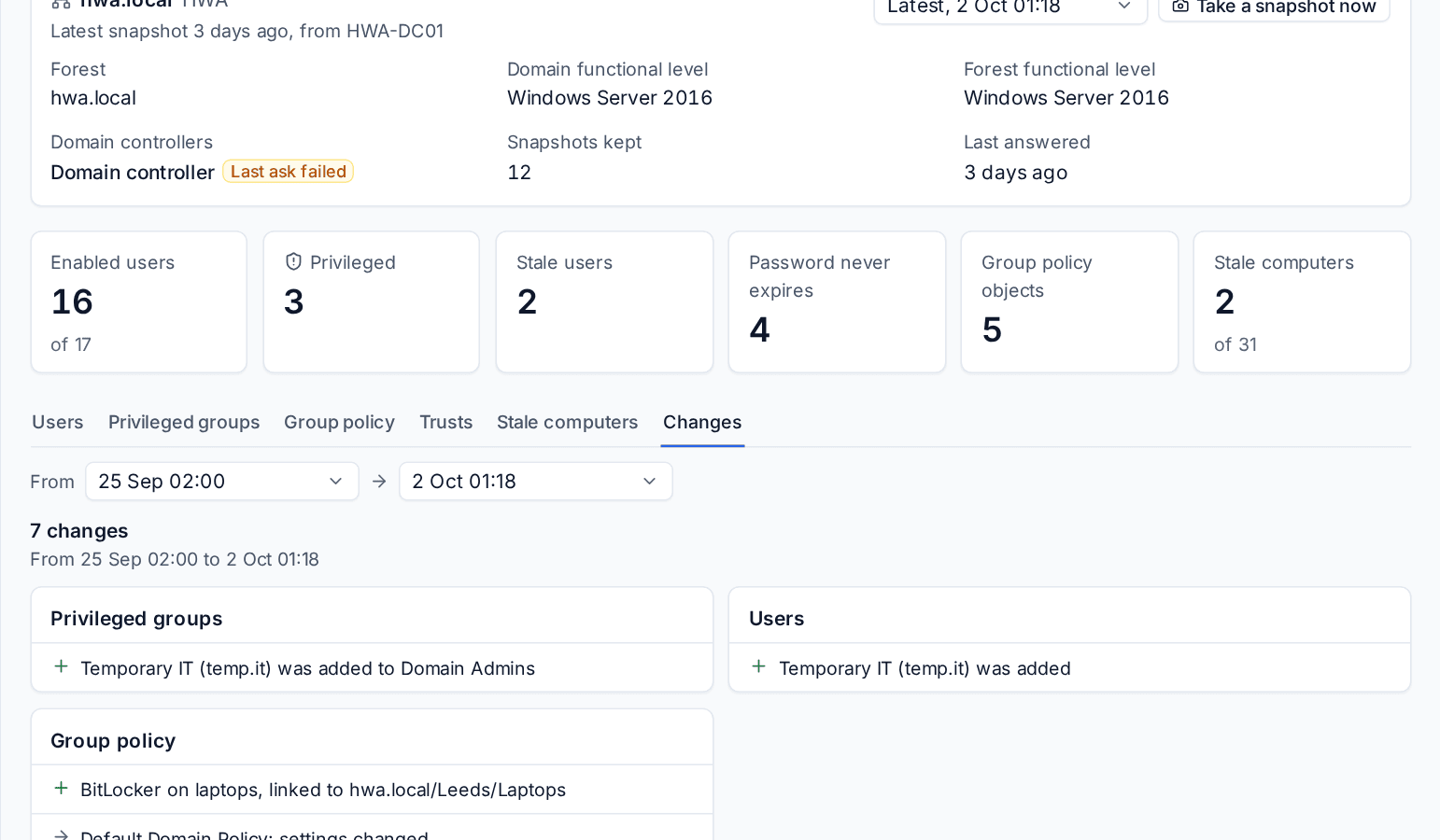
- The top shows the forest, the functional levels, the domain controllers (with a warning if the last ask failed), how many snapshots are kept and when it last answered, then six figures: enabled users, privileged, stale users, passwords that never expire, GPOs and stale computers.
- The tabs are Users (with All, Stale, Disabled, Never expires and Privileged), Privileged groups, Group policy, Trusts, Stale computers and Changes.
- The snapshot picker shows any earlier day.
- Changes compares two days (a week apart to start with) and lists users, privileged group members, GPOs, trusts and levels, and stale computers added, removed or changed.
- Take a snapshot now asks the domain controllers straight away.
Alerts
Each new snapshot is compared with the one before (the first one raises nothing):
| Change | Alert |
|---|---|
| Someone added to a privileged group | Critical |
| A new group policy object, with where it is linked | Warning |
| A trust added, changed or removed | Critical |
| A functional level changed | Information |
They go through your normal alert rules, so they can become tickets. Each can be switched off in Settings > Documentation > Active Directory, for everyone or per customer.
Settings
Settings > Documentation > Active Directory has Take a daily snapshot of Active Directory (on), Take it at (02:00; a domain controller that is off then is asked the next hour it is on), how long before an account is stale (90 days) and Keep snapshots for (400 days; the latest is always kept).
Tip: The snapshots also feed Cyber Essentials user access control: enabled accounts not used within the stale limit fail the check, and the privileged accounts are listed for review.
Related: Customer documentation and records, Templates.
Was this page helpful?
Thanks for the feedback.