Resuming large and interrupted backups
How big backups carry on after a reboot, sleep, crash or server restart instead of starting again, how large files are copied in parts with a disk guard, and how big OneDrives and sites download several files at once.
A first backup of a 2 TB file server, a 400,000-file OneDrive or a 300 GB SharePoint site takes hours, sometimes days. Over that time something will interrupt it: a laptop goes to sleep, a server reboots for updates, the backup server itself is updated. Tenvara keeps what was already stored and carries on from where it stopped. A big backup gets a little further every run until it finishes, and what it stored so far can be restored in the meantime.
What carries on
Every part of a backup saves its progress as it goes: each Microsoft 365 mailbox, OneDrive, site or team, each Google Workspace user's Gmail, Drive, Calendar and Contacts, and each device's volume, folder or virtual machine.
| What stopped it | What happens |
|---|---|
| The backup server restarted or was updated | Every part it interrupted is queued again as soon as it starts, and carries on |
| The device restarted or shut down | The helper writes a last checkpoint as Windows shuts down. The backup carries on when the device is back |
| The device went to sleep | The backup pauses and the job says Paused while the device sleeps. On wake the same run carries on, nothing read twice |
| The agent was updated or restarted | The backup is interrupted, not cancelled, and a run carrying it on is queued straight away |
| The helper or the device crashed, or the power went | It carries on from the last checkpoint, losing at most a few minutes of work |
| Someone cancelled it | What it stored is kept, and the next scheduled run carries on from there |
How a device carries on depends on what it is backing up:
- Folders: files already stored are not read again; only the rest are.
- A Linux disk on the same boot carries on from the exact byte it reached.
- A Windows volume or a virtual machine, or a Linux disk after a reboot, takes a fresh snapshot (an image is never stored half old, half new) and sends only the data that is not stored yet.
For Microsoft 365 and Google Workspace, files and messages already stored are reused by their version, so the resumed run reads only what is left and anything that changed in the meantime.
Seeing it
The job panel shows each resumed part with how far it had got: "Resumed from 64%, 38 GB already stored (try 3)". The job's log says the same, and how much it read this time. Job lists mark a job that carried parts on with a Resumed badge.
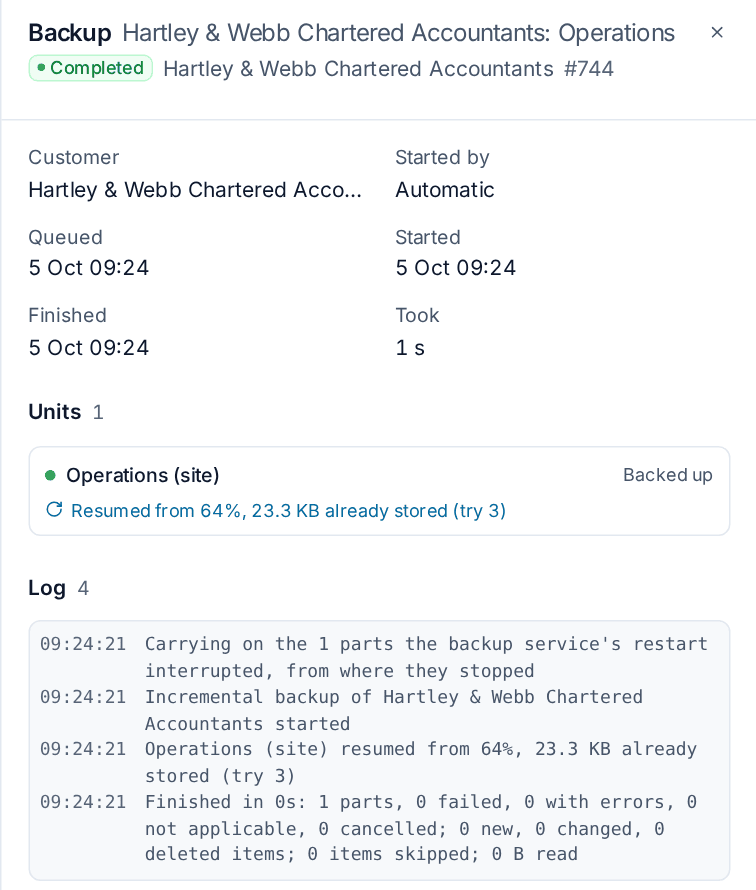
An interrupted device job ends with "Interrupted:" and the reason, with a link to the run carrying it on. The device's backup page, the Microsoft 365 tenant page and the Google Workspace item page show each part's unfinished run: how often it was interrupted and why, and how much is stored.
Partial recovery points
While a part is unfinished it keeps a partial recovery point holding everything stored so far. It is labelled Partial wherever recovery points are listed, and shown as a hollow amber dot on the browser's timeline. You can browse, search and restore from it like any other point: a file that was fully stored restores whole. A volume image holds the volume up to where it stopped.
A partial point never counts as the last good backup, and the complete recovery point replaces it when the part finishes.
Settings and alerts
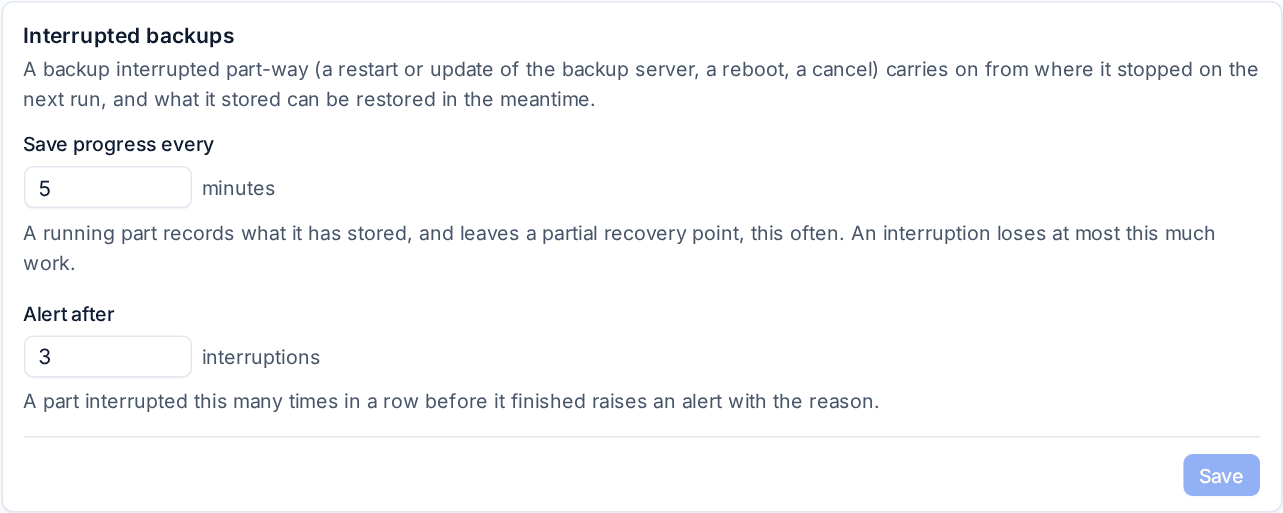
Open Settings > Backup, the Defaults tab, and find Interrupted backups:
- Save progress every (minutes, default 5): how often a running part records what it stored and refreshes its partial recovery point. An interruption loses at most this much work.
- Alert after (interruptions, default 3): a part interrupted this many times in a row before it finished raises a warning alert with the last reason and what is stored. It clears when the part completes.
Large files
Large files in OneDrive, SharePoint, Teams and Google Drive are never copied whole to the backup server's disk first. They stream straight into your backup storage in parts. A 60 GB file needs no free scratch space on the server.
- Files of at least Copy files in parts from (256 MB by default) are copied in parts of Part size (128 MB by default). Each part is one request to Microsoft or Google and one stored piece.
- A part whose connection breaks picks up at the byte it stopped on. A file interrupted part-way keeps its finished parts, and the next run fetches only the rest.
- A file that changes while it is being copied is copied again next run, so it is never stored half old, half new.
The disk guard
The backup server watches its own disks: its scratch space, its backup data and its database disk. Settings > Backup > Defaults > Backup server disk space shows each with its free space, the line below which large files pause, the scratch space used and the large files being copied.
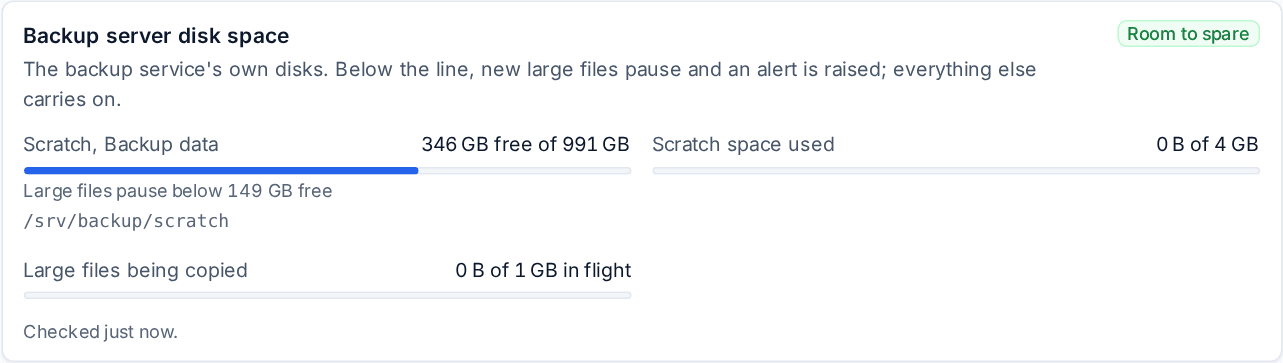
When free space drops below Pause large files below (15% by default) or Or below (10 GB), whichever is larger, new large files pause: they are fetched on a later run, and everything else in the backup carries on. A warning alert is raised while they are paused, critical below half the line, and it clears when there is room again. Scratch space cap (4 GB by default) limits the small amount of scratch space backups use for mail and Teams messages.
Big OneDrives and sites download in parallel
A OneDrive, SharePoint site or Google Drive backup downloads several files at once, and the job panel shows each running part's progress by bytes, files done of the total, files a second and an estimate to finish.
Set it in Settings > Backup > Defaults > Cloud downloads:
| Setting | Default | What it does |
|---|---|---|
| Files at once per OneDrive, site or Google Drive | 8 | Downloads at the same time for one drive. A customer can have its own |
| Files at once across the backup server | 32 | Shared by every running cloud backup, so big drives share the bandwidth |
| Warn when a backup is slower than | 256 KB/s | A drive slower than this for the time below warns in its job and raises an alert saying why |
| For longer than | 60 minutes | How long it must stay slow before it warns |
| SharePoint requests a minute per tenant | 1,000 | Microsoft allows an app about 1,250 a minute in a tenant of up to 1,000 licences, more for bigger tenants. Backups keep under this so Microsoft never pauses them. Raise it for a customer with more licences |
If Microsoft or Google slows a backup down, it backs off by itself and speeds up again once the throttling stops. The slow warning says why a backup is slow: throttled by Microsoft or Google, the network, storage, the processor, or the server-wide limit.
Note: For a drive of many small files, Microsoft's requests a minute set the pace, about 16 files a second per tenant at the default. A 400,000-file OneDrive's first backup takes several hours however fast your server is; later runs fetch only what changed.
Related
Was this page helpful?
Thanks for the feedback.