macOS and Linux
What hardening reads and sets on Macs through the agent, and the read-only checks for Ubuntu and Debian.
Device hardening is not only for Windows. The same library, baselines, compliance pages and drift alerts cover Macs and Linux machines with the Tenvara agent.
macOS
The shipped macOS 13 and later, Level 1 style baseline holds 46 settings, and the Cyber Essentials device controls baseline covers Macs and Windows together (each setting is checked only on its own platform). Assign them like any other baseline: see Assigning and auditing.
What the agent reads and sets
| Kind of setting | How |
|---|---|
| System and per-user preferences | Read from the preference domain, and set with the setting's own type. Per-user settings are read for every local account and show one value when they agree |
| Gatekeeper | Read |
| The application firewall and stealth mode | Read and set |
| FileVault | Read only |
| Minimum password length | Read and set as a password policy rule |
| Remote Login (SSH) | Read |
| Screen saver idle time | Read and set for each account |
The agent only runs a fixed list of macOS's own tools, never a command sent from the server.
Managed elsewhere
A value under the Mac's managed preferences, or set by a configuration profile from any MDM or installed by hand, is managed elsewhere. It counts towards compliance by its value but the agent never writes over it, exactly as with Group Policy on Windows.
Rollback and drift on a Mac
Changes made through the agent are recorded with the value before, so a run on Macs rolls back like a Windows one. Drift is found at each audit; macOS does not log who changed a preference, so a Mac drift names the change but not the account.
Linux
The Ubuntu and Debian checks baseline holds 23 settings, and Linux is read only: Tenvara reports how each machine compares with the baseline but never changes it. Every Linux setting is audit only, whatever the assignment says.
What is read:
- SSH server settings as SSH really applies them (including drop-in files), such as root sign-in and password authentication.
- Kernel settings from the running system, such as address space randomisation and network hardening values.
- Services: whether a service is running and enabled.
- The firewall (ufw), AppArmor, the audit daemon and unattended upgrades.
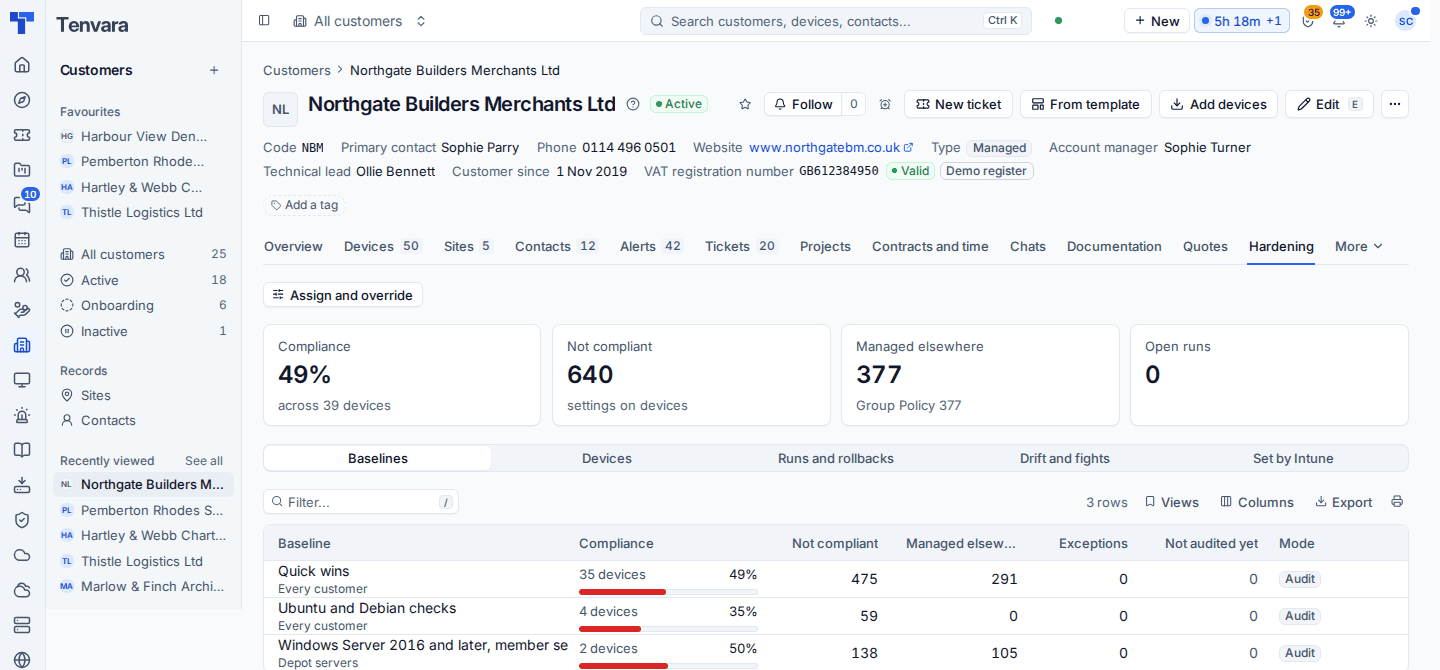
Linux machines show in the compliance overview, the customer's Hardening tab, the monthly report and the portal's Device security page like any other device. Use the results to plan the changes with the customer and make them with your own tooling or a script from the script library.
Mixed estates
A customer with Windows, Macs and Linux needs nothing special: assign the Windows, macOS and Ubuntu baselines at the customer level and each device takes the ones for its platform. The customer's Hardening tab shows each baseline's compliance side by side, and the monthly report sums them up.
Was this page helpful?
Thanks for the feedback.