Device hardening overview
What device hardening does in Tenvara, how audit, enforcement, rollback and drift fit together, and where to find it.
Device hardening holds your customers' computers to a known, safe configuration: password and lockout rules, audit policy, attack surface reduction, the firewall, SMB signing, LLMNR, Remote Desktop, PowerShell logging, BitLocker and hundreds more. Tenvara ships a library of settings written in plain words, each with why it matters and what changing it might break, and a set of ready-made baselines built from them. You assign a baseline, see how far each device is from it, and only then choose what to enforce.
How it works
- Pick a baseline. Start from a shipped baseline (Quick wins, the Windows workstation or member server baselines, Cyber Essentials device controls, macOS, or the Ubuntu and Debian checks) or copy one and make it your own. See The setting library and baselines.
- Assign it. Assign baselines to every customer, a customer, a site, a device group or one device. A new assignment only audits: nothing on a device changes. See Assigning and auditing.
- Read the gap. The agent reads every assigned setting and reports it. Each device, customer and baseline shows its compliance, and what enforcing would change lists every value that would move, before anything is written.
- Enforce in rings. An enforcement run goes to a pilot ring first, then the broad ring, inside each device's maintenance window, with an approval where a setting may break things. See Enforcing in rings and rolling back.
- Roll back. Tenvara keeps the value each setting had before it changed, so a whole run, one device or one setting can go back with one click.
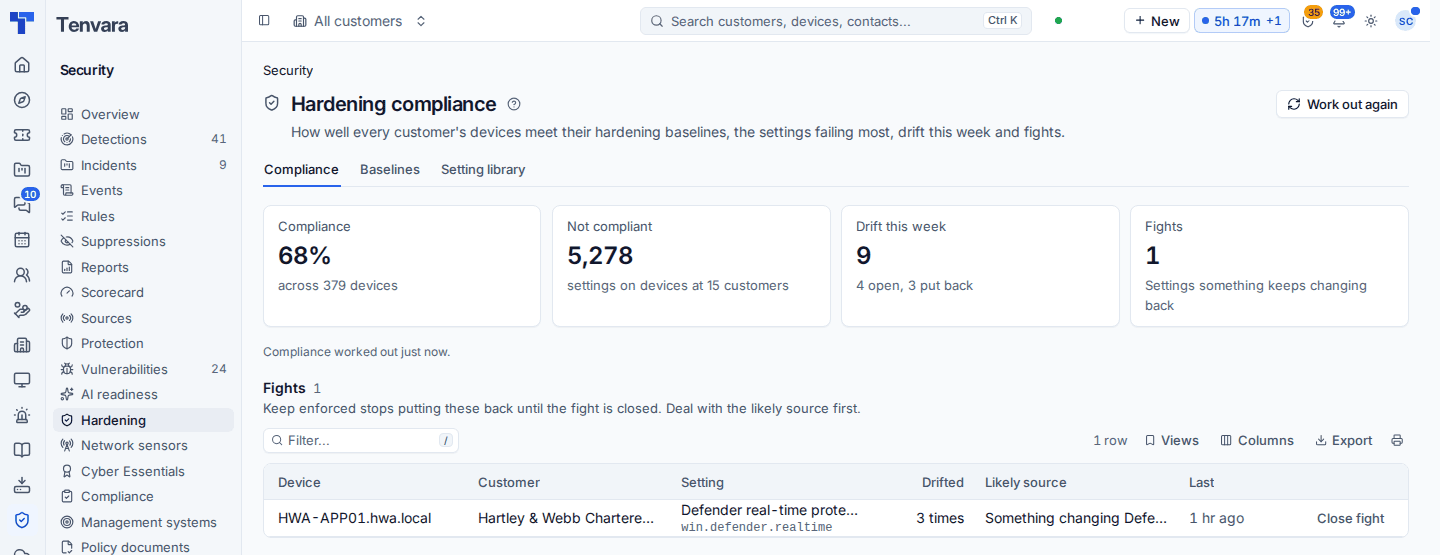
- Watch for drift. When a compliant setting stops being compliant, Tenvara raises a drift finding that names who changed it and, if you choose, puts it back. See Drift and reporting.
Where it lives
| Place | What you do there |
|---|---|
| Security > Hardening | The compliance overview across every customer, with the Baselines and Setting library tabs |
| Settings > Hardening | Assignments by level, exceptions and every run |
| Customer > Hardening | One customer's compliance per baseline and per device, runs and rollbacks, drift and fights, and what their Intune policies set |
| Device > Hardening | Every setting on one device: its value now, the value expected, where it is set, who changed it last, and enforce, roll back or except |
| Settings > Endpoint > Device hardening | How often devices audit, the pilot ring size, how long exceptions last, drift and fight alerts, and the portal page |
The Policies tab of a customer, site, device group and device also has a Device hardening line showing which baselines reach it: see Policies and where settings come from.
What Tenvara never does
- It never writes a setting something else manages. If Group Policy, an MDM such as Intune or a configuration profile sets a value, the device shows it as managed elsewhere and the agent leaves it alone. See Group Policy and Intune.
- It never enforces without being asked. Assignments start in audit, and every enforcement is a run someone starts (or keep enforced, which you switch on per setting or assignment).
- It never touches BitLocker or local group membership without an approval. Those always wait for one, and BitLocker is never rolled back.
- It never changes Linux. Linux settings are read and reported only. See macOS and Linux.
Who can do what
Device hardening has its own permission area in Roles and permissions. View reads the library, baselines and compliance; Manage changes baselines and your own settings. On top of that, five actions can be given separately:
| Action | Allows |
|---|---|
| Assign baselines | Assign baselines at any level and override settings |
| Enforce | Start enforcement runs (runs that need an approval still wait for it) |
| Approve | Approve enforcement runs |
| Exceptions | Exempt a device or customer from a setting, with a reason and an expiry |
| Roll back | Put settings back to their values before a run |
The NOC and security analyst role template gets view. If Device hardening is switched off in Modules, its pages say so and agents stop auditing.
Tip: The safest first step is to assign Quick wins to every customer in audit. It reads 31 low-risk, high-value Windows settings and shows you where every customer stands in a day, without changing anything.
Was this page helpful?
Thanks for the feedback.