Payroll export and on-call pay
Pull each pay period's hours, overtime, leave, sickness, on-call pay and expenses into one export shaped for your payroll package, and pay people for standby and call-outs.
At the end of each pay period, whoever runs payroll needs the same figures for everyone: hours worked, paid overtime, leave, sickness, on-call pay and expenses to pay back. Schedule > Payroll gathers them from approved timesheets, leave, on-call sheets and expense claims, and exports them in the format your payroll package imports.
Payroll is for administrators, HR, finance and timesheet approvers who can see pay rates (the Pay and cost rates field group in Roles and permissions).
Set up the export
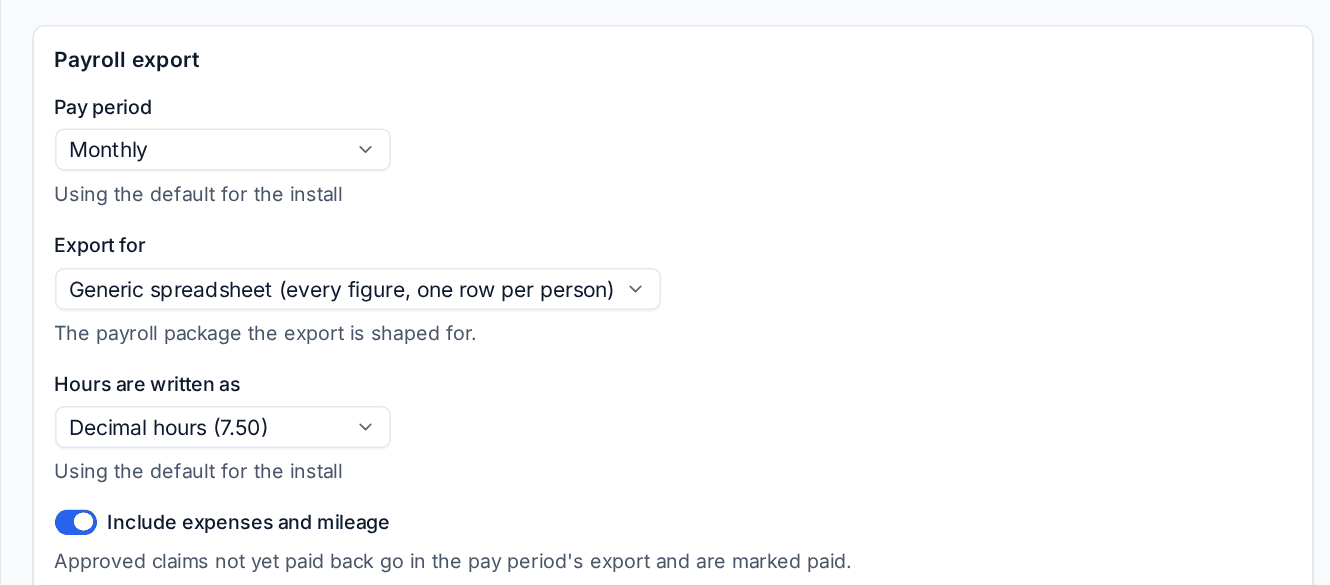
Settings > People > Payroll:
- Choose the Pay period: Monthly, Fortnightly or Weekly.
- Choose what to Export for: the payroll package the file is shaped for.
- Choose how Hours are written as: Decimal hours (7.50) or Hours and minutes (7:30).
- Leave Include expenses and mileage on to put approved claims still to be paid back in the export (they are marked paid when exported).
- Press Save.
The formats are:
| Export for | What the file is |
|---|---|
| Generic spreadsheet | Every figure, one row per person |
| Xero Payroll | Timesheet and pay item import |
| QuickBooks Payroll | Pay item import |
| Sage Payroll | Payments import |
| BrightPay | Hours and additions import |
| Staffology | Pay lines import |
| Gusto | Hours import, United States |
| Employment Hero / KeyPay | Timesheet import, Australia |
| ADP | Pay data batch |
Under Pay item names, enter the names your payroll package uses for Hours worked, Overtime ({multiplier} becomes 1.5, 2 and so on), Paid leave, Unpaid leave, Sickness, On-call standby, Call-outs, Expenses, Mileage and Commission, so the file lines up with your package without editing.
Run a pay period
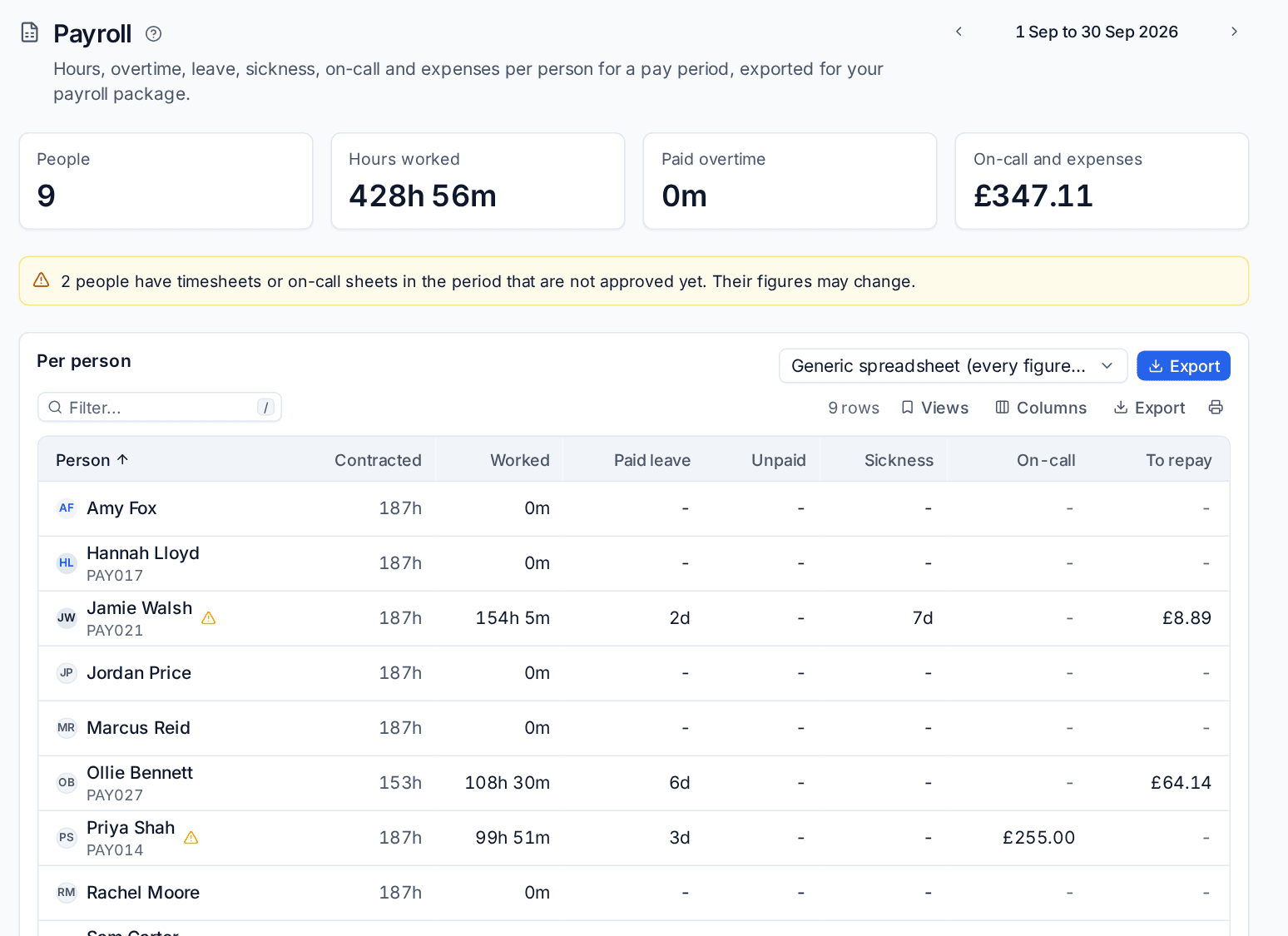
- Open Schedule > Payroll. Use the arrows to choose the period.
- Check the cards: People, Hours worked, Paid overtime and On-call and expenses.
- Read any warning. For example, "2 people have timesheets or on-call sheets in the period that are not approved yet. Their figures may change." Approve those first if you can.
- Check Per person: Contracted and Worked hours, Paid leave, Unpaid leave, Sickness, On-call pay and expenses To repay. A warning sign beside a name means something of theirs is not approved yet.
- Choose the format and press Export.
Exporting keeps the export and marks its overtime, on-call sheets and expenses as exported, so the next period leaves them out. Exports of this period lists each export as it went out; download any of them again, in any format.
Note: Paid overtime comes from approved timesheets at the multipliers in Settings > People > Overtime. Overtime banked as time off in lieu is not paid. See Leave allowances, sickness and overtime.
On-call pay
People on your on-call rotas can be paid for standby and for the call-outs they answer. Each person gets a sheet each month, built from the rotas and the pages they acknowledged.
Set the rates
Settings > People > On-call pay:
- Standby, each weeknight, Standby, each weekend day and Standby, each public holiday: the amount for each.
- A night counts when on call at: a weeknight is paid when the person is on call at this time.
- Each call-out pays: A fixed amount (the Call-out amount), or The time worked, at least the minimum (the Minimum time paid for a call-out, paid as out-of-hours overtime).
A call-out is a page they acknowledged, or ticket time they worked out of hours.
Submit and approve the sheet
Schedule > On-call shows Your on-call sheet for the month: Standby days, Call-outs, Call-out time paid and On-call pay, with a line per day saying which rota it came from.
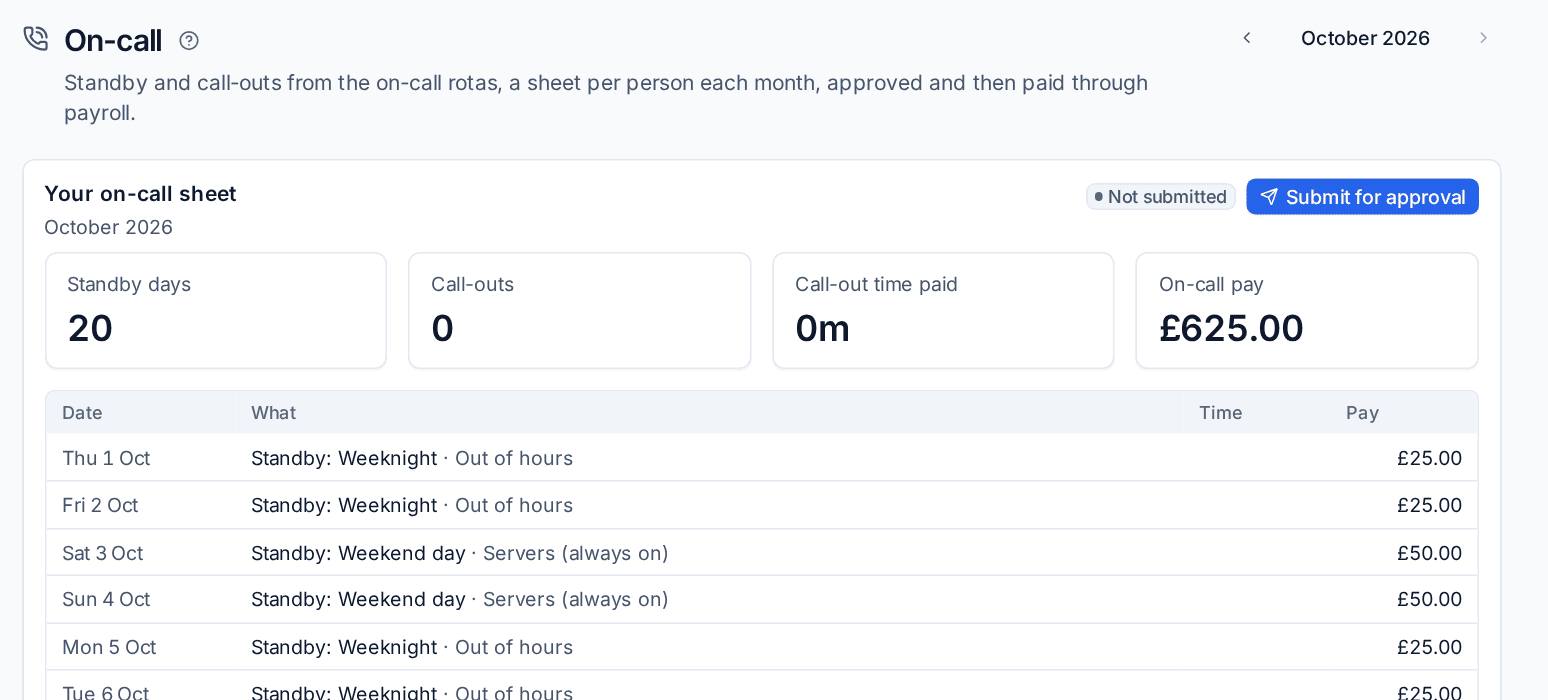
- At the end of the month, check the lines and press Submit for approval.
- The timesheet approvers get it in the Approvals inbox. Under Everyone on call, they open a person's sheet to approve or return it.
- Approved sheets go into the next payroll export as on-call standby and call-outs.
The hours people spend on call, the pages they answered and how fast are in Reports > On-call hours. See On-call rotas and paging.
Commission
Sales commission approved through commission statements also goes into the payroll export, under the Commission pay item. See Commission.
What goes in the export
| Figure | Where it comes from |
|---|---|
| Contracted hours | The staff profile's contracted hours and working pattern |
| Worked hours | Approved timesheets |
| Paid overtime | Overtime on approved timesheets that is paid, by multiplier |
| Paid and unpaid leave | Approved leave of each type, for the period |
| Sickness | Sickness recorded in the period |
| On-call | Approved on-call sheets |
| To repay | Approved expenses and mileage paid with the person's own money, not paid back yet |
Spending on a company card is never in the export, since the person did not pay it. See Company cards and the expense policy.
Was this page helpful?
Thanks for the feedback.