Risk register and Statement of Applicability
Score risks on the customer's matrix, treat them, get them accepted by their owner, and generate, approve and export the Statement of Applicability.
ISO 27001 asks for a risk assessment, a treatment plan and a Statement of Applicability. In Tenvara all three live on the programme, under the Risk register, Assets and processes and Statement of Applicability tabs.
The risk register
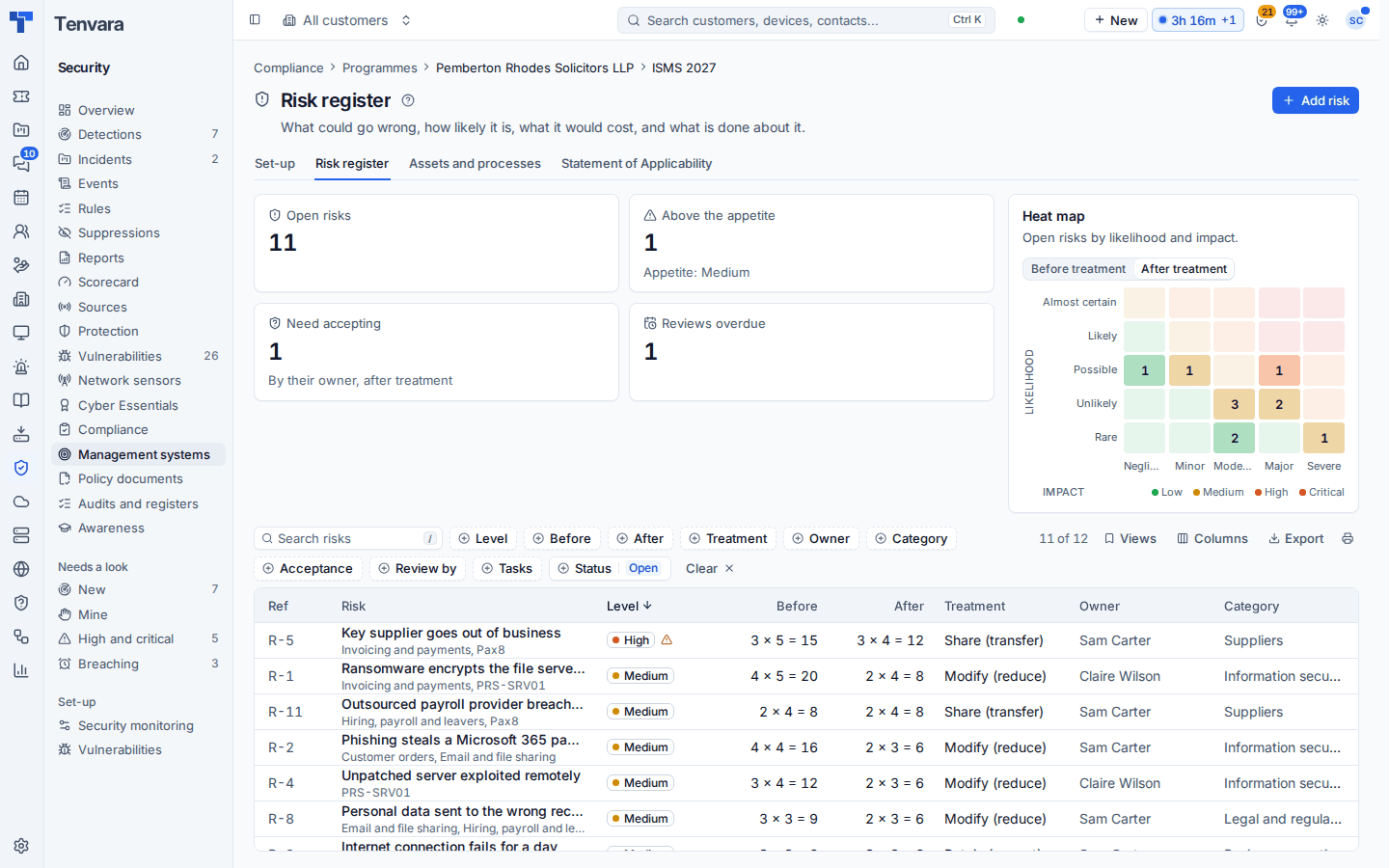
Open a programme and choose Risk register. The top shows Open risks, risks Above the appetite, those that Need accepting by their owner, and Reviews overdue, with a Heat map of open risks by likelihood and impact, before or after treatment.
Adding a risk
- Press Add risk.
- Give it a title, category, threat and vulnerability, and the assets and processes it touches.
- Name its owners, here and at the customer.
- Score it before treatment: likelihood and impact on the customer's matrix. The score is likelihood times impact, and its level (low, medium, high or critical) follows.
- Choose the treatment: modify (reduce), retain, avoid or share (transfer), with the plan and the common controls that treat it.
- Score it after treatment. It can never be higher than before.
- Add treatment tasks with an assignee and due date; the assignee is reminded on the day.
Each risk is numbered (R-1, R-2 and so on, never reused). Filter the list by level, before and after scores, treatment, owner, category, acceptance, review date, tasks and status, and export it to CSV or Excel.
Accepting risks
A risk whose current score is above the customer's appetite (medium by default) needs its owner's acceptance. Press Ask the owner to accept it: the request goes through Approvals to the risk's owner at the customer, else the programme's owner. Once approved, the risk is accepted at that score for the acceptance period (12 months by default); if its score later rises it needs accepting again. Acceptances lapse at the end of their period, and owners are told when a review is due. Mark reviewed records a review and sets the next date.
Assets and processes
The Assets and processes tab lists what the risks are about. An asset can link to something Tenvara already knows (a device, a Microsoft 365 tenant, a documentation record or a supplier) and shows its current name.
The matrix
Settings > Security monitoring > Compliance > Risk register (per customer too) sets the matrix size (3 x 3 up to 5 x 5), the likelihood and impact labels, the four levels and their colours, the appetite, whether every risk needs accepting, the review interval, how long an acceptance lasts, the categories and the reference prefix. Change the size later and existing risks are marked to score again, placed on the new matrix until you do.
Note: The risk register is different from the security Scorecard. The scorecard is a 0 to 100 risk score worked out every day from live data; the register is your judged list of risks with owners, treatment and sign-off. A risk's treating controls feed the scorecard through their checks.
Statement of Applicability
Open the Statement of Applicability tab and press Generate version 1. Tenvara lists every Annex A control of ISO 27001 with:
- whether it applies, and the justification when it does not;
- its implementation (implemented, partly, planned or not implemented), started from the customer's assessment;
- the risks it treats and the documents that support it.
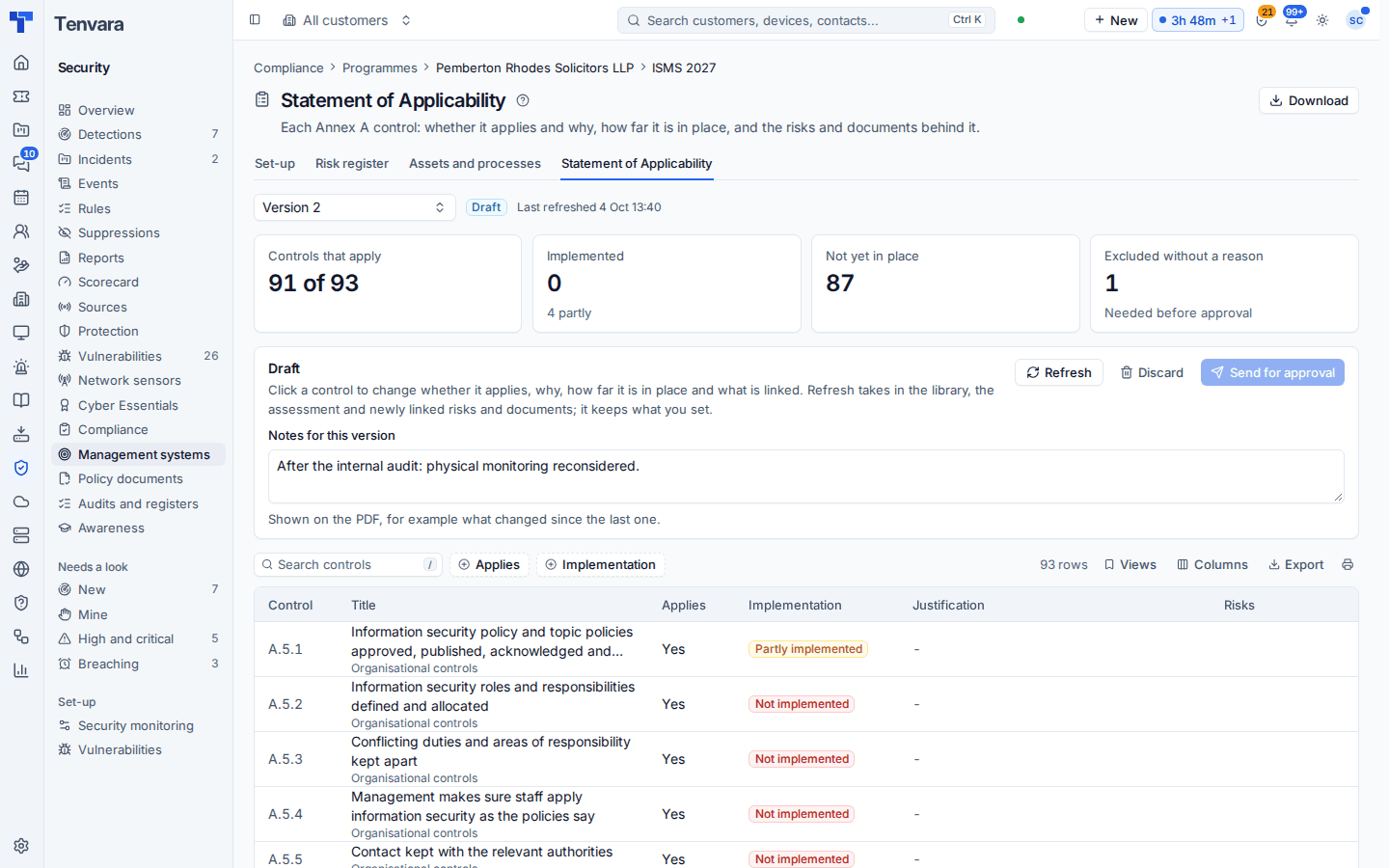
Work through the draft. Change applicability, justifications and implementation; add a note for the version ("after the internal audit: physical monitoring reconsidered"). Refresh takes in new library controls, what the assessment says now and newly linked risks and documents, without touching your applicability or justifications or an implementation you set by hand.
When every excluded control has a reason, press Send for approval. The programme's owner at the customer approves it through Approvals. Approved, it becomes the current version and the one before is superseded; returned, it is a draft again with the reason. Approved versions never change: start the next version to change anything.
Download gives the SoA as a landscape PDF in your branding with its version and approval on every page, or as an Excel sheet. Seeing the risk register and SoA, and downloading them, needs the risk register action in the person's role, because they are a map of the customer's weaknesses.
Was this page helpful?
Thanks for the feedback.