Management systems overview
What a programme is, how the control library, documents, risks, evidence and audits fit together, and how readiness is worked out.
Management systems turn Tenvara's compliance checks into a full programme you can run for a customer, or for your own business: an ISO 27001 information security management system, an ISO 9001 quality system, UK GDPR accountability or a Cyber Essentials certification. Everything a certification body asks for lives in one place, and much of it keeps itself up to date from the data Tenvara already holds about the customer's devices, Microsoft 365, backups, tickets and staff.
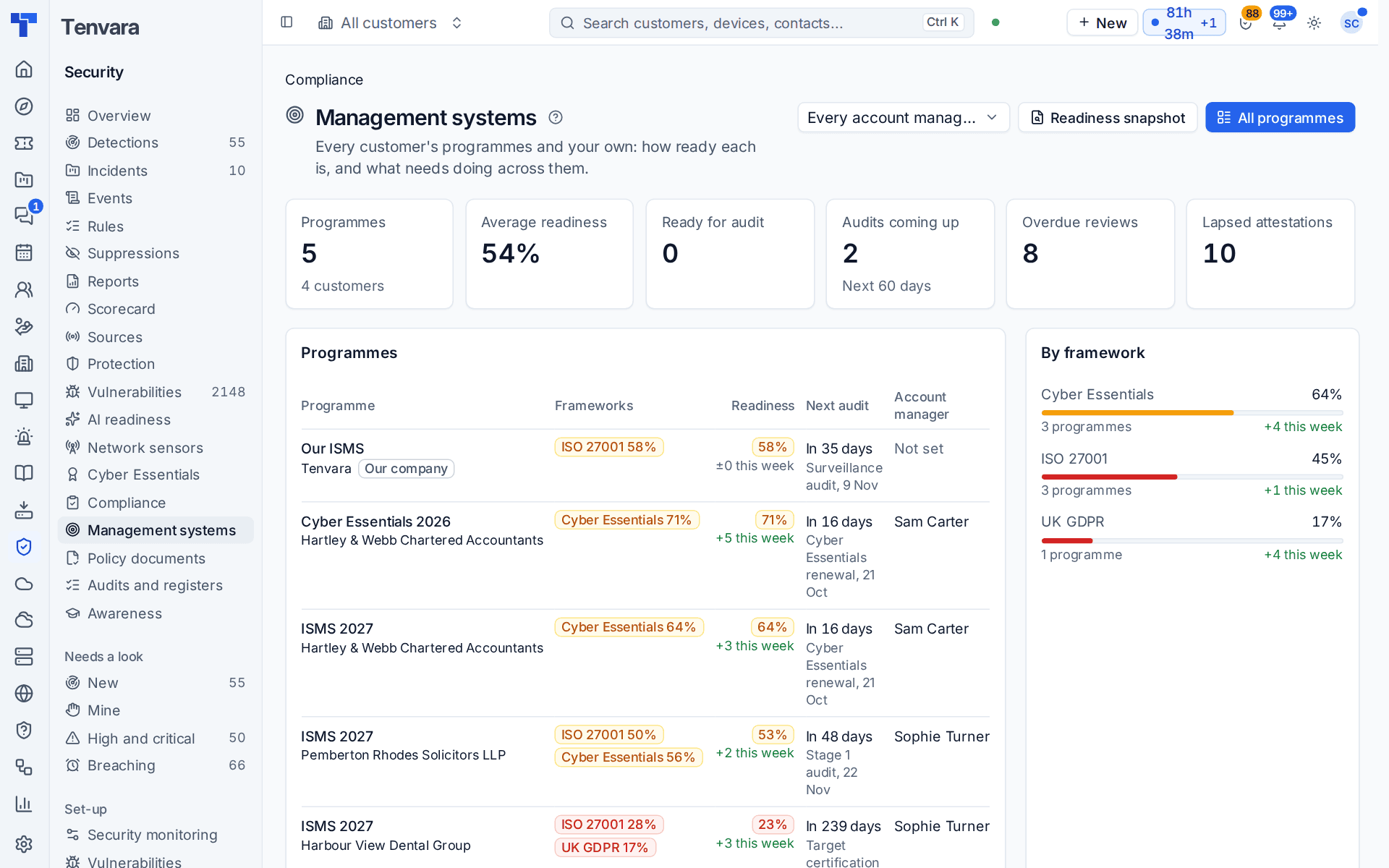
The pieces
| Piece | What it is | Guide |
|---|---|---|
| Programme | One customer's management system, such as "ISMS 2027": the frameworks in scope, the scope statement, owners, sites, devices and tenants in scope, and certification audit dates | This page |
| Library | The frameworks (ISO 27001, ISO 9001, UK GDPR, Cyber Essentials, Essential Eight, NIST CSF 2.0, CIS Controls, NIS2 and your own), mapped to 321 common controls | Frameworks and the control library |
| Policy documents | Policies and procedures under document control, from your master library, approved by the customer and acknowledged by their staff | Policy documents under control |
| Risk register and SoA | Risks scored on a matrix and treated, and the Statement of Applicability | Risk register and Statement of Applicability |
| Evidence and tasks | Files, links, notes, daily check snapshots and access reviews, and the recurring compliance tasks | Evidence and compliance tasks |
| Audits and registers | Internal audits, nonconformities, management reviews, objectives, suppliers, training and certificates | Audits, reviews and registers |
| Portal and auditors | What the customer's people see and do, and read-only access for the certification body | Auditors and the portal |
| Readiness and selling | Readiness per framework, the MSP overview, reports and the readiness snapshot | Readiness, reports and selling compliance |
Starting a programme
- Go to Security > Management systems and press All programmes, then New programme.
- Choose the Customer, or switch on This is our own company's programme for your own ISMS.
- Give it a Name (for example "ISMS 2027"), the Management system (information security, quality, privacy, Cyber Essentials or other) and the Status (planning, implementing, certified, maintaining or closed).
- Tick the Frameworks in scope. Once a customer is chosen, each framework shows how far along they already are from the live checks, for example "59% met already".
- Add the scope statement, boundaries, the owners at your end and the customer's, the target certification date and the certification body.
- Press Start programme.
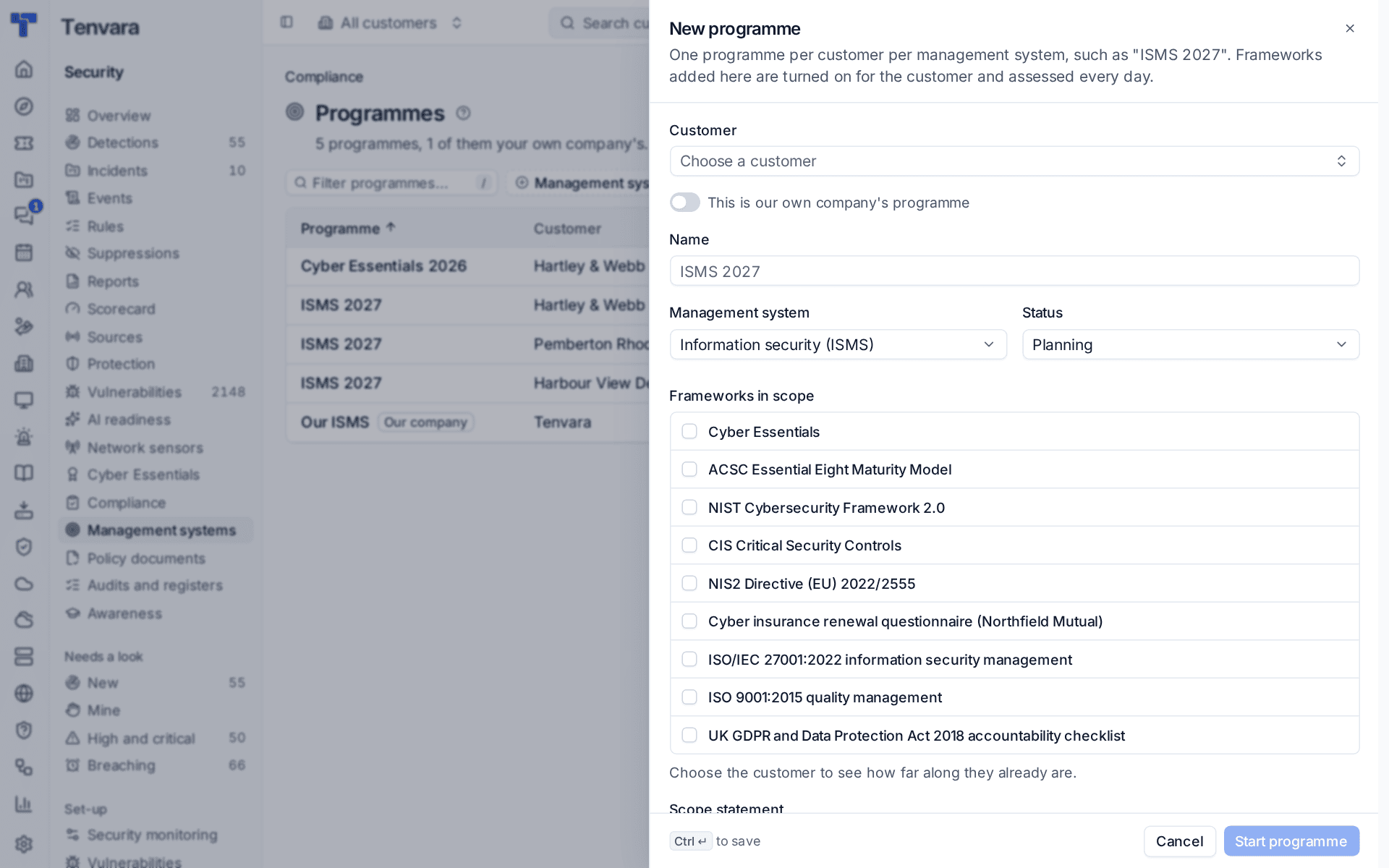
Adding a framework to a programme turns it on for the customer, so it is assessed every day. Open the programme's Set-up to add the sites, devices and Microsoft 365 tenants in scope and the certification audit dates (stage 1, stage 2, surveillance, recertification).
The programme page
A programme's page shows its overall Readiness, the next audit with a countdown, the owners, then a card per framework with its readiness and seven parts, the Gaps (common controls that fail, have lapsed or are only partly in place) and What to do next, overdue items first.
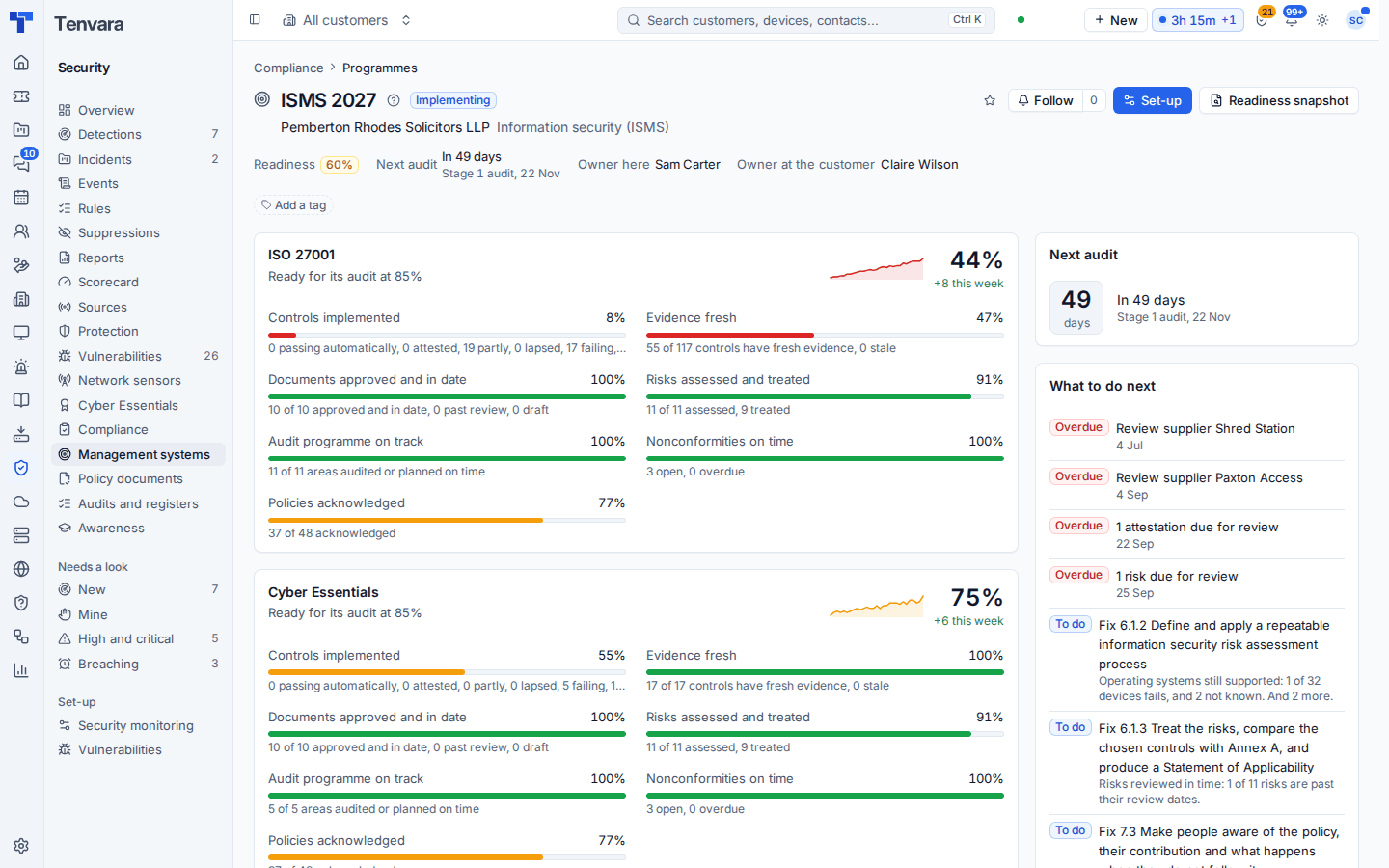
Readiness is worked out from:
| Part | What counts |
|---|---|
| Controls implemented | The framework's score from live checks and attestations |
| Evidence fresh | Controls with evidence still in date |
| Documents approved and in date | The customer's controlled documents, issued and inside their review date |
| Risks assessed and treated | Open risks scored and treated |
| Audit programme on track | Areas audited, or planned on time, within the cycle |
| Nonconformities on time | Open nonconformities not past their due date |
| Policies acknowledged | People asked who acknowledged the current version |
Each part has a weight (controls count most). A part with nothing to measure drops out, except where its absence is the gap, such as no risk register in an ISMS. A framework is ready for its audit at 85% by default. The weights and the threshold are in Settings > Security monitoring > Compliance, per customer too.
Who can use it
Management systems follow the Security module and have their own permission area in Roles and permissions: view or manage. Four actions are given separately: managing the library, seeing risk registers and SoAs, managing auditor access, and exporting evidence packs. The Compliance lead and vCISO role templates are set up for this work. Customer people get access through portal permissions: see Auditors and the portal.
Note: Cyber Essentials readiness and the other frameworks' daily assessments still have their own pages: see Cyber Essentials readiness and Compliance frameworks. A programme brings them together with everything else an auditor asks for.
Was this page helpful?
Thanks for the feedback.