Other AI tools
See which AI apps, browser extensions and consents a customer's staff already use, what each does with data, and sanction, block or revoke them.
Most businesses already use AI, whether or not anyone decided they would: a chat assistant in the browser, a note-taker that joined every Teams call, a writing extension, a free plan that trains on what people paste into it. The Other AI tools section shows what is in use for each customer, what each tool does with data, and lets you sanction the ones the customer is happy with and block the rest.
Open the customer, go to AI readiness and choose Other AI tools.
Where tools are seen
Tenvara looks for AI tools in several places and joins up what it finds:
- Installed apps: the software inventory of every device with the agent, including Microsoft Store and MSIX apps such as the ChatGPT and Claude desktop apps and Microsoft Copilot.
- Browser extensions: the agent lists the extensions in Chrome, Edge, Brave and Chromium for every local account, with the profile's signed-in account and whether each is switched on.
- Microsoft Entra consents: enterprise apps holding a consent to the customer's Microsoft 365 data, and who consented.
- Sign-ins: apps people sign in to with their work account.
A tool counts as in use when it was seen within the last 30 days (change it with A tool is in use if seen within). Tenvara looks again every 6 hours by default, and Look again on the page looks at once. Prompts and answers are never read.
Reading the list
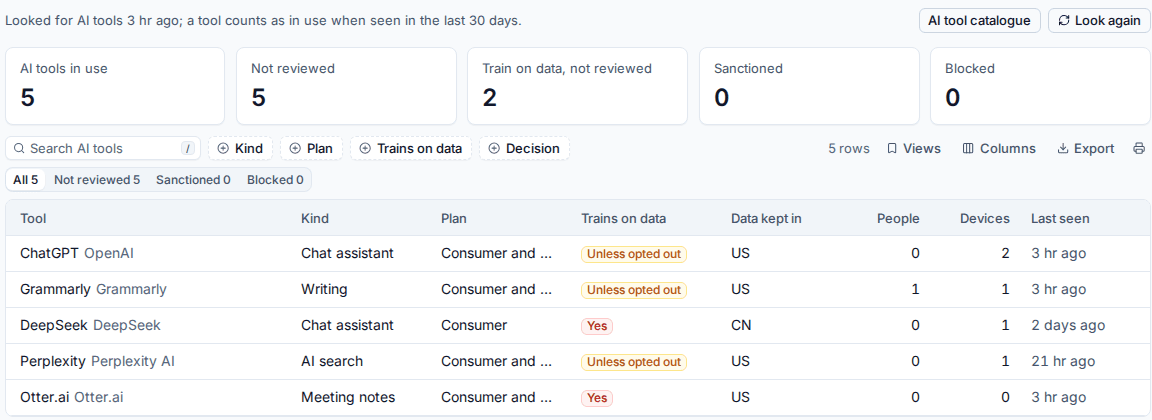
The tiles show AI tools in use, Not reviewed, Train on data, not reviewed, Sanctioned and Blocked. The table lists each tool with:
| Column | Meaning |
|---|---|
| Tool | The tool and its vendor |
| Kind | Chat assistant, writing, meeting notes, coding, AI search and so on |
| Plan | Consumer, business, or both |
| Trains on data | Whether the plan in use trains on what people put in: Yes, Unless opted out, No or not known |
| Data kept in | Where the vendor keeps the data |
| People and Devices | How many were seen using it |
| Last seen | When it was last seen |
Click a tool to open its details: every sighting (which device, browser profile, person or consent), the decision and the fixes.
Note: Whether a plan trains on data, and where data is kept, come from the vendors' published defaults. They are a starting point: check them for your customers and change them in the catalogue if you know better.
Sanction, block or revoke
Every tool is Not reviewed until someone decides. For each tool:
- Sanction marks it as allowed for this customer. It needs no approval and adds the tool to the customer's approved AI tools register. See Copilot, people and policy.
- Block stops it in browsers on the customer's devices. It is a fix, so it waits for the customer's approver. Once approved, the agent adds the tool's web addresses and extensions to Chrome's and Edge's block lists on Windows and Linux devices: a blocked extension is switched off and cannot be switched back on, and a blocked address shows the browser's "blocked by your organisation" page. Devices that are offline or enrolled later get the policy when they connect. Unblock undoes it.
- Revoke consent removes the app's consent to the customer's Microsoft 365 data, through the customer's approver. Undo gives the same consent back.
The agent only ever takes back the entries it wrote, so block lists set by Group Policy or by you stay as they are.
The checks
| Check | Severity |
|---|---|
| No unsanctioned AI tools that train on business data are in use | High |
| No unsanctioned AI app holds a consent to Microsoft 365 data | High |
| Every AI tool in use has been reviewed | Medium |
| Blocked AI tools are no longer used | Medium |
| Every device has the AI browser policy | Low |
New AI apps found by an assessment raise an alert when Alert on new AI apps is on in Settings > AI readiness. The alert gives counts, never names.
The AI tool catalogue
Tenvara recognises tools from a catalogue of more than 160 AI tools, with how each is found on devices, in browsers and in Microsoft Entra. Go to Settings > AI tool catalogue (or press AI tool catalogue on the page).
- Change a shipped tool, for example its training or data location. Your changes are kept when the catalogue is updated.
- Add a tool for one the catalogue does not have, or an app your customers built: its name, vendor, kind, plans, web addresses, extension IDs, app names and publishers and Entra app names.
- Switch a tool off so it is never reported.
A tool's risk follows from its data: high when its plan trains on data or keeps it in China, low for local models and business plans that do not train, medium otherwise.
Was this page helpful?
Thanks for the feedback.