Syslog relays
Collect syslog from firewalls, switches and printers at a site through a device with the agent, without sending syslog across the internet or opening a VPN.
Firewalls, switches and other network devices send their logs as syslog. When a site's devices cannot reach your Tenvara server directly (no fixed address, no VPN, or you would rather not send syslog across the internet), use a syslog relay: a computer with the Tenvara agent at that site listens for syslog and forwards every line over the agent's own secure connection.
The relay's customer and site own everything it forwards. Nothing in a syslog line can change which customer it belongs to.
Choosing the relay
Any device with the agent and a customer can be a relay. Pick one that is always on and has a fixed address on the site's network (a DHCP reservation or a static address): a server, or a small always-on Linux box in the comms cabinet. One relay per device; a site can have several.
Making a relay
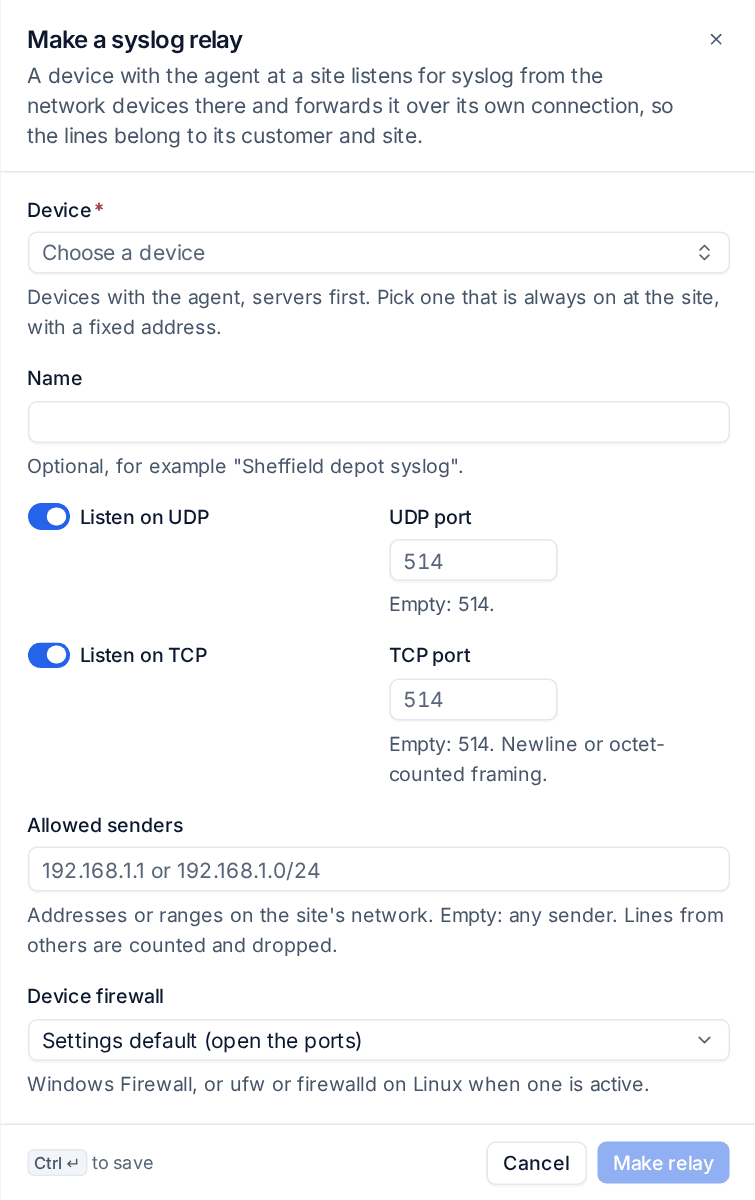
- Go to Security > Sources, open Syslog relays and press Make a syslog relay. (A server's device page also has a Syslog relay block.)
- Choose the Device. Servers are listed first.
- Optionally give it a Name, such as "Sheffield depot syslog".
- Leave Listen on UDP and Listen on TCP on, on port 514, unless the site's devices use other ports. TCP takes newline or octet-counted framing.
- Under Allowed senders, list the addresses or ranges on the site's network that may send (for example 192.168.1.0/24). Left empty, any sender is accepted; lines from others are counted and dropped.
- Device firewall: by default the agent opens the ports in Windows Firewall, or ufw or firewalld on Linux when one is active, and closes them when the relay stops.
- Press Make relay.
The agent starts listening within seconds.
Pointing network devices at it
Open the relay to see its Setup guide: the address and port to send to, and the steps for each make of device. On each firewall or switch, set the remote syslog server to the relay's address and port.
Then add each device as a network source received through the relay, with its address on the site's network. The relay's panel lists the Senders it hears; one you have not added as a network source has Add as a network source with the relay, customer and site filled in. Because private addresses repeat between sites, an address only has to be unique per relay.
Lines then appear under Security > Events like syslog sent straight to Tenvara, parsed for the device's make, as that customer and site. See Event sources and collection.
Health
The Syslog relays tab lists each relay with its health, site, what it is listening on, how many senders it hears and lines a minute. Open one for its findings and figures:
- Listening on: each port, marked when it could not open (for example another syslog service already uses TCP 514).
- Device firewall: whether the rule is open, or that no firewall is active so nothing needed opening.
- Lines a minute, lines since the agent started, lines dropped over the limit, lines refused from senders not allowed, and the last line.
- Senders: each with its lines and when it last sent.
A relay is Receiving, Silent, Failing, Waiting, Offline or Off. One that cannot listen, or stops reporting while its device is online, raises an alert (critical by default) that clears when it recovers. One with no lines for an hour while listening raises the silent source alert, like any silent network source. Press Report now (or r on the list) to ask the relay for a fresh report.
Settings
Settings > Security monitoring > Syslog relays sets the default ports, whether the agent opens the device firewall, the extra lines a minute a relay may send on top of the device's own events (so a busy firewall does not crowd them out), the longest line kept, how often the relay reports, when a relay counts as not reporting or quiet, and whether and how loudly to alert.
To stop a relay, switch it off or delete it. The agent stops listening and removes its firewall rule. Network sources received through it are removed with it (their addresses mean nothing elsewhere); their past events stay.
Tip: If the relay's machine already runs its own syslog service on 514, either stop that service or choose another port for the relay and point the network devices at it.
Was this page helpful?
Thanks for the feedback.