Backups through restarts and updates
A backup cut short by a restart, a reboot or an update of Tenvara is interrupted, not failed. It carries on from its checkpoint, overdue backups catch up a few at a time after a long stop, and updates wait for running backups.
Servers restart, and Tenvara is updated. None of that is a problem with the backup, so Tenvara does not treat it as one: the backup is interrupted, keeps what it stored, and carries on by itself. Nothing turns red, nobody is alerted and your success figures do not move.
Interrupted is not failed
Tenvara tells a restart apart from a real failure. A backup counts as interrupted when the cause is on Tenvara's own side:
- the backup service stopped, restarted or was updated;
- its database restarted or could not be reached for a moment;
- a device's backup helper could not reach Tenvara at all, because it was updating or its address was briefly unreachable.
A connection refused by a customer's own server, or by Microsoft, is a real answer and is handled as a real failure.
An interrupted backup:
| Status | Interrupted, with the reason: "Interrupted: the install could not be reached (it may have been updating)" |
| Alerts | None. No failed alert, and it is not counted towards "keeps being interrupted" |
| Figures | Left out of Success, last 24 hours, the 7 day figure and the 14 day strip on the Backup overview |
| Last good backup | Unchanged. The item is not marked as failing |
| What it stored | Kept as a partial recovery point you can browse and restore from |
Carrying on from the checkpoint
Every part of a backup saves its progress as it goes (every 5 minutes by default), so carrying on means reading only what is left.
Microsoft 365
A restart of the backup service never ends a Microsoft 365 backup:
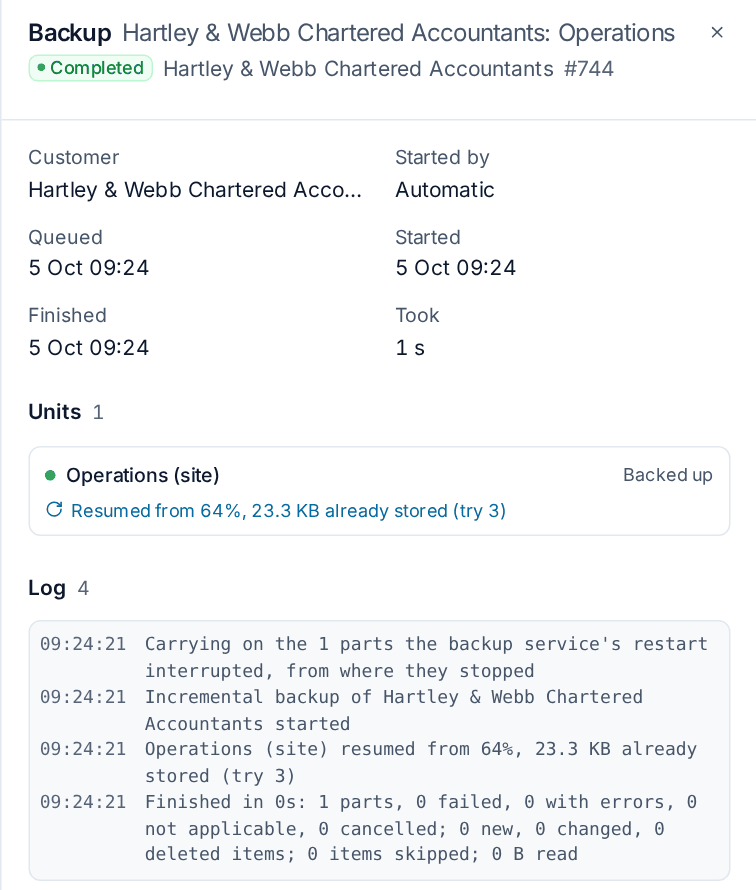
- A running job carries on in the same job. Its unfinished parts go back in its queue in their order, and a part cut short mid-way resumes from its checkpoint ("Resumed from 64%, 38 GB already stored").
- A queued job stays queued.
- Nothing is cancelled unless a person cancelled it.
Queued Microsoft 365 backups always start in their order after a restart. If the backup service was down for more than 15 minutes, a backup that shows no sign of life ends, and the next run starts from where it got to.
The Jobs list says "Carried on after a restart at 13:54" beside the job's status, the job panel has a note with how many restarts it came through, and the log says how many parts were still to back up.
Devices
A device backup that loses Tenvara itself, for example while it updates, waits. The job says "Waiting for the install (it may be updating)" and its log counts the wait. When the install answers, the backup carries on where it stopped and nothing already sent is sent again: "Carried on after the update".
If the install is away for longer than the wait, the backup ends interrupted, not failed, and a run of what it had not finished is queued at once, starting from the last checkpoint. The two jobs link to each other.
A restore to a device waits the same way. Past the wait it ends interrupted with no alert, what was already written stays, and Carry on in the job panel restores the rest without writing the finished files again.
For what happens when the device itself restarts, sleeps or loses power, see Resuming large and interrupted backups.
The Interrupted backups settings
Open Settings > Backup, the Defaults tab, and find Interrupted backups.
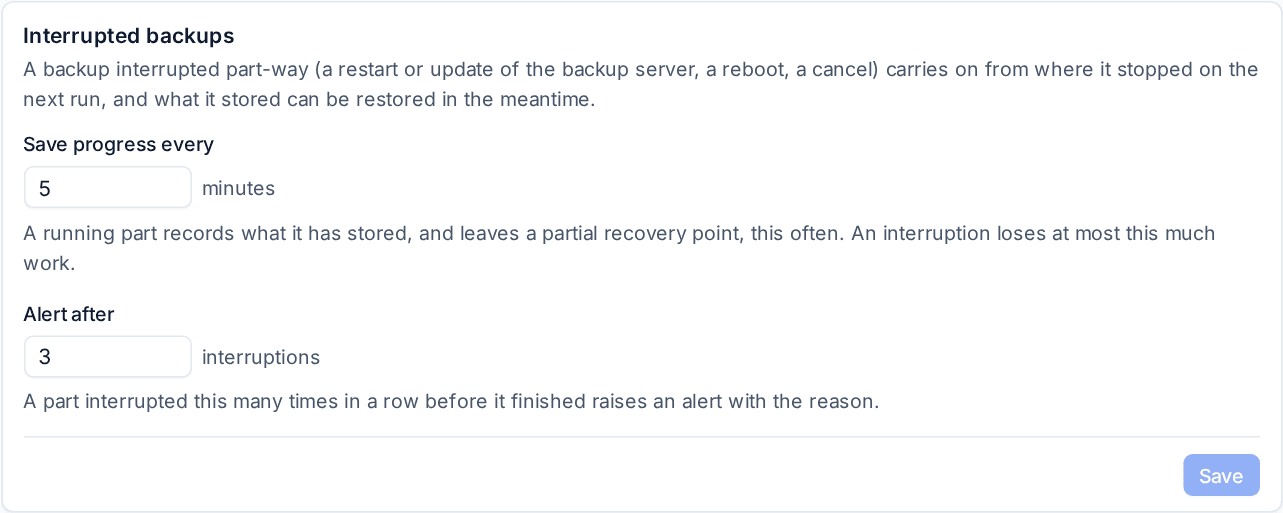
| Setting | Default | What it does |
|---|---|---|
| Save progress every | 5 minutes | How often a running part records what it has stored and refreshes its partial recovery point. An interruption loses at most this much work |
| Alert after | 3 interruptions | A part interrupted this many times in a row by its own device or source raises a warning with the reason |
| Carry on after a restart | 3 interruptions | A backup that a restart of the backup server or its database interrupted carries on by itself this many times in a row, uncounted and without an alert. The next interruption counts as a failure |
| Wait for the install for up to | 10 minutes | How long a device backup or restore that cannot reach the install pauses before it ends interrupted. From 1 to 60 minutes |
Catching up after a long stop
When the backup service has been off for a while, every schedule has passed by the time it is back. Overdue backups then catch up a few at a time rather than all at once:
- Device backups start a few at once, set by Device backups at once under Thresholds and lifetimes on the Defaults tab. At 0, the default, the number comes from the backup server's processors and memory. The rest wait, and each one's log says "Waiting for its turn" with how many are ahead.
- Longest overdue first. A "Back up now" someone pressed goes ahead of everything, then the backups that fell due longest ago. A device that is off holds no place in the line: the next one starts instead, and it starts when it is back.
- Microsoft 365 tenants are let in the same way, oldest last good backup first, within Microsoft 365 tenants at once.
- Repository maintenance that is due waits until the catch-up is over.
While it lasts, the Backup overview shows Catching up with a progress bar ("Catching up: 12 of 40 overdue"), how many are running and waiting, and under Next to start the devices in the order they will start, each with when it fell due or "Device is off".
Paused, not overdue
Items that are behind only because backups were deliberately off show Paused, with a line saying when backups were off, and raise no overdue alert. Overdue counts again from the moment backups came back. This applies when the backup service was stopped, when the Backup module was switched off in Modules, and while a customer is in takeover mode with its backups not started. Something already overdue before backups went off stays overdue.
Updates wait for backups
An update of Tenvara restarts it, so before it restarts anything the update looks at which device backups and restores are running and waits for them to finish.
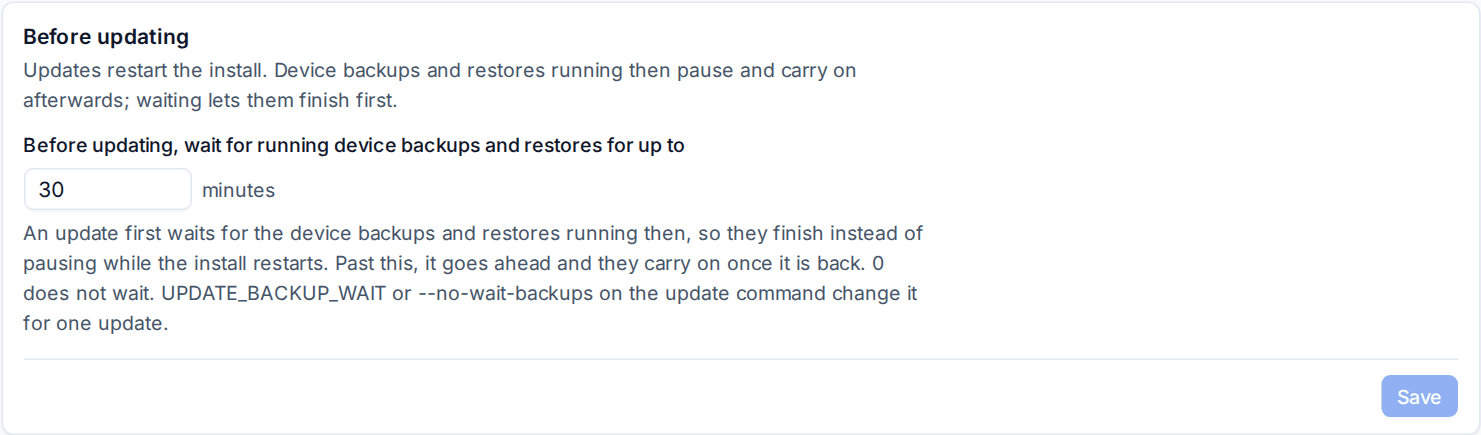
Open Settings > Updates and find Before updating:
- Before updating, wait for running device backups and restores for up to: 30 minutes by default. Set it to 0 to never wait.
- The page lists the device backups and restores running now, so you can see what an update would wait for.
Updates of the agent on a device wait too: an agent or backup helper update holds back while the device has backup work running, including a boot check or a standby machine's copy on a sandbox host, for up to 6 hours.
Each job says what is happening in its own log: "The install is updating: waiting for this backup to finish" and, for one the update went ahead under, "The install updated while this ran; it carried on". A short backup finishes before the update starts, and a long one waits out the update and carries on. See Updates.
Related
Was this page helpful?
Thanks for the feedback.