How Tenvara decides what reaches someone
The checks every alert and detection passes before anyone is told: a short wait, your own work, planned states and maintenance, one cause one alert, learning periods, and what Critical means.
An alert should mean someone needs to do something. Every alert and every security detection in Tenvara, from every module, passes the same set of checks before anyone is told. Nothing is thrown away: what does not reach a person is kept, as an alert held back or as information, so you can always see what happened and why it stayed quiet.
This guide explains each check, in the order Tenvara applies them, and where you change the numbers.
1. Waiting before telling
Many problems fix themselves within minutes: a server restarting after updates, a service the system brings back, a backup that fails once and works on the next run. So a new alert first opens held back, and tells people only if it is still true when the wait ends:
| Kind of alert | Waits |
|---|---|
| A device or site offline, a service stopped, a server check or website down | 5 minutes |
| A metric over its threshold (CPU, memory) | 15 minutes |
| A failed backup run or server check | until the next run fails too |
A problem that clears inside the wait becomes one resolved information line, such as Back within the 5 minutes grace window, so nobody was told. No notification, no ticket, no "resolved" email. A clear works the same way: an alert people were told about resolves only once the good state has lasted, so a value hovering on the line does not open and close it all day.
Detections work alike where a reversal is normal. Defender or the Windows firewall switched off and on again within 10 minutes raises nothing; switched off for good, it is raised as usual.
A problem that comes back soon after it resolved opens quietly and tells people only if it is still there after the cool-off (10 minutes by default). See Alert history, dependencies and flapping.
2. Our own work
Tenvara does a lot to your customers' systems: agent updates, scripts, patch runs, network scans, backups, Microsoft 365 changes, DNS edits, hypervisor updates. Each is recorded while it runs, and anything it sets off is recognised as our own work: one information line, closed at once, nobody told. An agent restarted by its own update is not an outage, and a scan Tenvara ran is not an attack.
The network sensor and some security rules also look at where activity came from. Add your own addresses in Settings > Monitoring, on the Our own work card:
- This server's own addresses: where Tenvara runs, public and on its own network.
- Network sensor addresses: sensors that are not devices with the agent.
- Build and test machines: your own build, test or jump machines that reach devices you manage.
- Lab ranges: networks of test or lab machines, whose activity is treated as your own testing.
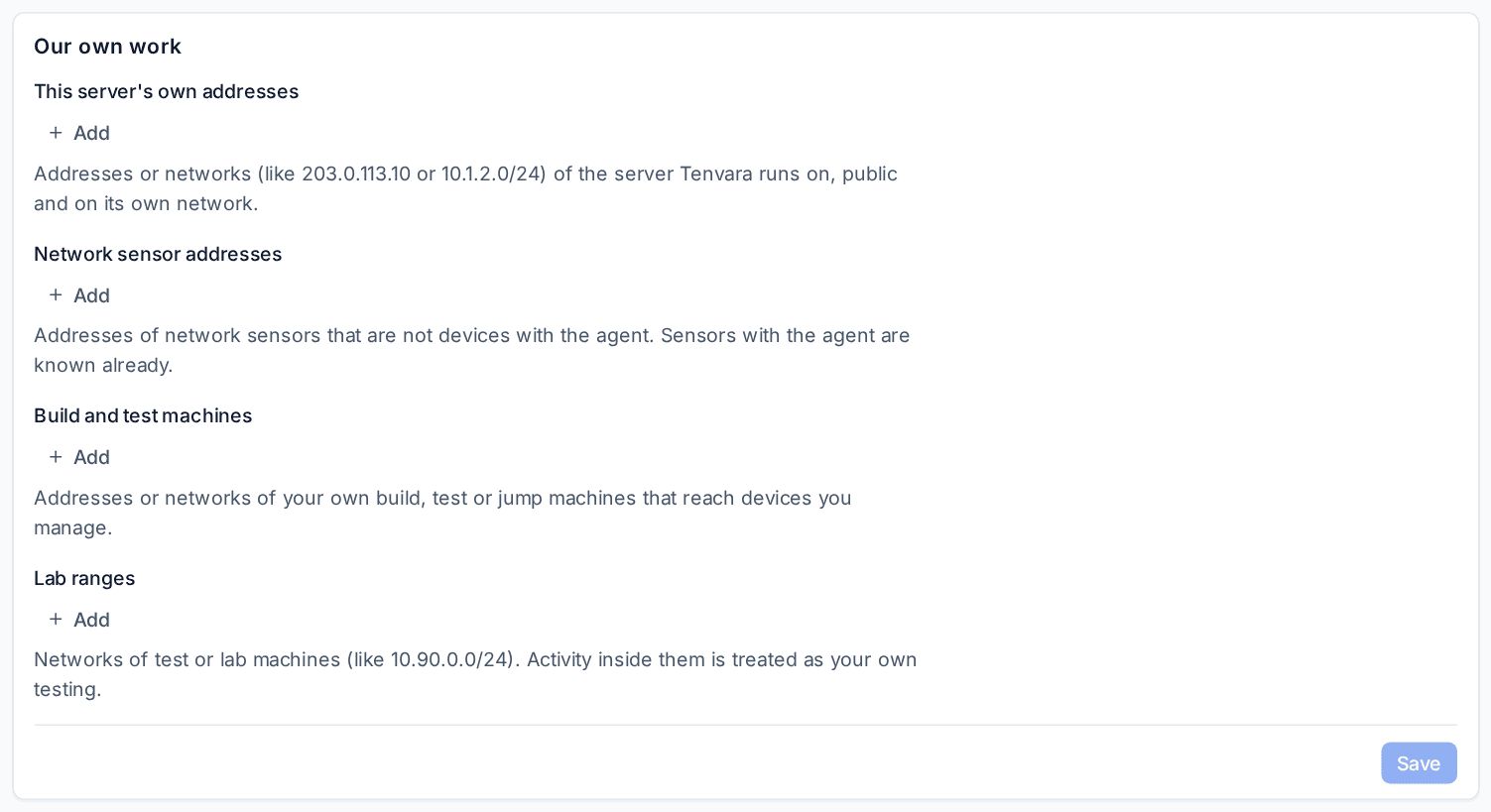
Only activity that comes entirely from your own addresses counts. One address that is not yours and it raises as usual.
3. Planned is not broken
Something switched off on purpose is not a fault:
- Maintenance: a maintenance window or maintenance mode on a device, site or customer holds alerts from every module until it ends, then tells people about whatever is still wrong.
- Test or lab: alerts stay visible but are never ticketed or sent to anyone.
- Unused or Retired: alerts are closed as planned.
Set these with Planned state... on a device, site, customer, server check, NAS, firewall or controller, or virtual desktop deployment. See Maintenance windows and mutes.
A server whose own log announced a restart or shutdown just before it went quiet is given time to come back before its offline alert tells anyone. Security detections are never held by a planned state: an attack on a test machine is still an attack.
4. One cause, one alert
When one thing goes wrong, the alerts it causes are gathered under it:
- any alert on a device that is offline waits under the offline alert, and the same for a device behind a parent that is down;
- alerts from a Microsoft 365 tenant that lost its connection, a backup source refusing access or a hypervisor node that is offline wait under that parent's alert;
- more than 3 alerts about one parent within 5 minutes open under one alert that lists them;
- a vulnerability on many devices is one alert per customer that lists the devices;
- a security detection that joins an incident waits under the incident's alert.
The parent makes one ticket and one page. See Alert storms and first-run findings.
5. Learning before judging
Security rules that look for something new (a sign-in from a new country, a remote desktop session from a new address) need history to know what is normal. Each such rule learns for a set number of days (14 for the built-in ones) before it raises anything; while it learns, its hits are counted but nothing is raised. A customer's own countries count as usual: the country on its record and sites, and countries its people regularly work from.
The first scan of anything new (a customer, a tenant, a domain, devices) goes into one findings report instead of alerts. See Quiet monitoring and onboarding findings.
6. What Critical means
Critical is kept for something that is broken or under attack now, that someone must act on now, and that harms people or data. Everything else is a warning or lower. Each alert type has a highest severity it can reach, and the steps that raise an alert (a VIP, a critical device, a repeat) add one step at most, never above that. A deadline that is still ahead, such as a certificate running out next month, is a warning.
7. Alerts that close themselves, and stay closed
An alert closes when its source says the problem has gone, and opens again (counting, not duplicating) if it comes back. What a person closes is judged by how it ended: an alert closed as actioned opens again if it recurs within 7 days, while one closed as a false positive, expected, our own work or a vendor routine stays closed and only counts the repeat. Kinds of alert that are mostly noise for a customer are lowered for that customer, with Undo. See How did it end? Closing alerts and the noise figures.
Seeing what was held
Nothing here hides anything:
- Held back in the alert list marks an alert that is open but has told nobody yet, and the alert says why.
- Information lines for our own work, planned states and quick recoveries are in the list with Resolved and on the device's alert history.
- Turning a whole kind of alert off is a separate, visible choice on Alerts > Alert types. See Alert types.
Related
Was this page helpful?
Thanks for the feedback.