Identity, access and governance
The AI readiness sections that read sign-in security from the Microsoft 365 checks and Purview's labels, data loss prevention, retention and audit settings, and what each means for Copilot.
Copilot gives whoever signs in as a person a search over everything that person can open. So a password without MFA is not just a stolen mailbox, it is a search over the business. And labels, data loss prevention and the audit log decide what Copilot may do with what it finds and whether anyone can see what it did. Two sections of AI readiness cover this: Identity and access and Governance.
Identity and access
Open the customer page, go to Security, then AI readiness, and choose Identity and access.
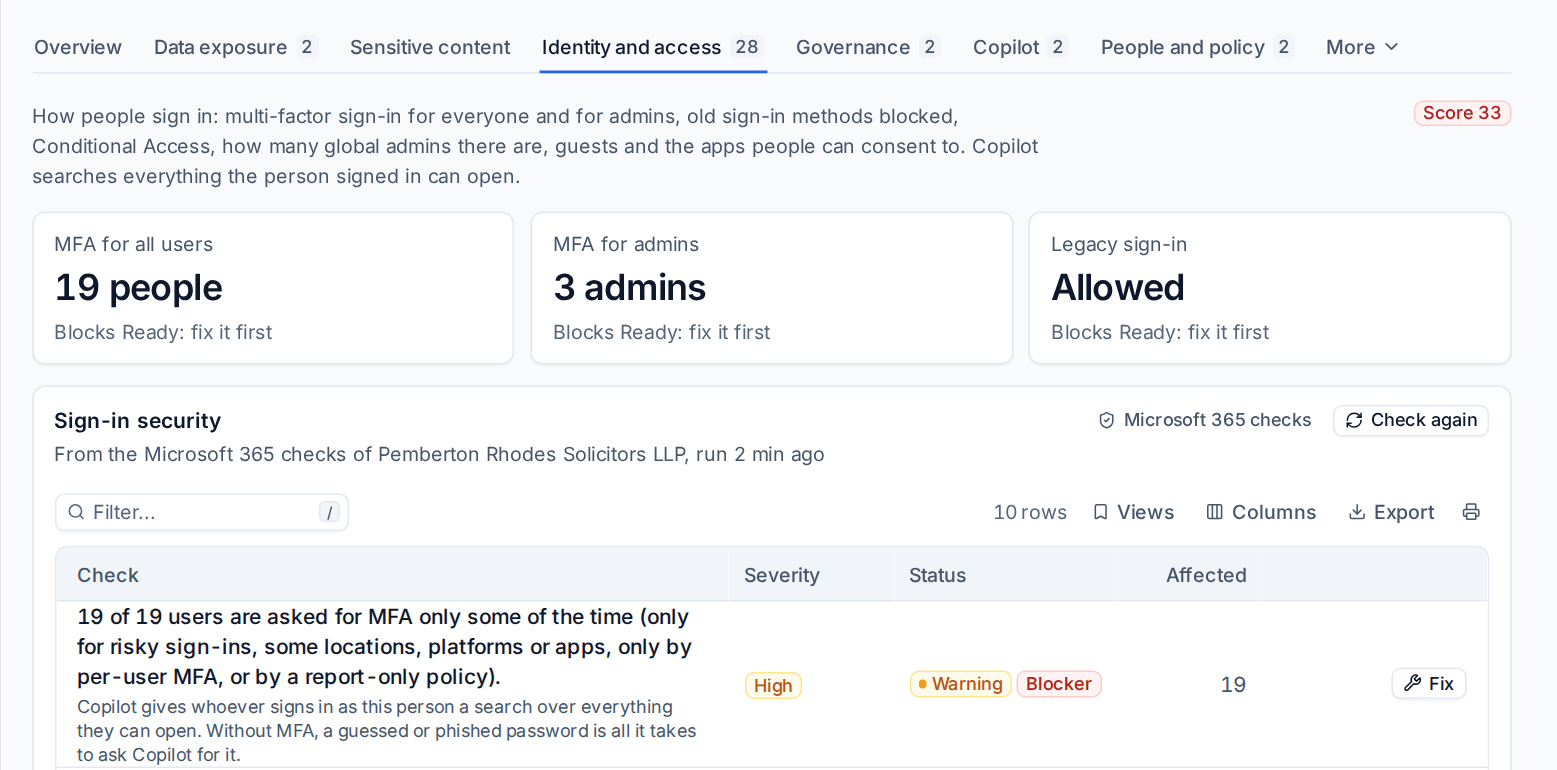
This section does not run checks of its own. It shows the customer's Microsoft 365 checks that matter most for Copilot, with the same results, findings and fixes, and adds Why this matters for AI to each:
| Check | Blocker for the verdict |
|---|---|
| Everyone must use MFA for every sign-in | Yes: No MFA for all users |
| Administrators must use MFA for every sign-in | Yes: No MFA for admins |
| Every privileged administrator has registered MFA | Yes: No MFA for admins |
| Legacy authentication is blocked | Yes: Legacy sign-in allowed |
| Device code sign-in is blocked | No |
| Two to four Global Administrators (the range is a setting) | No |
| Guests cannot browse the directory or invite other guests | No |
| Guests not seen for the number of days you set | No |
| Guests cannot reshare files | No |
| Users can only consent to low-risk apps | No |
The page starts with the three identity blockers, each Clear, open or Not read. Below them, per tenant ("From the Microsoft 365 checks of ..."), each check shows its status and severity, a Blocker badge where it is one, the people or settings at fault, the Microsoft 365 fix button and Check again. People's names need the See evidence permission.
One source of truth
Because the results are the Microsoft 365 checks' own:
- A fix made on either page clears the finding on both. Fix MFA from Cloud > Findings and the AI readiness finding resolves at the same moment.
- Each finding shows at the same severity on both pages, including where a result is graded lower than the check, such as a legacy authentication block with exclusions, which is a medium warning on both.
- A check switched off or given another severity in Settings > Microsoft 365, on the Checks tab, follows here. A risk accepted there is not applicable here, with the reason, although the verdict still reads the result itself.
A tenant whose Microsoft 365 checks are off (the Audit and config drift feature) or have not run for a week shows Not read with the reason. The identity blockers are then not read, so the verdict cannot be Ready until they are. See Security findings for the checks themselves.
For the pilot group, only the pilot's own people count towards the identity blockers. See Copilot readiness and the pilot group.
Governance
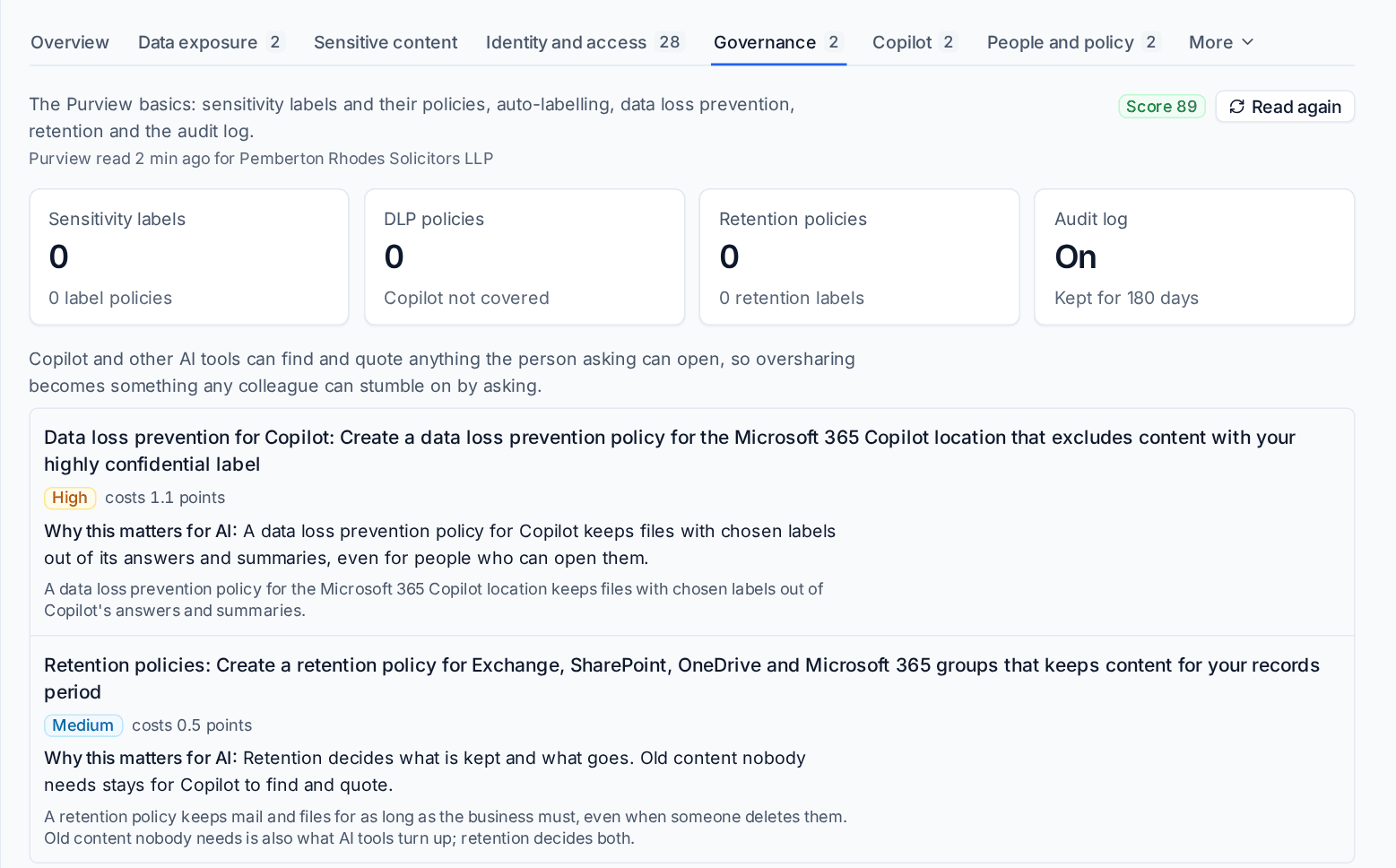
Choose Governance for what the customer's Purview is set up to do. Tenvara reads the sensitivity labels and their policies, data loss prevention, retention and the audit log, and the page says when each part was last read. A part that could not be read for a passing reason is tried again in the background ("tried again in the background"), a part the tenant's licences leave out says Not in this tenant's licences, and no check passes or fails on what could not be read.
The checks
| Check | Severity |
|---|---|
| Sensitivity labels are published | High |
| Labels are published to everyone | Medium |
| New files and email get a label by default | Medium |
| Labels are switched on for SharePoint and OneDrive | Medium |
| Labels can be put on Teams, groups and sites | Low |
| Encrypting labels let Copilot work for the people they allow | Low |
| Sensitive content is labelled automatically | Medium |
| Data loss prevention protects email and files | High |
| Data loss prevention covers Copilot | High |
| Mail and files are kept by a retention policy | Medium |
| Retention labels are published | Low |
| The unified audit log is on | Medium |
| Audit records are kept for 180 days or more (the days you set) | Low |
Data loss prevention counts only policies with a rule that blocks or restricts, and the policies together have to cover email, SharePoint and OneDrive. A policy that only reports, or one in test, is listed but does not count.
Until any sensitivity label is published, the label checks say "No labels exist yet" instead of failing one by one, and the plan shows Publish sensitivity labels as one root cause. See The verdict and the plan.
Checks that need a licence
Automatic labelling and data loss prevention for Copilot need Microsoft 365 E5 (or E5 Compliance). Keeping audit records past Microsoft's 180 days needs Audit (Premium). For a tenant without them, these checks say Needs with the licence and what it would give, are not scored and are not in the plan. The report lists them under Would need a licence you do not have.
How long audit records are kept
Audit records are kept for 180 days or more compares the audit retention the tenant has with the days you set. It is the same setting the Microsoft 365 check Audit log retention fits the need uses ("How long audit records are kept" on Settings > Microsoft 365, the Checks tab, per customer where needed), so the two pages never disagree. The default is 180 days, which Microsoft keeps for every tenant.
What needs the app's certificate
Purview is read through Microsoft's compliance service with the app registration, so labels, policies, retention and audit retention are read without anything extra. Whether labels are switched on for SharePoint and OneDrive is read through SharePoint's admin service, which only accepts the app registration's certificate. Until the certificate is added (Settings > Microsoft 365), that one line shows Not read with the reason. See App registration health and Fix it for me.
Related
Was this page helpful?
Thanks for the feedback.