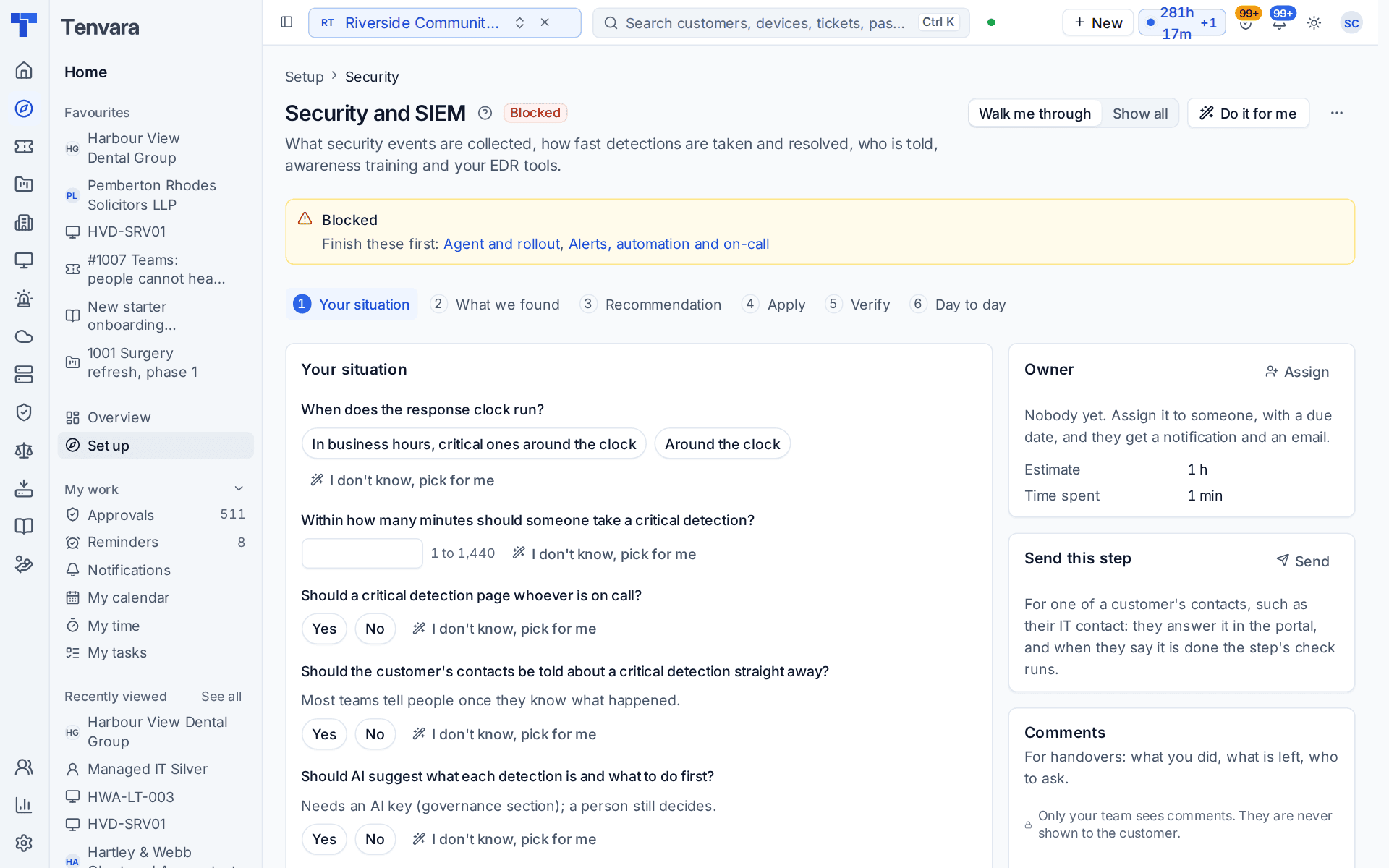
Security and SIEM
The setup section for security monitoring: the response clock for detections, how fast a critical one is taken, paging on-call, telling the customer, AI suggestions, awareness lessons and the checks that events arrive.
This section of the setup helper sets how your team responds to security detections: what is collected, how fast detections are taken and resolved, who is told, awareness training and your EDR tools. It sits in the Security phase and takes about an hour.
Open it from Home > Set up, then Security and SIEM. It runs through the same six beats as every section: see Working through a section.
Before you start
- Finish Agent and rollout and Alerts, automation and on-call first. Until then the section shows Blocked: devices send the events, and on-call is who a critical detection pages.
- If discovery says you provide no security service and no customer has a standard to meet, the section is listed as not needed, with that reason.
What it reads from your data
What we found shows:
- detections in the last 30 days, and how many are open;
- network sources sending events;
- EDR tools connected.
The questions it asks
| Question | Choices | Pick for me |
|---|---|---|
| When does the response clock run? | In business hours with critical ones around the clock, or around the clock | In business hours, critical ones around the clock |
| Within how many minutes should someone take a critical detection? | 1 to 1,440 | 15 |
| Should a critical detection page whoever is on call? | Yes or no | Yes |
| Should the customer's contacts be told about a critical detection straight away? | Yes or no | No |
| Should AI suggest what each detection is and what to do first? | Yes or no | No |
| Should new starters at customers get the security awareness lesson? | Yes or no | No |
Most teams tell people once they know what happened, which is why the helper's pick for telling contacts straight away is no. AI suggestions need your own Anthropic key, which the Governance and AI section covers, and a person still decides. The awareness question is answered for you when discovery says you provide awareness training.
What it recommends and why
- Detections are taken and resolved against a clock, and critical ones reach a person whatever the hour. The clock, the minutes to take a critical detection, paging on-call, telling contacts and AI suggestions are all set from your answers. Critical detections always run around the clock.
- New starters get the awareness lesson, and everyone a refresher each year. This is offered when you answered yes to awareness.
Press Apply when the preview is right. An apply can be undone for 7 days.
Checking it worked
Verify runs four live checks:
- Security events arrive from every customer with devices. This one must pass before go-live. It links to Security > Sources when a customer is silent.
- Microsoft 365 sign-in and audit streams are healthy.
- EDR integrations are connected. Each EDR tool is connected with your own account for it, in Settings > Security monitoring, the Integrations tab.
- A test detection raises an alert. The check makes a detection titled "Test detection from setup: nothing is wrong", confirms it raises an alert, and clears up after itself.
Day to day
- Detections arrive on Security > Detections and as alerts. The response clock shows what is due, and critical ones page whoever is on call.
- Related detections join one incident in Security > Security incidents, which keeps the timeline and what was done for the customer report.
- Awareness lessons and phishing simulations are run from Governance and compliance > Awareness training.
- Everything this section set is in Settings > Security monitoring.
Related guides
Was this page helpful?
Thanks for the feedback.