Who updates a device: Tenvara, the device itself, or nobody
Say who keeps each device up to date, so vulnerabilities alert only where someone can act. Devices that update themselves get one alert when their own updating fails, appliances nobody can patch become one accepted risk with a review date.
Not every device you look after is yours to patch. A phone system appliance or a Linux server running unattended-upgrades installs its own updates, a server may take them from WSUS, and a sealed appliance cannot be patched at all. Alerting on every missing package of such a device only buries the alerts that matter. Updates handled by tells Tenvara who keeps each device up to date, and Tenvara acts on the answer.
The three answers
| Updates handled by | What Tenvara does |
|---|---|
| Tenvara | Approves and installs its updates in the maintenance window. Its vulnerabilities alert as usual. See Patching. |
| The device itself | Its vulnerabilities are still matched and listed, without an alert for each update. One alert says when its own updating fails or falls behind. |
| Nobody | It cannot be patched (an appliance). All its vulnerabilities are one accepted risk with who accepted it, a note and a review date, and do not alert. |
A device that is updated by itself or by nobody gets no scheduled installs, no restarts for updates and no app updates from Tenvara, and nothing wakes it before a window. Its Next window says why, for example Nobody updates this device: Tenvara does not install updates on it. Scans for updates still run, so its vulnerabilities stay listed.
Answering for one device
- Open the device and find Patches on its Overview tab. The Updates handled by line says who updates it.
- Click Change.
- Choose Tenvara, The device itself or Nobody, and add a Note for whoever looks at it next.
- Click Save.

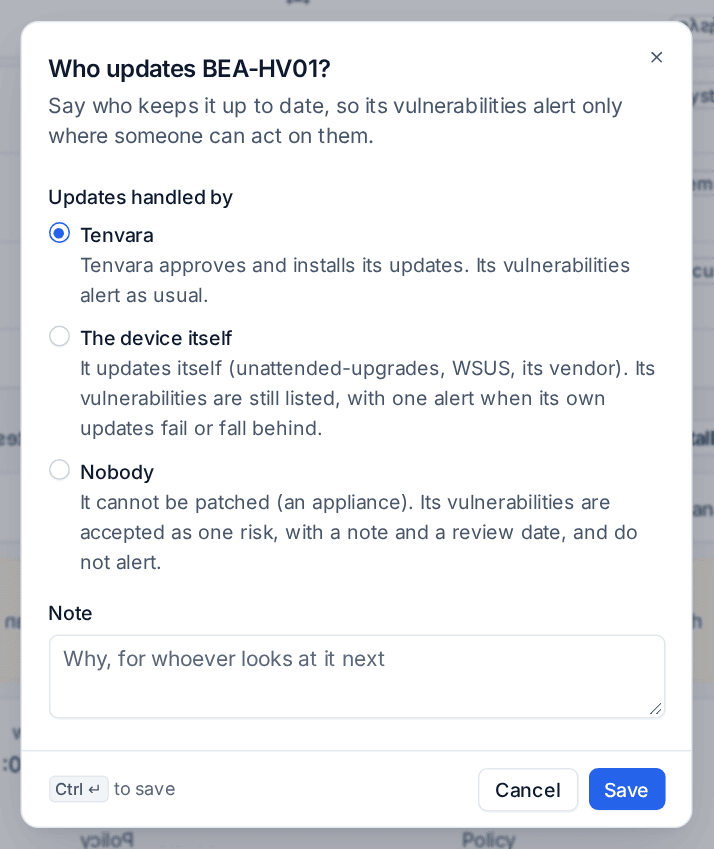
The answer is saved on the device's own patch policy, so it appears on the device's Policies tab like any other setting.
Answering for many devices
Devices > Patches opens with Who updates N devices? whenever there are devices nobody has decided about. The devices are listed and ticked; untick any you want to leave. Then choose Tenvara, The device itself or Nobody for them all, or The device itself, as proposed for the ones Tenvara recognised (below).
For a whole customer, site or device group, set Updates handled by in its patch policy on the Policies tab of Devices > Patches. A device's own answer wins over its group's, a group's over the site's and the customer's, as with every patch setting. Not said here leaves it to the level above.
Devices that update themselves are recognised
Tenvara spots devices that look after their own updates from what their agents already report:
- Linux with unattended-upgrades or dnf-automatic switched on, naming the tool;
- Windows taking its updates from a WSUS server, Windows Update for Business or a device management update policy;
- a Linux device that installed updates by itself in the last 30 days, such as an appliance's own updater.
Such a device is never moved to The device itself by Tenvara alone. It is proposed: its Patches section asks Does this device update itself? with the reason, and Yes, it updates itself answers in one click. Until someone answers, a device nobody has decided about stays quiet: its vulnerabilities are listed, with no alert or ticket for each update, and there is no Install now button. The question is the one thing to act on.
The one alert for a device that updates itself
A device updated by itself raises one alert, at most, when:
- its own updates are failing: an update it tried to install itself failed and is still not in, or its package manager is stuck. Where Tenvara can read the cause from the device's logs, the alert names it, for example the package that failed and the error lines, and where to look.
- it is behind: an update it was offered (not a feature release, driver or firmware) has waited longer than A device that updates itself is behind after (30 days by default) in Settings > Device management, under Patching.
The alert stays current as the device reports and clears by itself once its own updates work again. The same failure on several devices shows once, with one repair, which runs only after an approval.
Nobody: an accepted risk with a review date
A device updated by nobody gets one accepted-risk line covering every vulnerability on it, with who accepted it, when, the note and a review date (Review the accepted risk of a device nobody updates after, 180 days by default, in Settings > Device management, or a date you choose). The line shows on the device's Patches section, in the vulnerabilities' accepted risk list and in the customer report's vulnerability section as Accepted risk: devices nobody updates.
When the review date passes, one reminder is raised. Reviewed sets the next review date and clears it. To end the accepted risk, say who updates the device instead.
When the answer changes
Moving a device to the device itself or nobody judges its open alerts again: alerts that listed only that device close with the reason, and their open tickets get the reason as a line and are resolved without emailing the customer. Moving it back to Tenvara ends the accepted risk, and its vulnerabilities alert again.
Installing by hand anyway
On a device updated by itself or by nobody, installing updates by hand asks first. The install dialog names the answer and its reason, and the Install anyway tick box lets you go ahead. Installing on many devices at once skips these devices with the same reason unless you tick it.
Related
Was this page helpful?
Thanks for the feedback.