Service catalogue and approvals
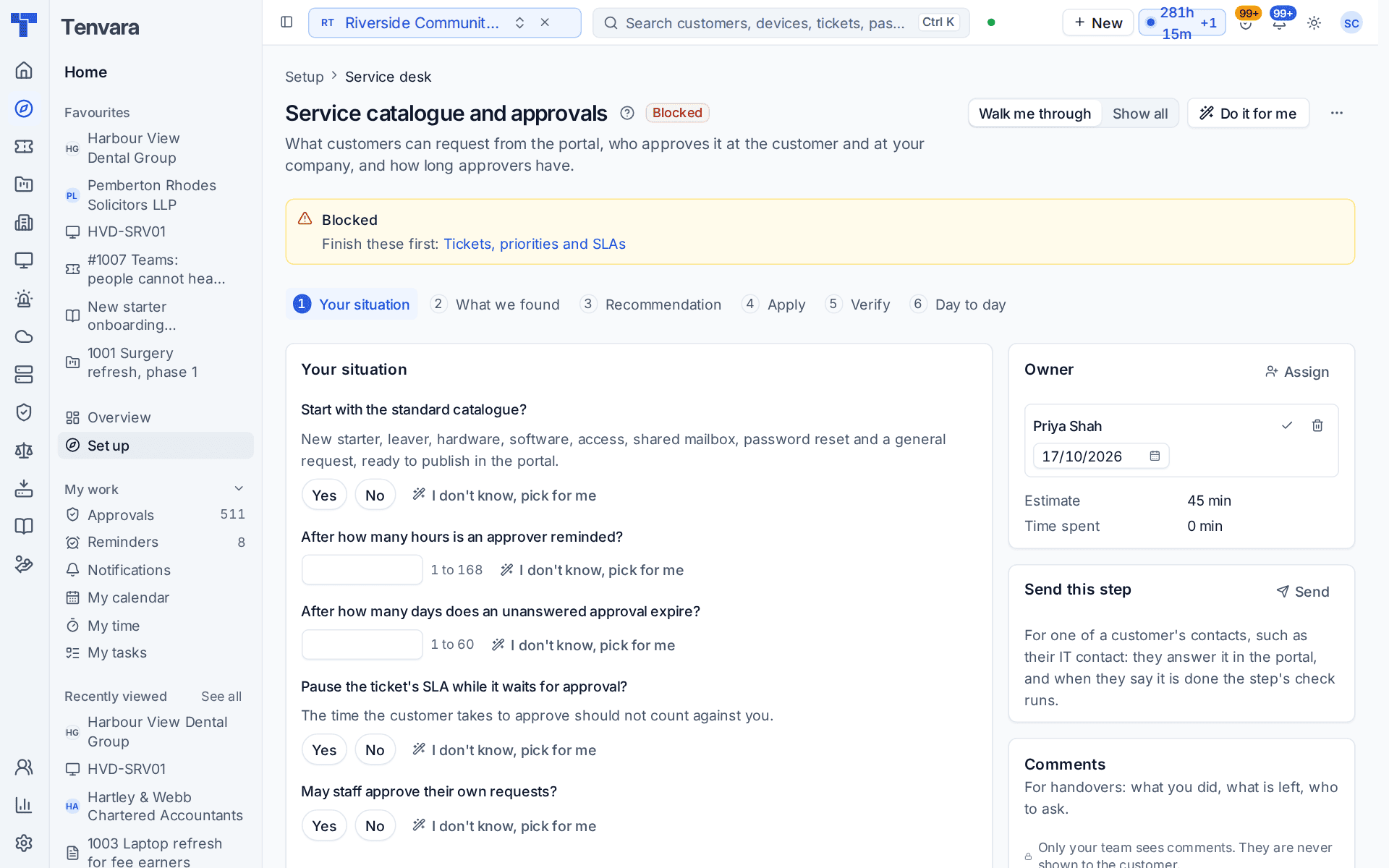
The Service catalogue and approvals section of the setup helper: what customers can request from the portal, who approves it at the customer and at your company, and how long approvers have.
Service catalogue and approvals is in the Service desk phase and takes about 45 minutes. It decides what customers can request from the portal, who approves it at the customer and at your company, and how long approvers have before they are reminded and the approval expires.
Open Set up (Health once you have gone live) and choose Service catalogue and approvals. It runs through the same six beats as every section: see Working through a section.
Note: Finish Staff, roles, teams and sign-in and Tickets, priorities and SLAs first. Until then the section shows Blocked with Finish these first and the sections it waits for. You can still read its questions.
What it reads from your data
What we found counts the catalogue items published, the starter items, the items that need approval, the customers with approvers and the people at your company who take approvals nobody else answers.
What it asks
| Question | Notes |
|---|---|
| Start with the standard catalogue? | New starter, leaver, hardware, software, access, shared mailbox, password reset and a general request, ready to publish in the portal |
| After how many hours is an approver reminded? | 1 to 168. The default is 24 |
| After how many days does an unanswered approval expire? | 1 to 60. The default is 7 |
| Pause the ticket's SLA while it waits for approval? | The time the customer takes to approve should not count against you |
| May staff approve their own requests? | Yes or no. The default is no |
What it recommends
- Customers can ask for the common things straight away, each with the questions a technician needs answered. The standard catalogue is added when you said yes.
- Approvers are reminded, unanswered approvals expire, and waiting for a customer does not count against your SLA. The reminder, the expiry, the SLA pause and self-approval follow your answers.
Check What changes, then press Apply. You can undo an apply for 7 days.
Tip: The standard catalogue is a starting point. Change each item's questions and approval, or add your own, in Settings > Service catalogue on the Items tab.
How it is verified
| Check | What it looks at | Where to fix it |
|---|---|---|
| Customers have something to request | Catalogue items are published | Add the standard catalogue, a one-press fix |
| Requests that need approval reach an approver | Items that need approval have someone to ask at each customer | Open Customers and set the customer's approvers, or the Approvers tab of Settings > Service catalogue |
| Someone at your company takes approvals nobody answers | A fallback at your side, so a request is never stuck | Settings > Approvals, the Our approvers tab |
Asking a customer who approves
Who signs off a new laptop at each customer is a question only they can answer. Press Send beside Send this step, choose A customer's contact and ask them to name their approvers. They answer in the customer portal from their To do list, and the check runs when they say it is done. See Working through a section.
Day to day
- Customers ask for things from Request something in the portal. The request goes to their approvers first and becomes a ticket with its tasks once approved.
- Requests are worked in Service desk > Service requests, with the To approve and In progress tabs.
- Everything waiting for a yes is in Home > Approvals, with reminders and expiry as set here.
- The pages behind this section are Settings > Service catalogue and Settings > Approvals.
Related guides
Was this page helpful?
Thanks for the feedback.