Docs, vault and connectors
The setup section for documentation and the vault: password rotation, watching for breached passwords, a second person reviewing articles, the break-glass export, the browser extension policy and connectors to other tools.
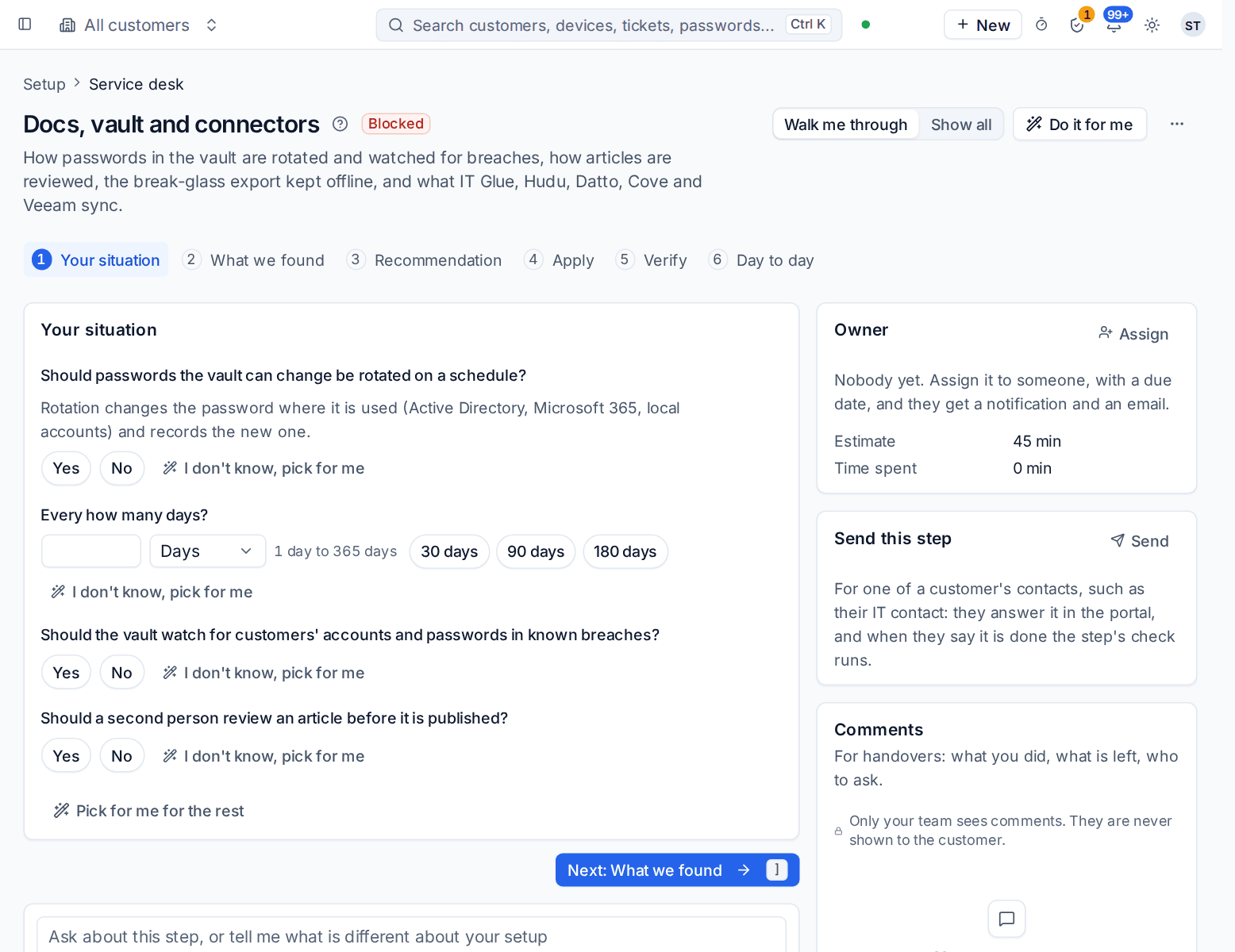
This section of the setup helper covers how passwords in the vault are rotated and watched for breaches, how articles are reviewed before they are published, the break-glass export you keep offline, and what your documentation and backup tools sync into Tenvara. It sits in the Service desk phase and takes about 45 minutes.
Open it from Home > Set up, then Docs, vault and connectors. It runs through the same six beats as every section: see Working through a section.
Before you start
Finish Customers and import first. Until then the section shows Blocked, because documentation and credentials belong to customers.
What it reads from your data
What we found shows:
- how many articles you have;
- passwords in the vault;
- connectors switched on;
- when the last break-glass export was taken, and whether one is written on a schedule.
The questions it asks
| Question | Choices | Pick for me |
|---|---|---|
| Should passwords the vault can change be rotated on a schedule? | Yes or no | Yes |
| Every how many days? | 1 to 365, with 30, 90 and 180 offered | 30 |
| Should the vault watch for customers' accounts and passwords in known breaches? | Yes or no | Yes |
| Should a second person review an article before it is published? | Yes or no | Yes |
Rotation changes the password where it is used (Active Directory, Microsoft 365, local accounts) and records the new one in the vault. Whether customers may keep their own passwords in the portal is answered per portal role in Customer portal, chat and phone.
What it recommends and why
- Vault passwords are rotated and watched for breaches, and articles are reviewed before they are published. Rotation, its interval, breach watching and the second-person review are set from your answers.
- Connect the tool you named in discovery. If you told discovery you use IT Glue, Hudu, Datto BCDR, Cove Data Protection or Veeam, the helper points you to Settings > Integrations, the Connectors tab. A connector uses your own account with that vendor, syncs what it knows into each customer, and lets you choose what comes across first.
Press Apply when the preview is right. An apply can be undone for 7 days.
Checking it worked
Verify runs three live checks:
- Connectors are syncing. A connector that has stopped links to Settings > Integrations.
- A break-glass export is taken and kept offline. This one must pass before go-live. The export is an encrypted copy of the vault you can open without Tenvara if the worst happens. Set it up in Settings > Vault export.
- Breached passwords are watched for. Fix it in Settings > Documentation, or add the domains to watch in Security > Dark web monitoring.
Day to day
- Technicians find passwords and articles from the customer, device or ticket they are on. Every reveal is in Docs > Vault audit log.
- Rotated passwords change by themselves and breached ones raise a ticket. Follow rotation in Docs > Password rotation.
- The break-glass export is written on its schedule. Keep the newest copy somewhere that is not the server.
- The defaults and locks for your staff's browser extension are on Settings > Documentation, the Browser extension policy tab. See Browser extension settings and policy.
Related guides
Was this page helpful?
Thanks for the feedback.