Out-of-hours cover per queue
Choose who handles each queue out of hours, nobody, your own on-call rota, a third-party provider or a mix, and how held work, SLA clocks, the morning list and providers' replies work.
Not every service desk runs a rota through the night. Some close at half five and pick up in the morning; some pay a partner to answer urgent calls overnight; many do a bit of both. Tenvara asks, per queue, who handles things out of hours, and behaves accordingly: nobody is paged for work that should wait, SLA clocks do not run while nobody is meant to be working, and a provider gets the urgent work with their replies landing on the ticket.
It works the same in the Company edition, for an IT team that has no night cover or pays a third party for it.
The four answers
| Out of hours | What happens |
|---|---|
| Nobody (business hours only) | Alerts and tickets wait for business hours. Nobody is paged, SLA clocks follow business hours, and what came in is on a morning list |
| Our own on-call rota | Critical alerts and urgent tickets page whoever is on call, as set in Team > On-call (see On-call rotas and paging) |
| A third-party provider | The urgent work goes to the provider, their replies come back to the ticket, and they hand it back in the morning |
| A mix | Each queue gets its own answer, for example the service desk to a provider and the alerts queue to nobody |
"Out of hours" means outside the default business calendar on the Business hours tab of Settings > Ticket setup, the same hours a rota's out-of-hours cover uses. In business hours nothing changes. A page someone raises by hand, and a test page, is never held.
Set it up
The setup helper asks it first in its Alerts, automation and on-call section: "Out of hours, who handles things?". A mix then asks who handles each queue. Only the follow-up questions that apply are asked:
- for Nobody: whether to still page someone for Critical alerts out of hours (if yes, it also sets up a small rota for those),
- for Our own on-call rota: how often it changes, the handover time and on-call pay,
- for A third-party provider: their name, how they get the work, the addresses it needs and what they may see.
Team > On-call, on its Rota tab, shows an Out of hours card with who handles each queue, such as "Held for business hours", "Held for business hours; Critical alerts still page whoever is on call" or the provider's name, with Change in setup. When nobody is on call by your choice, the page says so instead of warning. See Alerts, automation and on-call.
When nobody covers a queue
- Out-of-hours alerts and tickets on the queue are held. Nobody is paged and a held page has no escalation timer.
- A 24/7 SLA policy, or a priority set to run around the clock, follows business hours for that queue's tickets, so nothing breaches overnight while nobody is meant to be working.
- With Still page someone for Critical alerts on, a Critical alert or ticket still pages whoever is on call.
- At opening time, what came in overnight is on a morning list on Home and Team > On-call, and each of the queue's people (else the administrators) gets one email listing it. An alert and the ticket it raised show as one line.
Out-of-hours providers
A provider is a third party that takes some of your queues out of hours. It is not a member of staff and uses no seat. Add one in Settings > Channels, the Out-of-hours providers tab, with New provider:
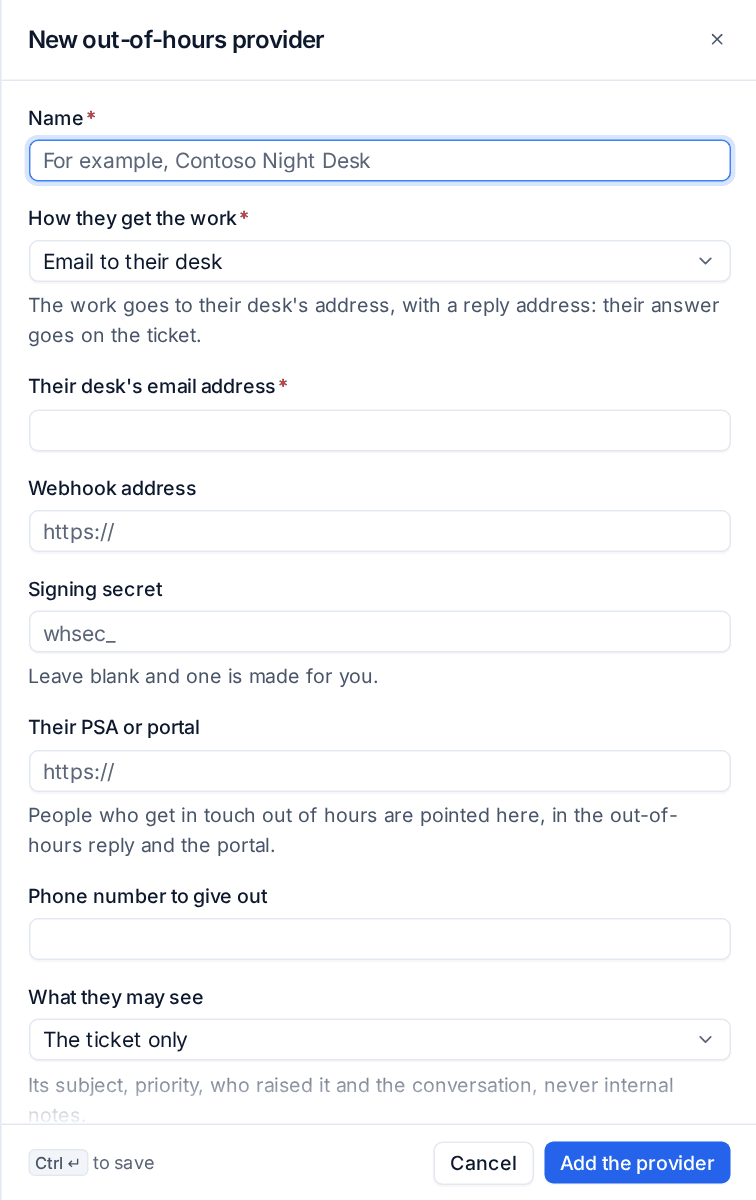
- Enter the Name.
- Choose How they get the work:
- Email to their desk: the work goes to their desk's address,
- Forward the ticket: the ticket is forwarded with its conversation,
- Webhook: a signed webhook to their system (a Signing secret is made for you if you leave it blank). An email or forward provider can have a webhook too,
- Their PSA or portal and A phone number to give out: nothing is sent; people who get in touch out of hours are pointed there.
- Fill in the addresses the choice needs, Their PSA or portal and the Phone number to give out.
- Choose What they may see: The ticket only (subject, priority, who raised it and the conversation, never internal notes) or Devices, read-only (the ticket's and the alert's devices, their status and open alerts).
- Add Instructions for them, sent with every piece of work, such as who to ring for a site visit and what they must not do.
- Leave it On (off: their queues are treated as nobody's out of hours) and press Add the provider.
Then choose which queues they cover, in setup.
How the work goes and comes back
Out of hours, a Critical alert or urgent ticket on a provider's queue goes to them instead of paging anyone, and the ticket says "Sent to" the provider. Every piece of work carries its own reply address and a provider link:
- By email: whoever at the provider answers the reply address, their answer lands on the ticket as a third party message (internal, never in the portal, never counted as the customer replying) and the assignee is told.
- On the provider link: no account needed. It shows the work as far as What they may see allows, with a box to answer.
The reply address and the link work until 72 hours after the hand-back. A send that fails for good is marked on the ticket and the administrators are told, since nobody of yours was paged.
At opening time each piece of work is handed back once: the ticket says the provider handed it back and how many answers they gave, and the queue's people get one summary per provider with what reached them, their last answer and where each ticket stands. The provider's recent work is listed on its settings.
What customers are told
When a provider covers the ticket's queue, the out-of-hours reply to a customer adds who covers urgent issues and how to reach them, and the customer portal's footer says the same, with when you open again.
Related
Was this page helpful?
Thanks for the feedback.