Second copies and the copy list
Keep every repository copied to another location with an ordered copy list, read the primary and secondary locations, see which repositories copy where and which are not copied, swap the primary with Make primary, and check a copy against its source.
A backup kept in one place is one fire, one ransomware attack or one failed NAS away from being lost. Tenvara copies each repository to a second storage location on a schedule, so a lost or attacked location is not the end (the 3-2-1 rule). The copy is a complete repository in its own right: it can be restored from even when the first location is gone.
The copy list
Open Settings > Backup, the Protection tab, and find Second copies.
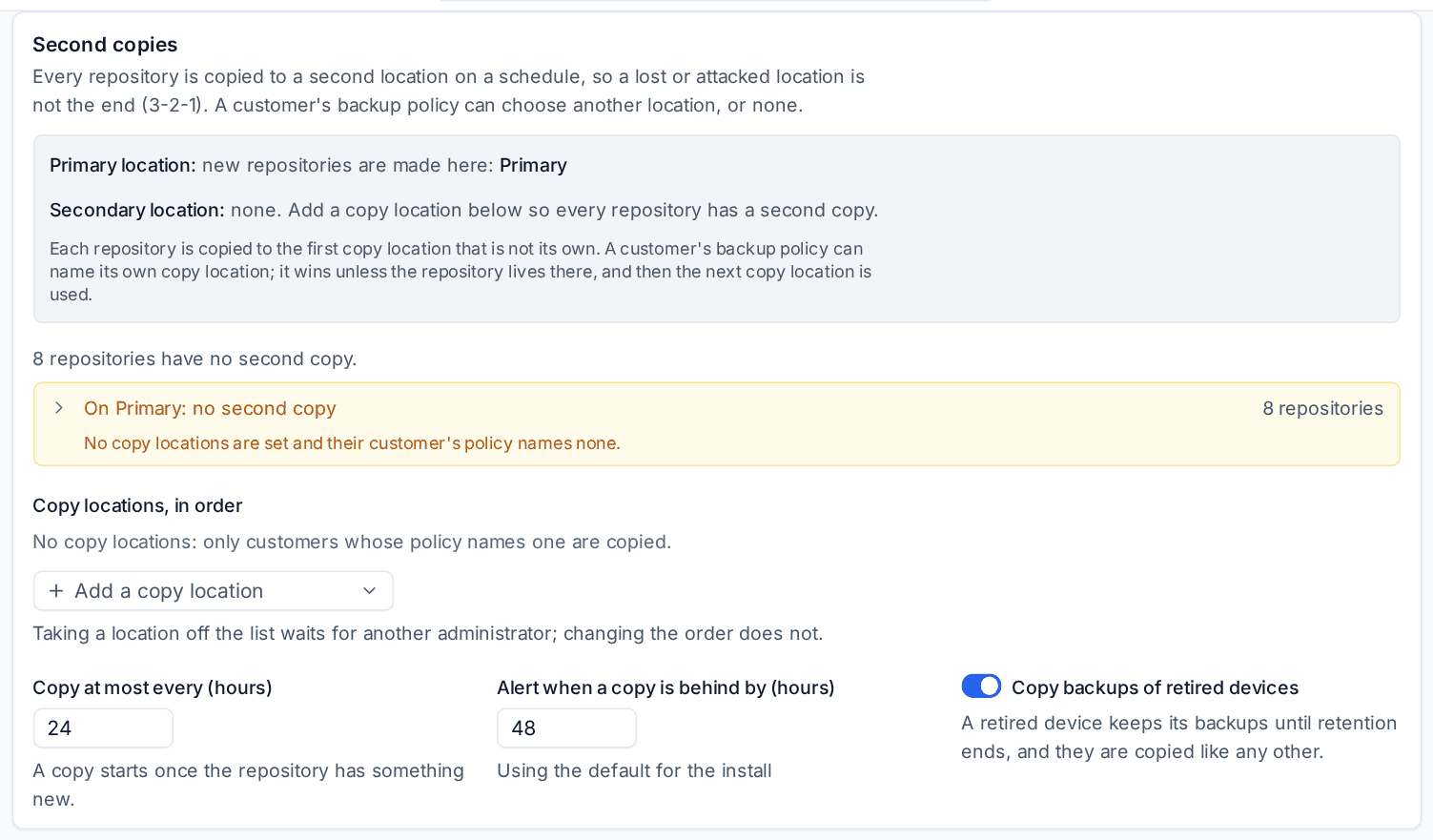
The card starts with your locations in plain words:
- Primary location: where new repositories are made.
- Secondary location: where second copies go, or to the primary for repositories that live on the secondary.
Under Copy locations, in order is the list Tenvara copies to. The rule is simple: each repository is copied to the first copy location that is not its own. With your office NAS and a cloud bucket both in the list, repositories on the NAS copy to the bucket and repositories on the bucket copy to the NAS, so both sides are covered.
To set it up:
- Add your storage locations on the Storage tab (see Storage locations and immutable backups).
- On the Protection tab, under Copy locations, in order, use Add a copy location for each location copies may go to.
- Put them in the order you want: the first one that is not a repository's own location is where it copies.
- Set Copy at most every (hours) (24 by default; a copy starts once the repository has something new) and Alert when a copy is behind by (hours) (48 by default).
- Press Save protection.
Changing the order takes effect at once. Taking a location off the list, or emptying it, weakens protection and waits for another administrator. A location in the copy list cannot be removed from the Storage tab.
A customer's own copy location
A customer's backup policy can name its own copy location, or turn copies off, on the customer's Backup tab (Change under Schedule and retention, then Second copy). It wins unless the repository already lives there; then the next copy location from the list is used.
Which repositories copy where
The card shows a row for each pair of locations with how many repositories copy that way. Open a row to see the repositories. Any repository with no second copy comes first, in amber, with the reason, for example "No copy locations are set and their customer's policy names none", or that the copy locations hold only its own location: add another location to the list to cover it.
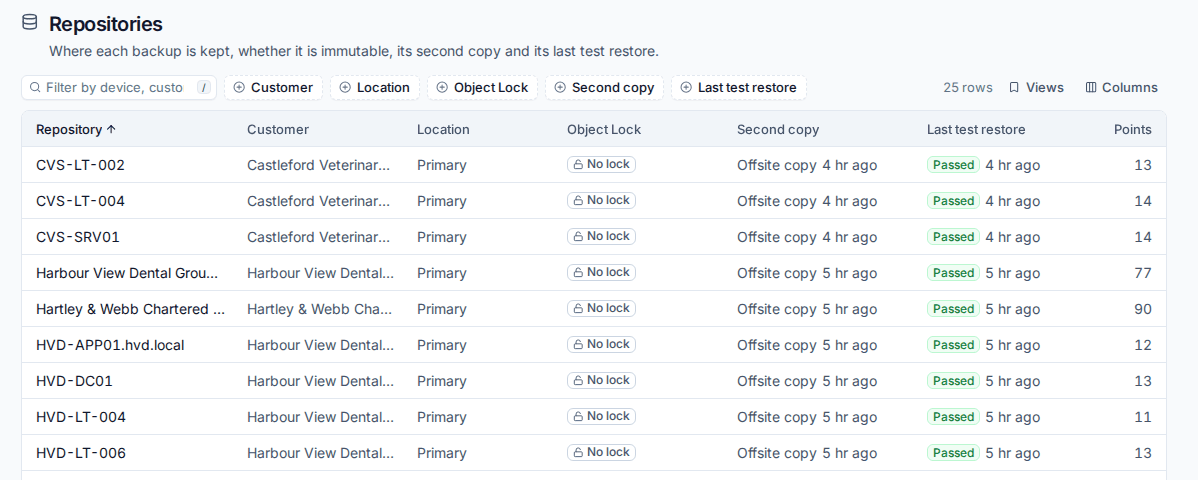
Backup > Repositories shows the same per repository in the Copies to column: the location its copy goes to, or No second copy in amber. The Second copy filter finds them.
Make primary
Moving to a new location, or making the cloud bucket the place new repositories start, should not leave anything uncopied. Make primary (on the location in the Storage tab, or as "Make ... the primary" in the Second copies card) does it in one step:
- The location becomes the primary, so new repositories are made there.
- The old primary goes to the front of the copy list, so new repositories copy to it.
- Existing repositories stay where they are and stay copied: those on the old primary now copy to the new one.
A swap removes nothing, so it never waits for approval. With two locations, no copy ever stops. With three or more, repositories whose copy went to a third location may start a fresh copy on the old primary.
How a copy runs
A copy sends only what is new since the last good copy and removes from the copy what was deleted from the repository, without listing either side, so even a slow storage copies a small change in seconds. Once a week, and whenever you ask, a copy also checks every piece against the source and copies anything missing.
On the repository's panel in Backup > Repositories, the Second copy section shows the last copy ("From the blob journal, without listing: 41 blobs (160 KB) sent, 6 removed") or the last full check, and what a check found. From there:
- Copy now copies at once.
- Check the copy against the source makes the next copy a full check.
- Use the copy instead moves the repository onto its copy's location when the first location is lost or retired.
Safety rules hold throughout. If the source suddenly looks wiped (more than half of the copy would go), the copy deletes nothing and says why. A damaged piece in the repository is left out of the copy and repaired (see Repository health, healing and verification), and a damaged piece in the copy is copied again. A copy that falls behind while newer backups exist raises a warning alert, which clears with the next good copy.
Tip: Make the copy location an S3 bucket with Object Lock, so the copy cannot be deleted or changed before its time even with stolen keys. See Storage locations and immutable backups.
Copies to offsite storage go over your own server's internet line. To hold them to a window and an upload budget, see Spreading backups across the night.
Related
Was this page helpful?
Thanks for the feedback.