Is it legally binding?
What the law says about signing proposals, service agreements and sign-offs electronically, the levels of electronic signature, and what Tenvara records so each signature is an advanced electronic signature.
Yes. A customer who signs a proposal, the service agreement that goes with it, or a sign-off in the portal gives a legally binding electronic signature. This guide explains, in plain English, what the law says, what the levels of electronic signature mean, and what Tenvara records so each signature is strong evidence. Your customers have their own version of this page in the portal, at /portal/legally-binding, linked from every audit certificate and signing page.
This is general information, not legal advice.
What the law says
- United Kingdom. The Electronic Communications Act 2000, section 7, lets an electronic signature be admitted as evidence. UK eIDAS (the EU regulation as kept in UK law) says a signature cannot be refused as evidence only because it is electronic. The Law Commission's 2019 report confirmed that an electronic signature can be used to sign a document where the law asks for a signature.
- European Union. The eIDAS Regulation (EU) No 910/2014, Article 25, says the same in every member state: an electronic signature cannot be denied legal effect only because it is electronic.
- The exceptions. A few documents still need ink, a deed with a witness, or a registry's own process (some property transfers, wills, some family law documents). Proposals, service agreements, purchase orders and sign-offs like the ones you send are not among them.
The levels
| Level | What it is | In Tenvara |
|---|---|---|
| Simple electronic signature | Any electronic way of agreeing: typing a name, drawing a signature, ticking a box. Legally valid; its weight as evidence depends on what was recorded | An acceptance with no code (when Confirm the signer with a code is off), or evidence made afterwards from an old acceptance record. Its certificate says why |
| Advanced electronic signature | eIDAS Article 26: uniquely linked to the signer, capable of identifying them, made with data under their sole control, and linked to the document so any later change is detectable | Every proposal, agreement and sign-off signature, and every quote acceptance confirmed with a code |
How each signature meets the advanced level
- Uniquely linked to the signer. When the person signs, a key and a short-lived certificate naming them are made for them alone.
- Capable of identifying them. Just before they sign, they type a six-digit code emailed to them (or texted, where their mobile is on their contact and SMS is set up), whether they accept a quote from its emailed link or in the portal, or sign a proposal. Someone who signed in to the portal with their authenticator app or a passkey a few minutes before is not asked again. For proposals worth more than the amount you set, they also give a second factor: a code by text message, or from the authenticator app on their portal account. A sign-off is signed in the portal, signed in to their own account.
- Under their sole control. The key is made only after that confirmation, used once to make their signature, and then destroyed. It never leaves your install.
- Any change is detectable. Their signature is their own digital signature on the signed PDF (several signers sign one after another), timestamped by an independent timestamp authority, then sealed with your organisation's document-signing certificate with the material needed to check it for years. Changing a single byte breaks it.
The audit certificate with every signed document has a Signature level box and, for each signer, the four requirements with how each was met.
Checking a signed document
- Open the signed PDF in Adobe Acrobat Reader: the signature panel lists each signer's signature and your organisation's seal. If your document-signing certificate is from your install's own certificate authority, Reader shows the signatures as valid once that authority's certificate is trusted (download it from Settings > Proposals, under Signing). A certificate from an authority on Adobe's trust list shows as valid straight away.
- Anyone can check a copy on your portal's verify page,
/portal/verify: it checks the file's fingerprint and every signature and timestamp. - The EU's own signature validator reports each signature's level.
On the quote itself, the Signed and evidence panel shows each signer, how they were confirmed, and the signed PDF and certificates to download.
Settings
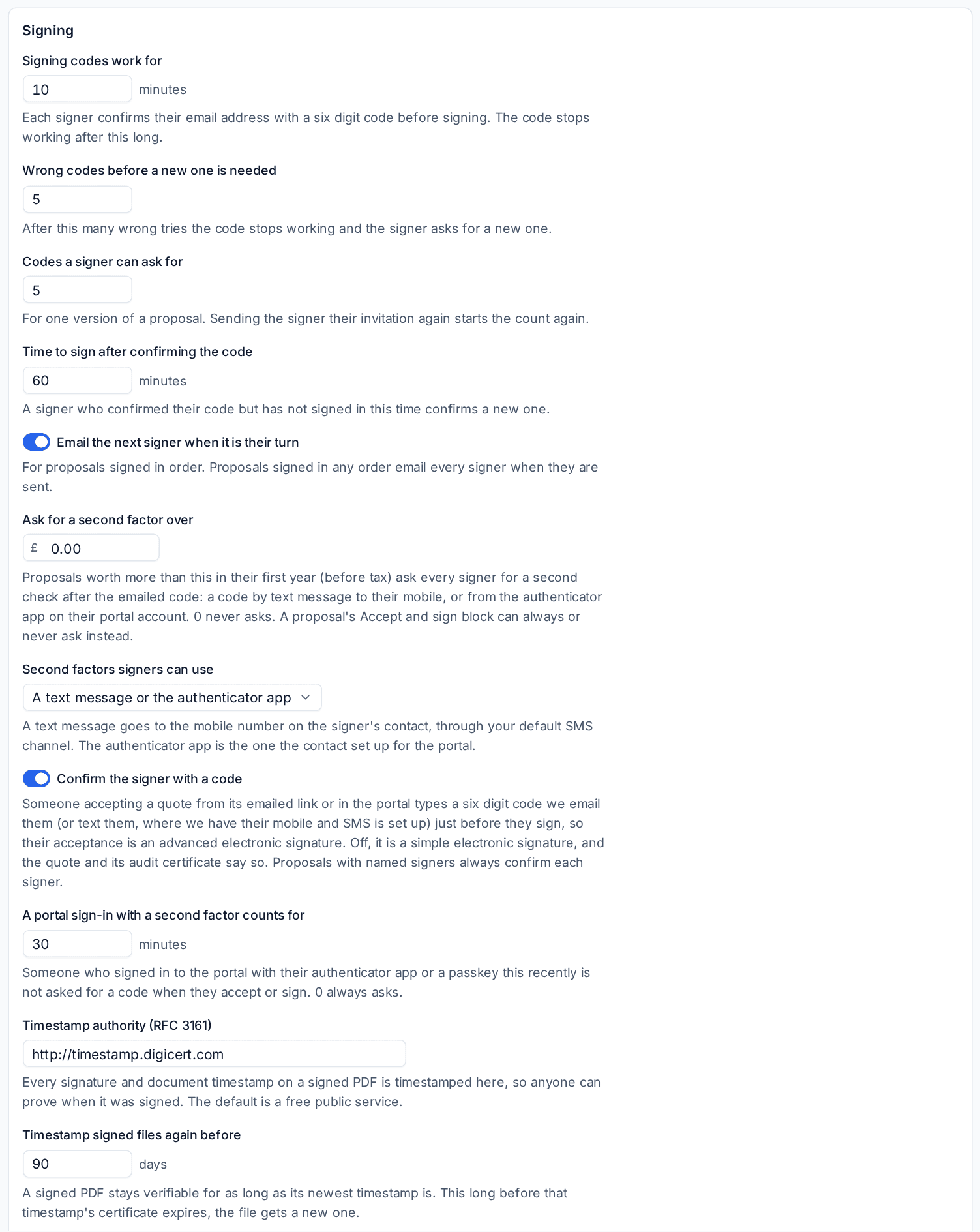
Open Settings > Proposals and find Signing.
- Document signing certificate: made for you the first time a proposal is signed, or Create certificate now, or Request from a CA to use one from a certificate authority.
- Signing codes work for, Wrong codes before a new one is needed, Codes a signer can ask for and Time to sign after confirming the code.
- Ask for a second factor over (0 never asks) and Second factors signers can use: a text message, the authenticator app, or either. A proposal's Accept and sign block can always or never ask instead.
- Confirm the signer with a code: on, a quote accepted from its link or in the portal is an advanced electronic signature; off, it is a simple one, and the quote and its certificate say so.
- A portal sign-in with a second factor counts for: how recently a portal sign-in with the authenticator app or a passkey saves the signer a code.
- Timestamp authority (RFC 3161) and Timestamp signed files again before: signed files are timestamped again before the timestamp's certificate expires, so they stay checkable.
Text messages go through the SMS channel set up in Settings > Channels, with your own SMS provider.
Related: Proposal pricing, signing and tracking, Customer sign-offs, Acceptance and what happens next.
Was this page helpful?
Thanks for the feedback.