Contracts, billing and accounting
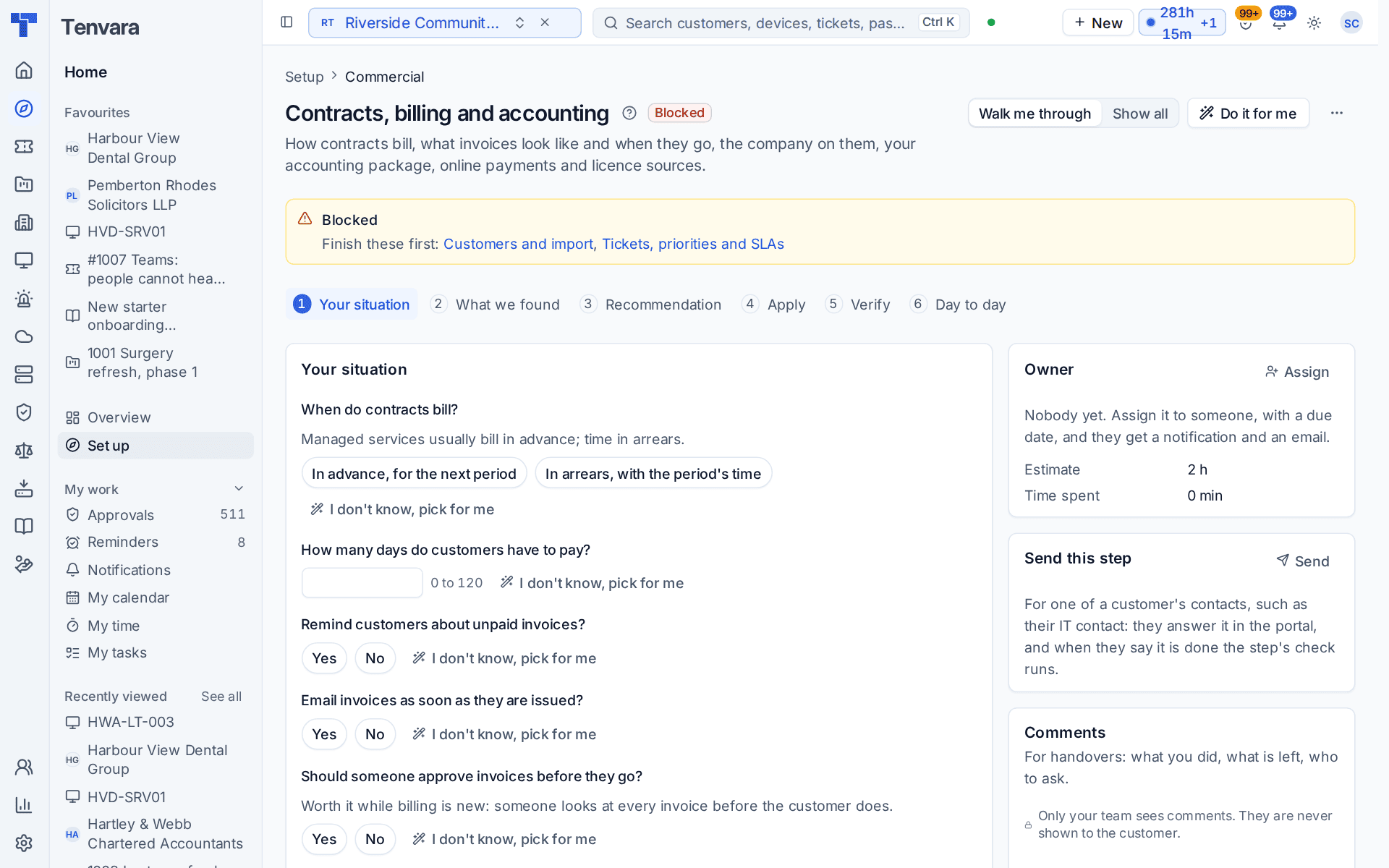
The Contracts, billing and accounting section of the setup helper: when contracts bill, payment terms and reminders, invoice approval, renewal uplifts, switching billing over from your old tool, and the checks on accounting, payments and licence sources.
Contracts, billing and accounting opens the Commercial phase and takes about two hours. It decides how contracts bill, when invoices go and what they carry, and it checks the connections money depends on: your accounting package, online payments and licence sources.
Open Set up (Health once you have gone live) and choose Contracts, billing and accounting. It runs through the same six beats as every section: see Working through a section.
Note: Finish Customers and import and Tickets, priorities and SLAs first. The section is marked Owner approves, so Do it for me waits for the owner's approval before anything about billing changes. It is part of the MSP edition; the Company edition has no billing section.
What it reads from your data
What we found counts your active contracts, draft contracts, imported contracts still in draft, customers with no contract and your trading entities, and says whether accounting, online payments and licence sources are connected.
What it asks
| Question | Choices and notes |
|---|---|
| Which accounting package do you use? | Usually answered in discovery, so it shows under Already known |
| When do contracts bill? | In advance, for the next period or In arrears, with the period's time. Managed services usually bill in advance; time in arrears |
| How many days do customers have to pay? | 0 to 120. The default is 30 |
| Remind customers about unpaid invoices? | Yes or no |
| Email invoices as soon as they are issued? | Yes or no |
| Should someone approve invoices before they go? | Worth it while billing is new: someone looks at every invoice before the customer does |
| By what percentage do contracts rise at renewal? | 0 to 50 |
| When do you stop billing from your old tool? | Later, at go-live or Now: make the imported contracts active. Imported contracts stay drafts until then, so nothing is billed twice |
What it recommends
- Contracts bill when you said, invoices give the days you chose to pay and go out as soon as they are issued. Reminders follow your answer.
- Someone checks every invoice before it reaches a customer, when you asked for approval. Why this? explains it: the first months on a new billing system are when mistakes happen, and approval catches them before customers do.
- Contracts rise by your percentage when they renew, when you gave one.
- Billing moves here now. When you chose Now, the imported contracts become active and the next invoice run bills them. The recommendation says how many contracts that is, and reminds you to stop billing them in your old tool.
Read What changes line by line before you press Apply. You can undo an apply for 7 days, and undo puts imported contracts back to drafts.
Warning: Making imported contracts active is the moment billing changes hands. Do it on the day your old tool has sent its last invoices, not before.
What you connect yourself
The section checks these connections; each is made with your own account:
- Accounting: Xero or QuickBooks Online, in Settings > Integrations on the Accounting tab. See Xero and QuickBooks.
- Online payments: Stripe or GoCardless, on the Payments tab. See Taking payments and autopay.
- Licence sources, on the Licence sources tab. See Connecting licence sources.
- Your company details and bank account, in Settings > Trading entities. See Invoice layouts and trading entities.
How it is verified
| Check | What it looks at | Where to fix it |
|---|---|---|
| The accounting package is connected | The package you named answers | Settings > Integrations, the Accounting tab |
| Every active customer has a contract | Customers you look after with nothing to bill them under | Open Contracts, which opens Sales and billing > Contracts |
| Every active contract bills something | Contracts with no price or lines | Open Contracts |
| Invoices carry your company details and bank account | A trading entity with the details an invoice must show. Needed to go live | Open Settings > Trading entities |
| Payments and licence sources work | Each payment provider and licence source you connected answers | Settings > Integrations |
Day to day
- The invoice run makes draft invoices from contracts, time and orders. Approve them, and they go to customers and your accounting package.
- Unpaid invoices are chased with reminders. Payments made online or recorded in your accounting package mark them paid.
- The pages behind this section are Settings > Billing rules (with the Contracts and Price uplifts tabs), Settings > Invoices, Settings > Invoice layouts and Settings > Trading entities. The work itself is in Sales and billing, under Invoices, Invoice runs and Contracts.
Related guides
Was this page helpful?
Thanks for the feedback.