My sales day and activities
Log calls, meetings, emails, notes and tasks on leads, contacts, customers and deals, read one timeline per record, and work through every sales task due on My sales day.
Every sales conversation lands in one place. Calls, meetings, emails, notes and tasks are logged on the lead, contact, customer or deal they are about, and roll up to the company, so anyone can pick up where a colleague left off. My sales day then lists every sales task that is due, across all of those records.
Note: The CRM is part of the MSP edition. In the Company edition a contact is an employee, so there is no sales timeline on it.
What you can log
| Kind | What it holds |
|---|---|
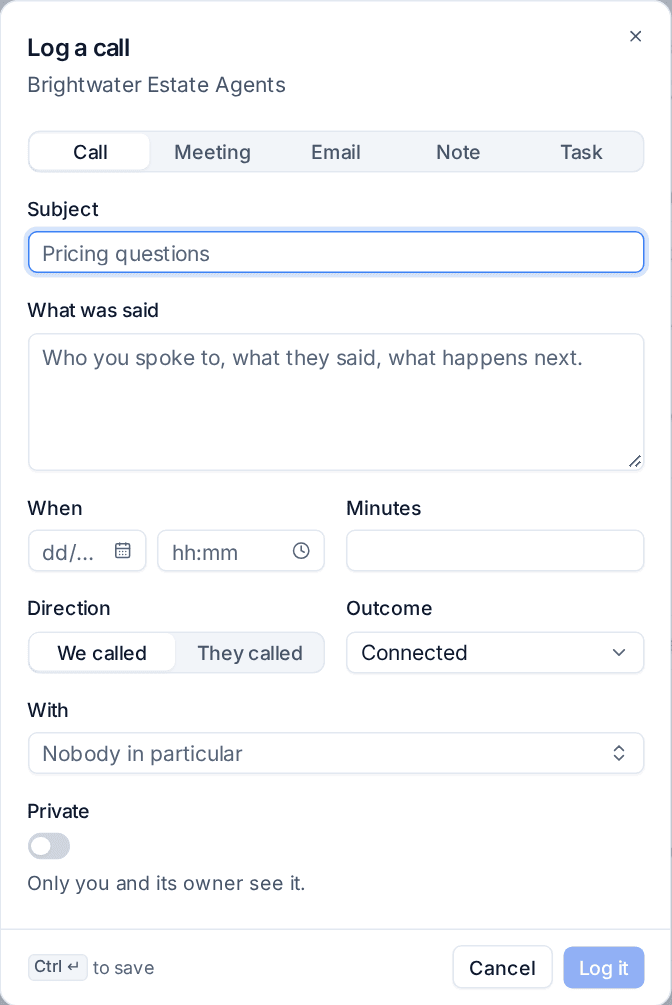
| Call | Who you spoke to, what was said, when, how long, which way (We called or They called) and the outcome, such as Connected |
| Meeting | When, how long and what was agreed |
| An email sent or received elsewhere. Emails from your connected mailbox are logged by themselves; see My mailbox and sales email | |
| Note | Anything worth keeping: who decides, what they use now, what worries them |
| Task | Something to do by a date, such as "Send the case study", with an owner and a reminder |
Tenvara adds its own lines too: a deal added, moved to another stage, won, lost or reopened, a quote sent, a task done. Those cannot be changed or removed.
Log an activity
Every lead, contact, deal and customer has the same buttons: Call, Meeting, Email, Note and Task. On a customer they are on the Sales tab (under Commercial), in Sales activity; on a contact, in their sales activity; on a lead, in Activity (with the keys L, M, N and T); on a deal, in its Timeline.
- Press the kind you want, or switch between them at the top of the dialog.
- Enter the Subject and What was said.
- Set When it happened and the Minutes it took.
- For a call, choose the Direction and the Outcome.
- Choose who it was With, if it was a particular contact.
- Turn on Private if only you and its owner should see it.
- Press Log it.
On a phone, the lead, contact and deal pages open with a bar of four: Call, Email, Log call and Log meeting, so a call made on the road is logged before you forget it.
One timeline per record
Each record shows everything logged on it and on what sits under it:
- a customer's timeline holds its own activities, its contacts' and its deals';
- a lead's holds its own and its deals';
- a contact's holds their own and those of the deals they are the contact on;
- a deal's holds its own.
Open tasks come first, with a tick and a snooze. A line that came from something underneath says where it came from, such as the deal it was logged on. Filter the timeline by Calls, Meetings, Emails, Notes or Tasks.
When a lead becomes a customer, or a deal moves to another customer or contact, its timeline goes with it.
Who sees what
A private activity is seen only by its owner and the person who logged it, not by administrators either: it is someone's own note. Everything else follows Who sees which deals in Settings > Sales. When salespeople see only their own leads and deals, they also see only the activities on them, and the ones they own or logged.
Tasks and reminders
A task is owned by the record's owner unless you choose someone else, and they are told when someone gives them one. At its reminder time the owner is reminded in the bell and, if Email follow-up reminders is on in Settings > Sales, by email with a link to the record.
Tasks also come from elsewhere: a sequence's call and task steps, an automation rule's Add a sales task, the reminder before a prospect's contract with their current provider ends, and the Outlook add-in.
My sales day
Open Sales and billing > My sales day. It lists every open task due on your leads, contacts, customers and deals, grouped as overdue, today, later this week and with no date.

- Mine, My team (everyone in any team you are in) or Someone (pick a colleague).
- Today or Next 7 days, and With no due date to include undated tasks.
- Tick a task (or press
X) to complete it. - Snooze it for an hour, until this afternoon, tomorrow morning, Monday morning or a week;
Ssnoozes it until tomorrow morning. Snoozing moves the due time and the reminder with it. JandKmove up and down the list,Eedits a task andOopens its record.
My sales day replaces the old Follow-ups list, which covered deals only; its address now opens My sales day.
Tip: Start each morning on My sales day with Today and work down it. Anything you cannot do today, snooze to a time you can, rather than leaving it overdue.
Sales triggers
Automation rules can react to sales events: a lead created, an enquiry coming in, a deal changing stage, a deal won or lost, a deal going cold and a sales task overdue. Actions include giving the lead or deal to someone, adding a sales task and notifying the owner. Three ready-made sales rules are in the gallery: an enquiry gets a task to reply today, a deal going cold gets a task for its owner, and a won deal gets a hand-over task. See Building a rule.
Related: Leads, Opportunities and pipelines, Sequences.
Was this page helpful?
Thanks for the feedback.