Server sets
Keep servers that do one job, such as domain controllers or the nodes of a cluster, from patching or going down at the same time. Make a set from a template, a rule or a suggestion, see who goes when on the calendar, and read how serious an outage is by how much of the service is left.
Two domain controllers, both nodes of a failover cluster, a pair of application servers: these servers do one job, so they must never all be down at once. A server set tells Tenvara that. You say how many may be down at a time (one, unless you change it) and Tenvara works out who patches when, checks the others are healthy before any member goes, and judges an outage by how much of the service is left.
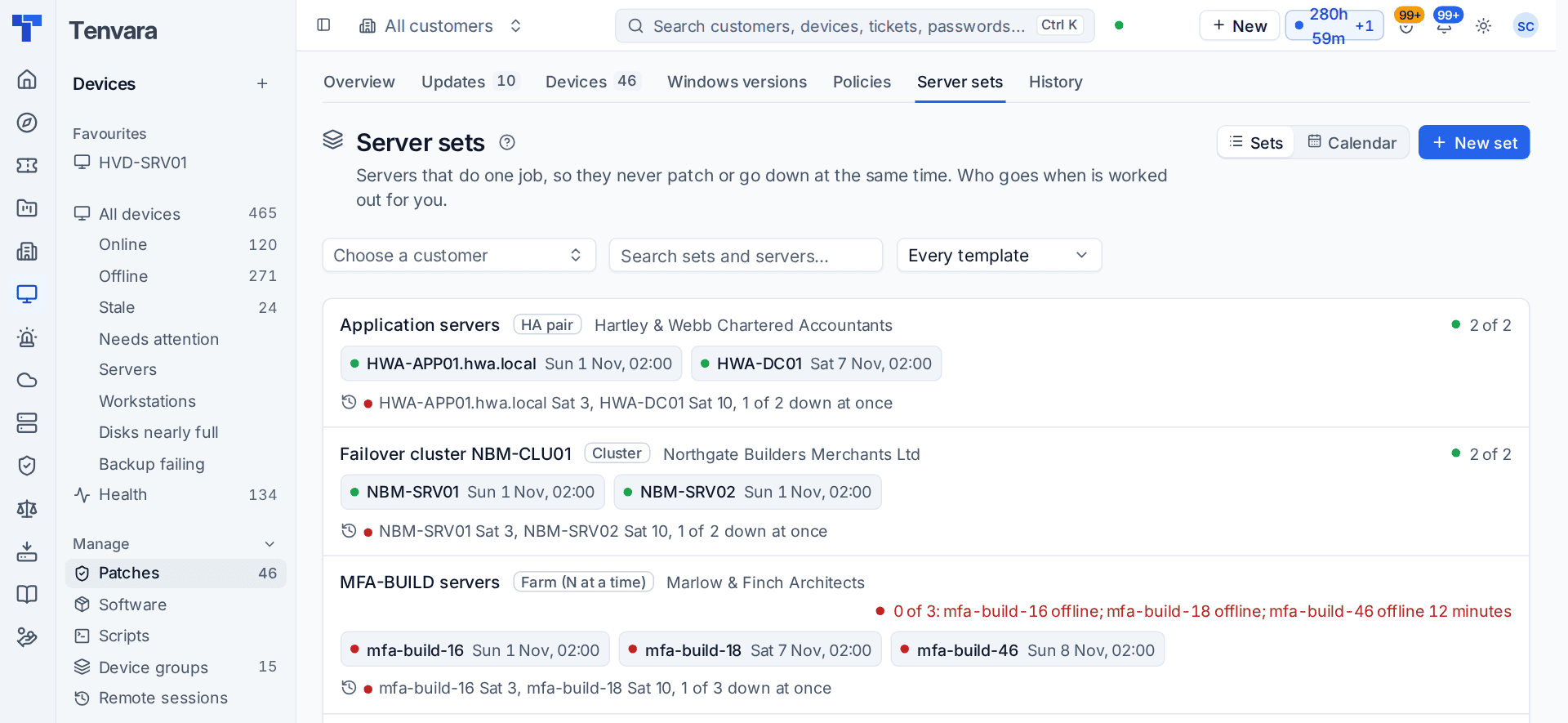
Open Devices > Patches and click the Server sets tab.
Make a set
The quick way, for two servers
- Open the customer and go to its Patching tab.
- If Tenvara has spotted servers that look like a pair, it says These look like a pair under Suggested server sets. Click Make set.
- Or click New set, pick the servers and click Make the set.
That is all. The defaults are one at a time, taking turns going first each cycle, and each waits until the other is back and healthy.
From a template
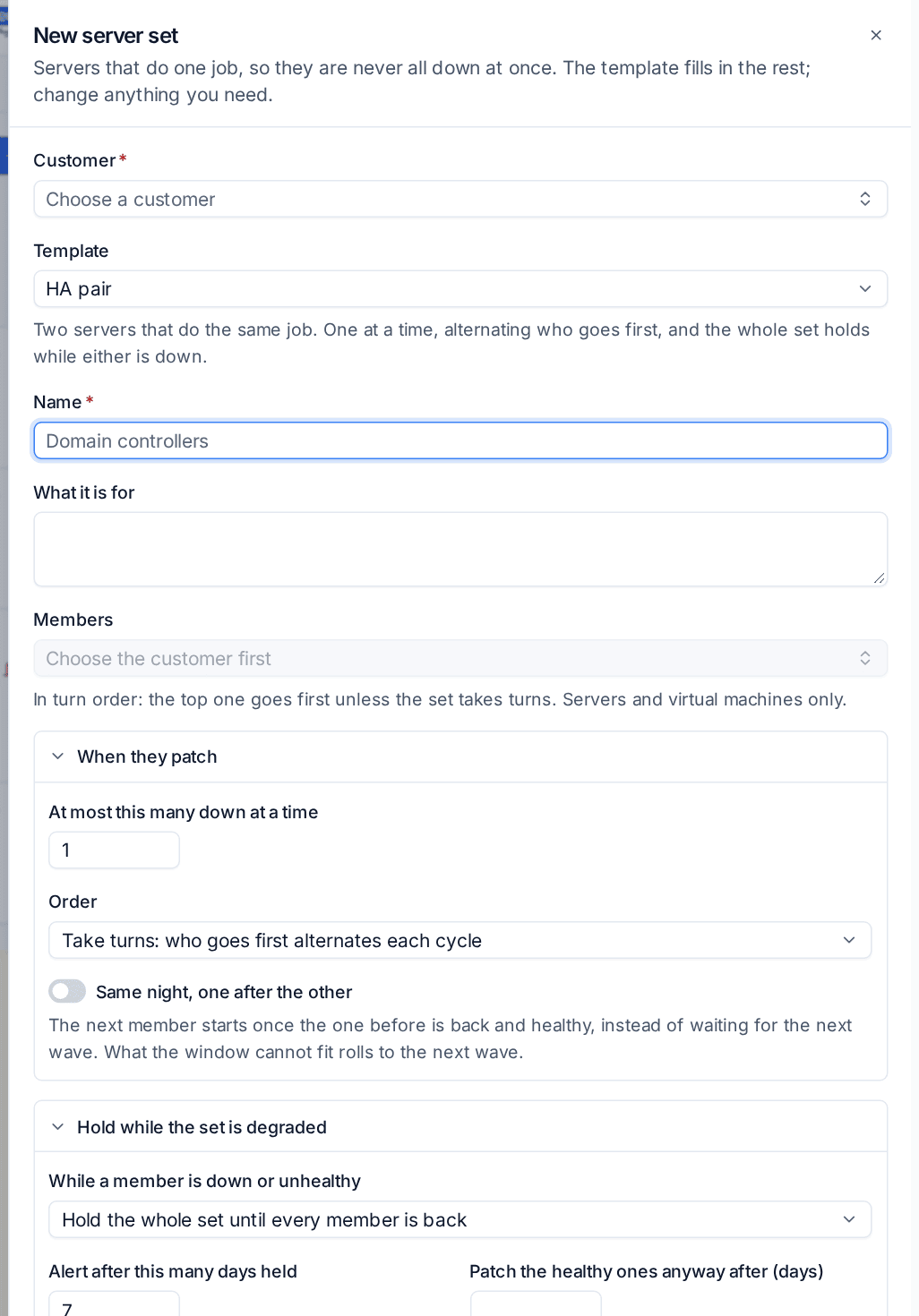
For more control, click New set on the Server sets tab. Choose the Customer, a Template, a Name and the Members, in turn order.
| Template | For |
|---|---|
| HA pair | Two servers that cover for each other. |
| Domain controllers | The controllers of one domain. The one holding the FSMO roles always goes last. |
| Cluster | Failover cluster nodes, patched one after the other on the same night, each paused and drained first and resumed after. |
| Farm (N at a time) | Three or more servers that share a load. You choose how many may be down at a time. |
The template fills in the rest, and you can change any of it:
- At most this many down at a time.
- Order: Take turns: who goes first alternates each cycle, The same order every cycle or A fixed order (top to bottom). On the set's page you can pin a member to always go first or always go last, for the FSMO holder or a primary.
- Same night, one after the other: the next member starts once the one before is back and healthy, instead of waiting for the next window.
- Hold while the set is degraded: hold the whole set until every member is back, keep at least a number healthy, or off. You can be alerted after a number of days held, and let the healthy ones patch anyway after a number of days.
- Partners must be healthy first: their agent checking in, their monitoring checks passing, and back up for a number of minutes after a restart.
- How bad is it: the alert ladder (below).
- Service checks for the whole set and Taking a member out of service: a check that should answer while any member is up, and whether a member is drained as a cluster node or by library scripts before and after.
Click Make the set.
Sets that make themselves
For many customers, add a rule under Rules on the Server sets tab, for example the domain controllers the agents report, one set per customer and domain. New domain controllers join their set as they enrol, and Check now runs the rule at once.
Suggestions and rules work from what the agents report: Tenvara recognises domain controllers and the nodes of a failover cluster this way. Make sets for other kinds of server by hand. Servers that look paired but are in no set are listed below the sets.
How patching takes turns
A set's members patch in the windows of their patch policy, at most the number you allowed at a time.
- Turns: with one down at a time, a pair gets one window each. Who goes first alternates, unless you fixed the order.
- The check before each turn: at the moment a member would install or restart, its partners must be online and healthy. If one is not, the member waits.
- Clusters: a failover cluster node is paused and drained first, and resumed after it is back.
- Degraded sets: while a member is down, patching holds as you set, and the set says so.
- By hand: if you restart, shut down or install updates on a member while a partner is down or patching, Tenvara warns you first, for example APP02 is patching right now. Restart APP01 anyway? To go ahead, tick Go ahead anyway and say why; it is kept in the audit log.
A patch policy's window can be every week, certain weeks of the month, a number of days after Patch Tuesday or every other week: Patch Tuesday + 4 and 11 days gives a pair one turn each. See Patching.
One alert per set
When members of a set go down you get one alert for the set, not one per server, and its severity follows how much of the service is left. The alert ladder sets the steps, for example one down is Medium and all down is Critical, with different steps out of hours if you want them. A witness or a disaster recovery copy can count as half a member, or not at all.
Seeing it
- The Server sets tab lists every set with its template and customer, how much of it is up (1 of 2: DC02 offline 14 min), each member's next turn, anything held, and the last cycle. Filter by customer and template.
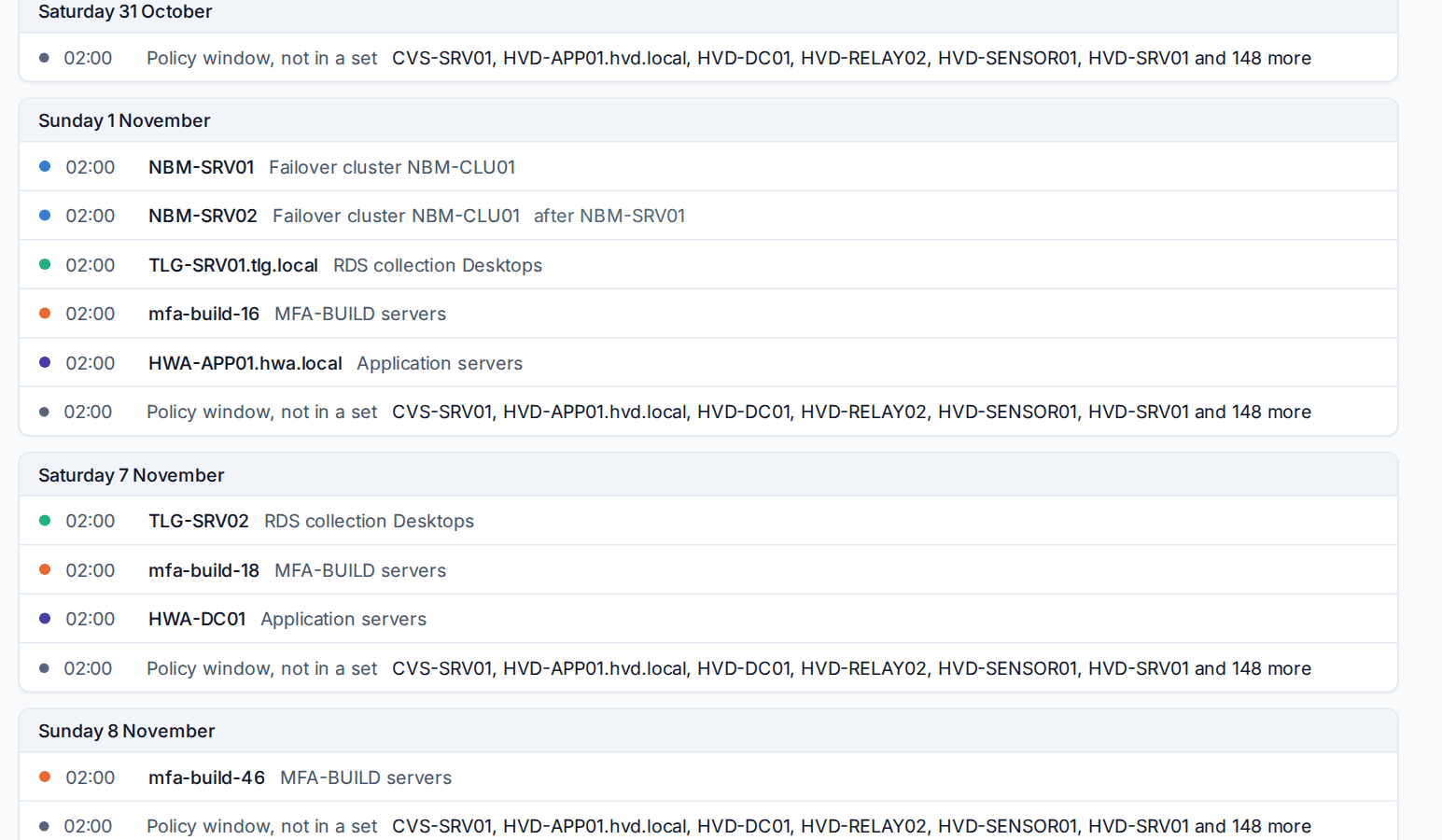
- Calendar, at the top of the tab, shows four weeks of turns day by day, coloured by set, and a table of every server's next patch time. A clash, two members of a set down together, shows in red with Fix: put the members one after the other on the same night, or take a server out of the set whose turns it does not follow.
- A set's page has its members in turn order with Add a server, this cycle's turns, the last six months and its settings in words. Change opens the editor, and Patch now appears for held members once everyone is back.
- The device page says in its Patches section which set the server is in, with whom, and its next turn.
- Reports: the customer report's patching section and the business review list each set month by month, Patched with no loss of service when every member patched and they were never down together.
Related
Was this page helpful?
Thanks for the feedback.