Governance and AI
The setup section for how long records are kept, privacy request deadlines, what happens when a customer leaves, the AI features and their key, and the API tokens and webhooks other tools use.
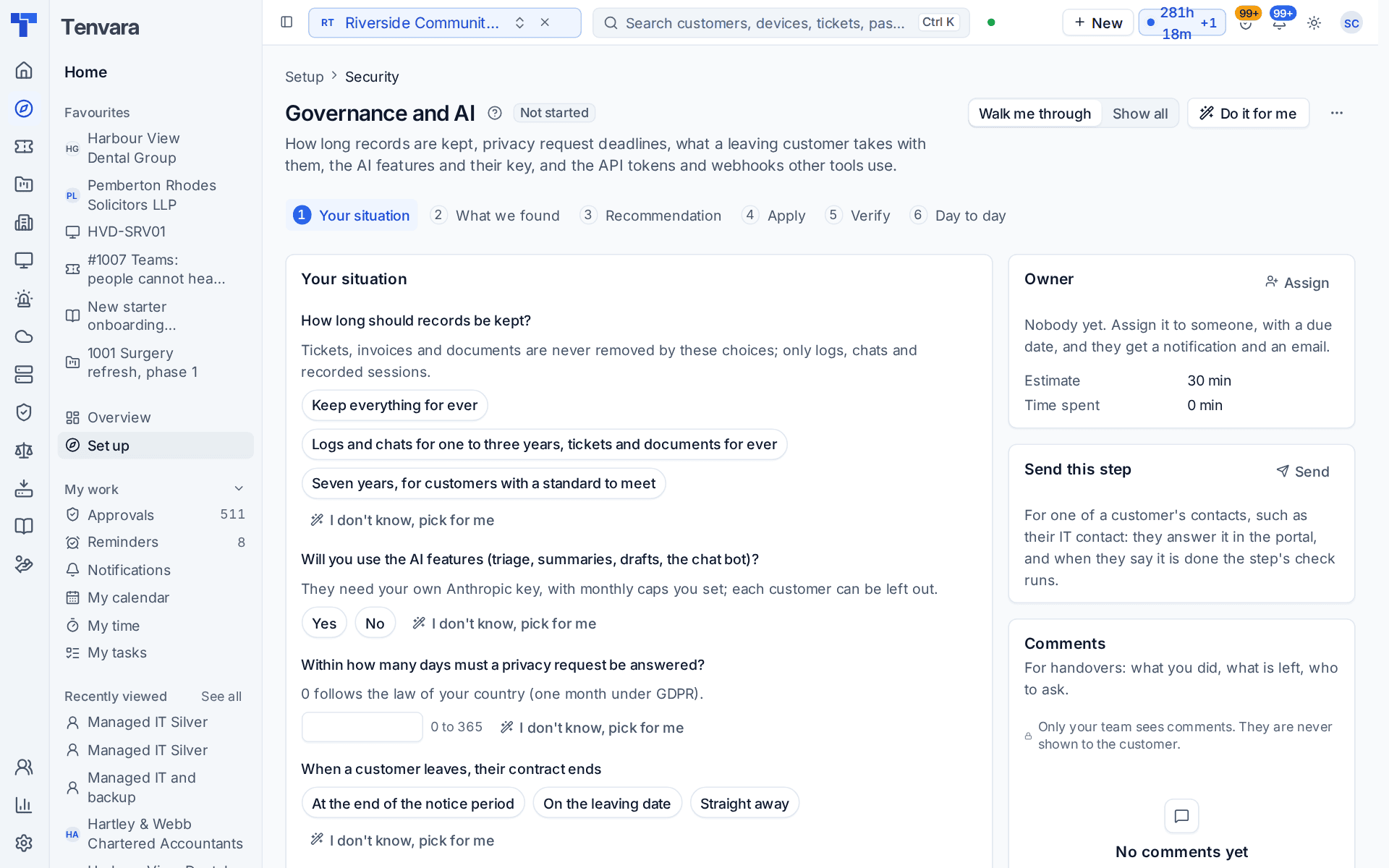
This section of the setup helper deals with the rules around your own data: how long records are kept, how fast privacy requests are answered, what happens to a leaving customer's contract, whether you use the AI features, and the API tokens and webhooks other tools use. It sits in the Security phase and takes about 30 minutes.
Open it from Home > Set up, then Governance and AI. It runs through the same six beats as every section: see Working through a section.
Note: This section is about how Tenvara itself keeps and protects data. Compliance programmes such as ISO 27001 and Cyber Essentials are run from the Governance and compliance area. See Management systems overview.
Before you start
Finish Staff, roles, teams and sign-in first. Until then the section shows Blocked, because API tokens and privacy requests belong to people with the right roles.
What it reads from your data
What we found shows:
- whether an AI key is set;
- API tokens in use;
- webhooks switched on;
- how many kinds of record have a retention period.
The questions it asks
| Question | Choices | Pick for me |
|---|---|---|
| How long should records be kept? | Keep everything for ever; logs and chats for one to three years, tickets and documents for ever; or seven years, for customers with a standard to meet | Logs and chats for one to three years |
| Will you use the AI features (triage, summaries, drafts, the chat bot)? | Yes or no | Yes |
| Within how many days must a privacy request be answered? | 0 to 365 | 0 |
| When a customer leaves, their contract ends | At the end of the notice period, on the leaving date, or straight away | At the end of the notice period |
Tickets, invoices and documents are never removed by the retention choices. Only logs, chats and recorded sessions are. For privacy requests, 0 follows the law of your country, which is one month under GDPR. The AI features need your own Anthropic key, with monthly caps you set, and each customer can be left out. The leaving customer question is not asked on the Company edition.
What it recommends and why
- Logs, chats and recorded sessions are kept only as long as you need them, and the audit log is archived rather than lost. Keeping personal data no longer than needed is a rule under GDPR and most privacy laws. This is offered when you chose a retention period.
- Privacy requests and leaving customers follow your answers.
- Add your Anthropic key under Settings > AI and set the monthly cap. The AI features stay off until then. This is a pointer, not a change: the key is yours to add.
Press Apply when the preview is right. An apply can be undone for 7 days.
Checking it worked
Verify runs four live checks:
- The AI key works. The key is tested against Anthropic. With no key it warns that the AI features are off, and the fix opens Settings > AI. With the AI features switched off it passes.
- A retention period is set. It warns while every record is kept for ever. Set periods in Settings > Data retention, the Policies tab.
- API tokens are scoped, named and used. It warns about tokens that can do everything, so each gets only the scopes it needs, and about tokens nobody has used for a long time, so you can revoke them. The fix opens Settings > Developer API.
- Webhooks deliver. A webhook that keeps failing links to Settings > Integrations, the Webhooks tab.
Day to day
- Old logs, chats and recorded sessions are removed or archived each night. Customers on legal hold are kept. See what each run did in Settings > Data retention, the Runs tab.
- Privacy requests are tracked to their deadline in Settings > Privacy requests. Every change and every reveal is in Settings > Audit log.
- When a customer leaves, start from Settings > Offboarding.
Related guides
Was this page helpful?
Thanks for the feedback.