Copilot readiness and the pilot group
Check person by person who is ready for Copilot, record what the app cannot read, review Copilot's own settings and restricted sites, and run a Copilot pilot group with its own verdict and short list.
Every Copilot rollout starts with a few people, and each of them needs more than a licence: a base licence Copilot accepts, a mailbox in Exchange Online, OneDrive set up, an account that signs in and MFA. The Copilot page of a customer's AI readiness checks all of that person by person, reads Copilot's own settings, and lets you pick a pilot group with its own verdict and its own short list of what to fix first.
Open the customer page, go to Security, then AI readiness, and choose Copilot.
Licences and use
The Licences card shows how many Copilot licences are given out of how many bought (Assigned of bought), read from licence sync, and the Use card shows how many of those people used Copilot, from Microsoft's usage report and the audit trail. These are figures, not scored checks: a seat nobody uses is a money question, not a readiness one. For the money side of licences, see Licences and billing.
The tenant's own Microsoft 365 Copilot (and Copilot Chat under the work account) is shown here as Copilot seen in use and counts as sanctioned when the tenant has Copilot licences. It is never listed under Other AI tools and never offered Block.
Who is ready for Copilot
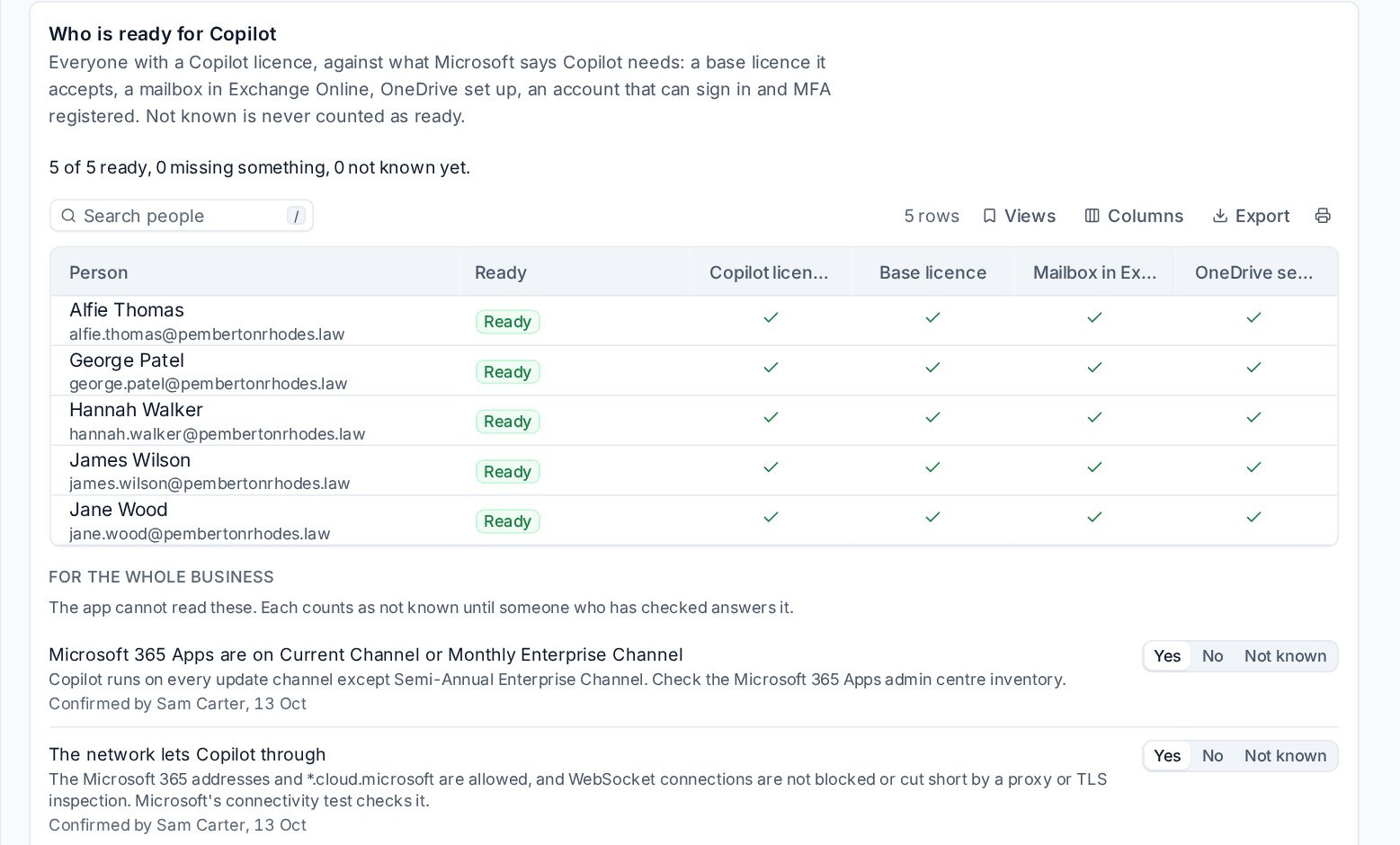
Who is ready for Copilot lists everyone with a Copilot licence against what Microsoft says Copilot needs:
- a Copilot licence;
- a base licence Copilot accepts (free and trial Teams licences do not count);
- a mailbox in Exchange Online (a shared mailbox is not a person's mailbox);
- OneDrive set up;
- an account that is enabled and can sign in;
- MFA registered.
Each is Yes, No or Not known, and each person is Ready, Missing something (with what) or Not known yet. The line above the table sums it up, for example "18 of 22 ready, 3 missing something, 1 not known yet." Names need the See evidence permission; without it you see the counts.
What the app cannot read
Three things Copilot needs are kept where Microsoft gives no way to read them: the Microsoft 365 Apps update channel, the network and cookies. They are asked For the whole business: someone who has checked answers Yes, No or leaves it Not known, and the answer shows who confirmed it and when, for example "Confirmed by Sam Patel, 13 Oct". An unanswered question counts as not known, never as ready.
The check People with Copilot can use it (medium) fails when anyone licensed misses something or the business answered no, and stays not known while anything is not known. It is not a blocker for the verdict.
Copilot's own settings
Copilot's own settings are read from Microsoft where the app can, and otherwise answered by someone who has checked. None of them stops Copilot being switched on, but each is worth a decision:
| Check | Severity | What it asks |
|---|---|---|
| Web search in Copilot is decided | Low | Whether Copilot may search the web (answered: on, web only or off) |
| Agents are shared only with the people chosen | Medium | Who can use and share agents, with the agent inventory where the licences give it |
| Staff cannot start Copilot Studio trials themselves | Low | Whether staff can sign up for trials on their own |
| Teams meetings keep what Copilot needs | Low | Transcription, recording and Copilot in the meeting policy |
| A retention policy covers Copilot chats | Medium | Whether Purview keeps Copilot conversations |
| Copilot interactions are audited | Medium | Whether Copilot use is recorded in the audit log |
Restricted sites
Sites with the most sensitive files lists the sites where the sensitive file scan found most, each with two SharePoint controls:
- Restricted Content Discovery hides a site from Copilot's search for people who do not use it. Access is unchanged: anyone who can open the site still can. Microsoft calls it a temporary control while access is narrowed. Its fix is Hide from Copilot's search, through the customer's approver.
- Restricted Access Control limits a site to the people in the groups you name, whatever other permissions or links say, and search and Copilot honour it. It is recommended for the most sensitive sites.
Both need SharePoint Advanced Management, which comes with a Copilot licence given to at least one person, and the app registration's certificate to read and change them. Where the tenant does not have it, the checks say Needs with the licence instead of failing. See AI readiness overview and the score.
The pilot group
Until you choose, the pilot group is the people with a Copilot licence. To choose it:
- On the Copilot page, press Choose the pilot group.
- Pick Copilot licence holders, Choose people (search by name or sign-in) or An Entra group (its members as the directory sync last read them, groups inside it included).
- Press Save.
Choosing people or a group needs the See evidence permission, because it shows names. A group of more than 1,000 people says only the first 1,000 are read.
What the pilot group shows
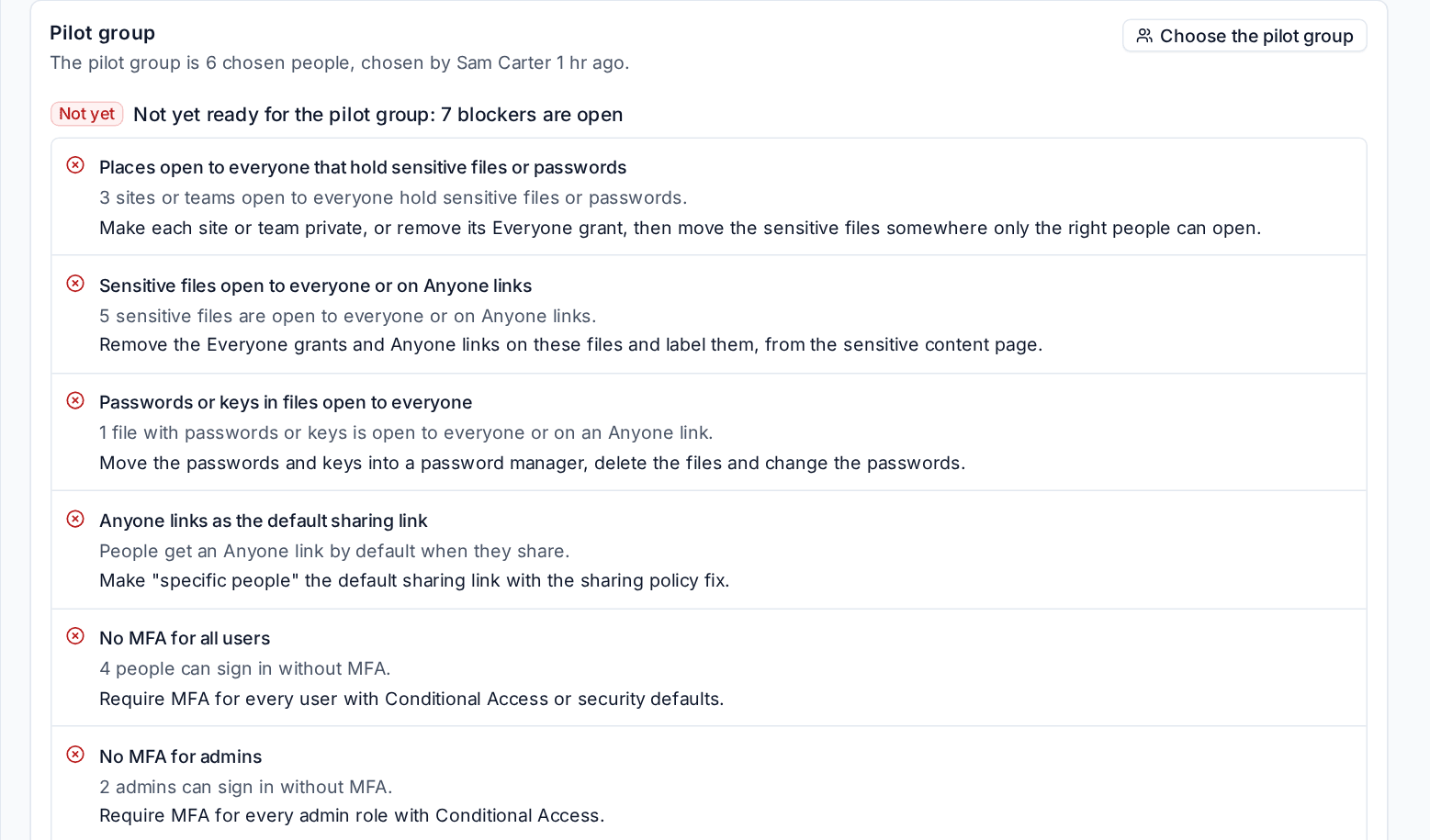
- Ready for Copilot: how many of the group are ready, with Something missing and how many are not known yet, person by person with what is missing.
- The verdict for them: "Ready for the pilot group", "Nearly ready for the pilot group" or "Not yet ready for the pilot group: N blockers are open", with only the blockers that apply to them. MFA is read for the pilot's people only. See The verdict and the plan.
- To fix first, at most ten items, in this order: files with passwords or keys open to everyone; Sites open to everyone that hold sensitive files; other Sensitive files open to everyone or on an Anyone link; and Links they hold on sensitive content, meaning a link shared with one of them by name or a link one of them has opened, from the audit log. A link nobody in the pilot holds or opened is not on their list, because Microsoft counts an organisation or Anyone link only for the people who have opened it.
The pilot plan
The pilot plan records what makes a pilot a pilot. Press Record the plan (or Edit the plan) and fill in:
- What it is for: the jobs the pilot group will use Copilot for.
- Champion: who leads it and answers questions.
- Starts and Ends.
- It worked if: how you will know the pilot worked.
Each answer shows who recorded it and when. The customer's contact with the AI readiness portal permission can record the same plan in the portal under AI readiness, in Your Copilot pilot, and it then says "Recorded in the portal by". The portal shows the group as counts only: how many, how many ready, the verdict for them and how many things to fix first, never names.
The report and the presentation include the pilot group, its verdict and its short list (names only in the internal copy).
Related
Was this page helpful?
Thanks for the feedback.