Vulnerability priorities, fix states and To do
How Tenvara rates each vulnerability the vendor's way, what the six fix states mean, how Critical, High, Routine and Mitigate are worked out from what can be done, how exposure is judged, and how the To do list groups work by the update that fixes it.
A fully patched Linux server can carry hundreds of CVEs with a CVSS score of 9 or more, every one of them waiting for the distribution to ship a fix. Counting those as "critical" buries the handful that matter. Tenvara does it the other way round: it asks what the platform's own vendor says, whether a fix exists, whether attackers use the vulnerability and whether it is reachable on the device, and puts what you can act on today in one list, grouped by the update that fixes it.
This guide explains those rules. For the rest of the vulnerability pages, fixing and accepted risk, see Vulnerability management.
The vendor's rating, with CVSS beside it
Each finding is rated the way the vendor of that platform rates it, for that release:
| Platform | Whose rating |
|---|---|
| Ubuntu | Ubuntu's priority |
| Debian | Debian's urgency |
| Red Hat, AlmaLinux and Rocky Linux | Red Hat's severity |
| Windows | Microsoft's severity for that product |
| Applications and anything the vendor does not rate | The CVSS band: the CNA's score first, then CISA's, then NVD's |
The CVSS score stays beside the rating with its source, so a finding reads, for example, Medium (Ubuntu) · CVSS 10.0 (CISA ADP). Where the two are far apart a note says so ("Ubuntu rates this lower than CVSS"). With no vendor rating the band says (CVSS), and where Debian gives no urgency it says No Debian rating. A CVSS score is never taken as the highest of several vectors: the vendor's own comes first.
Rocky Linux and AlmaLinux errata that fix several CVEs at once are counted as one finding per CVE, grouped back into one fix.
The six fix states
| Fix state | Means | Where it goes |
|---|---|---|
| Fix available | The vendor has shipped a version above the one installed | To do |
| Fix pending | The vendor has a fix on its way (its version is shown) | Waiting on vendor |
| Affected, no fix yet | The vendor agrees it is affected and has no fix | Waiting on vendor |
| Not yet assessed | The vendor has not looked at it yet | Not yet assessed |
| Won't fix | The vendor has decided not to fix it in this release, or the release is out of support | Hidden |
| Not affected | Every fix is at or below the installed version, or the version is outside the range | Hidden, closed |
Every open finding that is not an accepted risk is on exactly one of the four tabs. A not affected finding is kept, closed, so Hidden can count it. Nothing that cannot be installed has a deadline, so a server waiting on its vendor never goes overdue.
Priority: Critical, High, Routine and Mitigate
The priority is worked out from what can be done about a finding, not from its score:
| Priority | When |
|---|---|
| Critical | A fix is available, and the vulnerability is exploited, or likely to be exploited and exposed, or rated critical by its vendor and exposed |
| High | A fix is available, and it is likely to be exploited or rated high or critical |
| Routine | A fix is available, and nothing above applies |
| Mitigate | It is exploited and there is no fix: apply the vendor's mitigation or isolate the device |
- Exploited means on CISA's Known Exploited Vulnerabilities list, marked "Exploitation Detected" by Microsoft, or judged actively exploited by CISA.
- Likely means an EPSS of 4% or more, a public proof of concept that CISA judges automatable, or Microsoft's "Exploitation More Likely".
- A CVSS band alone can make a finding High, never Critical: only the vendor's own rating counts as "rated critical".
- A dormant finding (see below) drops one step: Critical to High, High to Routine. Mitigate stays Mitigate.
Deadlines
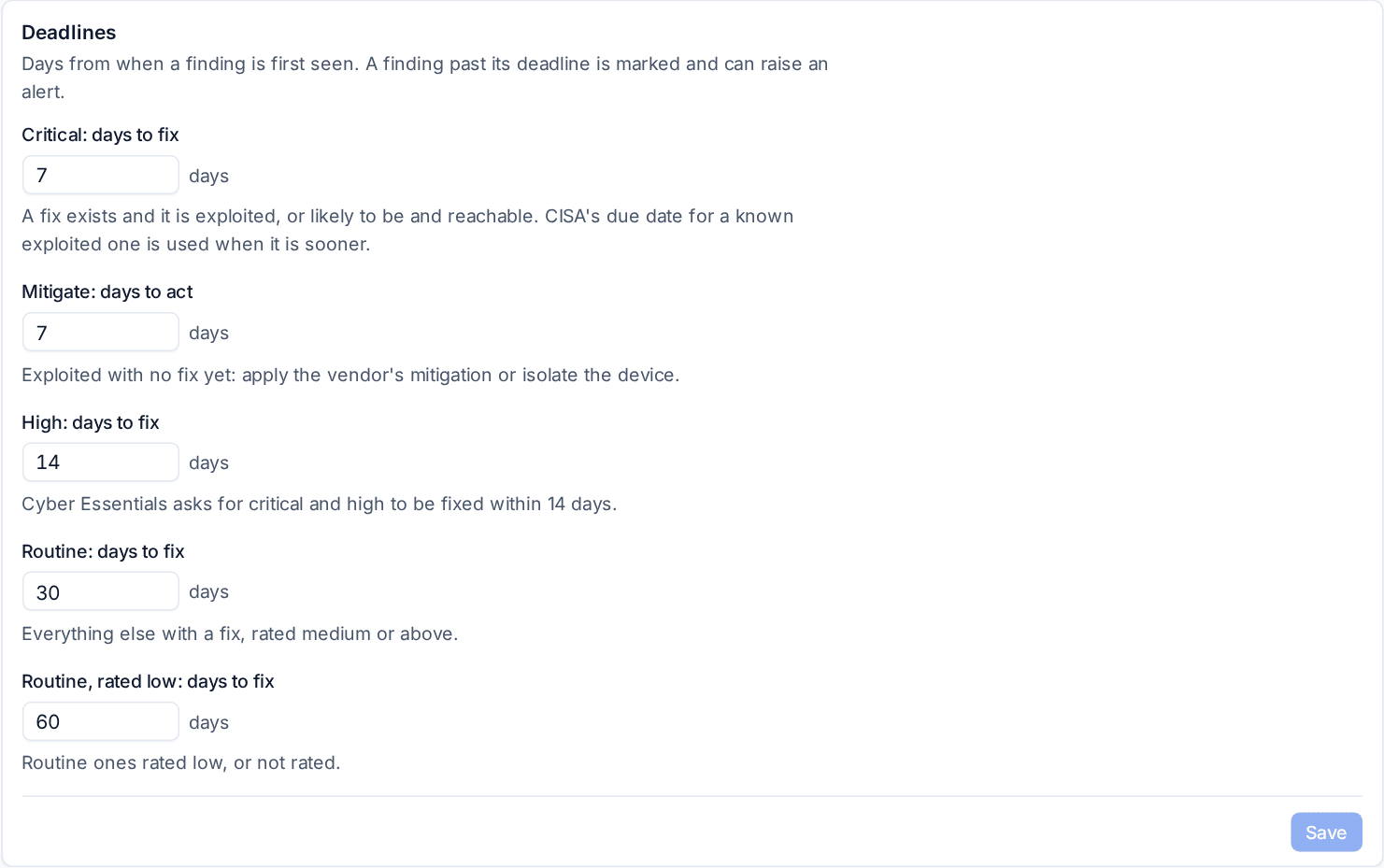
Deadlines run from when a finding is first seen, by priority: Critical and Mitigate 7 days (CISA's due date when that is sooner), High 14 days, Routine 30 days, and Routine rated low or not rated 60 days. Change them under Deadlines in Settings > Vulnerabilities, or per customer on the customer's Settings tab.
Exposure: exposed, running or dormant
The agent reports every program listening on the network on Windows, Linux and macOS, with the package it belongs to, and on Linux the libraries those programs have loaded. Each finding is then judged once per product on the device:
- Exposed: a program from the package listens on an address other than the device itself, a program listening on the network has it loaded (OpenSSL inside nginx or sshd), or it is the web server or language runtime of a device that faces the internet.
- Running: it listens only on the device itself (a database on 127.0.0.1), one of its services runs, it is the running kernel or the operating system, or it is simply installed with nothing else known.
- Dormant: every service it has is stopped, it is a kernel installed beside the running one, or it is installed but unused.
The finding's panel shows the exposure and what was seen: the sockets with the program and address, the stopped services or the running kernel. A device whose agent cannot report listening programs is treated as running.
The To do list
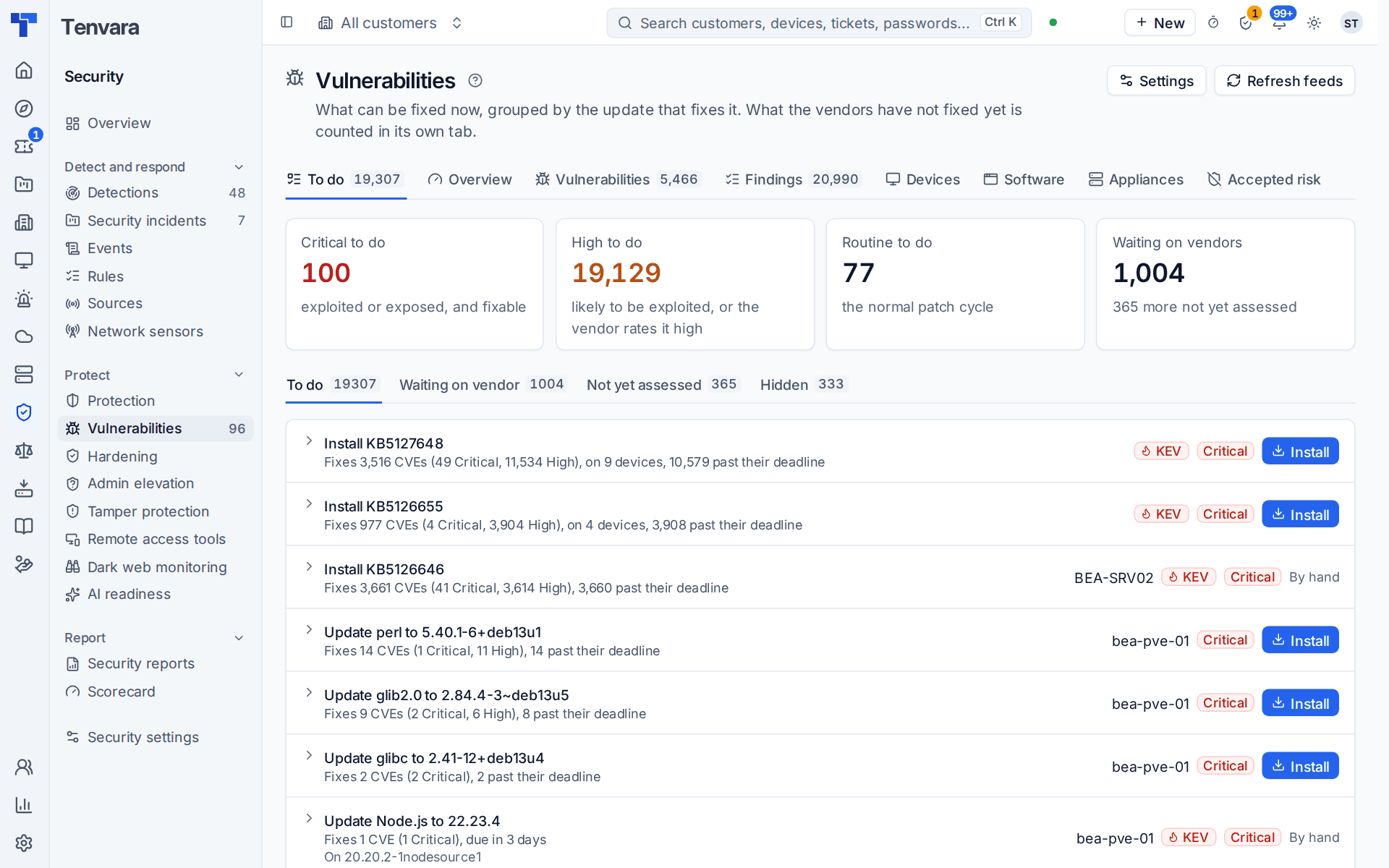
Security > Vulnerabilities opens on To do. Instead of one row per CVE, it lists the one action that fixes them, worst priority first, then the most findings:
- "Install kernel 6.8.0-148 and reboot: fixes 392 CVEs (40 High)"
- "Install KB5126653"
- "Update openssl to 3.0.13-0ubuntu3.16"
Every CVE that the same kernel, package, cumulative update or application version fixes is in one group, and each product on a device comes to one action: the newest fix of its line, since that fixes the earlier ones too. Each group says how many CVEs it fixes and at what priority, on how many devices, how many are past their deadline, whether any are known exploited (KEV), and has its button: Install or Update, By hand when the install cannot do it by itself, or no button for a Mitigate group. For an application installed more than once, the group lists the copies it is on, for example "On 130.0.1 (C:\Users...)".
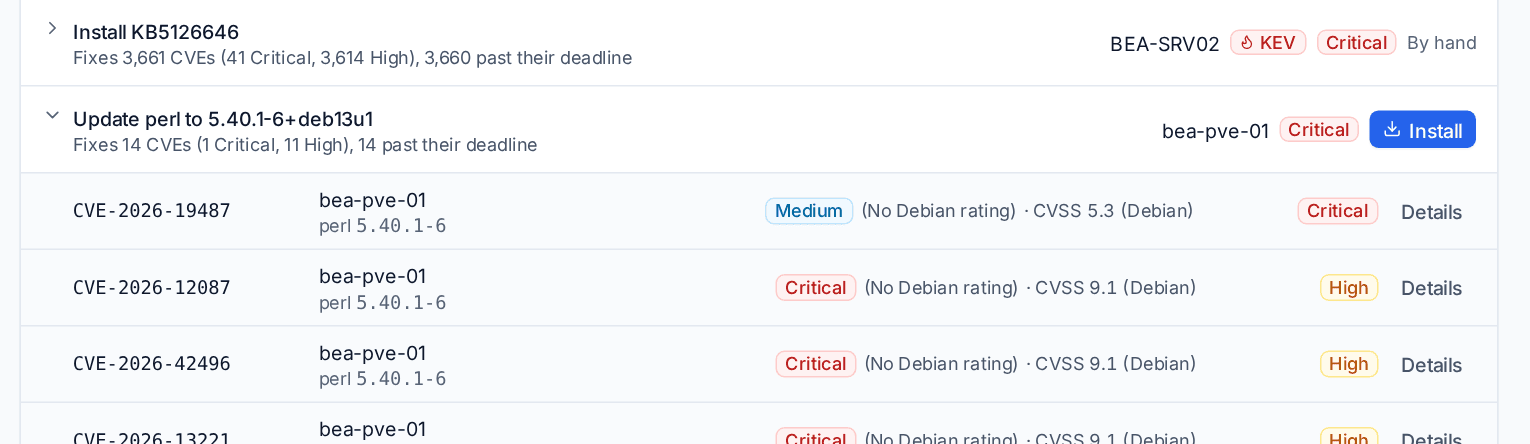
Open a group to see its findings, each with the vendor's rating, CVSS, its priority and Details.
The fix asks the usual remediation for every finding in the group, through patching or software deployment and any approvals they need, for the device or customer you are looking at.
The other tabs
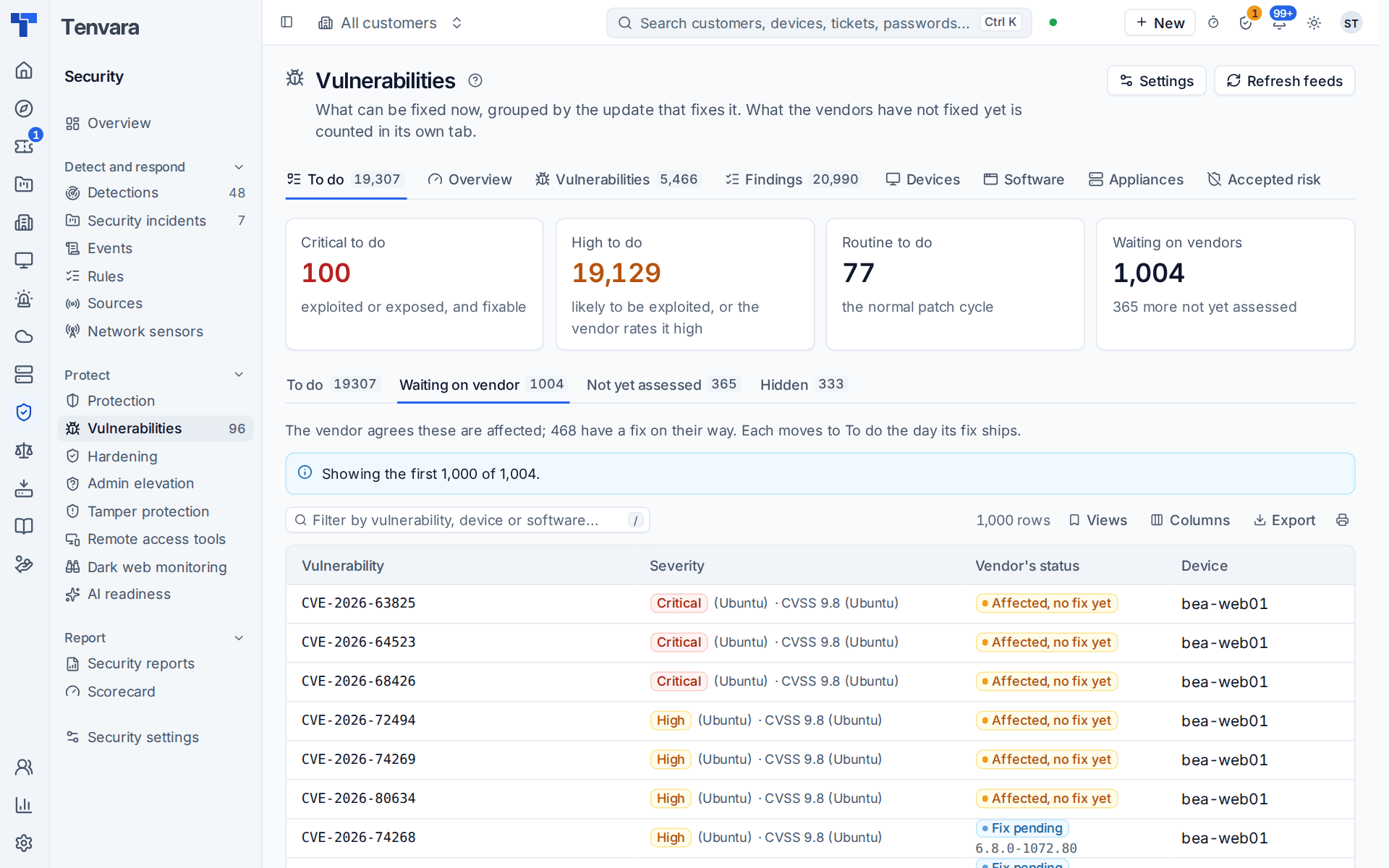
- Waiting on vendor: fix pending or affected with no fix, with the vendor's status in its own words and a pending fix's version. The tab says how many have a fix on its way; each moves to To do the day its fix ships.
- Not yet assessed: what the vendor has not looked at yet.
- Hidden: won't fix, end of life and not affected.
Alerts by priority
Critical and Mitigate findings raise alerts, one Critical alert per device listing the updates one patch run would install, made a ticket due by the fix deadline. High findings go in a weekly digest on Monday morning unless you choose to ticket them, and Alert on Waiting on vendor (off by default) warns about what the vendor rates high or critical and has not fixed. See Vulnerability management.
Reading it on a device or customer
The device's Vulnerabilities block and the customer's Vulnerabilities tab (under Security) use the same tiles, To do groups and tabs, and add the line "N known issues the vendors haven't fixed yet". A device's risk score (0 to 100) comes from its worst priority and how many CVEs are at it, so a device with nothing to do scores low however many waiting findings it carries.
Tip: When a customer asks why their server shows hundreds of vulnerabilities, open Waiting on vendor for that device: it shows what the distribution itself says about each one, and that none of them can be installed yet.
Was this page helpful?
Thanks for the feedback.