Reports and reviews
The setup section for reporting to customers: the monthly customer report and how it reaches them, a look before it goes out, business review frequency, where scheduled reports may be sent and staff cost rates.
This section of the setup helper sets up what your customers get from you on paper: the monthly report each customer receives, business reviews and how often you hold them, where scheduled reports may be sent, and what staff time costs so profit figures are right. It sits in the Commercial phase and takes about 30 minutes.
Open it from Home > Set up, then Reports and reviews. It runs through the same six beats as every section: see Working through a section.
Note: This section is part of the MSP edition's plan. The Company edition has no customer reports to send, so its plan leaves the section out. See What is different from the MSP edition.
Before you start
Nothing blocks this section. It works best after Contracts, billing and accounting and Customers and import, because reports are per customer and profit figures need your rates.
What it reads from your data
What we found shows:
- whether monthly customer reports are being made;
- customer reports sent in the last 60 days;
- scheduled reports;
- business reviews held in the last 90 days;
- technicians without a cost rate.
The questions it asks
| Question | Choices | Pick for me |
|---|---|---|
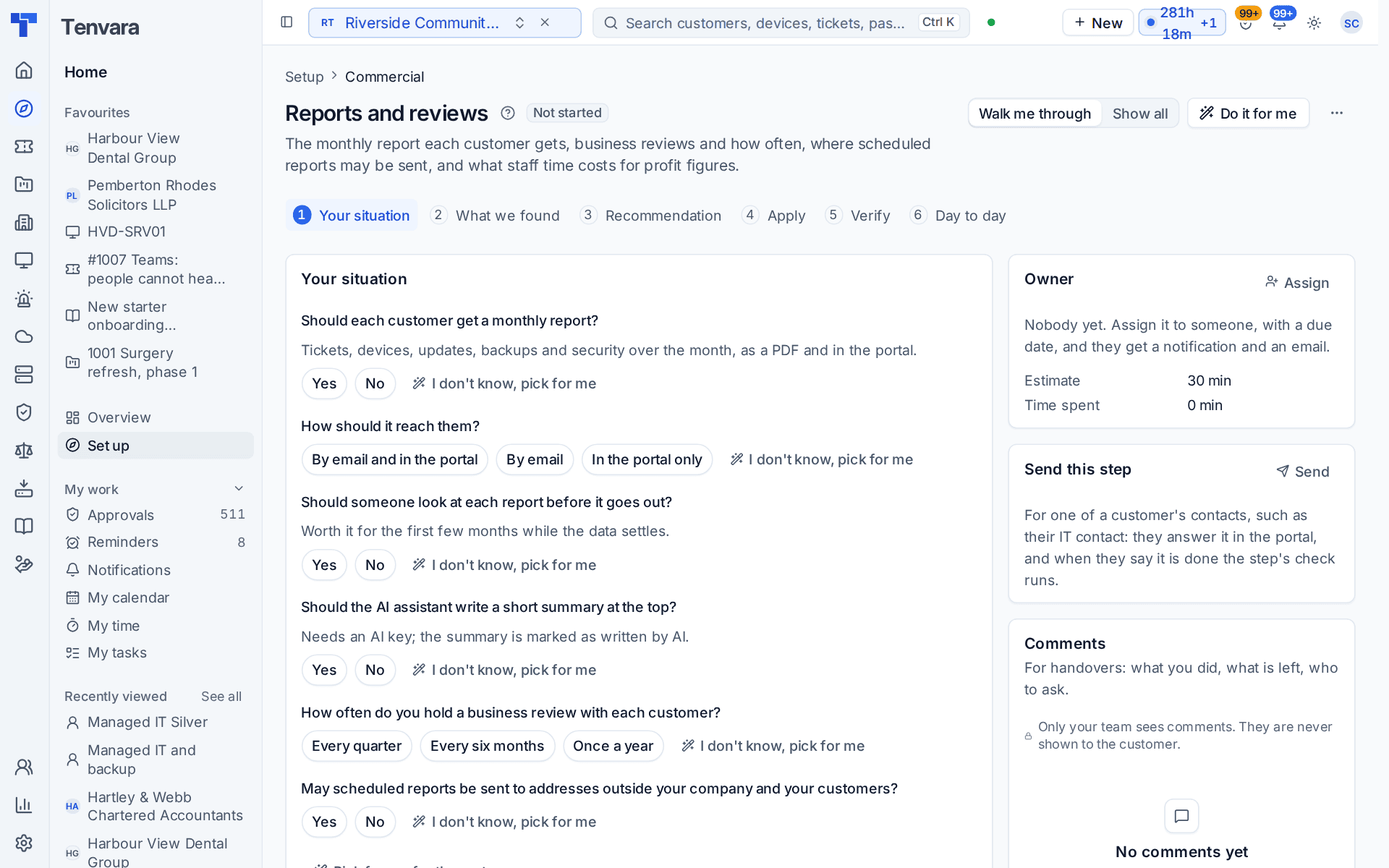
| Should each customer get a monthly report? | Yes or no | Yes |
| How should it reach them? | By email and in the portal, by email, or in the portal only | By email and in the portal |
| Should someone look at each report before it goes out? | Yes or no | Yes |
| Should the AI assistant write a short summary at the top? | Yes or no | No |
| How often do you hold a business review with each customer? | Every 1 to 24 months, with every quarter, every six months and once a year offered | Every quarter |
| May scheduled reports be sent to addresses outside your company and your customers? | Yes or no | No |
The monthly report covers tickets, devices, updates, backups and security over the month, as a PDF and in the portal. A look before it goes out is worth it for the first few months while the data settles. The AI summary needs your own Anthropic key, and the summary is marked as written by AI.
What it recommends and why
- Each customer gets a monthly report the way you chose. Delivery, the hold for a look and the AI summary are set together. If you answered no, the recommendation says no monthly reports are made.
- Business reviews are planned at the interval you chose, and scheduled reports go only where you allow. Reviews are also shown to the customer in the portal.
Press Apply when the preview is right. An apply can be undone for 7 days.
Checking it worked
Verify runs two live checks:
- Scheduled and monthly reports are delivered. A monthly report that failed, or a scheduled report that was not delivered, is named with its error and links to Settings > Reports, the Customer reports or Schedules tab. Until the first monthly reports are due, it says which day of the month they are made.
- Every technician has a cost rate. Profit figures count no cost for a technician without one, and the check names them. The fix opens Settings > Reports, the Cost rates tab.
Day to day
- Monthly reports are made on their day and wait for a look or go straight out. Reports held for a look are in Reports > Customer reports, the Waiting for review view. Customers find theirs in the portal.
- Business reviews are planned a year ahead in Reports > Business reviews, with the standards, recommendations and budget ready to present.
Related guides
Was this page helpful?
Thanks for the feedback.